manuals.online logo
Brands
  1. Home
  2. •
  3. Brands
  4. •
  5. Regent Lighting Solutions
  6. •
  7. Lantern
  8. •
  9. Regent Lighting Solutions Lumina User manual

Regent Lighting Solutions Lumina User manual

Popular Lantern manuals by other brands

DS Produkte TRF18P0752-1 instructions

DS Produkte

DS Produkte TRF18P0752-1 instructions

Stahl ECOLUX 6610 Series operating instructions

Stahl

Stahl ECOLUX 6610 Series operating instructions

SNOWJOE SUNJOE 24V-LGT500-CT Operator's manual

SNOWJOE

SNOWJOE SUNJOE 24V-LGT500-CT Operator's manual

PRG VARI LITE VL5 Service manual

PRG

PRG VARI LITE VL5 Service manual

Raytec VARIO2 series installation guide

Raytec

Raytec VARIO2 series installation guide

ENSA LEDBT18WS2 installation instructions

ENSA

ENSA LEDBT18WS2 installation instructions

LUG OFFICE LB LED N/T Installation instruction

LUG

LUG OFFICE LB LED N/T Installation instruction

Draper RLEDL19/B instructions

Draper

Draper RLEDL19/B instructions

Green Lighting TRI-SENSOR GL4612LU Assembly & fitting instructions

Green Lighting

Green Lighting TRI-SENSOR GL4612LU Assembly & fitting instructions

Panasonic EY3741B57 operating instructions

Panasonic

Panasonic EY3741B57 operating instructions

Clas Ohlson LCC8T instruction manual

Clas Ohlson

Clas Ohlson LCC8T instruction manual

Coolon WDN-140 manual

Coolon

Coolon WDN-140 manual

shada 1000436 instruction manual

shada

shada 1000436 instruction manual

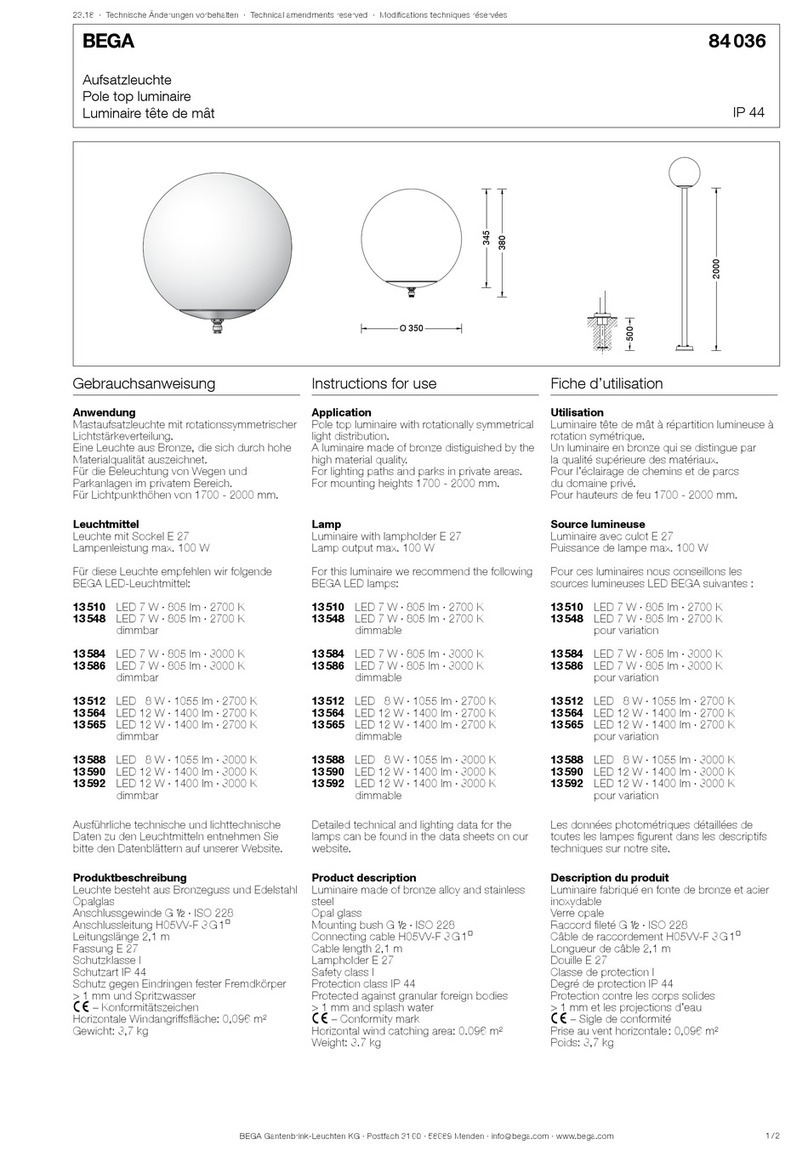
BEGA 84 036 Instructions for use

BEGA

BEGA 84 036 Instructions for use

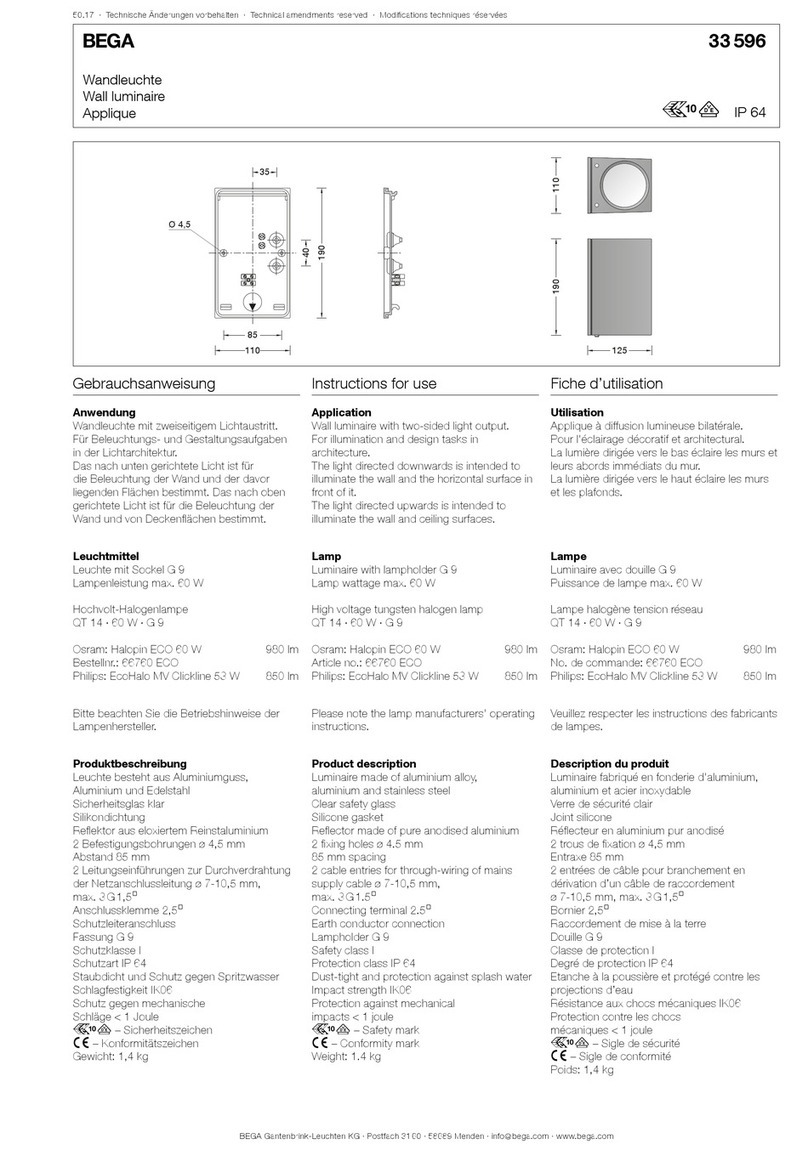
BEGA 33 596 Instructions for use

BEGA

BEGA 33 596 Instructions for use

Dale Tiffany GT701162 Assembly instructions

Dale Tiffany

Dale Tiffany GT701162 Assembly instructions

Wagan Brite Nite Pop-Up USB Lantern user manual

Wagan

Wagan Brite Nite Pop-Up USB Lantern user manual

Eaton Crouse-Hinds Pauluhn DLLA M2 Series Installation & maintenance information

Eaton

Eaton Crouse-Hinds Pauluhn DLLA M2 Series Installation & maintenance information

manuals.online logo
manuals.online logoBrands
  • About & Mission
  • Contact us
  • Privacy Policy
  • Terms and Conditions

Copyright 2025 Manuals.Online. All Rights Reserved.

1
2
www.regentlight.co.za
INSTALLATION INSTRUCTIONS
ALL CONNECTIONS TO BE CARRIED OUT BY A QUALIFIED ELECTRICIAN
1
PLEASE READ CAREFULLY BEFORE STARTING INSTALLATION.
Regent Lighting reserves the right to change specifications modify designs and discontinue items without
incurring obligation and whilst every effort is made to ensure that descriptions, specifications and other
information in this catalogue are correct, no warranty is given in respect thereof and the company shall not be
liable for any error therein.
WARNING: TO AVOID FIRE, SHOCK OR DEATH
ALL LUMINAIRES SUPPLIED AND TO BE INSTALLED ABOVE AND BELOW 5 METERS ARE IN COMPLIANCE WITH SANS
60598 SECTION 3.5.6 ACCORDING TO THE MANUFACTURER GUARANTEE AND WARRANTY
TURN OFF POWER AT CIRCUIT BREAKER OR FUSE AND TEST THAT THE POWER IS OFF BEFORE WIRING
Electrical products can cause death, injury, or damage to
property. Installation of this product must be carried out by a
qualified electrician, in compliance with SANS 10142 or
corresponding regulations of the country of installation. On
completion of installation, the Certificate of Compliance must
be updated.
Lumina
WARNING
Electronic Control Device
WARNING
3 - 13 MAIN REEF SERVICE ROAD, CORNER
SPRINGBOK AND MAIN REEF ROAD, INDUSTRIA,
JOHANNESBURG. SOUTH AFRICA.
TEL : +27 11 474 0171
www.regentlight.co.za
RE GENT L I GHT ING A D IVIS ION
OF WA HL IND USTR IES.
Requirements:
1. Ensure the pole is installed
correctly.
ŸBe sure the electricity
to the system you are
working on is
isolated.
DO NOT PLUG
(CONNECT) WHEN
LIVE AS IT WILL CAUSE
DAMAGE TO THE
LUMINAIRE.
DO NOT CONNECT THE FITTING LIVE
November 2017
Save These Instructions for Future Reference
ELECTRICAL CONNECTIONS
Connect the Switched
Live (S/L), Neutral (N)
and Earth (E) cable(s)
to the terminal block.
SWITCHED LIVE – (Red
or Brown) to terminal
marked L
EARTH –
(Green/Yellow) to
terminal marked E.
2. Connect the
electrical cable tail
supplied through the
spigot/gland to the
access door.
NEUTRAL – (Black or
Blue) to terminal
marked N
A: SPIGOT B: DIRECT MOUNTED
2
Save These Instructions for Future Reference
ELECTRIC SHOCK
HAZARD
This equipment is to be
serviced by trained
personnel only.
ELECTRIC SHOCK
HAZARD
This equipment is to be
serviced by trained
personnel only.
Lumina
SURFACE
SURFACE
www.regentlight.co.za
3
4
7
8
3
This product should be installed by a competent person i.e. Qualified electrician.
This product requires a constant stable electrical supply 220V - 240V VAC 50Hz - alternating current.
The product must be regularly maintained, including the replacement of lamps/LED timeously.
This product could be HAZARDOUS if not used correctly, it could cause electric shock, serious bodily harm or death.
This product is not a toy, please keep away from children.
This product may contain small parts that can be swallowed.
Use only the correct light bulbs/LED as stipulated on the carton for the product.
Any modifications of this product after supply will result in the guarantee being void.
Spare parts may become unavailable over time.Items can vary slightly from the picture on the carton
Coastal humidity can affect the longevity of the light fitting over time.
Be sure to follow the steps in the order given.
Read instructions carefully.
Important Safety Instructions
Ensure the fitting is securely
located and it at the desired
position/angle before
fastening the fasteners.
Ensure that there are no
exposed conductors, loose
strands or trapped insulation.
3. SPIGOT:
Align and fasten the fitting’s
spigot onto the pole/wall
using the spigot and tighten
th e grub sta in les s s tee l
screws with an allen key.
Ensure the fitting is level
horizontally.

A: SPIGOT
Spigot adaptor
Pole Mount
Pole clamp Roto Spigot
SURFACE
SURFACE
Align and fasten the fitting
onto the surface via the
surface mount bracket or the
tru nnio n a rm, u sing th e
stainless steel fasteners.
3. DIRECT SURFACE
MOUNTED:
Adjust the fitting on the
trunnion arm according to
the desired angle.
Ensure that there are no
exposed conductors, loose
strands or trapped insulation.
4. Switch on power supply.
Trunnion Arm
Wall mount bracket
Level
Ensure the fitting is
level horizontally.
Level
Ensure the fitting is
level horizontally.