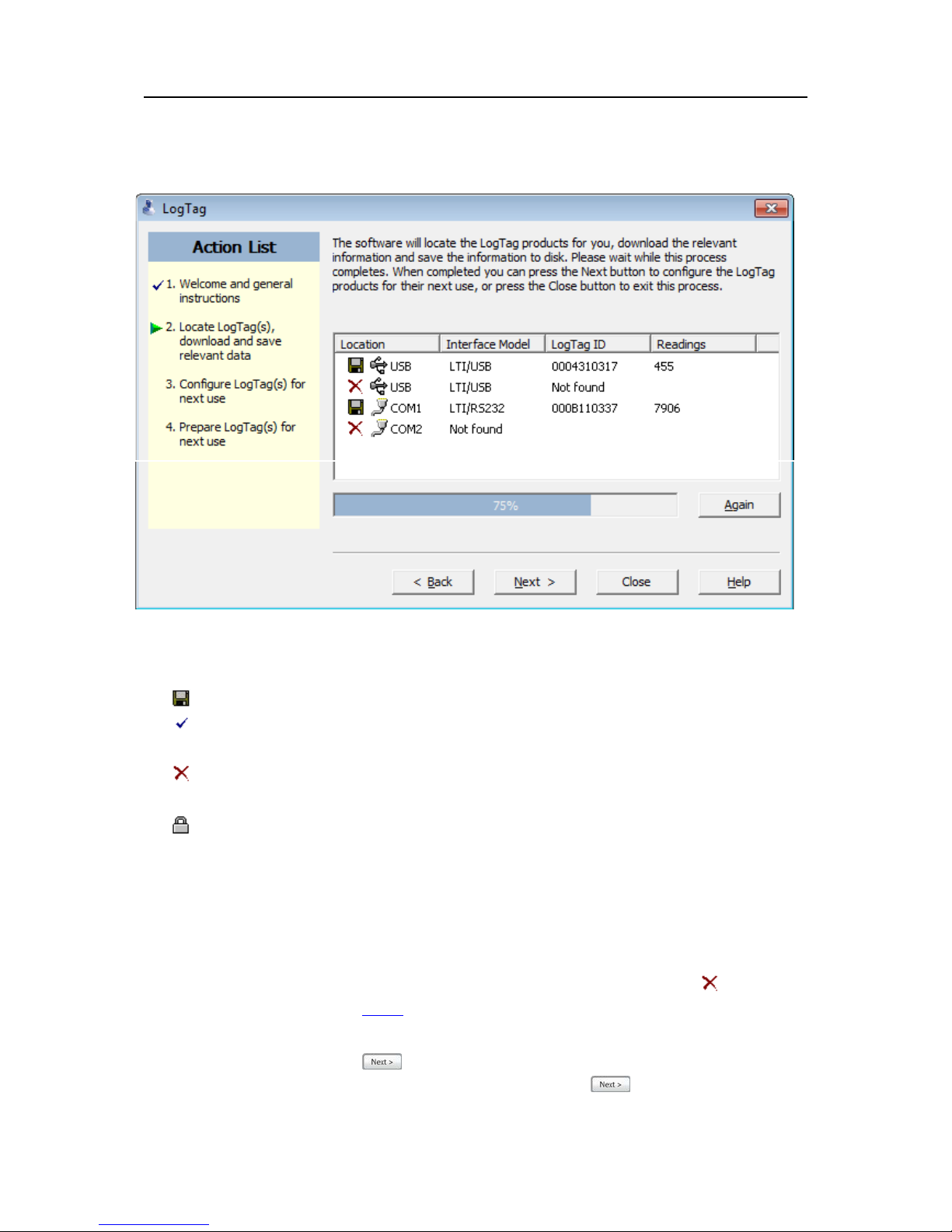
In this screen you will see one of the following pictures next to each of the items in the list:
• (no picture) indicates the software is still trying to access this communications port.
l Data was successfully retrieved from the LogTag and stored/saved to disk.
l Data was successfully retrieved from the LogTag but there was no need to save the information
to disk.
l The software was unable to detect an Interface Cradle connected to the communications port or
was unable to detect a LogTag in the Interface Cradle.
l The LogTag is a single use recorder and cannot be prepared for use again. It should be returned
to the supplying distributor or agent or disposed of in accordance with local regulations. You will
still be able to continue to retrieve information stored within the LogTag.
The LogTag should be almost instantly recognized by serial number and the number of readings. It is
possible to have and use more than one communication port at a time and if so, the wizard will find all the
LogTags.
The communication ports that are not in use (the ones that initially are reported with the mark) can be
removed from view by selecting an option. You don't have to do that now, but you can do it later to clean
up the "wizard window" appearance.
To get to the next screen, click on and the third wizard step screen will appear. The software will
automatically proceed to the next wizard step, as if the user clicked on , if each of the Interface
Cradles detected have a LogTag detected in them and the information within the LogTag was successfully
retrieved.