Rowley R-Tec Automation RTMWSR5C User manual

© 2021 Rowley®Company. All rights reserved. R-TEC Automation®is a registered trademark of the Rowley®Company, LLC. 1
R-TEC Smart Controls - Surface Mount Wall Switch
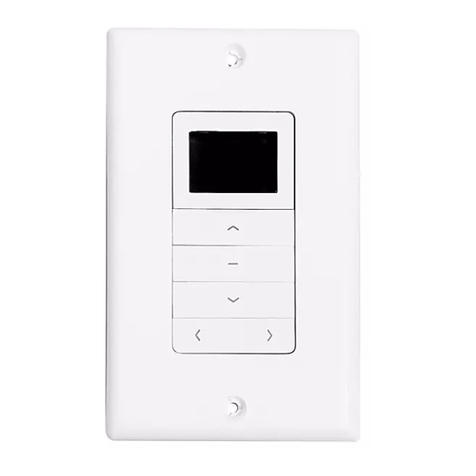
Surface Mount Wall Switch in flush mount provides a sensible control option for
individual window treatment, room and home control.
Available in 5 channel model, wall switches are compatible with all ARC motors.
Flush wall switches feature a contemporary design and a wirefree deployment,
making them retrofit ready for any location. They can be mounted on top of any
surface as either a fixed mount or magnetic mount. Its slim profile eliminates the
need for any holes to be cut in walls.
FEATURES - 5 CHANNEL
Multi Channel
Selectable
Retrofit
Ready
Group
Control
Optionally Functions as
a Handheld Remote
2-Way RF
Communication
1
2
3
4
5
STOP
RTMWSR5C

© 2021 Rowley®Company. All rights reserved. R-TEC Automation®is a registered trademark of the Rowley®Company, LLC. 2
Technical Data / Pack Contents 3
Safety 4
Installation 5-6
Kit Components
Install Switch Batteries
Magnetic Wall Clip
Fixed Wall Clip
Functional Overview 7
Buttons
Selecting a Channel
Programming 8 - 9
Using the P1 Button
Using a Pre-Existing Controller
Initial Set Up 10 - 11
Check Motor Direction
Set Limits
Locking the Limit Setting Function
Adjusting Limits 12
Adjusting Upper Limit
Adjusting Lower Limit
Favorite Positioning 13
Set a Favorite Position
Send Window Treatment to Favorite Position
Delete Favorite Position
Troubleshooting 14
TABLE OF CONTENTS

© 2021 Rowley®Company. All rights reserved. R-TEC Automation®is a registered trademark of the Rowley®Company, LLC. 3
Parameters Value
COMPLIANCE STATEMENT
TECHNICAL DATA / PACK CONTENTS
This device complies with part 15 of the FCC Rules. Operation is subject to the following two conditions:
• This device may not cause harmful interference.
• This device must accept any interference received, including interference that may cause undesired operation.
PRODUCT SPECIFICATIONS
Voltage 3 V DC
Battery CR2430
Radio Frequency 433.92 MHz
Transmitting Power 10 milliwatt
Transmission Range 65'
Temperature Working Range 14º F - 122º F (-10º C - 50º C)
PACK CONTENTS
1. Surface Mount Wall Switch, 5 Channel
2. Cover
3. Magnetic Wall Clip
4. Fixed Wall Clip
5. Pan Head Screws (2)
6. Phillips Head Screws (2)
7. Anchors (2)
8. 3 V - CR2450 Battery
9. Instruction Manual
5 2 1 47368

© 2021 Rowley®Company. All rights reserved. R-TEC Automation®is a registered trademark of the Rowley®Company, LLC. 4
SAFETY
Any changes or modifications to this unit not expressly approved by the party responsible for compliance could
void the user’s authority to operate the equipment. Incorrect installation can lead to serious injury and will void
manufacturer’s liability and warranty.
WARNING
Do no dispose of in general waste.
Please recycle batteries and damaged electrical
products appropriately.
CAUTION
• Do not expose to moisture or extreme temperatures.
• Do not allow children to play with this device.
• Use or modification outside the scope of this instruction manual will void warranty.
• Installation and programming to be performed by a suitably qualified installer.
• Use only R-TEC Automation®hardware.
• Keep clear when in operation.
• Replace battery with correctly specified type.
IMPORTANT SAFETY INSTRUCTIONS TO BE READ PRIOR
TO OPERATION
• It is important for the safety of persons to follow the enclosed instructions. Save these instructions for future reference.
• Persons (including children) with reduced physical, sensory or mental capabilities, or lack of experience and knowledge
should not be allowed to use this product.
• Frequently inspect for improper operation. Do not use if repair or adjustment is necessary.
• Keep away from children.

© 2021 Rowley®Company. All rights reserved. R-TEC Automation®is a registered trademark of the Rowley®Company, LLC. 5
INSTALLATION
INSTALL SWITCH BATTERIES
Open rear battery cover by gently
separating switch covers with screwdriver.
Install CR2430 battery with positive (+) side
facing up. Snap covers back together.
Snap covers back together.

© 2021 Rowley®Company. All rights reserved. R-TEC Automation®is a registered trademark of the Rowley®Company, LLC. 6
MAGNETIC WALL CLIP
FIXED WALL CLIP
Use the Magnetic Wall Clip if you require the remote to be easily detachable.
Use the Fixed Wall Clip if you require the remote to be non-removable.
Best Practice Tip:
Pair the Switch to the motor prior to installation, then test radio performance in the location the switch will be installed in, to
ensure best performance.
Best Practice Tip:
Pair the Switch to the motor prior to installation, then test radio performance in the location the switch will be installed in, to
ensure best performance.
1. Use supplied fasteners and anchors as needed to attach the base and cover.
2. Switch is held in position magnetically and can be removed as desired.
3. Safely dispose of the unused Fixed Wall Clip.
1. Slide the Switch onto the Wall Clip.
2. Use supplied fasteners and anchors as needed to attach the base and cover.
3. Switch is secured unless the Cover is removed.
4. Safely dispose of the unused Magnetic Wall Clip.

© 2021 Rowley®Company. All rights reserved. R-TEC Automation®is a registered trademark of the Rowley®Company, LLC. 7
BUTTONS
SELECTING A CHANNEL
FUNCTIONAL OVERVIEW
When a channel is selected, the blue LED will stay illuminated for four seconds and then go out. The channel remains active.
Programming and operation of the window treatment(s) on the channel can proceed without reselecting the channels.
IMPORTANT
To determine which channel is activated prior to programming or operating the control simply press and release any of
the ‘channel’ buttons or the ‘stop’ button once and the active channel or channels will illuminate.
IMPORTANT
You can program one channel at a time but you can operate several channels at once if desired after the programming
has been completed.
IMPORTANT
UP DOWN
CHANNELS 1-5
STOP
P2 Button
Select a channel by ‘toggling’ it on until a blue LED is
showing next to it. This will require pressing and releasing
the channel once or twice until the light appears.
Motor Response
Blue LEDs will illuminate indicating channel selection.
Deselect the channels that you don’t
want to be active by ‘toggling’ them off
until the blue LED disappears.
Now only the channel that you want to program or
operate will be active. Your selected channel is now
ready to be programmed or operated.

© 2021 Rowley®Company. All rights reserved. R-TEC Automation®is a registered trademark of the Rowley®Company, LLC. 8
PROGRAMMING
• Confirm that motor limits and favorite position are already set for each individual motor.
• Ensure that each motor you want to group is also assigned to another channel by itself.
USING MOTOR P1 BUTTON
Multiple motors can be grouped onto shared channels for coordinated control.
IMPORTANT
Select a CHANNEL on switch. Hold P1 button on motor head. Hold STOP on switch.
Motor Response
Approx. Approx.
Motor Response
P1 LOCATIONS
Drapery
Large Tubular
* Internal Tubular
pictured. Refer to
P1 LOCATIONS below
for specific devices.

© 2021 Rowley®Company. All rights reserved. R-TEC Automation®is a registered trademark of the Rowley®Company, LLC. 9
A = Existing switch or channel (to keep). B = Switch or channel to add or remove.
USING PRE-EXISTING CONTROLLER
Select channel that operates
motor on existing switch.
Press P2.
Press P2 a second time on
existing switch.
Select desired channel
on new switch.
Press P2 on new switch.
Motor ResponseMotor ResponseMotor Response

© 2021 Rowley®Company. All rights reserved. R-TEC Automation®is a registered trademark of the Rowley®Company, LLC. 10
INITIAL SET UP
CHECK MOTOR DIRECTION
To check travel direction of shade,
press UP or DOWN on the controller.
Move shade to the desired highest or lowest
position by pressing the UP or DOWN on the controller.
Quick Press = Step
Long Press = Continuous Travel
To reverse shade direction, hold both UP
and DOWN until the motor responds.
To save upper limit,
hold UP and STOP.
To save lower limit,
hold DOWN and STOP.
Damage to shade may occur when
operating motor prior to setting limits.
Attention should be given.
IMPORTANT
Cycle shade up and down prior to setting
limits to settle fabric
IMPORTANT
For FT Motors, the bottom limit should be set ~ 1.38 in. (35mm) below the Ultra-Lock to disengage the auto
lock mechanism when the shade is raised.
IMPORTANT
Reversing motor direction using this method
is only possible during initial set up.
Direction change will not occur if switch is
locked. See page 11.
IMPORTANT
After setting limits, motor will automatically
exit from initial set up mode.
IMPORTANT
Motor Response
Approx.
Approx.
Motor Response
or
SET LIMITS
or
or
Initial set up is not complete yet.
5

Table of contents
Other Rowley Switch manuals
Popular Switch manuals by other brands

SMC Networks
SMC Networks SMC6224M Technical specifications

Aeotec
Aeotec ZWA003-S operating manual

TRENDnet
TRENDnet TK-209i Quick installation guide

Planet
Planet FGSW-2022VHP user manual

Avocent
Avocent AutoView 2000 AV2000BC AV2000BC Installer/user guide

Moxa Technologies
Moxa Technologies PT-7728 Series user manual

Intos Electronic
Intos Electronic inLine 35392I operating instructions

Cisco
Cisco Catalyst 3560-X-24T Technical specifications

Asante
Asante IntraCore IC3648 Specifications

Siemens
Siemens SIRIUS 3SE7310-1AE Series Original operating instructions

Edge-Core
Edge-Core DCS520 quick start guide

RGBLE
RGBLE S00203 user manual