manuals.online logo
Brands
  1. Home
  2. •
  3. Brands
  4. •
  5. Rythmik audio
  6. •
  7. Subwoofer
  8. •
  9. Rythmik audio L12 User manual

Rythmik audio L12 User manual

This manual suits for next models

1

Other Rythmik audio Subwoofer manuals

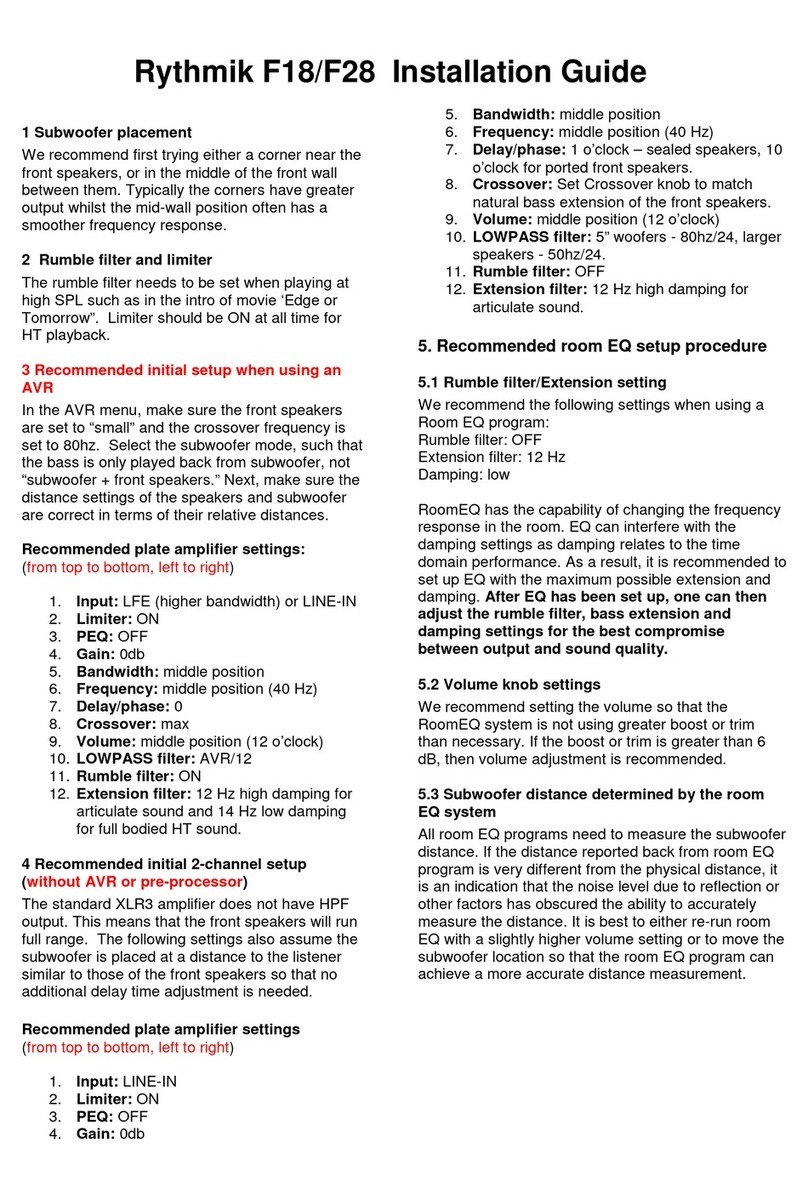
Rythmik audio F28 User manual

Rythmik audio

Rythmik audio F28 User manual

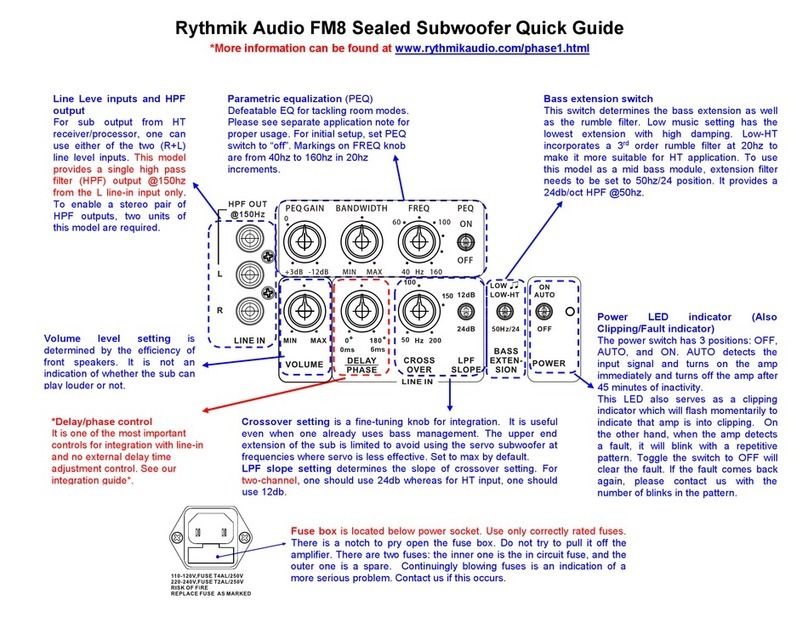
Rythmik audio FM8 User manual

Rythmik audio

Rythmik audio FM8 User manual

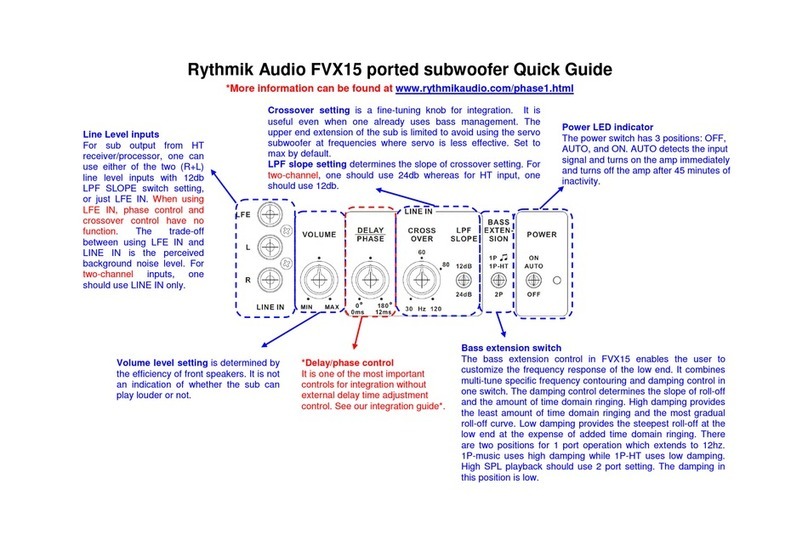
Rythmik audio FVX15 User manual

Rythmik audio

Rythmik audio FVX15 User manual

Rythmik audio FM8 User manual

Rythmik audio

Rythmik audio FM8 User manual

Rythmik audio FVX15 User manual

Rythmik audio

Rythmik audio FVX15 User manual

Popular Subwoofer manuals by other brands

Extron electronics SF 8CT SUB user guide

Extron electronics

Extron electronics SF 8CT SUB user guide

SVS PB-4000 quick start guide

SVS

SVS PB-4000 quick start guide

Pioneer S-DVR9SW Service manual

Pioneer

Pioneer S-DVR9SW Service manual

Yamaha YST-SW515 Service manual

Yamaha

Yamaha YST-SW515 Service manual

Velodyne SPL-800 ULTRA - REV B datasheet

Velodyne

Velodyne SPL-800 ULTRA - REV B datasheet

Teufel US 2110/1 SW operating instructions

Teufel

Teufel US 2110/1 SW operating instructions

Wet Sounds SS-65 user manual

Wet Sounds

Wet Sounds SS-65 user manual

Pyle PLQB10 Specifications

Pyle

Pyle PLQB10 Specifications

Sony XS-L1536 Product guide

Sony

Sony XS-L1536 Product guide

Sony XS-AW8 operating instructions

Sony

Sony XS-AW8 operating instructions

B&C Speakers 15 HPL 76W Specifications

B&C Speakers

B&C Speakers 15 HPL 76W Specifications

Velodyne DD-18+ Specifications

Velodyne

Velodyne DD-18+ Specifications

Sonance Cinema Series SUB 10-150 Specifications

Sonance

Sonance Cinema Series SUB 10-150 Specifications

Hifonics HW-12 Owners & installation manual

Hifonics

Hifonics HW-12 Owners & installation manual

Yamaha 64263 owner's manual

Yamaha

Yamaha 64263 owner's manual

Magnat Audio ADR 130 BP user manual

Magnat Audio

Magnat Audio ADR 130 BP user manual

Technics SB-AS500 Operaing instructions

Technics

Technics SB-AS500 Operaing instructions

Lyngdorf BW-2 owner's manual

Lyngdorf

Lyngdorf BW-2 owner's manual

manuals.online logo
manuals.online logoBrands
  • About & Mission
  • Contact us
  • Privacy Policy
  • Terms and Conditions

Copyright 2025 Manuals.Online. All Rights Reserved.

Rythmik Audio L12/L22 Amplifier Quick Guide
*More information can be found at www.rythmikaudio.com/phase1.html
Volume level setting
is determined by
the efficiency of front speakers. It is not
an indication of whether the sub can
play louder or not.
Crossover setting
is a fine
-
tuning knob for integration. It is useful even when
one already uses bass management. The upper end extension of the sub is
limited to avoid using the servo subwoofer at frequencies where servo is less
effective. Set to max by default.
LPF slope setting determines the slope of crossover setting. For two-channel,
one should use 24db whereas for HT input, one should use 12db.
*Delay/phase control
One of the most important controls
for integration without external
delay time adjustment control. See
our integration guide*.
Power LED indicator
The power switch has 3 positions:
OFF, AUTO, and ON. AUTO detects
the input signal and turns on the amp
immediately and turns off the amp
after 45 minutes of inactivity.
Bass extension switch
This switch determines the bass extension as well as the rumble
filter. Low music setting has the lowest extension with high
damping. Low-HT incorporates a 3
rd
order rumble filter at 20hz to
make it more suitable for HT application. High extension setting
uses a single 3
rd
order HPF with a cut off frequency around 28hz
for those who would like to have higher SPL output while still
maintain good group delay characteristics.
Line Level inputs
For sub output from HT
receiver/processor, one
can use either of the two
(R+L) line level inputs with
12db LPF SLOPE switch
setting, or just LFE IN.
When using LFE IN, phase
control and crossover
control have no function.
The trade-off between
using LFE IN and LINE IN
is the perceived
background noise level.
For two-channel inputs,
one should use LINE IN
only.