manuals.online logo
Brands
  1. Home
  2. •
  3. Brands
  4. •
  5. Safe-t-Cover
  6. •
  7. Enclosure
  8. •
  9. Safe-t-Cover 200D Series User manual

Safe-t-Cover 200D Series User manual

This manual suits for next models

13

Other Safe-t-Cover Enclosure manuals

Safe-t-Cover 1000TS-AL User manual

Safe-t-Cover

Safe-t-Cover 1000TS-AL User manual

Safe-t-Cover 800 Series User manual

Safe-t-Cover

Safe-t-Cover 800 Series User manual

Safe-t-Cover 1000D-AL User manual

Safe-t-Cover

Safe-t-Cover 1000D-AL User manual

Safe-t-Cover 1000 Series User manual

Safe-t-Cover

Safe-t-Cover 1000 Series User manual

Safe-t-Cover HCF600DS Series User manual

Safe-t-Cover

Safe-t-Cover HCF600DS Series User manual

Safe-t-Cover 1000S-AL User manual

Safe-t-Cover

Safe-t-Cover 1000S-AL User manual

Safe-t-Cover 1000TD-AL User manual

Safe-t-Cover

Safe-t-Cover 1000TD-AL User manual

Popular Enclosure manuals by other brands

Antec Veris Fusion Remote Max Specification sheet

Antec

Antec Veris Fusion Remote Max Specification sheet

ENERMAX iVektor.Q ECA 3371 Series user manual

ENERMAX

ENERMAX iVektor.Q ECA 3371 Series user manual

Lindy 43095 user manual

Lindy

Lindy 43095 user manual

SICK C4000 Select operating instructions

SICK

SICK C4000 Select operating instructions

Geeek A60 PLUS installation guide

Geeek

Geeek A60 PLUS installation guide

OVE SYDNEY 48 installation manual

OVE

OVE SYDNEY 48 installation manual

SilentiumPC Armis AR5 Hardware installation

SilentiumPC

SilentiumPC Armis AR5 Hardware installation

Pulsar 17/TRP80/DSPR Assembly instructions

Pulsar

Pulsar 17/TRP80/DSPR Assembly instructions

MSI MPG SEKIRA 500X quick start guide

MSI

MSI MPG SEKIRA 500X quick start guide

Antec Dark fleet DF-10 user manual

Antec

Antec Dark fleet DF-10 user manual

Peavey DS 1502 Specifications

Peavey

Peavey DS 1502 Specifications

D-Link ShareCenter Pro DNS-1550-04 user manual

D-Link

D-Link ShareCenter Pro DNS-1550-04 user manual

Rosewill RX82-U(JBOD) user manual

Rosewill

Rosewill RX82-U(JBOD) user manual

QNAP SAS JBOD CLI 1.0 user guide

QNAP

QNAP SAS JBOD CLI 1.0 user guide

GAMDIAS Talos P1 Quick installation guide

GAMDIAS

GAMDIAS Talos P1 Quick installation guide

Auvs KR615 user manual

Auvs

Auvs KR615 user manual

Antec AR300 user manual

Antec

Antec AR300 user manual

CommScope FDH 3000 user manual

CommScope

CommScope FDH 3000 user manual

manuals.online logo
manuals.online logoBrands
  • About & Mission
  • Contact us
  • Privacy Policy
  • Terms and Conditions

Copyright 2025 Manuals.Online. All Rights Reserved.

The information contained herein is intended for the use of the individual(s) named above and those authorized to receive it. Dissemination, distribution
or copy of this information is strictly prohibited.
ASSEMBLY INSTRUCTIONS PLEASE READ CAREFULLY
Model No.
Inside
Dimensions
Outside
Dimensions
Recommended Concrete
Pad Dimensions
200D Series
30"W x 48"L x 40"H
33 3/4"W x 51 1/8"L x 43 1/4"H
44"W x 62"L x 6" Thick
200DS Series
48"W x 48"L x 44"H
51 3/4"W x 51 1/8"L x 47 1/4"H
62"W x 62"L x 6" Thick
300 Series
22"W x 72"L x 38"H
25 3/4"W x 75 1/8"L x 41 1/4"H
36"W x 86"L x 6" Thick
300D Series
48"W x 78"L x 44"H
51 3/4"W x 81 1/8"L x 47 1/4"H
62"W x 92"L x 6" Thick
300DS Series
48"W x 91"L x 44"H
51 3/4"W x 94 1/8"L x 47 1/4"H
62"W x 105"L x 6" Thick
300T Series
22"W x 72"L x 50"H
25 3/4"W x 75 1/8"L x 53 1/4"H
36"W x 86"L x 6" Thick
300TD Series
48"W x 78"L x 50"H
51 3/4"W x 81 1/8"L x 53 1/4"H
62"W x 92"L x 6" Thick
300TDS Series
48"W x 91"L x 50"H
51 3/4"W x 94 1/8"L x 53 1/4"H
62"W x 105"L x 6" Thick
400 Series
26"W x 86"L x 44"H
29 3/4"W x 89 1/8"L x 47 1/4"H
40"W x 100"L x 6" Thick
400T Series
26"W x 86"L x 54"H
29 3/4"W x 89 1/8"L x 57 1/4"H
40"W x 100"L x 6" Thick
600 Series
36"W x 100"L x 56"H
39 3/4"W x 103 1/8"L x 59 1/4"H
50"W x 114"L x 6" Thick
600T Series
36"W x 100"L x 64"H
39 3/4"W x 103 1/8"L x 67 1/4"H
50"W x 114"L x 6" Thick
600TM Series
36"W x 100"L x 70"H
39 3/4"W x 103 1/8"L x 73 1/4"H
50"W x 114"L x 6" Thick
600TS Series
38"W x 120"L x 64"H
41 3/4"W x 123 1/8"L x 67 1/4"H
52"W x 134"L x 6" Thick
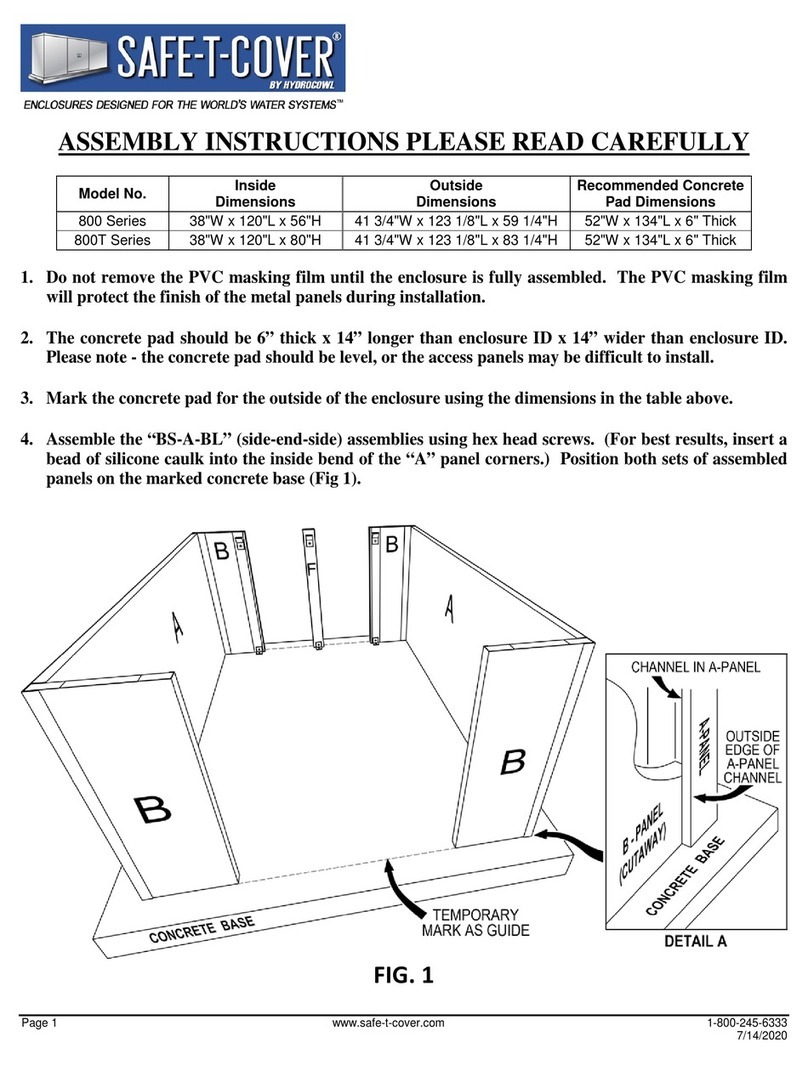
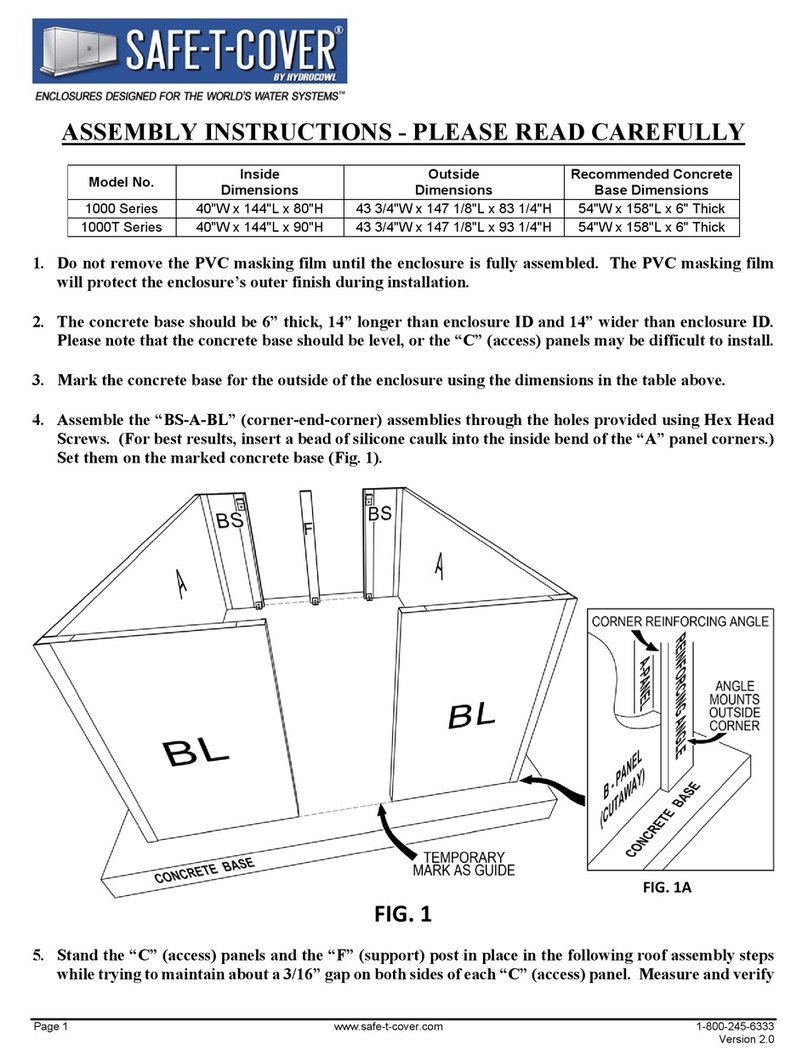
1. The concrete base should be 6”thick x 14”longer than enclosure ID x 14”wider than enclosure ID.
A. Mark the concrete base for the outside of the enclosure (3” wider than ID and 3” longer than ID).
2. The PVC masking film will help to protect the finish of the metal panels during installation. These
coatings should be left intact and removed only after assembly of the enclosure is complete.
A. Assemble the “B-A-B” (side-end-side) assemblies using hex headed screws. (For best results, insert a
The information contained herein is intended for the use of the individual(s) named above and those authorized to receive it. Dissemination, distribution
or copy of this information is strictly prohibited.
bead of silicone caulk into the inside bend of the “A” panel corners.) Position both sets of assembled
panels on the marked concrete base (Fig 2).
3. Inspect the alignment of the “C” (access) panels during the assembly process. Verify that their
removal and replacement allows adequate space and positioning within the openings and with the
adjacent panels prior to attaching any bracket to the concrete.
4. Set the “C” access panels in place with about a 3/16” gap on each side of the panels.
A. Set the “D” (roof) panel on the “B-A-B” assemblies.
5. Using one (1) hex headed screw for each, attach the Outside Corner Anchoring Brackets to the
“B-A-B”sections. Using one (1) anchor for each bracket, fasten them to the concrete (Fig 1A). Fasten
one (1) Outside Corner Anchoring Bracket at both corners on one side.
A. Attach the Inside Anchoring Brackets to the “B”panels at the bottom, inside at the concrete (Fig 1B).
Using one (1) anchor for each, fasten each bracket to the concrete. Fasten the Inside Side Anchoring
Brackets to the “B”panels and concrete along one side of the enclosure.
B. Insert the Inside Roof Clips into the “D” (roof) panel at the “B” panel studs (Fig 1C). Using one (1) hex
headed screw for each, attach the clips to the “B” panels as shown.
C. Repeat Steps 5, 5A and 5B on the other side of the enclosure.
NOTE: model sizes and configurations vary, see the chart.
6. Provide a ground-fault interrupter device in all electrical circuits per all applicable codes. Install the

The information contained herein is intended for the use of the individual(s) named above and those authorized to receive it. Dissemination, distribution
or copy of this information is strictly prohibited.
heater(s) as per manufacturer’s instructions and governing local and national codes.
7. For maximum protection, it is suggested that the area between the bottom of the enclosure and the
concrete base should be caulked except for the “C” panels. DO NOT CAULK THE BOTTOM OF
THE “C” PANELS.
8. REMOVE THE PVC MASKING FILM IMMEDIATELY AFTER INSTALLATION. If the panels
get wet with the masking film in place, water will irreversibly stain the panels. Summertime heat will
bake the masking film onto the panels.
The information contained herein is intended for the use of the individual(s) named above and those authorized to receive it. Dissemination, distribution
or copy of this information is strictly prohibited.
Model No. 200D Series
Model No. 200DS Series
Model No. 300 Series
Model No. 300D Series
Model No. 300DS Series
Model No. 300T Series
Model No. 300TD Series
Model No. 300TDS Series
Model No. 400 Series
Model No. 400T Series
Model No. 600 Series
Model No. 600T Series
Model No. 600TM Series
Model No. 600TS Series
CONTENTS
1. Your assembly should include
A. 2- “A”(end) Panels
B. 4- “B”(side) Panels
C. 1- “C”(removable access) Panel
D. 1- “C”(removable access) Panel W/drain
E. 1- “D” (roof) Panel
F. 4- Outside Corner Anchoring Brackets (1 ½”x 1 ½”)
G. 4- Inside Anchoring Brackets (3”x 3”)
H. 4- Inside Roof Clips
I. 1- Package of Anchors
J. 1- Package of Hex Headed Screws
K. 1- Masonry Bit
L. 1- Magnetic Chuck
2. Tools you will need
A. Hammer
B. Drill
C. ¾”Wrench