
Saluki SMR Series Instruction manual

SMRSeries Monitoring Receiver Module
Quick Start Manual
Saluki Technology Inc.

Content
General safety summary......................................................................................... 1
Daily maintenance and cleaning..............................................................................3
Safety terms and symbols................................................................................................4
Working environment.....................................................................................................5
Temperature............................................................................................................5
Relative humidity................................................................................................... 5
Altitude............................................................................................................. ..... 5
Ventilation and heat dissipation requirements.........................................................5
Static electricity requirements................................................................................ 5
Confirm power supply............................................................................................ 6
Prevent mutual interference via power supply........................................................6
Confirm power cord............................................................................................... 6
1 Quick start...................................................................................................... ........ 7
1.1 Appearance interface description...............................................................7
1.1.1 Front panel..........................................................................................7
1.1.2 Left panel........................................................................................... 8
1.1.3 Back panel..........................................................................................8
1.1.4 Right panel......................................................................................... 9
1.2 Preparations before use............................................................................. 9
1.2.1 General inspection..............................................................................9
1.2.2 Connect adaptor power...................................................................... 9
1.2.3 Power on............................................................................................10
Appendix :.....................................................................................................................11
Warranty Statement...............................................................................................11
SMR Series Monitoring Receiver Module Quick Start Manual

Security requirements
General safety summary
Understand the following safety precautions to avoid injury and prevent damage to this
product or any product connected to this product. To avoid possible hazards, be sure to use this
product as specified.
•Use the correct power cord
Only use the power cord approved for this product in your country.
•Make sure the product is well grounded
This product is grounded through the protective ground wire of the power supply. In order
to prevent clicking, the ground wire must be well grounded to the earth; before connecting to
any input and output terminals of this product, be sure to properly ground the device.
•Powered by the correct power adapter
Use the AC/DC power adapter provided by our company to power the product. The use of
other types of AC/DC power adapter is not allowed, otherwise the user will be responsible for
all consequences arising therefrom.
•Use the correct power supply
Different countries or regions have different power supply standards. Please check whether
the power supply required by this product is consistent with the local power supply standard,
otherwise the device will be burned out.
•Correct use of power fuses
Only use fuses with specifications specified for this product.
•View all terminal ratings
To avoid fire and excessive current shock, please check all ratings and markings on the
product. Please consult the product manual for detailed rating information before connecting
the product.
•Use appropriate overvoltage protection
Make sure that no high voltage (such as that caused by lightning) is applied to the product,
otherwise the operator may be at risk of electric shock.
•Do not open the cover for operation
Do not operate this product with the metal case of the instrument open or with the fixing
screws loose.
SMR Series Monitoring Receiver Module Quick Start Manual
1 / 11

•Do not operate the product if you suspect it is malfunctioning
If you suspect that this product is malfunctioning, please contact Saluki authorized
maintenance personnel for testing. Any maintenance, adjustment or parts replacement must
be performed by service personnel authorized by Egret Electronics. If the machine is
disassembled without authorization, the warranty will be voided during the warranty period.
•Maintain good ventilation
In an environment with poor ventilation conditions, the internal temperature of the
instrument will rise, which may cause damage to the instrument. Maintain good ventilation
conditions during use, and regularly check and clean ventilation channels.
•Do not operate in humid environment
To avoid short circuiting the internal circuit of the instrument or the risk of electric
shock, do not operate the instrument in a humid environment.
•Do not operate in flammable and explosive environments
To avoid instrument damage or personal injury, do not operate the instrument in
flammable and explosive environments.
•Please keep the product surface clean and dry
To prevent dust or moisture in the air from affecting receiver performance, please keep
the product surface clean and dry.
•Anti-static protection
Static electricity can cause damage to the instrument, so testing should be conducted in
an anti-static area as much as possible. Before connecting the cable to the instrument, briefly
ground its inner and outer conductors to discharge static electricity.
•Pay attention to transportation safety
To prevent the instrument from slipping during transportation and causing damage to
interfaces and other components, please pay attention to transportation safety.
SMR Series Monitoring Receiver Module Quick Start Manual
2 / 11

Daily maintenance and cleaning
•General maintenance
Do not leave the instrument in a place exposed to sunlight for a long time. If it is
not used for a long time, please store it in a cool, dry place.
•Be careful
Do not allow any corrosive liquid to stick to the instrument to avoid damage to
the instrument.
•Clean
Please clean the instrument frequently according to usage. Methods as below:
· Disconnect the power supply and turn off the instrument.
· Use a damp but non-drip soft cloth (you can use mild detergent or clean water) to
wipe the dust on the outside of the instrument.
· Neutral computer cleaning paste can also be used to wipe dust from the outside
of the instrument.
· Use a soft cloth or absorbent cotton dipped in absolute alcohol to wipe the
outside of the instrument, ports, connectors, etc.
Before re-powering on, please make sure the instrument is
completely dry to avoid short circuiting the instrument or even
personal injury due to moisture.
WARNING
SMR Series Monitoring Receiver Module Quick Start Manual
3 / 11

Safety terms and symbols
Terminology used in this manual. The following terms may appear in this manual:
WARNING
The statement identifies conditions and actions that may endanger the
lives of operators.
!
CAUTION
The statement identifies conditions and actions that could cause damage
to the product or loss of data.
terminology on the product. The following terms may appear on the product:
1DANGER means that there may be immediate danger to you if you perform this
operation.
2WARNING Indicates potential hazards to you if you perform this operation.
3CAUTION means that if you perform this operation, you may cause damage to this
product or other devices connected to this product.
Symbols on the product. The following symbols may appear on the product:
!
SMR Series Monitoring Receiver Module Quick Start Manual
4 / 11
Warning high voltage Protective terminal Be careful Switch Measurement ground terminal

Working environment
Temperature
Ambient temperature during operation:0℃~+50℃
Storage ambient temperature:-10℃~+50℃
Relative humidity
•When ≥+10℃, humidity ≤95%RH
•When ≥+30℃, humidity ≤75%RH
•When ≥+40℃, humidity ≤45%RH
Altitude
0~4600 meters
Note: The above three working environment requirements are only for the instrument
operating environment and are not technical indicators.
Ventilation and heat dissipation requirements
In order to ensure that the working environment temperature of the instrument is
within the temperature range required by the working environment, the heat
dissipation space requirements of the instrument should be met:
•The heat dissipation distance at the rear of the instrument is ≥150mm
•The heat dissipation distance between the left and right sides of the instrument is
≥100mm
Static electricity requirements
Please correctly apply the following anti-static measures to reduce electrostatic damage:
•Ensure that all instruments are properly grounded.
•Before connecting the coaxial cable to the instrument, contact the inner and outer
conductors of the cable with the ground for discharge.
•Operators must wear anti-static bracelets or take other anti-static measures before
touching connectors, wires, or assembly operations.
SMR Series Monitoring Receiver Module Quick Start Manual
5 / 11

Confirm power supply
Mainland China must meet:
Voltage:AC220±10%
Frequency:50~60Hz
Prevent mutual interference via power supply
To prevent multiple devices, especially instruments and high-power equipment
from being connected to the same power grid, the pulse interference generated by
high-power equipment will cause the instrument to work abnormally or even be
damaged. It is recommended to use an AC regulated power supply to power the
instrument.
Confirm power cord
The instrument uses a three-core power cord interface, which complies with
national standards. You must confirm that the power protective ground wire is
reliably connected to the earth. Floating ground or poor grounding may cause damage
to the instrument. It is strictly prohibited to use power cord without protective ground.
Before turning on the power, make sure the power cable is in good condition and
complete. Use the power cord to connect the instrument power plug and a well-
grounded three-core power socket.
SMR Series Monitoring Receiver Module Quick Start Manual
6 / 11

1 Quick start
This chapter introduces the front panel, rear panel, side panel and host computer
user interface of the monitoring receiver module, precautions when using it for the
first time, and demonstrates its use through a measurement example.
1.1 Appearance interface description
1.1.1 Front panel
Figure 1-1 Front panel view
Table 1-1 Front panel description
No. Function Description
APower interface
①12V power supply connector
②If necessary, the adapter interface can be
BUSB interface USB interface for communication
CNetwork Interface RJ45 network interface for communication
DSystem indicator light Indicators showing system status
ERF input interface For RF signal input interface
SMR Series Monitoring Receiver Module Quick Start Manual
7 / 11
1.1.2 Left panel
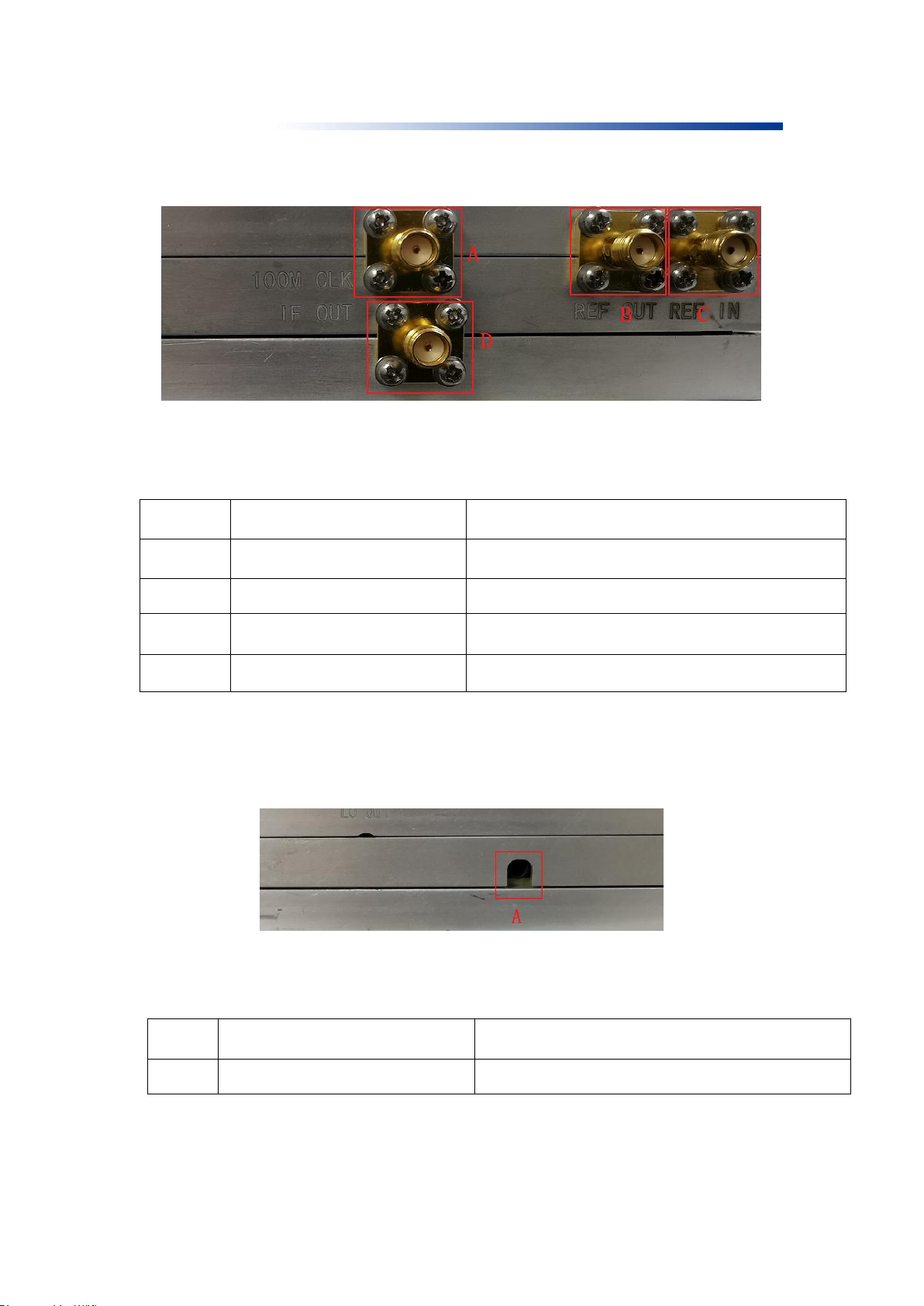
Figure 1-2 Left panel view
Table 1-2 Left panel description
No. Function Description
A100M clock output RF 100M clock output interface
B10M reference clock output RF 10M clock output interface
C10M reference clock input RF 10M clock input interface
D145M clock output IF 145M clock output interface
1.1.3 Back panel
Figure 1-3 Back panel view
Table 1-3 Back panel description
No. Function Description
1Headphone jack Headphone jack for audio output
SMR Series Monitoring Receiver Module Quick Start Manual
8 / 11
This manual suits for next models
2
Table of contents
Other Saluki Control Unit manuals
Popular Control Unit manuals by other brands

Festo
Festo Compact Performance CP-FB6-E Brief description

Elo TouchSystems
Elo TouchSystems DMS-SA19P-EXTME Quick installation guide

JS Automation
JS Automation MPC3034A user manual

JAUDT
JAUDT SW GII 6406 Series Translation of the original operating instructions

Spektrum
Spektrum Air Module System manual

BOC Edwards
BOC Edwards Q Series instruction manual

KHADAS
KHADAS BT Magic quick start

Etherma
Etherma eNEXHO-IL Assembly and operating instructions

PMFoundations
PMFoundations Attenuverter Assembly guide

GEA
GEA VARIVENT Operating instruction

Walther Systemtechnik
Walther Systemtechnik VMS-05 Assembly instructions

Altronix
Altronix LINQ8PD Installation and programming manual





