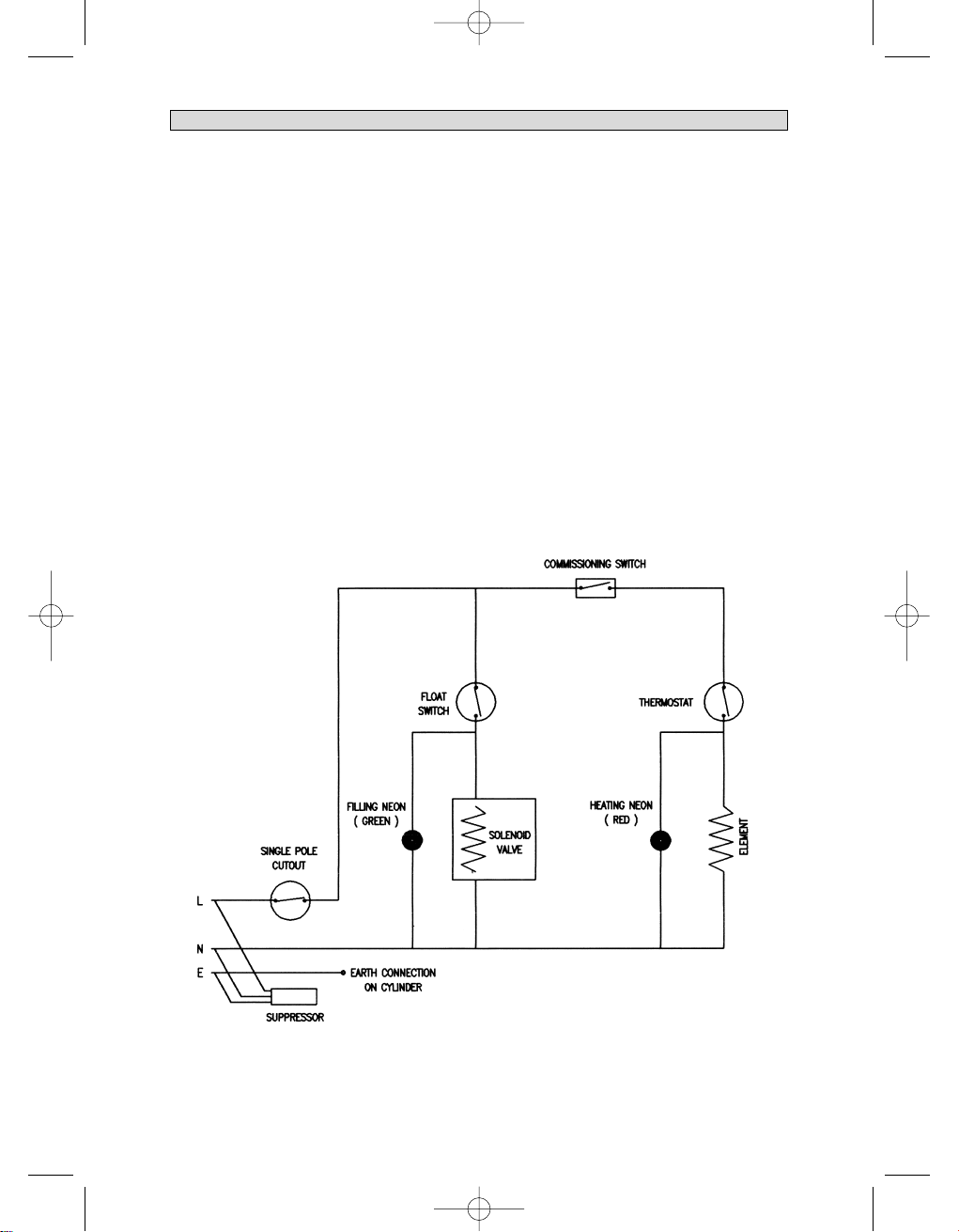
Unit won’t fill - Check solenoid valve for failure in closed position. This is usually caused
by an open circuit coil. This can be detected by removing the wires to the solenoid and
checking for continuity across the two terminals. An open circuit coil has no continuity.
No water flow - The most common reasons are a lack of power or water.
It is, however, possible that the pressure reducing valve is fitted the wrong way round.
To check, loosen the connections slightly and swivel the valve so that you can see the back.
There is a small arrow moulded into the body on the inlet port of the pressure reducing
valve and it should point towards the blender.
Poor water flow - This may occur when the unit is first commissioned. The mechanism of
the blender benefits from being loosened up. Turn the maroon knob from minimum to
maximum and back about ten times.
Likewise check the filters for blockage. Again if the unit is newly installed then debris could
have found its way into the blender restricting its movement and causing poor flow. The
blender can easily be stripped down for servicing whilst on site following this procedure.
1. Pierce centre circle of nameplate with a screwdriver and remove screw and hand wheel.
2. Loosen upper nut (do not remove) to allow engaging an adjustable wrench on lower
nut. Unscrew lower nut (counter clockwise). This removes top assembly.
3. Brass top assembly will pop up. Remove lower assembly and spring.
4. Carefully remove any scaling (calcium deposits) or foreign particles from valve seat
and other internal parts. Use vinegar to remove calcium. Soak parts in vinegar until
calcium becomes soft and can be scrubbed and washed off. Do not use solvents or
scratch metallic surfaces.
5. Replace cleaned spring and lower assembly following instructions below.
a Insert spring with large diameter on bottom into body.
b Fit valve top assembly into lower assembly and insert into valve.
c Tighten lower nut. Line up U slot with raised dot or arrow on body and hold while
tightening upper nut.
d Turn plastic star wheel clockwise until it stops, then back a quarter of a turn.
e Place hand wheel on position 1 over raised dot or arrow and insert screw. Turn hand
wheel to desired temperature setting.
Unstable delivery temperature - First check that the blender has been fitted the correct
way round with the cold port being closest to the pressure reducing valve. Alternatively the
pressure reducing valve may have failed. The outlet pressure is factory set and sealed at
0.5 bar. Higher outlet pressures than this may lead to unstable temperature delivery.
Water discharging from the overflow - Turn off the power supply to the unit. If the flow
stops (this may take up to one minute) then the float switch has failed or is stuck in the up
position. If flow continues however then the solenoid has probably failed in the open position.
Note: If the unit has been turned on dry with the commissioning switch in the heating
position the float switch may have been damaged by the high temperatures created.
Water dripping from the overflow - Scale or other deposits may be preventing either the
hot side non-return valve or the solenoid seating. In both cases the symptoms are the
same, that of water seeping into the tank. The water level will rise, eventually reaching the
overflow. Inspect, clean and/or replace as necessary.