SS-FCR3000 4-461-338-11(1) GB/FR/ES/DE/NL/IT/PL
4-461-338-11(1)
© 2013 Sony Corporation
DA CB
HOME
V/v/B/b,
LEVELPHASE
English
Nederlands
Français
Italiano
This Quick Setup Guide is for overpack package of
STR-DH540, SS-FCR3000, and SA-W2500.
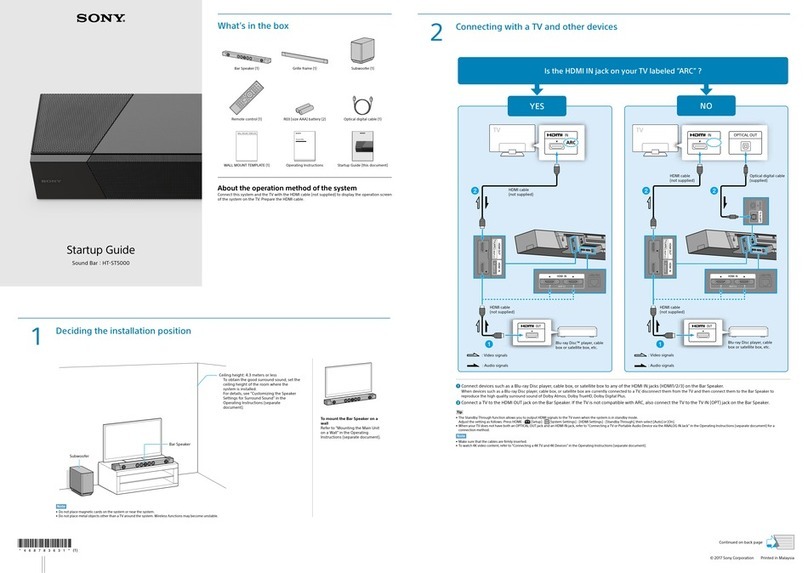
Connect and turn on your receiver. For details,
refer steps 1 to 3 in the Quick Setup Guide of the
receiver. Then, make the following settings.
1 Adjust the cut-off frequency of the
subwoofer (A)
Turn the CUT OFF FREQ control to the
location between 2and 3as shown in the
illustration above.
2 Set the phase polarity of the subwoofer (B)
Set the PHASE switch to “REVERSE” (Default
setting).
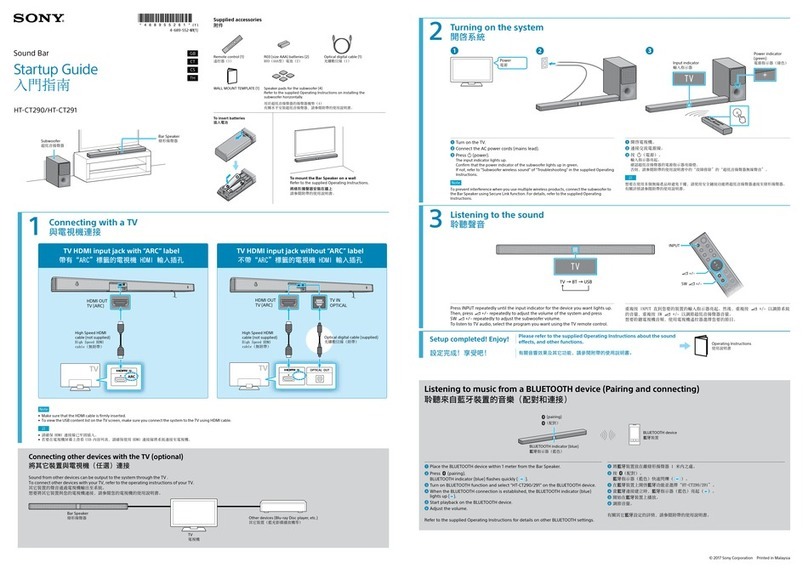
3 Adjust the volume level of the subwoofer
(C)
Turn the LEVEL control so that you can hear
the bass sound. It is recommended to adjust the
LEVEL control to the position as shown in the
illustration above.
4 Set up the receiver and perform Auto
Calibration
For details, refer to step 4 in the Quick Setup
Guide of the receiver.
5 Adjust the front speaker size (D)
Press HOME, then use V/v/B/band to
select “Settings” > “Speaker Settings” > “Manual
Setup” > “Size” > “Small”.
Note
You can also adjust the settings according to your
preference.
Español
Polski
Deutsch
Ce Guide d’installation rapide est pour les
ensembles STR-DH540, SS-FCR3000 et SA-W2500.
Connectez et mettez l’ampli-tuner sous tension.
Pour les détails, reportez-vous aux étapes 1 à 3 du
Guide d’installation rapide de l’ampli-tuner. Puis,
réalisez les réglages suivants.
1 Ajustez la fréquence de coupure du caisson
de grave (A)
Tournez le réglage CUT OFF FREQ sur un
emplacement entre 2et 3comme indiqué sur
l’illustration ci-dessus.
2 Réglez la polarité de phase du caisson de
grave (B)
Réglez le commutateur PHASE sur
« REVERSE » (réglage par défaut).
3 Ajustez le niveau de volume du caisson de
grave (C)
Tournez le réglage LEVEL de façon que vous
entendiez le son grave. Il est recommandé que
vous ajustiez le réglage LEVEL sur la position
montrée sur l’illustration ci-dessus.
4 Réglez l’ampli-tuner et réalisez l’auto-
calibration
Pour les détails, reportez-vous à l’étapes 4 du
Guide d’installation rapide de l’ampli-tuner.
5 Ajustez la taille de l’enceinte avant (D)
Appuyez sur HOME, puis utilisez V/v/B/bet
pour sélectionner « Settings » > « Speaker
Settings » > « Manual Setup » > « Size » >
« Small ».
Remarque
Vous pouvez aussi ajuster le réglage en fonction de
vos préférences.
Esta Guía de instalación rápida contiene
información para los productos STR-DH540,
SS-FCR3000 y SA-W2500 contenidos en el
sobreembalaje.
Conecte y encienda el receptor. Para obtener más
información, consulte los pasos 1 a 3 de la Guía de
instalación rápida del receptor. A continuación,
realice los siguientes ajustes.
1 Ajuste la frecuencia de corte del altavoz de
graves (A)
Gire el control CUT OFF FREQ y ajústelo entre
las posiciones 2y 3, como se muestra en la
ilustración de arriba.
2 Ajuste la polaridad de fase del altavoz de
graves (B)
Ajuste el selector PHASE a “REVERSE” (ajuste
predeterminado).
3 Ajuste el nivel de volumen del altavoz de
graves (C)
Gire el control LEVEL hasta que pueda
escucharse el sonido de graves. Se recomienda
ajustar el control LEVEL a la posición indicada
en la ilustración de arriba.
4 Configure el receptor y realice la Calibración
automática
Para obtener más información, consulte el paso
4 de la Guía de instalación rápida del receptor.
5 Ajuste el tamaño del altavoz frontal (D)
Pulse HOME y, a continuación, utilice V/v/B/b
ypara seleccionar “Settings” > “Speaker
Settings” > “Manual Setup” > “Size” > “Small”.
Nota
También puede configurar los ajustes según sus
preferencias.
Diese Kurzanleitung bezieht sich auf die Overpack
Packung von STR-DH540, SS-FCR3000 und
SA-W2500.
Schließen Sie Ihren Receiver an und schalten ihn
ein. Einzelheiten hierzu finden Sie in Schritt 1 bis 3
der Kurzanleitung des Receivers. Nehmen Sie dann
die folgenden Einstellungen vor.
1 Passen Sie die Grenzfrequenz des
Subwoofers (A)an
Stellen Sie den Regler CUT OFF FREQ auf
eine Stellung zwischen 2und 3wie in der
Abbildung oben gezeigt.
2 Stellen Sie die Phasenpolarität des
Subwoofers (B)ein
Stellen Sie den PHASE-Schalter auf „REVERSE“
(Standardeinstellung).
3 Passen Sie den Lautstärkepegel des
Subwoofers (C)an
Drehen Sie den LEVEL-Regler so, dass Sie den
Bassklang hören können. Es wird empfohlen,
den LEVEL-Regler auf die Stellung wie in der
Abbildung oben gezeigt zu stellen.
4 Richten Sie den Receiver ein, und führen Sie
eine automatische Kalibrierung durch
Einzelheiten hierzu finden Sie in Schritt 4 der
Kurzanleitung des Receivers.
5 Passen Sie die Größe der Frontlautsprecher
(D)an
Drücken Sie HOME, und verwenden Sie dann
V/v/B/bund zum Wählen von „Settings“ >
„Speaker Settings“ > „Manual Setup“ > „Size“ >
„Small“.
Hinweis
Sie können auch die Einstellungen nach Ihren
Wünschen anpassen.
Deze Beknopte installatiegids is voor de verpakking
van de STR-DH540, de SS-FCR3000 en de
SA-W2500.
Verbind uw receiver en schakel in. Zie voor details
stappen 1 tot 3 in de Beknopte installatiegids van de
receiver. Maak dan de volgende instellingen.
1 Stel de grensfrequentie van de subwoofer in
(A)
Draai de CUT OFF FREQ-regelaar naar de
stand tussen 2en 3zoals in de afbeelding
hierboven wordt aangegeven.
2 Stel de fasepolariteit van de subwoofer in
(B)
Stel de PHASE-schakelaar op “REVERSE”
(standaardinstelling).
3 Stel het volumeniveau van de subwoofer in
(C)
Verdraai de LEVEL-regelaar zodat u de lage
tonen kunt horen. Het wordt aanbevolen de
LEVEL-regelaar in de stand te stellen die in de
afbeelding hierboven is aangegeven.
4 Stel de receiver in en voer de automatische
kalibratie uit
Zie voor details stap 4 in de Beknopte
installatiegids van de receiver.
5 Stel het formaat van de voorluidspreker in
(D)
Druk op HOME en gebruik dan V/v/B/ben
om “Settings” > “Speaker Settings” > “Manual
Setup” > “Size” > “Small” te kiezen.
Opmerking
U kunt de instellingen ook naar uw eigen voorkeur
maken.
Questa Guida di impostazione rapida riguarda i
modelli STR-DH540, SS-FCR3000 e SA-W2500.
Collegare e accendere il ricevitore. Per ulteriori
informazioni si prega di vedere i passi da 1 a 3 della
Guida di impostazione rapida del ricevitore stesso.
Provvedere quindi alle seguenti impostazioni:
1 Regolare la frequenza di taglio del
subwoofer (A)
Come mostra la figura, ruotare il controllo CUT
OFF FREQ tra le posizioni 2e 3.
2 Impostare la polarità di fase del subwoofer
(B)
Regolare il selettore PHASE nella posizione
“REVERSE” (impostazione predefinita).
3 Regolare il volume del subwoofer (C)
Ruotare il controllo LEVEL in una posizione
che permetta di udire i bassi. La figura qui sopra
mostra la posizione suggerita.
4 Impostare il ricevitore e dare corso alla
funzione “Auto Calibration” (calibrazione
automatica)
Per ulteriori informazioni si prega di vedere il
passo 4 della Guida di impostazione rapida del
ricevitore stesso.
5 Regolare la dimensione dei diffusori
anteriori (D)
Premere HOME e con V/v/B/be
selezionare “Settings” > “Speaker Settings” >
“Manual Setup” > “Size” > “Small”.
Nota
Queste impostazioni possono altresì essere eseguite
sulla base della propria preferenza.
Ten Podręcznik szybkiej konfiguracji jest
przeznaczony dla pakietu dodatkowego
STR-DH540, SS-FCR3000 i SA-W2500.
Podłącz i włącz odbiornik. Szczegóły patrz
kroki 1 – 3 w Podręczniku szybkiej konfiguracji
odbiornika. Następnie wykonaj poniższe czynności.
1 Ustaw częstotliwość graniczną subwoofera
(A)
Ustaw pokrętło CUT OFF FREQ na położenie
pomiędzy wskazaniem 2i 3na powyższej
ilustracji.
2 Ustaw biegunowość fazy subwoofera (B)
Ustaw przełącznik PHASE na „REVERSE”
(ustawienie domyślne).
3 Ustaw poziomu głośności subwoofera (C)
Obracaj pokrętłem LEVEL, by tony niskie były
słyszalne. Zalecamy ustawienie pokrętła LEVEL
w położeniu przedstawionym na powyższej
ilustracji.
4 Ustaw odbiornik i przeprowadź
Automatyczną kalibrację
Szczegóły patrz krok 4 w Podręczniku szybkiej
konfiguracji odbiornika.
5 Ustaw rozmiar głośnika przedniego (D)
Naciśnij przycisk HOME, a następnie użyj
przycisków V/v/B/bi , aby wybrać
„Settings” > „Speaker Settings” > „Manual
Setup” > „Size” > „Small”.
Uwaga
Można również wybrać ustawienia zgodnie z
własnymi preferencjami.