Sony SRS-XB21 Reference guide
Help Guide
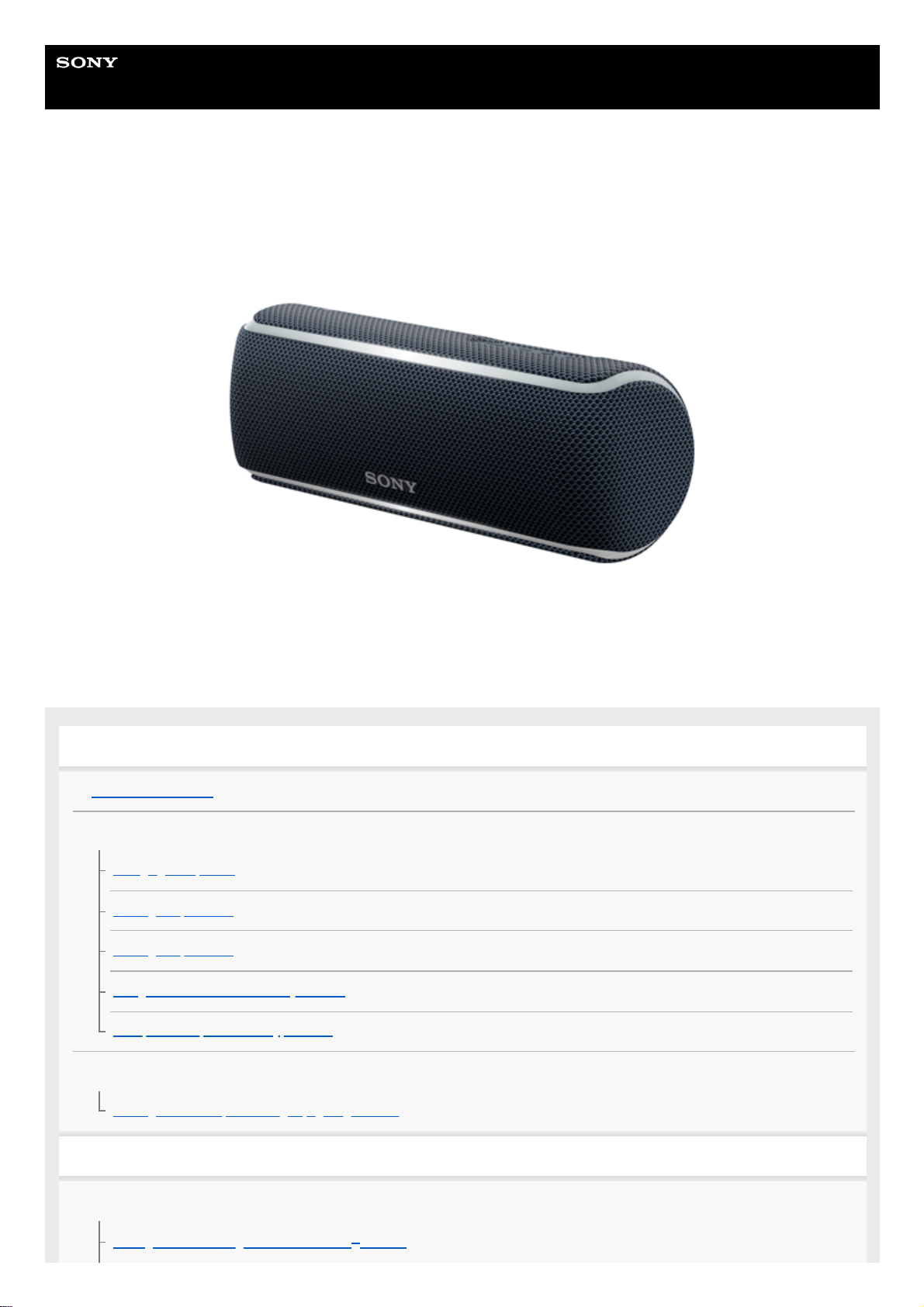
Wireless Speaker
SRS-XB21
The following explains how to use this speaker. Select a topic from the navigation pane.
Getting Started
Parts and controls
Power source/charging
Charging the speaker
Turning the power on
Turning the power off
Using the BLUETOOTH standby function
Auto power off (Auto Standby) function
Lighting function
Turning on/off the speaker’s light (Lighting function)
Making connections
BLUETOOTH
Pairing and connecting with BLUETOOTH® devices
1

Connecting with an NFC-compatible device by One-touch (NFC)
Connecting with a computer via a BLUETOOTH connection (Windows)
Connecting with a computer via a BLUETOOTH connection (Mac)
Listening to music
BLUETOOTH device
Listening to music of a device via BLUETOOTH connection
Selecting the BLUETOOTH audio streaming playback quality (Codec)
Terminating the BLUETOOTH connection (After use)
Switching the BLUETOOTH devices connected at the same time (Multi-device connection)
Speaker Add function
Listening to music wirelessly with two speakers (Speaker Add function)
Switching between double mode and stereo mode (Speaker Add function)
Terminating the Speaker Add function
Wireless Party Chain function
Enjoying wireless playback using multiple speakers (Wireless Party Chain function)
Terminating the Wireless Party Chain function
Listening to music of a portable audio device, etc.
Enjoying switching the sound effects
Using the Party Booster function
Phone calls
Receiving a call
Making a call
Using “Sony | Music Center”
What you can do with “Sony | Music Center”
Installing “Sony | Music Center”
Using the voice assist function
Using the voice assist function (Google app)
Using the voice assist function (Siri)
Information
2
4-735-513-11(3) Copyright 2018 Sony Corporation
About the indicators
Updating the pre-installed software
Notes on use
Precautions
Notes on charging
Notes on waterproof and dust proof features
How to care for the speaker
About the BLUETOOTH wireless technology
Trademarks
Troubleshooting
What can I do to solve a problem?
Power supply
Unable to charge the speaker
Unable to turn on the speaker or the speaker suddenly turns off
Sound
No sound/Sound from only one speaker/Low sound level/Distorted sound/Humming or noise in the speaker output/No voice or low
voice from callers
Sound becomes low while in use
BLUETOOTH
Unable to pair the speaker with a BLUETOOTH device
Unable to connect the speaker to a BLUETOOTH device with One-touch connection (NFC)
Unable to connect a BLUETOOTH device with the speaker in the Speaker Add function
Unable to connect with a speaker in the Wireless Party Chain function
Reset
Using the RESET button
Initializing the speaker
3

Help Guide
Wireless Speaker
SRS-XB21
Parts and controls
(power) button with indicator/ PAIRING button1.
–/+ (volume) buttons2.
(BLUETOOTH) indicator3.
(play) button/ (call) button4.
N-mark5.
Lighting6.
Microphone7.
Cap8.
BATT (battery) button/ LIGHT button
The lighting built into the speaker is turned on/off when you press and hold this button for about 3 seconds.
9.
WPC (Wireless Party Chain) button with indicator10.
ADD (Speaker Add) button with indicator11.
RESET button12.
CHARGE indicator13.
4

Help Guide
Wireless Speaker
SRS-XB21
Charging the speaker
The speaker can be operated by connecting it to an AC outlet via the USB AC adaptor (commercially available) or by
using the built-in battery.
When using the speaker for the first time, be sure to charge the built-in battery for more than 1 hour before turning on the
power.
You can operate the speaker with the built-in battery by charging the speaker before use.
Checking the charging completion
If the built-in battery is fully charged when you connect the speaker to an AC outlet, the CHARGE indicator lights up in
orange then turns off after about 1 minute.
Checking the built-in battery level of the rechargeable built-in battery
Connect the speaker to an AC outlet to charge it.
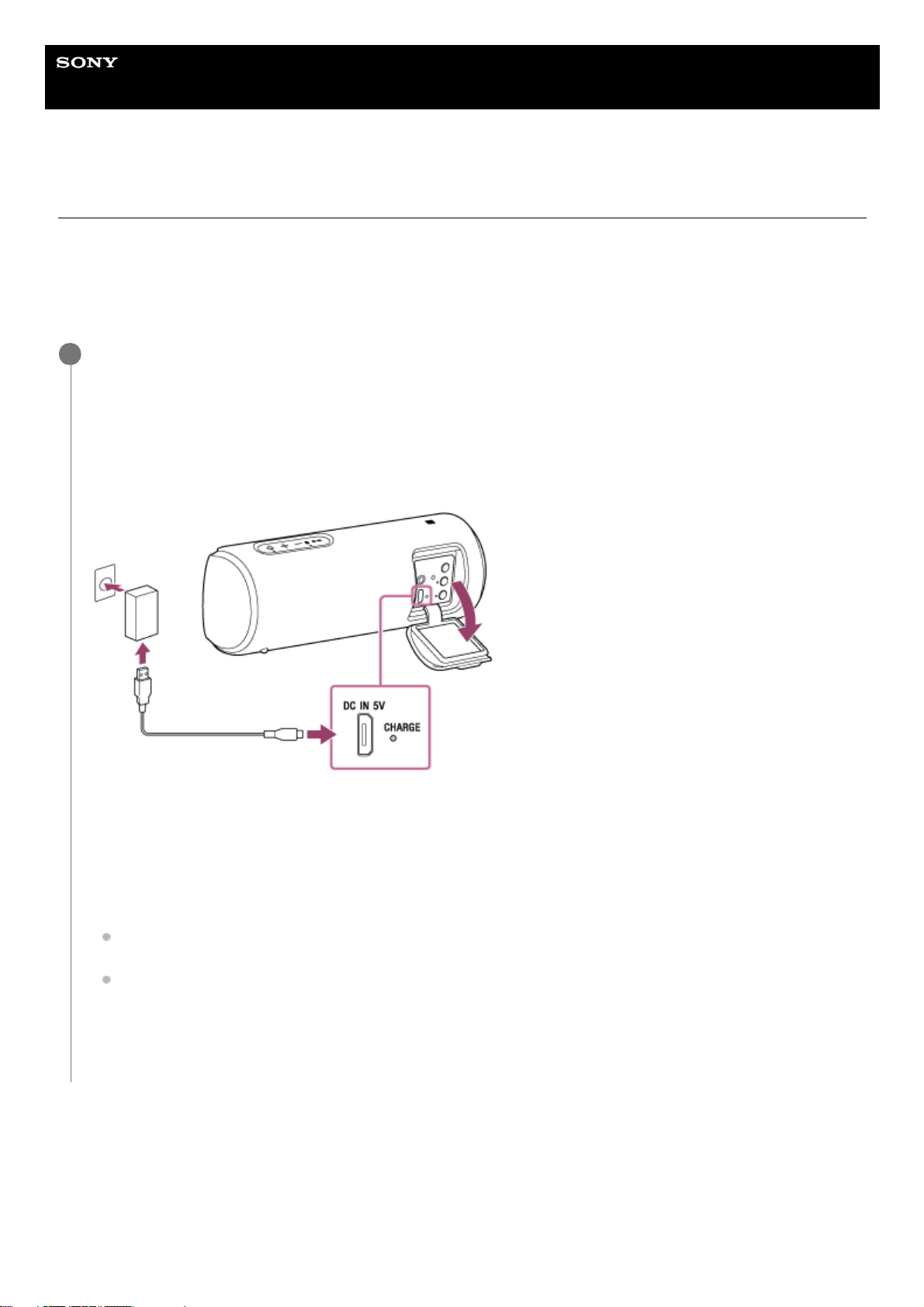
Connect the micro-USB cable (supplied) to the DC IN 5V jack on the speaker, and then connect the other end to a
USB AC adaptor (commercially available). After that, plug the USB AC adaptor into an AC outlet.
The speaker supports a USB AC adaptor (commercially available) with an output current of 500 mA or more.
However, using a USB AC adaptor with an output current of 1.5 A or more and a supplied micro-USB cable or
micro-USB cable conforming to the USB standard is recommended. Charging from the other device is not
guaranteed.
The CHARGE indicator lights up in orange while charging.
The estimated charging time differs depending on the power output capacity of the connected USB AC adaptor
(commercially available). Depending on the type and specification of the USB AC adaptor and micro-USB cable,
the charging time may take longer than the time stated below. The time stated below may vary depending on the
ambient temperature or conditions of use.
The following time is stated as the reference time.
When connecting to a USB AC adaptor (commercially available) which has the ability to output in 1.5 A:
Charging will be completed in about 4 hours*, and the CHARGE indicator will turn off.
When connecting to a USB AC adaptor (commercially available such as iPhone accessories) which has the
ability to output in 500 mA, it is out of warranty, so it will take longer than 10 hours* and may take a very long
time to charge.
1
Time that is required to charge the empty built-in battery to its full capacity when the speaker turns off.
*
6

After pressing the BATT (battery) button/ LIGHT button inside the cap on the rear side of the speaker, when the
speaker is turned on, the voice guidance listed below is output from the speaker depending on the remaining built-in
battery power.
70% or more: “Battery fully charged”
50% or more: “Battery about 70%”
20% or more: “Battery about 50%”
10% or more: “Battery about 20%”
Less than 10%: “Please charge”
Built-in battery life (using BLUETOOTH connection)
About 12 hours
The volume level of the speaker is set to 25.
The lighting function is set to off.
The Sound Mode is set to STANDARD.
About 3 hours
The volume level of the speaker is set to maximum (50).
The lighting function is set to on.
The Sound Mode is set to EXTRA BASS.
The built-in battery life above is measured using the specified music source.
The built-in battery life varies depending on the content to be played, ambient temperature or conditions of use.
When the built-in battery is running low
When the voice guidance says “Please charge” and the CHARGE indicator and (power) indicator flash slowly, the
built-in battery is running low and needs to be charged.
Hint
You can also charge the speaker by connecting it to a booted computer via the micro-USB cable. However, operation with all
computers is not guaranteed. Operation with a home-built computer is also not covered by the warranty.
A speaker that is in use can be charged if it is connected to an AC outlet via a USB AC adaptor (commercially available) or if
connected to a booted computer. In this case, it may take longer to charge the built-in battery compared to when the speaker is
turned off depending on the conditions of use. Therefore, it is recommended to turn off the speaker when charging.
Note
When you use the speaker at a loud volume, the built-in battery may run low even if the speaker is connected to an AC outlet. If
you want to use the speaker while charging, lower the volume of the speaker. Otherwise, turn off the speaker and charge the
built-in battery sufficiently.
When you use the speaker at a loud volume for a long time, the built-in battery may run low even if the speaker is connected to
an AC outlet. As a result, sound becomes low. This is not a malfunction. Turn off the speaker and charge the built-in battery
sufficiently.
The maximum power output will be lower when the built-in battery is running low.
In an extremely cold or hot environment, charging stops for safety. If charging takes a long time, it also makes charging of the
speaker stop. To resolve these issues, disconnect the micro-USB cable, and then connect it again within an operating
temperature between 5 °C and 35 °C (41 °F and 95 °F).
Do not charge in places where water may splash on the speaker.
Even if you do not intend to use the speaker for a long time, charge the built-in battery sufficiently once every 6 months to
maintain its performance.
Related Topic
Turning the power on
Notes on charging
7

4-735-513-11(3) Copyright 2018 Sony Corporation
8
Help Guide
Wireless Speaker
SRS-XB21
Turning the power on
Hint
When you turn on the speaker for the first time after purchase, the lighting function is on. The front part of the speaker lights up.
Note
If the CHARGE indicator and (power) indicator flash 3 times and turn off when you turn on the speaker, the built-in battery is
empty. In this state, the speaker turns off automatically. Charge the built-in battery.
When the CHARGE indicator and (power) indicator flash slowly, the built-in battery is running low and needs to be charged.
Related Topic
Turning the power off
Charging the speaker
Turning on/off the speaker’s light (Lighting function)
4-735-513-11(3) Copyright 2018 Sony Corporation
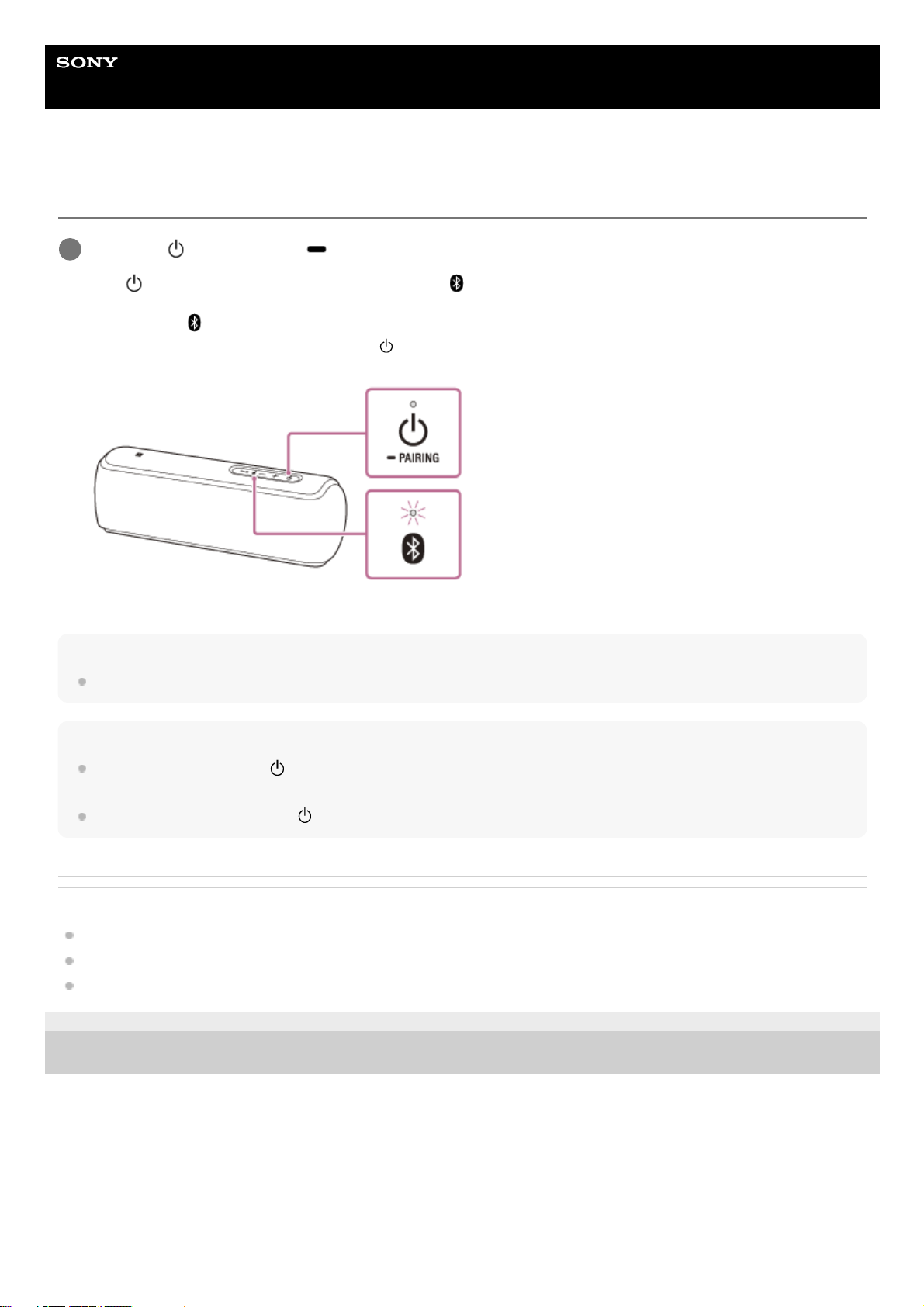
Press the (power) button/ PAIRING button.
The (power) indicator lights up in white* and the (BLUETOOTH) indicator flashes slowly in blue.
When you turn on the speaker for the first time after purchase or there is no pairing information stored in the
speaker, the (BLUETOOTH) indicator will begin to flash quickly in blue.
1
Depending on the Sound Mode, the color of the (power) indicator varies. For details, refer to the following topic.
About the indicators
*
9

Help Guide
Wireless Speaker
SRS-XB21
Turning the power off
Hint
If you turn off the speaker when it is connected to an AC outlet via a USB AC adaptor (commercially available), or connected to a
booted computer, and while the BLUETOOTH standby function is on, the (power) indicator lights up in orange and the
speaker enters the BLUETOOTH standby mode.
Related Topic
Auto power off (Auto Standby) function
Using the BLUETOOTH standby function
4-735-513-11(3) Copyright 2018 Sony Corporation
Press the (power) button/ PAIRING button.
The (power) indicator and (BLUETOOTH) indicator turn off.
1
10
Other manuals for SRS-XB21
4
Table of contents
Other Sony Speakers manuals
Sony
Sony RDP-X200iP User manual

Sony
Sony XS-L835 Installation/Connections Instructions (primary... Product guide

Sony
Sony LSPX-S2 Reference guide
Sony
Sony SRS-BTD70 User manual
Sony
Sony SS-MF550H User manual
Sony
Sony RDP-XA700iPN Manual

Sony
Sony WS-TV150 User manual

Sony
Sony BSP10 User manual
Sony
Sony SS-MB300H User manual
Sony
Sony HT-CT260H User guide