logo
Brands
  1. Home
  2. •
  3. Brands
  4. •
  5. Teac
  6. •
  7. Stereo System
  8. •
  9. Teac MCDV72iP User manual

Teac MCDV72iP User manual

Other manuals for MCDV72iP

1

Other Teac Stereo System manuals

Teac GF-350 User manual

Teac

Teac GF-350 User manual

Teac CR-H250 User manual

Teac

Teac CR-H250 User manual

Teac DC-D6300 User manual

Teac

Teac DC-D6300 User manual

Teac DC-D6800 User manual

Teac

Teac DC-D6800 User manual

Teac CD-X10I User manual

Teac

Teac CD-X10I User manual

Teac CD-X10I User manual

Teac

Teac CD-X10I User manual

Teac LP-R550USB User manual

Teac

Teac LP-R550USB User manual

Teac MC-DX220iDAB User manual

Teac

Teac MC-DX220iDAB User manual

Teac MCDV66BT User manual

Teac

Teac MCDV66BT User manual

Teac CX-400iDAB User manual

Teac

Teac CX-400iDAB User manual

Teac CD-X9 User manual

Teac

Teac CD-X9 User manual

Teac LPU192CD User manual

Teac

Teac LPU192CD User manual

Teac ST-C150 User manual

Teac

Teac ST-C150 User manual

Teac MC-DX10 User manual

Teac

Teac MC-DX10 User manual

Teac CD-X10I User manual

Teac

Teac CD-X10I User manual

Teac GF-550 User manual

Teac

Teac GF-550 User manual

Teac TD-X250i User manual

Teac

Teac TD-X250i User manual

Teac AG-H600NT User manual

Teac

Teac AG-H600NT User manual

Teac CS-X8 User manual

Teac

Teac CS-X8 User manual

Teac GF-188 User manual

Teac

Teac GF-188 User manual

Teac A-4010GSL User manual

Teac

Teac A-4010GSL User manual

Teac MC-DX20 User manual

Teac

Teac MC-DX20 User manual

Teac PowerMax-950 User manual

Teac

Teac PowerMax-950 User manual

Teac SB303 User manual

Teac

Teac SB303 User manual

Popular Stereo System manuals by other brands

LG CM3330B owner's manual

LG

LG CM3330B owner's manual

Sony SS-CEP50 Service manual

Sony

Sony SS-CEP50 Service manual

Cetacea Sound CVS-II user guide

Cetacea Sound

Cetacea Sound CVS-II user guide

Denon UCD-250 Service manual

Denon

Denon UCD-250 Service manual

Sanyo DC-MX41i instruction manual

Sanyo

Sanyo DC-MX41i instruction manual

Sharp CD-ES600V Service manual

Sharp

Sharp CD-ES600V Service manual

Exibel BDX600-UK user manual

Exibel

Exibel BDX600-UK user manual

Sanyo DC-F320 Service manual

Sanyo

Sanyo DC-F320 Service manual

Philips FWM583X Specifications

Philips

Philips FWM583X Specifications

Sharp CD-C462 Service manual

Sharp

Sharp CD-C462 Service manual

Onkyo CBX 300 - CD / MP3 Clock Radio instruction manual

Onkyo

Onkyo CBX 300 - CD / MP3 Clock Radio instruction manual

Aiwa XR-EM70 Service manual

Aiwa

Aiwa XR-EM70 Service manual

Cyrus Lyric user guide

Cyrus

Cyrus Lyric user guide

Philips MCM159/98 quick start guide

Philips

Philips MCM159/98 quick start guide

Philips/Magnavox Magnavox FW 62C owner's manual

Philips/Magnavox

Philips/Magnavox Magnavox FW 62C owner's manual

RCA RS3965SB user manual

RCA

RCA RS3965SB user manual

Sharp XL-UH240 Operation manual

Sharp

Sharp XL-UH240 Operation manual

Philips FW 690 Instructions for use

Philips

Philips FW 690 Instructions for use

https://manuals.online logo
https://manuals.online logoBrands
  • About & Mission
  • Contact us
  • Privacy Policy
  • Terms and Conditions

Copyright 2025 Manuals.Online. All Rights Reserved.

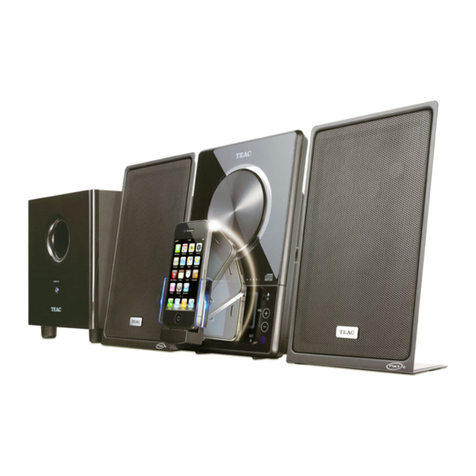
MCDV72iP
DVD Micro Hi-Fi System with Docking for iPod
USER MANUAL
WARRANTY INFORMATION INSIDE. PLEASE READ
www.teac.com.au
IMPORTANT !
Trademark of TEAC Corporation JAPAN
/iPhone/iPad
Downloaded From Disc-Player.com TEAC Manuals
WARRANTYPROCEDUREv1.5.2:DEC2011
Pleasereadtheowner’sanualcarefullyandensurethatyouhavefollowedthecorrectinstallationandoperating
procedures.
1.Pleasereadthiswarrantycard.
2.KeepyourpurchasereceipttoenableyoutoproceedquicklyintheeventofaWarrantyService.
3.IfyourequireWarrantyService,pleasecontacttheTEACCustoerSupportHotlineat1300553315for
assistance.Pleaseensurethatyouhavetheodelnuber,serialnuberandpurchasereceiptreadywhen
youcall.
Pleasecopletethesectionbelowandkeepthisinforationforyourownrecords.
Owner’sNae
Owner’sAddress
Postcode
ModelNae/No.SerialNo.
Dealer’sNae
Dealer’sAddress
Postcode
Authorised
Authorised
Authorised
AuthorisedService
S ervice
Service
ServiceCentres
C entres
Centres
Centresin
i n
in
inMajor
M ajor
Major
MajorAustralian
A ustralian
Australian
AustralianCities
C ities
Cities
Cities
NSW
NSW
NSW
NSW
151ArthurStreet
HoebushWest,NSW2140
Queensland
Q ueensland
Queensland
Queensland
Unit1,320CurtinAveWest
EagleFar,QLD4009
Western
W estern
Western
WesternAustralia
A ustralia
Australia
Australia
Unit2,50PilbaraStreet
Welshpool,WA6106
South
South
South
SouthAustralia
A ustralia
Australia
Australia
11McInnesStreet
Ridleyton,SA5008
Victoria
V ictoria
Victoria
Victoria
282NoranbyRoad
SouthMelbourne,VIC3205
Thank
Thank
Thank
Thankyou
y ou
you
youfor
f or
for
forselecting
s electing
selecting
selectinga
a
a
aTEAC
T EAC
TEAC
TEACproduct
p roduct
product
product.
Ifyoushouldrequireassistancewithyourproductregardingitssetup
oroperation,orifanydifficultiesarise,pleasecallusdirectlyforadvice
betweenMondaytoFridayat8.30AM–6PMAESTatthe
TEAC
TEAC
TEAC
TEACCustomer
C ustomer
Customer
CustomerSupport
S upport
Support
SupportHotline
H otline
Hotline
Hotline
1300
1300
1300
1300553
5 53
553
553315
3 15
315
315
teacservicesupp[email protected].au
www.teac.co.au
Downloaded From Disc-Player.com TEAC Manuals
WARRANTYINFORMATIONv1.5.2:DEC2011
Our
Our
Our
Ourgoods
g oods
goods
goodscome
c ome
come
comewith
w ith
with
withguarantees
g uarantees
guarantees
guaranteesthat
t hat
that
thatcannot
c annot
cannot
cannotbe
b e
be
beexcluded
e xcluded
excluded
excludedunder
u nder
under
underthe
t he
the
theAustralian
A ustralian
Australian
AustralianConsumer
C onsumer
Consumer
ConsumerLaw.
L aw.
Law.
Law.You
Y ou
You
Youare
a re
are
are
entitled
entitled
entitled
entitledto
t o
to
toa
a
a
areplacement
r eplacement
replacement
replacementor
o r
or
orrefund
r efund
refund
refundfor
f or
for
fora
a
a
amajor
m ajor
major
majorfailure
f ailure
failure
failureand
a nd
and
andfor
f or
for
forcompensation
c ompensation
compensation
compensationfor
f or
for
forany
a ny
any
anyother
o ther
other
otherreasonably
r easonably
reasonably
reasonably
foreseeable
foreseeable
foreseeable
foreseeableloss
l oss
loss
lossor
o r
or
ordamage.
d amage.
damage.
damage.You
Y ou
You
Youare
a re
are
arealso
a lso
also
alsoentitled
e ntitled
entitled
entitledto
t o
to
tohave
h ave
have
havethe
t he
the
thegoods
g oods
goods
goodsrepaired
r epaired
repaired
repairedor
o r
or
orreplaced
r eplaced
replaced
replacedif
i f
if
ifthe
t he
the
thegoods
g oods
goods
goodsfail
f ail
fail
fail
to
to
to
tobe
b e
be
beof
o f
of
ofacceptable
a cceptable
acceptable
acceptablequality
q uality
quality
qualityand
a nd
and
andthe
t he
the
thefailure
f ailure
failure
failuredoes
d oes
does
doesnot
n ot
not
notamount
a mount
amount
amountto
t o
to
toa
a
a
amajor
m ajor
major
majorfailure.
f ailure.
failure.
failure.
WarrantyTers&Conditions
1.TEACwarrantsthatthisproductisfreefrodefectsinaterialandworkanshipundernoraldoesticusewith
reasonablecareandskill.Maintenanceandcleaning(i.e.laserhead)isnotcoveredbythiswarranty.TheTEAC
warrantyonlyappliestoTEACproductspurchased,usedandservicedinAustralia.
2.ThebenefitstotheconsuergivenbythisWarrantyareinadditiontootherrightsandreediesoftheconsuer
underalawinrelationtogoodsorservicestowhichthewarrantyrelates,beingtheAustralianConsuerLaw.
3.Refundorreplaceentviayourretailerisavailableforaperiodof14daysafterpurchaseforgoodsthathavebeen
inspectedanddeterinedtohaveaajorfailure.Refundandexchangeisnotapplicableforchangeofind.
4.Subjecttothetersherein,thiswarrantyeffectivelycoverstheequipentasspecifiedintheWarrantyPeriods
Tablebelowfrothedateofpurchase.
TEAC
TEAC
TEAC
TEACPRODUCT
P RODUCT
PRODUCT
PRODUCTWARRANTY
W ARRANTY
WARRANTY
WARRANTYPERIOD
P ERIOD
PERIOD
PERIOD
LED/LCDTV32”(80c)andabove1Year(In-HoeService/PickupAvailable)*
AllotherTEACproducts1Year(Carry-inService)
5.InHoeService/Pickup*Service
Thisservicewillonlybeprovidedaspartofthiswarrantyifallthefollowingconditionsareet;
a)TheproductisindicatedintheWarrantyPeriodTable.
b)Theproductiswithinthewarrantyperiod.
c)TheproductislocatedwithinthenoralserviceareaofthelocalTEACAuthorisedServiceCentre.
IfTEACdeterinesthattheproductisnotrepairableonsite,TEACcancopletetherepairbytakingtheproductto
aTEACAuthorisedServiceCentre.
Carry-inService
WhereIn-Hoeservice/Pickup*isnotavailable,thepurchaserisrequiredtosendtheproducttothenearestTEAC
AuthorisedServiceCentreforrepair.Inthisevent,proofofpurchaseisrequiredtosupportawarrantyclai.After
therepair,theproductwillbeavailableforcollectionbyorreturntothepurchaseratafeeuponrequest.TEACin-
hoeservicecanbeadeavailableatafeeuponrequest.
6.A12-onthreplaceentwarrantyisapplicabletoallAccessoriessuchasReote,PowerAdaptorsandCables.
7.TEACwillensuretothebestofitsabilitiesthatallrequiredpartsareadeavailableforanyrequiredservice/repair.
8.TEACAustraliaPtyLtdanditsAuthorisedServiceCentreswillusetheirbestendeavourstocopleteproduct
repairswithinareasonableperiodbasedonavailableresourcesandworkloadduringthetiewhenserviceis
requestedandperfored.
9.Refurbishedpartsaybeusedtorepairtheproduct.Inthecaseofareplaceent,theproductaybereplaced,
witharefurbishedunitofthesaetypeor,ifoneisunavailable,asiilarrefurbishedodelwithequalorbetter
features&specifications.
10.Pleasebeadvisedthatiftheproductpresentedforrepairiscapableofretaininguser-generateddata,thedataay
belostduringservicing.Custoersarestronglyencouragedtobackupalliportantinforation/databefore
sendingtheproductinforservice/repair.
11.Servicewillbeprovidedonlyduringnoralbusinesshoursandundersafetyconditionsandcircustances.TEAC
anditsauthorisedserviceagentscanrefuseanyrepairifsafety,inrelationtoOH&S,becoesaconcerntoitsstaff
orauthorisedserviceagents’personnel.
12.Thewarrantyisvoidandwarrantyclaisayberefused,subjecttotheAustralianConsuerLaw,if:
a)Theproductwasnottransported,installed,operatedoraintainedaccordingtoanufacturerinstruction,or
b)Theproductwasabused,daaged,tapered,alteredorrepairedbyanyunauthorisedpersons,or
c)Productfailureisduetoaccidentsduringuse,installationortransit,powersurges,useofdefectiveor
incopatibleexternaldevices,exposuretoabnoralconditionssuchasexcessiveteperaturesorhuidity,or
entryofliquids,objectsorcreaturesintotheproduct.
13.NooneisauthorisedtoassueanyliabilityonbehalfofTEACoriposeanyobligationonit,inconnectionwiththe
saleofanyequipentotherthanasstatedinthiswarranty andoutlinedabove.
14.TEACreservestherighttoinspectandverifywhethertheproductisexhibitingaajorfailureasclaiedby
custoers/retailers.
15.LCDdeadpixelpolicy,pleasecontactTEACCustoerSupportHotlineon1300553315forassistance.
Downloaded From Disc-Player.com TEAC Manuals

CAUTION!
Dangerous voltage may be present inside the product! To reduce the risk of electric
shock, do not open or remove the cover or back. No user-serviceable parts inside.
Only qualified service personnel can repair and maintain this product.
Place the product on a straight, solid and stable place.
Place the product in a sufficiently ventilated place to avoid overheating.Allow at least 10cm of
space at the back and top of the product, and 5cm of space on both side to prevent
overheating.
The product should not be exposed to dripping or splashing. No object filled with liquids, such
as vases, should be placed on the product.
Do not place other items that may damage the product close to it (for example, water
containers and lighted candles).
No naked flame sources, such as lighted candles, should be placed on the product.
Downloaded From Disc-Player.com TEAC Manuals
Please unplug the product in the case of prolonged non-use.
240V ~ 50Hz.
CAUTION
Never turn the unit off or disconnect a USB Storage Device (Flash Drive) when it is being accessed.
Doing so could damage the MCDV72iP and the connected USB storage device.
Do not use a device that has a maximum current consumption of 100 mA or more.
Do not use a device that has security functions or other special functions.
Do not use a device that is divided into two or more partitions.
A USB hub cannot be use to connect USB device to this unit.
USB storage devices that can be played on this unit
Only USB Storage device (Flash Memory) maximum 16GB can be used. Do NOT use a high-
capacity USB hard disc with this unit.
Some flash memory players that charge from USB terminal cannot be use for playback.
Hard disk drives, CD/DVD Drives, and other devices connected via USB cannot be used.
This unit cannot copy or move files.
Playable formats: FAT12, FAT16, FAT32
Depending on the conditions of a USB flash drive, this unit might not be able to play the files
on it or skipping might occur.
NTFS, HFS and HFS+ formats are not support and cannot be used.
Max. number of playable folders: 200
Max. number of playable files: 999
If the USB storage device contains more than 999 files or 200 folders, this unit cannot play it
back correctly.
This unit cannot playback files that are larger than 2GB.
Variable bit rate files might not playback correctly.
File information display
The display of this unit can only show single-byte letters and numbers.
If the file information contains Japanese, Chinese or other double-byte characters, playback
is possible but the name will not be show correctly.
Downloaded From Disc-Player.com TEAC Manuals
Thank you for choosing this TEAC product.
FM Loop Antenna
Equipped with a digital PLL tuner, enabling you to easily search and memorise FM radio channels,
With its elegant and compact design,
With its USB input functions and CD Ripping, it is truly a multimedia player which can play and record
all your favourite songs in both MP3 and WMA file formats,
FUNCTION OVERVIEW
- Compatible with DVD, CD, CD-R(W) MP3, CD-R(W) WMA
- IPod dock, compatible with iPod, iPhone and iPad.
- VFD display
- Two matching speakers with total output power: 2 x 15W RMS
- Digital PLL FM Tuner
- USB and CD Ripping function
TABLE OF CONTENTS
INTRODUCTION....................................................................................................................................................4
- Function Overview...................................................................................................................................................4
- Location of Controls..............................................................................................................................................5-6
- Install the Remote Control Battery...........................................................................................................................7
- System Connection..................................................................................................................................................7
BASIC OPERATION..............................................................................................................................................8
- Operation with iPod/iPhone/iPad ...........................................................................................................................7
- Operation with Remote Control................................................................................................................................7
- FM Radio Operation...............................................................................................................................................11
REFERENCE.........................................................................................................................................................12
- Troubleshooting......................................................................................................................................................12
- Specifications.........................................................................................................................................................13
INTRODUCTION
- It is equipped with Ipod docking ,enabling you to enjoy the music and video from your ipod /ipod touch/
iphone/ipad
INTRODUCTIONBASIC OPERATIONIPOD OPERATIONREFERENCE
Downloaded From Disc-Player.com TEAC Manuals
1.OPEN/CLOSE
2.SOURCE
3.PREV
4.VOL-
5.PLAY/PAUSE
6.DVD TRAY
1.Component(Y Cb Cr) Video Output
2.L/R Stereo audio Output
3.Coaxial Output
4.Speaker L/R
7.DISPLAY
8.REMOTE CONTROL SENSOR
9.POWER
10.NEXT
11.ENTER
12.VOL+
13.USB PORT
1
2
3
1
2
3
4
5
6
7
8
4
5
6
7
8
9
10
11
12
13
5.AUX IN L/R
6.Composite Video
7.FM Antenna
8.S-video Output
INTRODUCTIONBASIC OPERATIONREFERENCE IPOD OPERATION
Downloaded From Disc-Player.com TEAC Manuals
1. Power/Standby
2. Source
3. OSD
4. Step
5. V-Mode
6. N/P
7. Title
8. Menu/PBC
9. Setup
10. UP
11. Left/iPod Menu
12. Down
13. Angle
14. Prog
15. Play/Pause
16. L/R
17. Language
18. Number keys
19. Rev/Scan-
20. Fwd/Scan+
1
2
3
4
5
6
7
8
9
10
11
12
13
14
15
16
17
18
21
22
23
24
25
26
27
28
29
30
31
32
33
34
35
36
37
38
39
19
20
INTRODUCTIONBASIC OPERATIONIPOD OPERATIONREFERENCE
21. Open/Close
22. Subtitle
23. Repeat
24. A-B
25. CD Ripping
26. Slow
27. Zoom
28. DVD/USB
29. Return/Auto Scan
30. iPod Enter
31. Enter/Browse
32. EQ(Equalizer)
33. Vol+(Volume)
34. Stop
35. Vol-(Volume)
36. Mute
37. Goto
38. Next/CH+(Channel)
39. Prev/CH-(Channel)
prolong
If the chemicals touch your skin,
Dispose of used batteries by
1. Remove the battery cover.
2. Insert 2 AAA batteries into the battery compartment (batteries not provided). Make sure the + / -
symbols match.
3. Close the battery cover.
Please refer to the "Operation with Remote
Control" section for detailed information on remote
control button functions.
Downloaded From Disc-Player.com TEAC Manuals
BASIC OPERATIONIPOD OPERATIONREFERENCE
Y Cb Cr AUX L
AUX R
RL
Unit is compatible with the following iPod/iPhone/iPad models:
4
1st generation
16GB 32GB 64GB
2nd generation
16GB 32GB 64GB
"iPhone, iPad and iPod touch are trademarks of Apple lnc., Registered in the U.S.And other countries.
“Made for iPod”, “Made for iPhone” “Made for iPad” mean that an electronic accessory has been
designed to connect specifically to iPod, iPhone, or iPad, respectively, and has been certified by the
developer to meet Apple performance standards.
Apple is not responsible for the operation of this device or its compliance with safety and regulatory
standards. Please note that the use of this accessory the iPod, iPhone, or iPad may affect wireless
performance.”
BASIC OPERATION
The figure below shows the unit connection setup and all possible connections to external devices
WARNING: Ensure that the AC power is turned off when making or changing cable connections.
Note: When connecting this product's speaker wires to the main unit, note the white markings on
the wires and make the connections consistent (ie. if a marked wire is connected to MR+, ensure
that the other marked wire is connected to ML+.)
all the connections are correct and secure. After that, plug in the
power connection.
Press the POWER button
To play a DVD, press the OPEN/CLOSE button on the front panel to open the disc tray. Put a DVD
onto the disk tray and close the tray. The DVD will start playing automatically.
PREPARATION
4). Some DVDs have built-on menu. The player will automatically show the menu after loading the DVD.
During payback, press Menu or Title will return to main Menu. This is depending on the DVD content.
5). Some VCDs and SVCDs have PBC(Playback Control) Menu. The player. When playing a VCD disc,
press PDC to show PBC menu. Up to 4X zoom is available for all video materials.
Downloaded From Disc-Player.com TEAC Manuals
When in DVD Mode, press the STEP button to view the video frame by frame. Press STEP to advance each

frame.
To advance in larger steps, press Fast Forward (>> button), then press STEP.
It is also possible to STEP backwards by starting Fast Rewind (<< button), then pressing STEP.
Press to cycle through different input sources: DVD/IPOD/FM RADIO/AUX
2. SOURCE
When in DVD Mode, press this button to display information about the current track. Press repeatedly
to cycle through different information display options or hide the display.
3. OSD
4. SCAN/SLOW
BASIC OPERATIONREFERENCE IPOD OPERATION
In DVD Mode, this button to switch the video between 1.S-Video 2.Component Video 3. Composite Video
To adjust DVD player output so that it matches your TV system. Press to select toggle between NTSC,
AUTO or PAL System.
6. N/P
In DVD Mode, press to stop playback and return to the title menu. Press direction key to select your desired title.
Note: This feature is dependant on the DVD content structure.
7. TITLE
5. V-MODE
Press this button to enter the on-screen Setup Menu for setup options. Press again to exit the Setup Menu.
9. SETUP
In DVD Mode, press to select your desired viewing angle when playing a multi-angle DVD disc. Press repeatedly
to cycle through all available angles.
Note: This feature is dependant on the DVD content structure.
13. ANGLE
11. IPOD MENU
While playing music/video in iPod Mode, press IPOD MENU (LEFT button) to view the iPod track list.
Note: This command may not work on all iPod/iPhone/iPad models.
1.POWER
OPERATION WITH REMOTE CONTROL
In DVD Mode, press to return to the previous menu for chapter selection.
8. MENU/PBC
1. Dock an iPod onto the unit’s Dock Connector .
2. Press the Power button to turn the unit on .
3. Press the SOURCE button to switch to iPod mode .
4. Press ► button to begin playing the docked iPod .
5. Press or to skip between tracks on the docked iPod .
6. Press the IPOD MENU button (LEFT button) on the remote to scroll to the menu on a docked iPod .
7. Press the UP/DOWN buttons to move up and down to select the desired track.
OPERATION WITH IPOD/IPHONE/IPAD
10. UP
Press this button to navigate upwards
12. DOWN
Press this button to navigate downwards
NOTE:
- Video output from iPod/iPhone/iPad is possible by using a composite (CVBS) connection to a TV screen.
Downloaded From Disc-Player.com TEAC Manuals