manuals.online logo
Brands
  1. Home
  2. •
  3. Brands
  4. •
  5. Themis
  6. •
  7. Laboratory Equipment
  8. •
  9. Themis TS-500 User manual

Themis TS-500 User manual

Other manuals for TS-500

2

Other Themis Laboratory Equipment manuals
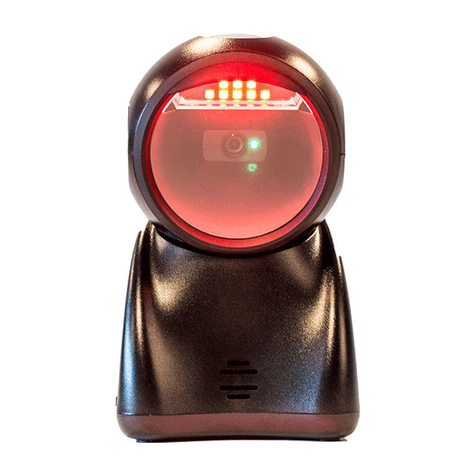
Themis TS-500 User manual

Themis

Themis TS-500 User manual

Themis TS-500 User manual

Themis

Themis TS-500 User manual

Popular Laboratory Equipment manuals by other brands

Qiagen DML 3000 user manual

Qiagen

Qiagen DML 3000 user manual

Queensgate NANOSCAN OP400 Quick start instructions

Queensgate

Queensgate NANOSCAN OP400 Quick start instructions

Conviron GEN1000-GE Operator's manual

Conviron

Conviron GEN1000-GE Operator's manual

Parr Instrument 4560 Operating instructions manual

Parr Instrument

Parr Instrument 4560 Operating instructions manual

IKA IC control operating instructions

IKA

IKA IC control operating instructions

Integra DOSE IT operating instructions

Integra

Integra DOSE IT operating instructions

Agilent Technologies 5800 ICP-OES user guide

Agilent Technologies

Agilent Technologies 5800 ICP-OES user guide

Endress+Hauser Cleanfit CPA875 operating instructions

Endress+Hauser

Endress+Hauser Cleanfit CPA875 operating instructions

NI PXI-5422 CALIBRATION PROCEDURE

NI

NI PXI-5422 CALIBRATION PROCEDURE

Collomix Aqix operating instructions

Collomix

Collomix Aqix operating instructions

SPEX SamplePrep 6875 Freezer/Mill Series operating manual

SPEX SamplePrep

SPEX SamplePrep 6875 Freezer/Mill Series operating manual

Ocean Insight FLAME-NIR+ Installation and operation manual

Ocean Insight

Ocean Insight FLAME-NIR+ Installation and operation manual

Parker ALIGN-MG-NA Installation, operation and maintenance manual

Parker

Parker ALIGN-MG-NA Installation, operation and maintenance manual

BD 644787 user guide

BD

BD 644787 user guide

DENTAURUM Compact Megaplus Instructions for use

DENTAURUM

DENTAURUM Compact Megaplus Instructions for use

Biuged Laboratory Instruments BGD 626 instruction manual

Biuged Laboratory Instruments

Biuged Laboratory Instruments BGD 626 instruction manual

VWR SAS Super IAQ instruction manual

VWR

VWR SAS Super IAQ instruction manual

illumina MiSeqDx reference guide

illumina

illumina MiSeqDx reference guide

manuals.online logo
manuals.online logoBrands
  • About & Mission
  • Contact us
  • Privacy Policy
  • Terms and Conditions

Copyright 2025 Manuals.Online. All Rights Reserved.

Note: 1. More details refer to User Manual. 2. For better readability, please print this document with laser printer. 3. Version:TS-500_QG_EN_V1.3.
TS-500 Presentation Imager Quick Guide
Note
Parts of the imager
Installing the cable
1. Switch off the host;
2. Refer to the below pictures, connect the host with the imager based on different cables;
3. Ensure that all connections are secure.
4. Switch on the host system. If the installation is successful, the beeper will beep and LED
will light.
RS232 cable USB cable
Return default parameters and version information
Default value initialization
Firmware version list
Note: If the host cannot receive data normally becausethe input speed of the imager is too
fast, please scan the barcode below:
Programming instruction and example
Two programming modes have been provided as bellows:
ØSingle-scan setting
Scan the appropriate
Single-scan setting
Example: to set Flow control to be XON/XOFF.
ØMultiple-scan setting
Example: to set Flow control to be XON/XOFF.
F
A standard packing includesa
n
imager
, a USB cable and a CD (or a user manual).
F
Accessories
include a RS232 cable, a 5V adaptor.
F
Use
a piece of
dry and soft cloth
when
clean
ing
the
imager
is in need
.
Scan window
Beeper
Trigger
All manuals and user guides at all-guidesbox.com
all-guidesbox.com
Note: 1. More details refer to User Manual. 2. For better readability, please print this document with laser printer. 3. Version:TS-500_QG_EN_V1.3.
Reading techniques
1. Press and hold the trigger, the imager projects a green LED square which allows
positioning the barcode within its field of view, and turns on awhite LED for illumination.
2. When reading a barcode, the green LED square will be smaller when the imager is closer
to the barcode and larger when it is farther from the barcode. Please hold the imager at an
appropriate distancefrom the barcode, and center the green LED square on the barcode.
3. On a successful barcode reading, the imager will beep once, and the green LED square
and white LED will be turned off. Then the imager transmits barcode message to the host.
Scanning mode
Note: The factory default settings are indicated with asterisks (*).
Good-read off
Good-read on
Auto-detection-Good-read on*
Volume of beeper
Low
Middle
High*
Enable illumination in low light conditions
Notes: This function is only valid in auto-induction mode.
Disable*
Enable
All manuals and user guides at all-guidesbox.com