TLA CTS-5-CA User manual

Tuning-Set CTS-5-CA
Manual
E
V1.40

Tuning-Set CTS-5-CA
Good/bad indicator
LC-display
Strobo-display
On/off slide switch
Inbuilt condenser
microphone
Socket for external
microphone
Sensitivity slide switch
Socket for net adapter

< >
>1< TUNE ->
E
< > S
SELECT NOTE
A
SELECT NOT
AUTOMATICALLY
<>
>2< PITCH ->
E
< > S
SELECT PITCH
A
SELECT PITCH
AUTOMATICALLY
<>
>3< CENT-MEAS ->
E
< > S
SELECT CENT
S E
+
THEN
< >
OR
SELECT NOTE
A
SELECT CENT
AUTOMATICALLY
<>
>4< TEMP.HIST->
E
< > S
SELECT
HISTORICAL
TEMPERAMENT
S E
+
< >
SELECT CENT
REFERENCE
<>
>5< STRETCHING->
E
< > S
SELECT PIANO
STRETCHING
<>
>6< MEMORY ->
E
S E
+
MEMORY MODE
(STORAGE OF A
TEMPERAMENT
ORAPIANO
STRETCHING)
E
SELECT
TRANSPOSER
S
< > S
E
S A
+AUDIBLE TONE ON OR OFF
PRESSED KEY DURING SWITCH ON TUNING SET
S SET LANGUAGE:
ENGLISH; GERMAN; FRENCH; ITALY
ASETUP'S:
ILLUMINATION ON/OFF;
TIMER ON/OFF;
FIRST MODE AFTER TURN ON THE DEVICE;
A+E SET BASIC ADJUSTMENT
Diagram for modes of operation CTS-5-C
E
E
BARGRAPH
INDICATION
E
<>
>7< PIANYZER ->
E
MAKE AN
INDIVIDUAL
PIANO
TUNING

>6< MEMORY ->
S A
+
< >
S
DIAGRAM FOR MEMORY MODE TUNING SET CTS-5-CA
E
INDICATION:
" go ahead by tapping S + A ! "
SELECT STRETCHING OR
TEMP:HIST
E
< >
S
SET PITCH a-1
E
< >
S
SELECT NOTE
E
< >
S
SET CENT VALUE
E
DEVICE WRITES CENT VALUE TO STORE AND
SWITCHES ON SEMITONE STEP HIGHER
S E
+
S E
+
S E
+
S E
+
< >
OR

< >
>1< TUNE ->
E
< > S
SELECT NOTE
A
SELECT NOT
AUTOMATICALLY
<>
>2< PITCH ->
E
< > S
SELECT PITCH
A
SELECT PITCH
AUTOMATICALLY
<>
>3< CENT-MEAS ->
E
< > S
SELECT CENT
S E
+
THEN
< >
OR
SELECT NOTE
A
SELECT CENT
AUTOMATICALLY
<>
>4< TEMP.HIST->
E
< > S
SELECT
HISTORICAL
TEMPERAMENT
S E
+
< >
SELECT CENT
REFERENCE
<>
>5< STRETCHING->
E
< > S
SELECT PIANO
STRETCHING
<>
>6< MEMORY ->
E
S E
+
MEMORY MODE
(STORAGE OF A
TEMPERAMENT
OR A PIANO
STRETCHING)
E
SELECT
TRANSPOSER
S
< > S
E
S A
+AUDIBLE TONE ON OR OFF
PRESSED KEY DURING SWITCH ON TUNING SET
S SET LANGUAGE:
ENGLISH; GERMAN; FRENCH; ITALY
ASETUP'S:
ILLUMINATION ON/OFF;
TIMER ON/OFF;
FIRST MODE AFTER TURN ON THE DEVICE;
A+E SET BASIC ADJUSTMENT
Diagram for modes of operation CTS-5-CA
E
E
BARGRAPH
INDICATION
E
<>
>7< PIANYZER ->
E
MAKE AN
INDIVIDUAL
PIANO
TUNING

--------- c - 5
------------ g# - 5
--------- c - 4
--------- c - 3
--------- c - 2
--------- c - 1
--------- c
--------- C
--------- C - 1
--------- E - 2
--------- a - 1 (PITCH)
--------- C
--------- D
--------- A
--------- G
--------- F
--------- E
--------- B
---- C#
---- Bb
---- G#
---- F#
---- D#
CTS-5-CA NOTE INDICATION

1
Manual for Tuning Set CTS-5-CA
Contents:
1Initial Operations................................................................................................................................2
1.1 Power............................................................................................................................................2
1.1.1 Battery change........................................................................................................................ 2
1.2 Switching on the Tuning Set......................................................................................................3
1.3 Selection of language for operator guidance ...........................................................................3
1.4 Introduction to the diagram for modes of operation................................................................3
1.5 Erasing all inputs.........................................................................................................................4
1.6 Timer switch.................................................................................................................................4
1.7 Sensivity adjustment of the built in microphone amplifier .....................................................5
2Operating Examples ..........................................................................................................................5
2.1 Tuning, equal temperament, standard pitch 440 Hertz............................................................5
2.1.1 Automatic note adjustment ..................................................................................................... 5
2.1.2 Audible tone on/off.................................................................................................................. 6
2.1.3 Bargraph Display .................................................................................................................... 6
2.2 Presetting of the concert pitch...................................................................................................6
2.3 Measuring the concert pitch of an instrument .........................................................................7
2.4 Measuring a tone's cent deviation.............................................................................................7
2.5 Piano tuning.................................................................................................................................7
2.6 Presetting of historical tempereaments....................................................................................9
2.7 Memory.........................................................................................................................................9
2.7.1 Operating scheme for memory mode.................................................................................... 11
2.8 Combining individual modes ...................................................................................................11
3For all those who wish to learn more about Tuning Set …..........................................................12
3.1 The equal temperament............................................................................................................12
3.2 The "cent" unit...........................................................................................................................12
3.3 The target frequency genaration of CTS 5-C ..........................................................................12
3.4 The "cent"-values of the historical temperaments.................................................................13
3.4.1 The "cent"- relation function.................................................................................................. 13
3.4.2 The transposer...................................................................................................................... 13
3.4.3 The adjustment of "cent relation function" and transposer ................................................... 14
3.5 The "cent"- settings for piano tuning......................................................................................14
3.6 The PIANYZER - how to make an individual piano tuning ....................................................15
3.6.1 How to create a stretching by the analysis of a piano (ANALYZER) .................................... 15
3.6.2 How to produce a piano stretching by entering of support values (Piano Editor) ................. 17
3.6.3 Sample diagram of an piano stretching generated by the PIANYZER.................................. 17
3.6.4 Control scheme for using the PIANYZER ............................................................................. 19
3.7 Special settings.........................................................................................................................20
4Technical data Tuning Set CTS-5-C ...............................................................................................21
2
1 Initial Operations
Congratulations on the purchase of your Tuning Set CTS-5. It will make the tuning of all kinds of
musical instruments much easier. Part 1 of these operating instructions contains general
information about the Tuning Set. Part 2 gives examples on how to learn the most important
functions, and part 3 is for those of you who want to know all about this Tuning Set.
1.1 Power
The Tuning Set is equipped with 4 rechargeable NiMH batteries (1.2 Volt 2000 mAh). The
operating period with one battery charge lasts approx. 12 hours. When the batteries are low, the
indicator "LOW BAT" appears in the LC-display. In order to avoid deep discharge of the
batteries, the device will automatically shut off. The battery can be recharged with the supplied
plug-in transformer. The batteries are fully recharged after approx. 14 hours. When the plug-in
transformer is connected, the yellow charge control LED is lit. When the batteries are fully
charged, the transformer will not automatically shut down. Therefore, the tuning device should
be disconnected after the charge. The instrument can be operated without risk during the
recharging process.
Should the operating period with one battery charge decrease at some point to much less than
8 hours, the following may have occurred:
1. The battery set is defect. Measure to be taken: Install new batteries.
2. The plug-in transformer is defect. Measure to be taken: Replace the transformer.
(7.5 Volt (min) 400 mA DC stabilized, hollow plug 5 x 2 mm plus outside)
3. The Tuning Set is defect. Measure to be taken: The charger and Tuning Set should be sent
in for maintenance.
If you constantly use the device with the plug-in transformer connected, it is advisable to
remove the batteries to avoid permanent-charging damage.
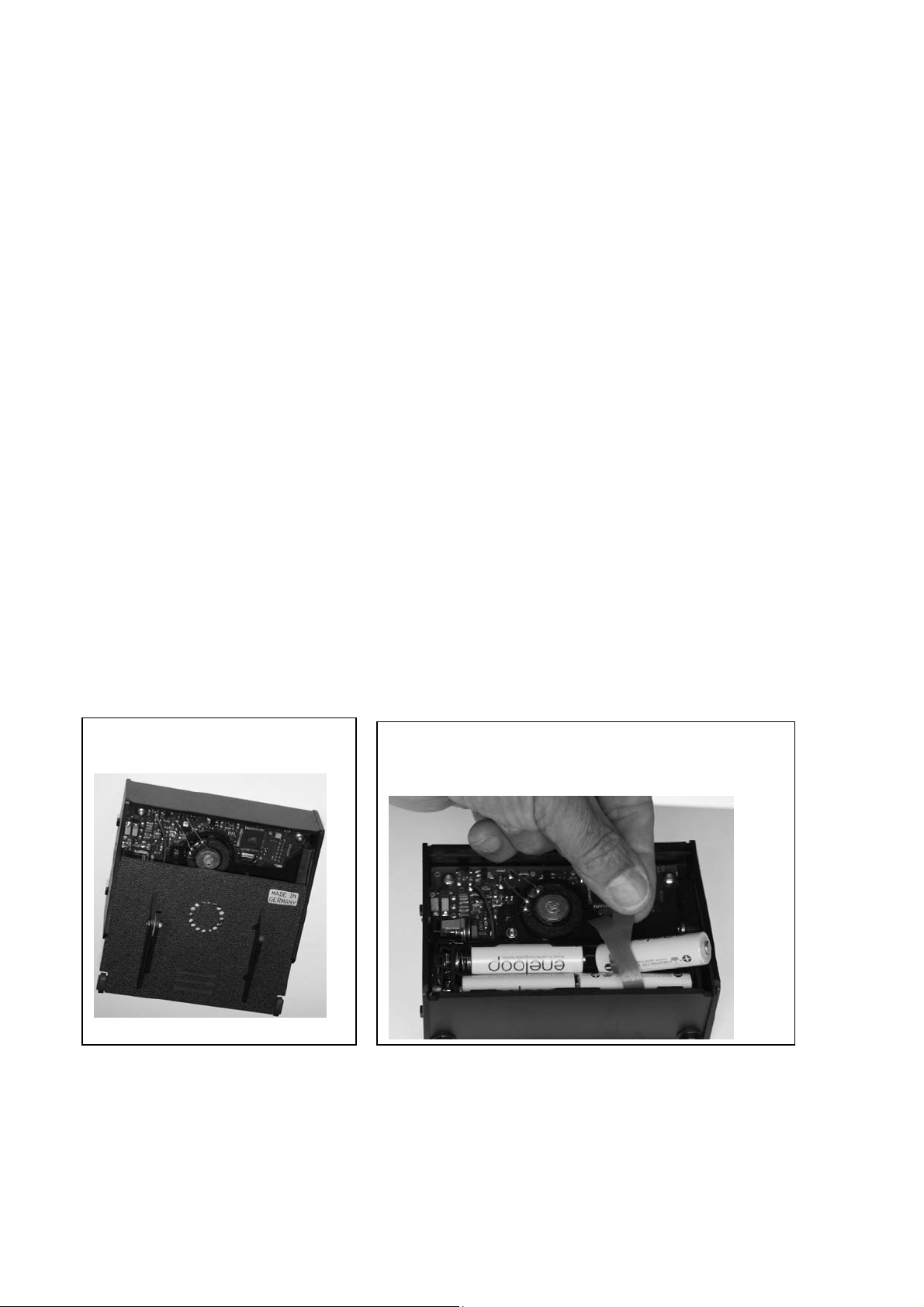
1.1.1 Battery change
Please use only rechargeable NiMh batteries. Non-Rechargeable Batteries are leaking
when the AC adapter is plugged in. The acid will destroy the device.
Remove back cover.
Replace batteries and pay attention to the
correct polarity.

3
1.2 Switching on the Tuning Set.
Switch on the Tuning Set with the slide switch on the
right side of the Tuning Set. For approx. one second
you see the program version, and then the following
indication:
Should one of the next two indications appear, please go to the next paragraph.
1.3 Selection of language for operator guidance
Your Tuning Set can converse with you in English, French, German or Italien. Select the
desired language as follows:
1. Turn off the Tuning Set.
2. While with the left hand depressing and holding the key
"S", switch on the Tuning Set. Continue depressing the
key "S" until you see this indicator.
With the "< >" key you can select your desired language. Confirm it with the "E" key.
From then on the operator guidance language displayed by the Tuning Set is in the language
you have selected. Switching the Tuning Set on or off does not change the language.
1.4 Introduction to the diagram for modes of operation
The Tuning Set is basically operated with the keys "<", ">", and "E". With the basic keys you can
find your way through the included Diagram for Modes of Operation, like on a 'city map'. You are
now, after turning on the Tuning Set, in the upper left hand corner, shown by the big black
arrow.
With the keys "<" and ">" you can move to the left and right, and select one of the following
modes:
>1< TUNING Tuning with the strobe display
>2< PITCH Mode for standard pitch adjustment
>3< CENTMESS Measuring or adjustment of a tone in cent
>4< TEMPERATURE Mode for historical temperaments
>5< STRETCHING Mode for tuning pianos
>6< MEMORY Storage of one piano tuning or one historical temperament
>7< PIANYZER Create an individual piano tuning
With the key "E" you can move downward on the diagram. The selected mode is activated. If
you press the key "E" again, you will enter the next user level or you will move upward, and are
leaving the activated mode.
Selecting the wrong key or mode will not damage the Tuning Set. The stored temperatures and
stretchings are protected and cannot be erased or changed by depression of a wrong key. In
order to become acquainted with the Tuning Set, please play and experiment with the keys to
your heart's content.
To quickly familiarize yourself with the Tuning Set, follow the examples given in part 2 on a
musical instrument, and closely stick to the guidance.
>1< STIMMEN ->
>1< TUNING ->
>1< ACCORDER ->
>1< ACCORDARE->
LANGUAGE
English

4
Don't try to memorize the key sequences in the examples. Try to understand the operation of
the Tuning Set by tracing the example steps on the diagram.
Note the arrow in the lower, right hand corner of the LC-Display:
When this arrow appears, the keys ">" and "<"are
used for mode selection. You are then at the highest
operating level of the diagram for operation modes.
The text in the display then shows you what you may do with the keys "<" and ">", after you
have depressed the key "E":
>1< TUNING Select a tone
>2< PITCH Select the standard pitch
>3< CENTMESS Measuring or adjustment of a tone in cent
>4< TEMPERATURE Select a historical temperament
>5< STRETCHING Select a piano stretching
>6< MEMORY Storage of one piano tuning or one historical temperament.
>7< PIANYZER Create an individual piano tuning
Pressing the key "E" makes the arrow disappear. The Tuning Set is now in the selected mode.
With the keys "<" and ">" you can now carry out your previously selected mode.
By pressing the key "E" again you enter the next user mode.
If the arrow will reappear, you have left the mode. With the keys "<" and ">" you may select a
new mode of operation. The input or adjustment made within a mode will remain intact after you
exit the mode.
A special case ist the mode number 6 (MEMORY). This mode you only can leave by tapping
both keys "S" and "E".
All inputs or adjustments made in the operation modes will not be erased by turning the Tuning
Set on or off. One exception is the standard pitch, which automatically resets to a1 after the
Tuning Set is turned on.
1.5 Erasing all inputs
Should you have stumbled in your first walking trials, and put in a non desired setting, you may
return to the original settings contained in the Tuning Set upon delivery:
Standard pitch: 440 Hz
Temperature: Equal Temperament
Stretching: None
Transpose Function and Cent Relate Function: Off
Operate as follows:
Turn off the Tuning Set. Simultaneously depress keys "A"
and "E" with the left hand until you have switched on the
Tuning Set with your right hand. Continue holding the keys
until the LC-Display indicates:
1.6 Timer switch
A timer was installed in the Tuning Set, to save battery power. If you don't use the set for twenty
minutes, it will automatically turn off. Before shutdown it will set off several short accoustical
signals. This allows you to prevent shutdown by depressing one of the five keys. If the Tuning
Set automatically turned off, you may restart it with the on/off lever on the right side by switching
it off and on. You may turn off the timer completely (see chapter 3.7).
<1> TUNE ->
Table of contents
Other TLA Tuner manuals
Popular Tuner manuals by other brands





MFJ
MFJ MFJ-928 instruction manual
NAD
NAD C 445 owner's manual
Sony
Sony ST-SA5ES operating instructions
Sirius Satellite Radio
Sirius Satellite Radio SC-FM1 user guide
Antique Automobile Radio
Antique Automobile Radio 283501B Installation and operating instructions
Monacor
Monacor PA-1200R instruction manual