manuals.online logo
Brands
  1. Home
  2. •
  3. Brands
  4. •
  5. Toro
  6. •
  7. Lawn Mower
  8. •
  9. Toro 3200 User manual

Toro 3200 User manual

Other manuals for 3200

7

This manual suits for next models

2

Other Toro Lawn Mower manuals

Toro Super Recycler 20781 User manual

Toro

Toro Super Recycler 20781 User manual

Toro Eurocycler 21080 User manual

Toro

Toro Eurocycler 21080 User manual

Toro Z Master Professional 7500-DSeries Manual

Toro

Toro Z Master Professional 7500-DSeries Manual

Toro 74571 M74571 User manual

Toro

Toro 74571 M74571 User manual

Toro GrandStand Revolution Manual

Toro

Toro GrandStand Revolution Manual

Toro GrandStand 134-3259 User manual

Toro

Toro GrandStand 134-3259 User manual

Toro 74246TE User manual

Toro

Toro 74246TE User manual

Toro Recycler 20655 User manual

Toro

Toro Recycler 20655 User manual

Toro 29730 User manual

Toro

Toro 29730 User manual

Toro Greensmaster eTriFlex 3360 User manual

Toro

Toro Greensmaster eTriFlex 3360 User manual

Toro 22164TE User manual

Toro

Toro 22164TE User manual

Toro Groundsmaster 4300-D User manual

Toro

Toro Groundsmaster 4300-D User manual

Toro Z Master 8000 Series User manual

Toro

Toro Z Master 8000 Series User manual

Toro 30529 User manual

Toro

Toro 30529 User manual

Toro GrandStand 74583 User manual

Toro

Toro GrandStand 74583 User manual

Toro GrandStand 71504 User manual

Toro

Toro GrandStand 71504 User manual

Toro Z Master Professional 5000 Series User manual

Toro

Toro Z Master Professional 5000 Series User manual

Toro 4250 User manual

Toro

Toro 4250 User manual

Toro TurfMaster 22205TE User manual

Toro

Toro TurfMaster 22205TE User manual

Toro LAWN-BOY 20041 User manual

Toro

Toro LAWN-BOY 20041 User manual

Toro TimeCutter Z4200 User manual

Toro

Toro TimeCutter Z4200 User manual

Toro 13AX91RS848 User manual

Toro

Toro 13AX91RS848 User manual

Toro 3318 User manual

Toro

Toro 3318 User manual

Toro Z Master 74919TE User manual

Toro

Toro Z Master 74919TE User manual

Popular Lawn Mower manuals by other brands
Global garden products 72 Workshop manual

Global garden products

Global garden products 72 Workshop manual

EINHELL 01045 operating instructions

EINHELL

EINHELL 01045 operating instructions

Baroness LM315GC Owner's operating manual

Baroness

Baroness LM315GC Owner's operating manual

GreenWorks Tools 25157 user manual

GreenWorks Tools

GreenWorks Tools 25157 user manual

Etesia MVEHH user manual

Etesia

Etesia MVEHH user manual

Husqvarna LTH125 owner's manual

Husqvarna

Husqvarna LTH125 owner's manual

Gravely 915034 - ZT1640 Owner's/operator's manual

Gravely

Gravely 915034 - ZT1640 Owner's/operator's manual

Jacobsen 63281 Technical manual

Jacobsen

Jacobsen 63281 Technical manual

GreenWorks Pro MO802524 Operator's manual

GreenWorks Pro

GreenWorks Pro MO802524 Operator's manual

Deutz-Allis 3000 Series parts manual

Deutz-Allis

Deutz-Allis 3000 Series parts manual

Craftsman 917.9998C owner's manual

Craftsman

Craftsman 917.9998C owner's manual

jobmate YT9108 user manual

jobmate

jobmate YT9108 user manual

Yard force GM R40A instructions

Yard force

Yard force GM R40A instructions

Husqvarna R 419TsX AWD Operator's manual

Husqvarna

Husqvarna R 419TsX AWD Operator's manual

STERWINS ELM2-36P-3W.4 Assemby - Use - Maintenance Manual

STERWINS

STERWINS ELM2-36P-3W.4 Assemby - Use - Maintenance Manual

Craftsman 917.378770 owner's manual

Craftsman

Craftsman 917.378770 owner's manual

Partner M6556SMD Repair parts manual

Partner

Partner M6556SMD Repair parts manual

Craftsman 25913 instruction manual

Craftsman

Craftsman 25913 instruction manual

manuals.online logo
manuals.online logoBrands
  • About & Mission
  • Contact us
  • Privacy Policy
  • Terms and Conditions

Copyright 2025 Manuals.Online. All Rights Reserved.

FormNo.3440-687RevB
EURoadLightKit
Groundsmaster®3200or3300SeriesTractionUnit
ModelNo.31992
InstallationInstructions
IfyouareinstallingthiskitonaROPS-onlytraction
unit(i.e.,thetractionunitdoesnothaveacab),
youmustalsoinstallthePowerHarnessKit(Part
140-1559).
Safety
SafetyandInstructional
Decals
Safetydecalsandinstructionsare
easilyvisibletotheoperatorandare
locatednearanyareaofpotential
danger.Replaceanydecalthatis
damagedormissing.
decal140-1587
140-1587
1.Horn—15A4.Worklights—10A
2.Headlights—10A5.ReadtheOperator’s
Manualforfuse
information.
3.Beacon—10A
Installation
1
PreparingtheMachine
NoPartsRequired
Procedure
1.Parkthemachineonalevelsurface.
2.Engagetheparkingbrake.
3.Lowerthecuttingunit.
4.Shutofftheengineandremovethekey.
5.Disconnectthebattery;refertotheelectrical
systemmaintenancesectionofyourOperator’s
Manual.
©2020—TheToro®Company
8111LyndaleAvenueSouth
Bloomington,MN55420
Registeratwww.Toro.com.OriginalInstructions(EN)
PrintedintheUSA
AllRightsReserved*3440-687*
2
InstallingtheClips,Speed
Nuts,andFuseBlock
Partsneededforthisprocedure:
1Switchmount
6Clip(1/4inch)
2Speednut
1Fusemountplate
4U-typespeednut
1Fuseblock
2Screw(#10x3/4inch)
Procedure
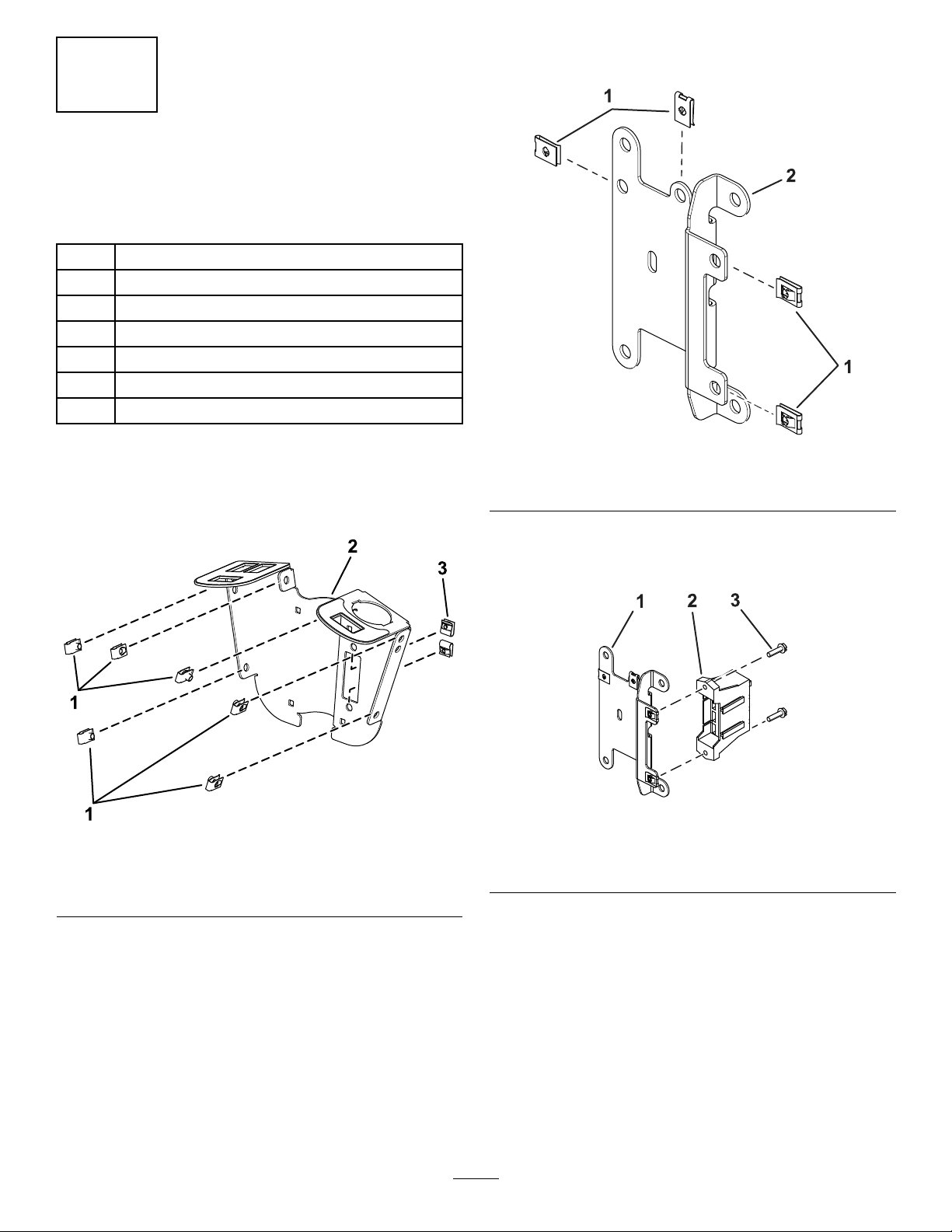
1.Installthe6clipsand2speednutstotheswitch
mount(Figure1).
g319851
Figure1
1.Clip3.Speednut
2.Switchmount
2.InstalltheU-typespeednutstothefuse-mount
plate(Figure2).
g304335
Figure2
1.U-typespeednuts2.Fuse-mountplate
3.Installthefuseblockonthewireharnesstothe
fuse-mountplateusing2screws(#10x3/4inch)
asshowninFigure3.
g304300
Figure3
1.Fuse-mountplate3.Screw(#10x3/4inch)
2.Fuseblock
2
3
InstallingtheSwitchMount
Partsneededforthisprocedure:
2Mountbracket
4Carriagebolt(1/4x2inches)
2Locknut(1/4inch)
2Hex-headscrew(1/4x3/4inch)
2Flangenut(1/4inch)
1Flasher
1Relay
1Wireharness
2Cabletie
1Fusecover
2Thumbscrew
2Pushnut
1Decal
2Screw(#10x3/8inch)
1Multi-functionswitch
3Holeplug
1Rockerswitch
1Controlcover
6Hex-headscrew(1/4x3/4inch)
2Switchclip
2Pushrivet
Procedure
1.Looselyinstalltheswitchmountaroundthe
steeringcolumnusing4carriagebolts(1/4x2
inches),2mountingbrackets,fuse-mountplate,
and4locknuts(1/4inch)asshowninFigure4.
g319856
Figure4
1.Locknuts(1/4inch)4.Steeringcolumn
2.Fuse-mountplate5.Switchmount
3.Mountingbrackets6.Carriagebolt(1/4x2
inches)
3
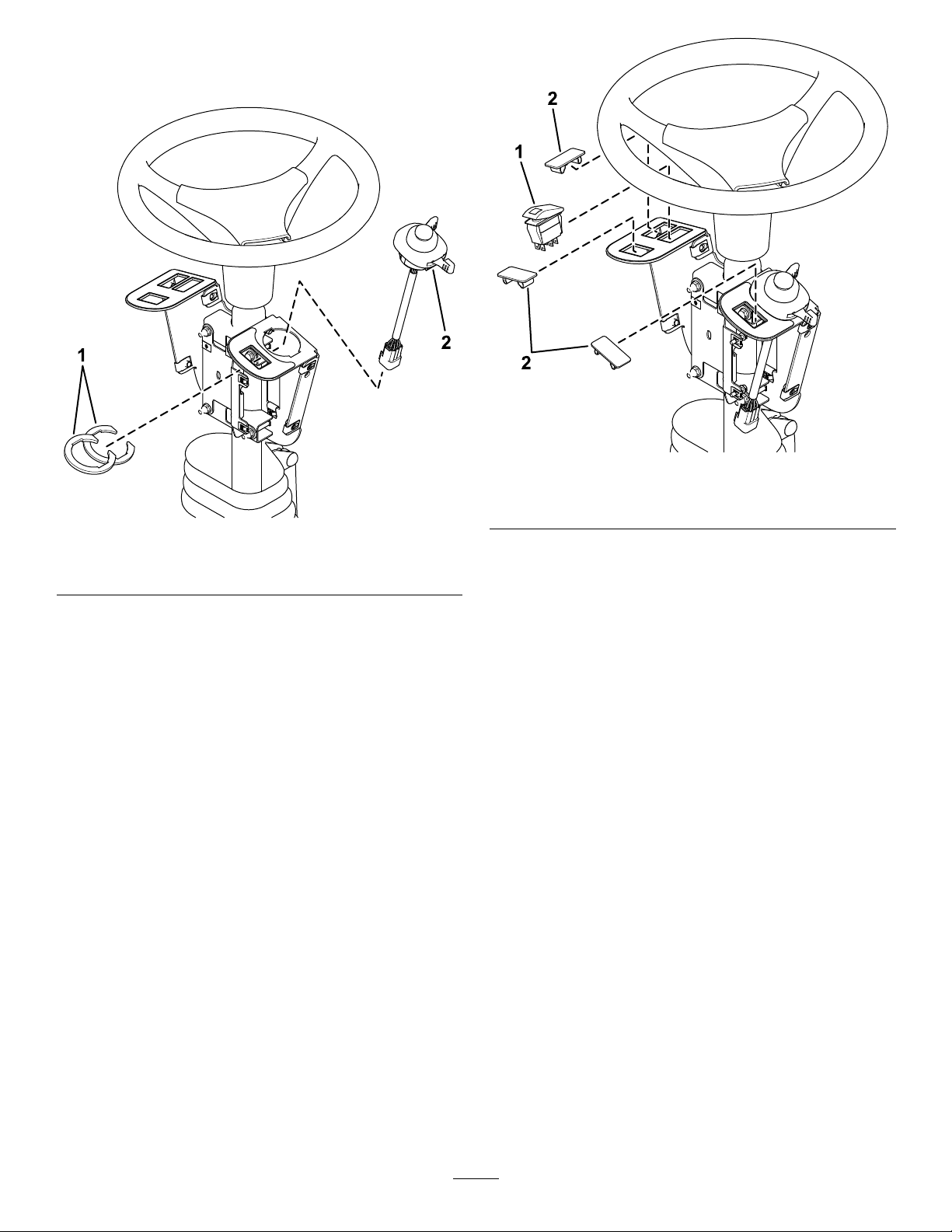
2.Installthemulti-functionswitchtotheswitch
mountandsecureitusingtheswitchclipsunder
theholefortheswitch(Figure5).
g319854
Figure5
1.Switchclips2.Multi-functionswitch
3.Installtherockerswitchandholeplugsintothe
switchmount(Figure6).
g319855
Figure6
1.Rockerswitch2.Holeplug
4.Installtheasherandrelaytothefuse-mount
plateusing2screws(#10x3/8inch)asshown
inFigure7.
4
g319853
Figure7
1.Relay3.Flasher
2.Screw(#10x3/8inch)
5.Securetheasherusingacabletie(Figure8).
6.Plugtheharnessintotherockerswitchand
multi-functionswitch(Figure8).
g319850
Figure8
1.Rockerswitchconnector4.Switchconnector
2.Relayconnector5.Cabletie
3.Flasherconnector
7.Plugthewireharnessintotherelayandasher
(Figure8).
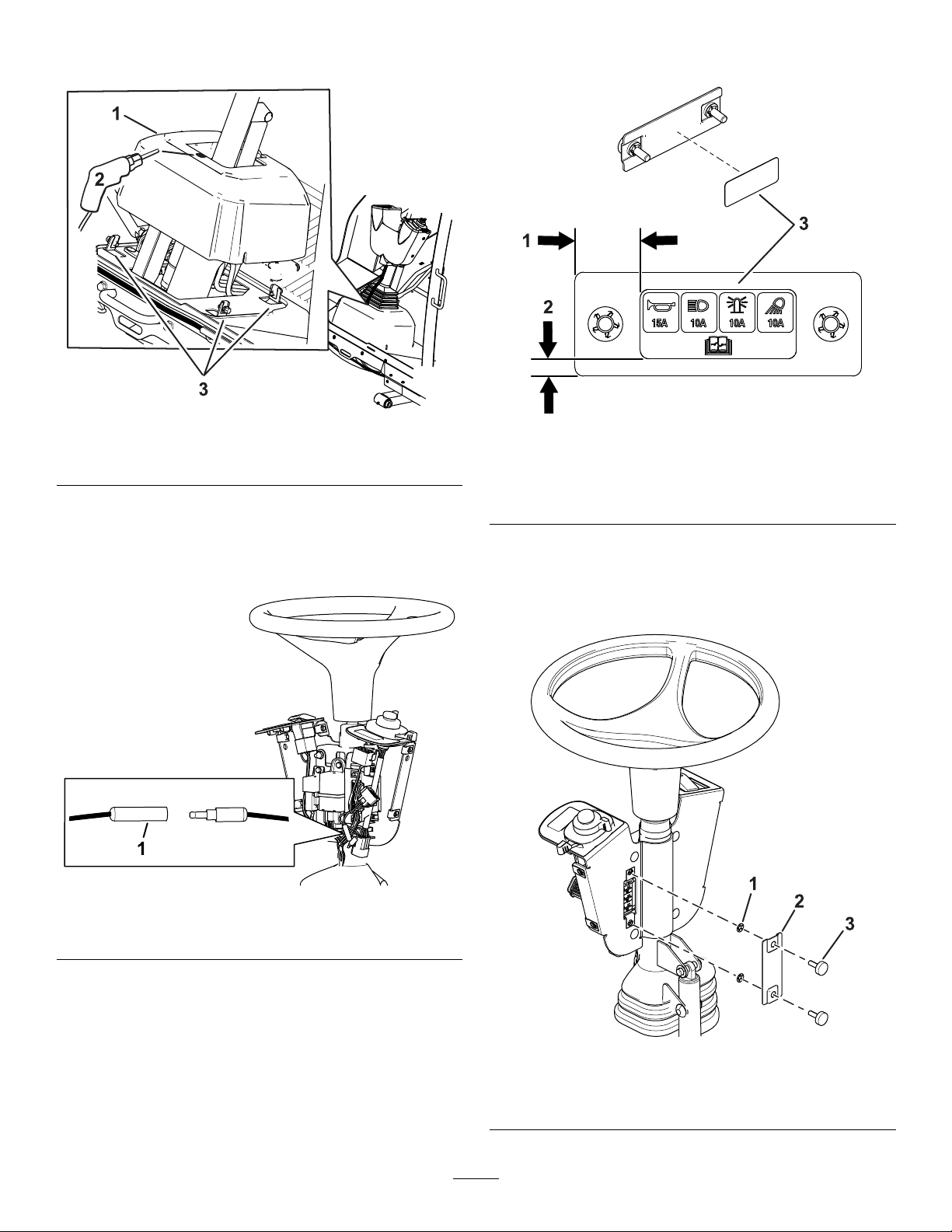
8.Loosentheboltsaroundthesteering-column
base(Figure9).
5
9.Raisethebaseupanddrilla22mm(7/8inch)
holeasshowninFigure9.
g304296
Figure9
1.Steering-columnbase
10.Routetheharnessthroughtheholeyoudrilled
inthebase.
11.Leavethebulletconnectorsdisconnectedas
showninFigure10.
g333871
Figure10
1.Leavethebulletconnectorsdisconnected.
12.Applythedecaltothefusecoverasshownin
Figure11.
g304374
Figure11
1.25mm(1inch)3.Decal—insideoffuse
cover
2.6mm(1/4inch)
13.Installthefusecovertotheswitchmountusing
2thumbscrewsand2pushnuts(Figure12).
Note:Ensurethatthepushnutsareinstalled
ontheinsideofthefusecover(Figure12).
g304295
Figure12
1.Pushnut3.Thumbscrew
2.Fusecover
6
14.Adjustthecontrolassemblysothattheswitches
areaccessible.
15.Tightenallthefasteners.
16.Installthecontrolcovertotheswitchmount
using2pushrivetsand6hex-headscrews(1/4
x3/4inch)asshowninFigure13.
g319852
Figure13
1.Pushrivet3.Controlcover
2.Hex-headscrew
4
InstallingtheFront
Components
Partsneededforthisprocedure:
1Leftlightbase(formachineswithacab)
1Rightlightbase(formachineswithacab)
1Leftlightmount
1Rightlightmount
1Leftlightassembly
1Rightlightassembly
6Button-headbolt(1/4x5/8inch)
4Carriagebolt(3/8x3/4inch)—formachineswithacab
4Locknut(3/8inch)—formachineswithacab
1Lightcrossmount(formachineswithoutacab)
ForMachineswithaCab
Wheninstallingthelightmounts,refertothefollowing
chartforthemountingpositionbasedonyourmower
decksizeandtype.
LightPositionTable
Cutting
UnitModel
Number
FrontLightsRear,Left
Light
Rear,Right
Light
31970NarrowNarrowWide
31971NarrowNarrowNarrow
31972WideNarrowWide
31973NarrowNarrowNarrow
31974NarrowNarrowNarrow
31975NarrowNarrowNarrow
7
1.Securetheleftlightbaseandrightlightbase
tothecabframeusing2carriagebolts(3/8x
3/4inch)and2locknuts(3/8inch)oneachside
(Figure14).
g303644
Figure14
1.Carriagebolt(3/8x3/4
inch)
3.Rightlightbase
2.Locknut(3/8inch)4.Leftlightbase
2.Securetheleftlightmountandrightlightmount
tothelightbasesusing3button-headbolts(1/4
x5/8inch)throughthespeednutsoneachside
(Figure15).
Note:RefertotheLightPositionT able(page7)
fortheappropriatepositionofthelights.
g303645
Figure15
1.Lightbase3.Button-headbolt(1/4x5/8
inch)
2.Rightlightmount4.Leftlightmount
3.Securetheleftlightassemblyandrightlight
assemblytotheleftlightmountandrightlight
mountusingthehexnutonthelightassemblies
(Figure16).
Note:Installthelightswiththelowbeamtoward
theouteredgeofthemachine.
Lookatthebottomofthelightsforhighbeam
andlowbeamorientation.
g303646
Figure16
1.Lightassembly3.Hexnut
2.Lightmount
ForMachineswithoutaCab
1.Removethetie-downbracketfromtheplatform
(Figure17).
Retaintheparts.
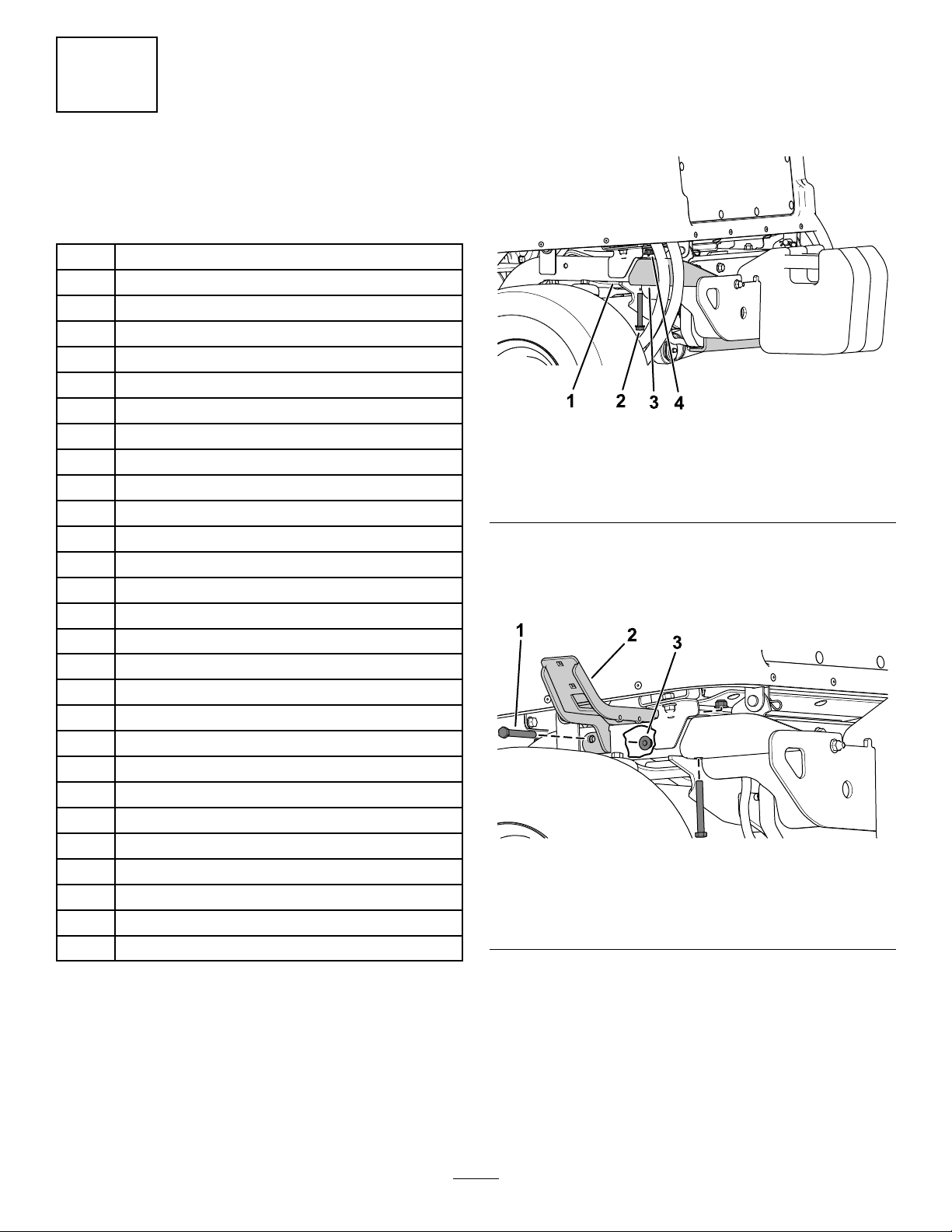
g299562
Figure17
1.Tie-downbracket3.Nut
2.Bolt
8
2.Securethelightcrossmounttotheplatform
usingthepreviouslyremovedbolts,nuts,and
tie-downbracket(Figure18).
g305380
Figure18
1.Bolt3.Lightcrossmount
2.Tie-downbracket4.Nut
3.Securetheleftlightmountandrightlightmount
tothelightcrossmountusing3button-head
bolts(1/4x5/8inch)throughthespeednutson
eachside(Figure19).
Note:RefertotheLightPositionT able(page7)
fortheappropriatepositionofthelights.
g305381
Figure19
1.Rightlightmount3.Lightcrossmount
2.Button-headbolt(1/4x5/8
inch)
4.Leftlightmount
4.Securetheleftlightassemblyandrightlight
assemblytotheleftlightmountandrightlight
mountusingthelockwasherandhexnutonthe
lightassemblies(Figure20).
Note:Installthelightswiththelowbeamtoward
theouteredgeofthemachine.
Lookatthebottomofthelightsforhighbeam
andlowbeamorientation.
g305382
Figure20
1.Lightassembly3.Lockwasher
2.Lightmount4.Hexnut
9
5
InstallingtheRear
Components
Partsneededforthisprocedure:
1Leftmount
1Rightmount
1Leftshortmount
1Rightshortmount
4Carriagebolt(5/16x3/4inch)
4Flangenut(5/16inch)
4Carriagebolt(1/4x5/8inch)
8Locknut(1/4inch)
2Innermountassembly
2Taillight
4Pan-headscrew(#10x1-1/4inches)
4Flangenut(#10)
4Hex-headbolt(3/8x3inches)
4Locknut(3/8inch)
1Markermount
2Backmount
4Flange-headbolt(1/4x3/4inch)
1Speed-platemount
2Speednut
5Carriagebolt(1/4x1/2inch)
5Locknut(1/4inch)
1Horn-mountingbracket
1Horn
320kphspeeddecal
324kphspeeddecal
1Right,longmount
1Leftlighthousing
1Rightlighthousing
Procedure
1.Removetheange-headbolt(3/8x2-3/4
inches)andangenut(3/8inch)securingthe
bumpertothereartubeframeoneachsideof
thebumper(Figure21).
g303770
Figure21
1.Reartubeframe3.Bumper
2.Flange-headbolt(3/8x
2-3/4inches)
4.Flangenut(3/8inch)
2.Securetheleftmountandrightmounttorear
frametubesusing2hex-headbolts(3/8x3
inches)and2locknuts(3/8inch)oneachside
(Figure22).
g304042
Figure22
1.Hex-headbolt(3/8x3
inches)
3.Locknut(3/8inch)
2.Leftmount
10