EnglishDeutsch
 logo
Brands
  1. Home
  2. •
  3. Brands
  4. •
  5. Toshiba
  6. •
  7. Laptop
  8. •
  9. Toshiba Satellite 1200-S122 User guide

Toshiba Satellite 1200-S122 User guide

This manual suits for next models

1

Other Toshiba Laptop manuals

Toshiba Portege R835-P56 User manual

Toshiba

Toshiba Portege R835-P56 User manual

Toshiba M400 - Portege - Core 2 Duo 1.83 GHz User manual

Toshiba

Toshiba M400 - Portege - Core 2 Duo 1.83 GHz User manual

Toshiba Qosmio G10 Series User manual

Toshiba

Toshiba Qosmio G10 Series User manual

Toshiba M115-S1064 User manual

Toshiba

Toshiba M115-S1064 User manual

Toshiba L450 EZ1543 - Satellite - Core 2 Duo 2.2 GHz User guide

Toshiba

Toshiba L450 EZ1543 - Satellite - Core 2 Duo 2.2 GHz User guide

Toshiba L505D-ES5024 User manual

Toshiba

Toshiba L505D-ES5024 User manual

Toshiba A200-EZ2204X - Satellite Pro - Core 2 Duo... User manual

Toshiba

Toshiba A200-EZ2204X - Satellite Pro - Core 2 Duo... User manual

Toshiba P745-S4360 User manual

Toshiba

Toshiba P745-S4360 User manual

Toshiba Satellite L40 A Series User manual

Toshiba

Toshiba Satellite L40 A Series User manual

Toshiba M55-S2252 User manual

Toshiba

Toshiba M55-S2252 User manual

Toshiba Satellite P500-BT2G22 Firmware update

Toshiba

Toshiba Satellite P500-BT2G22 Firmware update

Toshiba L515-S4960 - Satellite - Pentium 2.1 GHz User manual

Toshiba

Toshiba L515-S4960 - Satellite - Pentium 2.1 GHz User manual

Toshiba Portege 7140CT User manual

Toshiba

Toshiba Portege 7140CT User manual

Toshiba L70-C User manual

Toshiba

Toshiba L70-C User manual

Toshiba L655-S5117 User manual

Toshiba

Toshiba L655-S5117 User manual

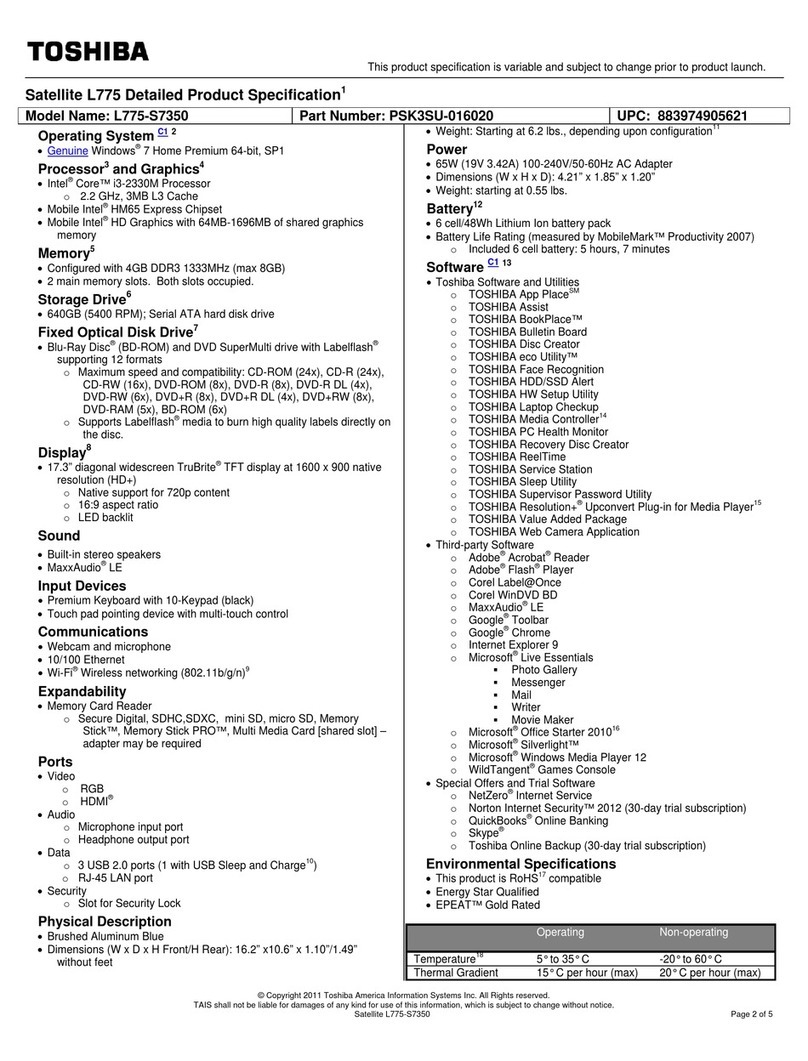
Toshiba Satellite L775-S7350 User manual

Toshiba

Toshiba Satellite L775-S7350 User manual

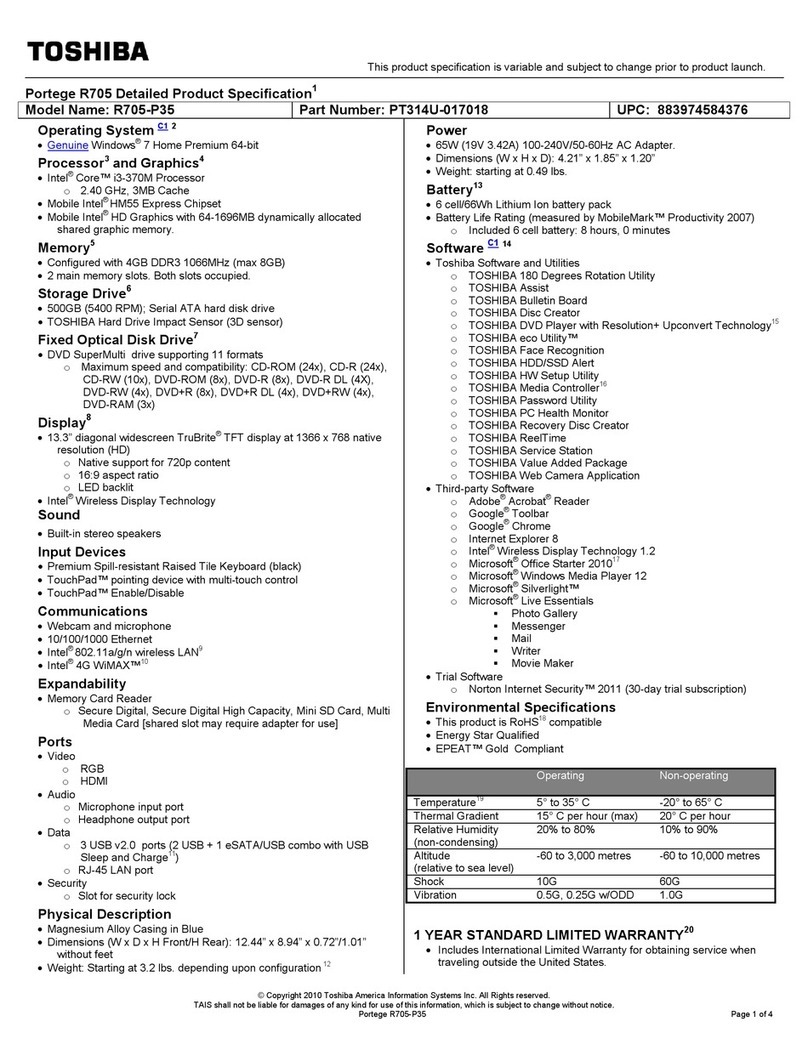
Toshiba R705-P35 User manual

Toshiba

Toshiba R705-P35 User manual

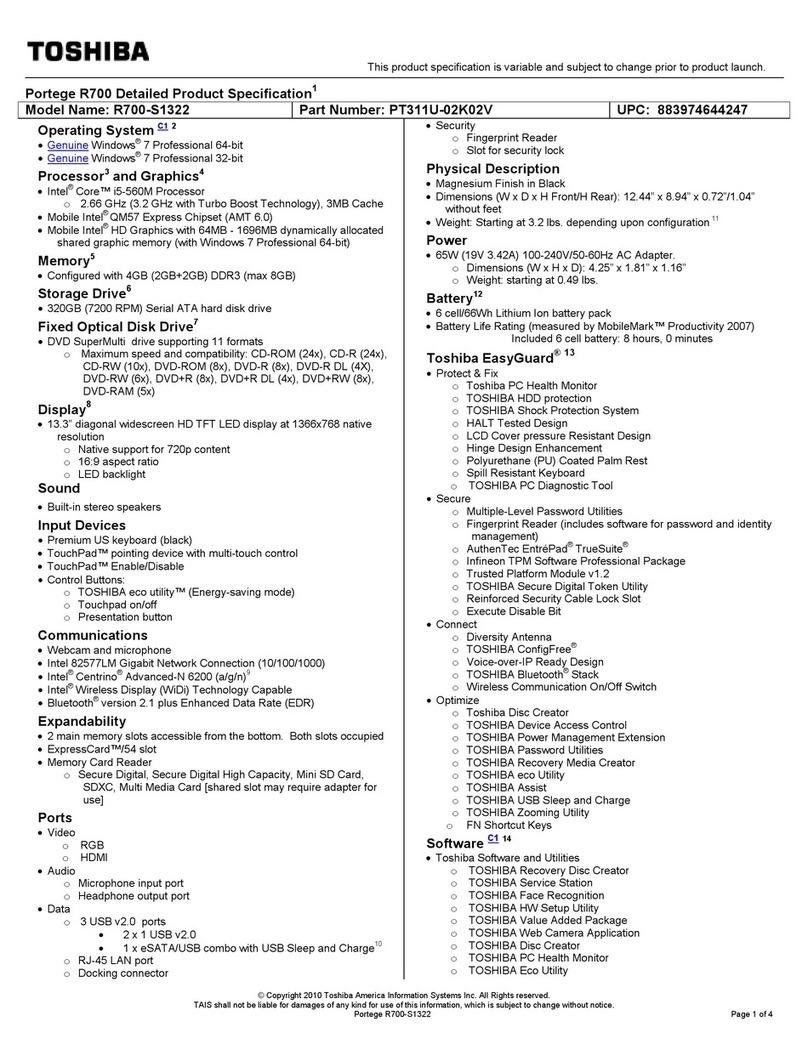
Toshiba R700-S1322 User manual

Toshiba

Toshiba R700-S1322 User manual

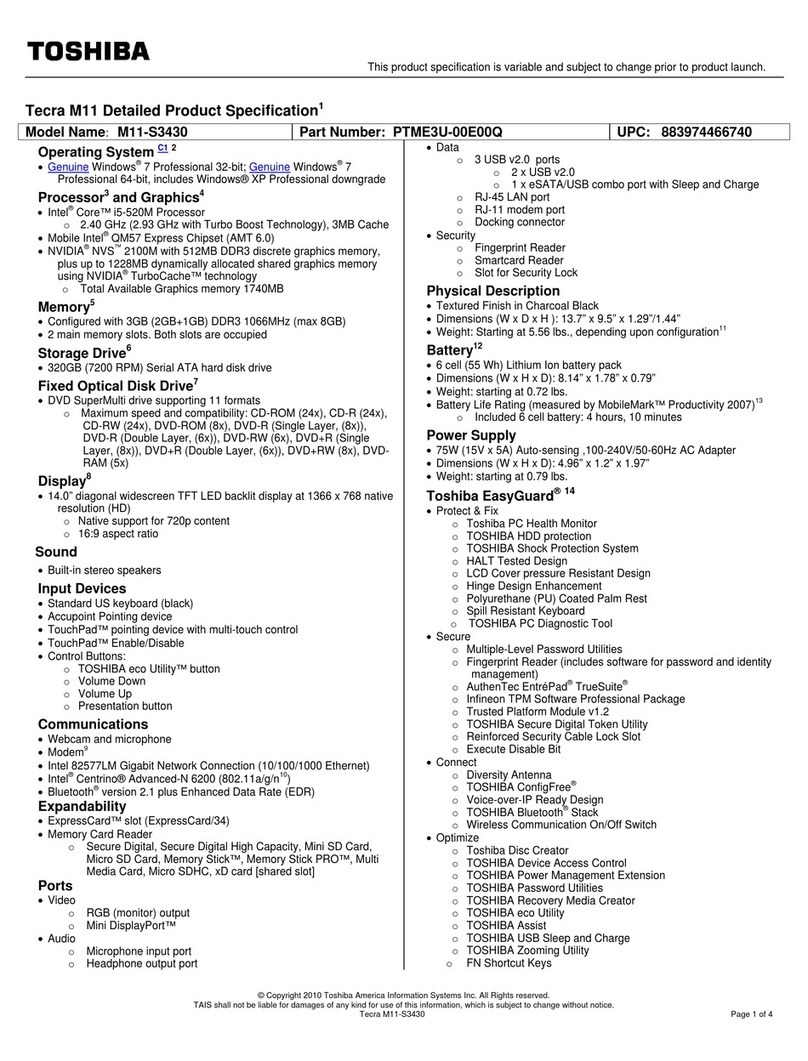
Toshiba M11-S3430 User manual

Toshiba

Toshiba M11-S3430 User manual

Toshiba Tecra A8-EZ8411 Firmware update

Toshiba

Toshiba Tecra A8-EZ8411 Firmware update

Toshiba L305 S5876 - Satellite - Pentium 1.86 GHz User manual

Toshiba

Toshiba L305 S5876 - Satellite - Pentium 1.86 GHz User manual

Toshiba NB205-N310 User manual

Toshiba

Toshiba NB205-N310 User manual

Toshiba P105-S6148 User manual

Toshiba

Toshiba P105-S6148 User manual

Toshiba Satellite Pro C70-A User manual

Toshiba

Toshiba Satellite Pro C70-A User manual

Popular Laptop manuals by other brands

Lenovo ThinkPad X201 Tablet null

Lenovo

Lenovo ThinkPad X201 Tablet null

Lenovo THINKPAD X31 null

Lenovo

Lenovo THINKPAD X31 null

Lenovo THINKPAD X60S null

Lenovo

Lenovo THINKPAD X60S null

Lenovo ThinkPad X230 Tablet null

Lenovo

Lenovo ThinkPad X230 Tablet null

Lenovo IdeaPad N585 null

Lenovo

Lenovo IdeaPad N585 null

Lenovo ThinkPad Z61E null

Lenovo

Lenovo ThinkPad Z61E null

Lenovo ThinkPad Edge E220s null

Lenovo

Lenovo ThinkPad Edge E220s null

Lenovo V200 null

Lenovo

Lenovo V200 null

Lenovo ThinkPad Edge E120 null

Lenovo

Lenovo ThinkPad Edge E120 null

Lenovo ThinkPad X230 Tablet null

Lenovo

Lenovo ThinkPad X230 Tablet null

Lenovo V200 null

Lenovo

Lenovo V200 null

Lenovo ThinkPad L430 null

Lenovo

Lenovo ThinkPad L430 null

Lenovo ThinkPad R61e null

Lenovo

Lenovo ThinkPad R61e null

Lenovo ThinkPad Edge E320 null

Lenovo

Lenovo ThinkPad Edge E320 null

Lenovo THINKPAD R40 null

Lenovo

Lenovo THINKPAD R40 null

Lenovo ThinkPad Edge E335 null

Lenovo

Lenovo ThinkPad Edge E335 null

Lenovo R50 null

Lenovo

Lenovo R50 null

Lenovo ThinkPad T430s null

Lenovo

Lenovo ThinkPad T430s null

https://manuals.online logo
https://manuals.online logoBrands
  • About & Mission
  • Contact us
  • Privacy Policy
  • Terms and Conditions

Copyright 2026 Manuals.Online. All Rights Reserved.

TOSHIBA
Satellite1200 Series
Flexible, feature rich, thin and light mobile solution at a value price
Model(s): PartNumber
Satellite 1200-S121 PS120U-00DJX7
Cel1200MHz(1.20GHz)/14.1”TFT/256MB/20GB/DVD/Mdm/LAN/WiFi/WinXP Pro
Satellite 1200-S122 PS120U-00DJX3
Cel1200MHz(1.20GHz)/14.1”TFT/256MB/20GB/DVD/Mdm/LAN/WiFi/WinXP Home
Toshiba America Information Systems Inc. ("TAIS") shall not be liable for damages of any kind for use of this information, which is subject to change without
notice. Copyright 2002 TAIS satellite_1200s121.doc Created on 4/22/2002 11:47 AM Page 1 of 2
Product Hightlights
Performance
• Intel® Celeron® processor 1200MHz
• 256MB expandable to 1024MB*
• 20.0GB hard disk drive
Modular design
• DVD-ROM drive
• Modular 3.5” 1.44MB floppy diskette drive
Great Features
• 14.1” TFT active-matrix display
• 8MB UMA Intel 830MG video memory
Get On-Line
• Integrated V.90/56K modem
• Integrated 10/100 Ethernet LAN
• Integrated 802.11b Wireless LAN
System Characteristics
CPU
• Intel® Celeron® processor 1200MHz
• Integrated co-processor
L2 Cache
• 256KB Level 2 Cache integrated in module
• 133MHz processor system bus clock speed
Memory
• 256MB SDRAM, expandable to 1024MB*
• Expansion Memory: SODIMM, PC133 SDRAM, 3.3V
• Data/Address Bus Width; 64-bit/32-bit
• BIOS ROM: 512KB; CMOS Flash EPROM; 4Mbit
• Intel® 830MG Chipset
Mass Storage
• Modular Bay Floppy Disk Drive: 3.5”, 1.44MB
• Primary Hard Disk Drive: 20.0GB hard disk drive; ATA-5
Interface; 9.5mm height, 0.2lbs, 13ms access time, 3ms track to
track seek time, 4200rpm drive rotation, supports PIO mode4,
Ultra DMA mode5, & Multiword DMA mode2, service removable
• Modular Bay DVD-ROM: Enhanced IDE (ATAPI Interface);
Compatibility: CD-ROM, CD-R (read only), CD-RW (read only),
DVD-ROM, DVD-R (read only); 150ms (DVD-ROM)/110ms (CD-
ROM) Access time (read/write); 3600KB/sec (CD mode
max.)/10816KB/sec (DVD mode max.); supports PIO mode4,
Ultra DMA mode2, & Multiword DMA mode2, user removable
• Modular Bay support: 2nd HDD / 2nd Battery
• Software Decoder: WinDVD
Graphics/Video
• 14.1”TFT color LCD active-matrix display; internal display
supports 1024 x 768 Resolution
• Intel 830MG integrated controller; 8MB external UMA video
memory
• 3D Graphics Accelerator, AGP bus support; 2D Graphics
Accelerator, BitBLT hardware, Hardware cursor, Direct Draw
support
Input Devices
• Keyboard: Full sized 85 keys with 12 function keys, 3.0mm key
stroke, 7mm height; Dedicated Windows& Application keys
support; HotKey function; TouchPad pointing device; Scroll
function (by help of driver)
Expandability
• 2 Expansion memory slots; 2 PC Card slots support 2 Type II or
1 Type III PC Cards; 32-bit CardBus ready
• Toshiba Modular Bay (see Accessories)
Communications
• Integrated V.90/56K modem; Data and fax support
• Integrated 10/100 Ethernet LAN
• Integrated Wireless LAN
Due to FCC limitations, speeds of 53kbps are the maximum permissible
transmission rates during Download. Actual data transmission speeds will
vary depending on line conditions.
Ports
• ECP Parallel printer port
• RGB (Monitor) port
• 3 Universal Serial Bus port
• RJ-11 modem port
• RJ-45 LAN port
Physical Description
• Dimensions (LxWxH): 12.2” x 10.7” x 1.4”
• Weight: 5.94 lbs
• LED Indicators: Power, Power Save Mode, HDD, 2nd
HDD/Battery, FDD, CD/DVD, DC-IN, Caps Lock, Arrow, Numeric,
Main Battery Charging Status, System Sleep / Suspend status
Sound
• Crystal CS4299-A Codec Chip; Software sound
• 16-bit stereo, Windows Sound System Ver. 2.0; SoundBlaster
Pro compatible (in DOS box only); Built-in stereo speakers
• 3D sound support with HRTF 3D positional audio; Direct 3D
Sound; Hardware acceleration for DirectSound and DirectMusic;
Full Duplex and MIDI support
• Sound Volume (by Up/Down buttons)
• Ports: Microphone port, headphone port, Line-in port
Power Supply
• AC Adapter: 60W AC Adapter, 100-240V / 50-60Hz frequency
(Universal) input voltage, 19V x 3.16A Output.
Dimensions (LxWxH): 4.3” x 2.4” x 1.2”
Weight: 0.7lbs
• Battery Pack: 8-cell, rechargeable, removable Li-Ion battery,
58Wh Dimension (LxWxH): 3.8” x
5.3” x 0.9”
Weight: .90lbs (approx.)
• Approx. (main/main + 2nd batt) 3H / 6H battery life; Recharge time
(Off/On): 3.5H / 3.5 – 8H approx.
Battery life may vary depending on product model, configuration,
applications, power management settings and features utilized.
Recharge time varies depending on usage. Battery may not
charge while computer is consuming full power. After a period of
time, the battery will lose its ability to perform at maximum
capacity and will need to be replaced. This is normal for all
batteries. To purchase a new battery pack, see the accessories
information that shipped with your computer or visit
www.accessories.toshiba.com
Security
• Memory, HDD and memory (by screw only), Built-in Modem
(screw only), Setup Security, Keyboard Lock (by HotKey), Screen
Blank (by Hotkey), Screen Saver by software
Bios
• ACPI, PnP, VESA, DPMS, DDC, SM BIOS, PC BIOS support
Operating System
• MicrosoftWindows XP Pro pre-installed (1200-S121)
• MicrosoftWindows XP Home pre-installed (1200-S122)
Additional Software
• Intuit Quicken Basic 2001
• Norton AntiVirus 2002
• AOL (3 –Month offer)
• Adobe Acrobat Reader
• Microsoft Internet Explorer
• Toshiba Custom Utilities
• Satellite Series Online Documentation
•Toshiba Great Software Offer: Receive your choice of two
software titles. The software selection includes titles from the

Satellite1200 Series (con.)
Toshiba America Information Systems Inc. ("TAIS") shall not be liable for damages of any kind for use of this information, which is subject to change without
notice. Copyright 2002 TAIS satellite_1200s121.doc Created on 4/22/2002 11:47 AM Page 2 of 2
follow categories; productivity, education/reference, creativity and
entertainment
Warranty
• 1 year parts, labor and battery
Environmental Specifications
• Temperature: Operating: 5°to 35°C (41°to 95°F); Non-
operating: -20°to 65°C (-4°to 149°F)
• Thermal gradient: Operating: 15°C per hour maximum; Non-
operating: 20°C per hour maximum
• Relative Humidity: Operating: 20% to 80% non-condensing;
Non-operating: 10% to 95% ono-condensing
• Altitude (relative to sea level): Operating: 0 to 3000 meters;
Non-operating: 0 to 10,000 meters
• Shock: Operating: 10G; Non-operating: 60G
• Vibration: Operating: 0.5G; Non-operating: 1.0G
Accessories
KINGSTON Memory
KTT-SO133/128 128MB Memory
KTT-SO133/256 256MB Memory
KTT-SO133/512 512MB Memory
Other Accessories
PA3097U-1ACA Universal AC Adaptor
PA3098U-1BRS Battery Pack
PA3100U-1H15 15GB Modular Bay HDD
PA3101U-1H30 30GB Modular Bay HDD
PA3102U-1DVD Modular Bay DVD-ROM
PA3198U-1CD1 Modular Bay CD-R/RW
PA3199U-1CD2 Modular Bay DVD-ROM/CDRW
PA3099U-1BRS Modular Bay 2nd Battery
PA3079U-1PCC 2GB Type II PC Card Hard Disk Drive
PA3053U-1PCC Bluetooth PC Card
PA3066U-1PCC PC Card FingerprintReader
PA450U Targus Defcon Key Lock
Targus (Cases)
NWCTM1 Metropolitan CarryingCase (koskin)
NWCSS1 Suburban Carrying Case (nylon)
NWCEB1 Expedition Backpack
NWCER1 Excursion Roller
Wi-Fi (Agere)
8484415560 Orinoco Wireless LAN PC Card (Gold)
8485582350 Orinoco AP-1000 Access Point
8485878380 Orinoco AP-500 Access Point
8485463880 Orinoco RG-1000 Residential Gateway
8485893390 Orinoco Range Extending Antenna
Product/Part Numbers/UPC
Satellite 1200-S121 (Win XP Pro) PS120U-00DJX7
Satellite 1200-S122 (Win XP Home) PS120U-00DJX3
512MB memory module available Fall 2002
* Central Processing Unit (“CPU”) Performance Disclaimer:
CPU performance in your computer product may vary from specifications
under the following conditions:
• use of certain external peripheral products
• use of battery power instead of AC power
• use of certain multimedia games or videos with special effects
• use of standard telephone lines or low speed network connections
• use of complex modeling software, such as high end computer
aided design applications
• use of computer in areas with low air pressure (high altitude >1,000
meters or >3,280 feet above sea level)
• use of computer at temperatures outside the range of 5°C to 35°C
(41°F to 95° F) or >25°C (77°F) at high altitude (all temperature
references are approximate).
CPU performance may also vary from specifications due to design
configuration.
Under some conditions, your computer product may automatically shut-
down. This is a normal protective feature designed to reduce the risk of lost
data or damage to the product when used outside recommended
conditions. To avoid risk of lost data, always make back-up copies of data
by periodically storing it on an external storage medium. For optimum
performance, use your computer product only under recommended
conditions. Read additional restrictions under “Environmental Conditions” in
your product Resource Guide. Contact Toshiba Technical Service and
Support for more information.
Return Policy
TAIS does not accept the return of component parts, or bundled software,
which have been removed from the PC system. Pro-rata refunds on
individual PC components or bundled software, including the operating
system, will not be granted. If you wish to return a complete PC system,
contact the TAIS dealer where you purchased the product, and comply with
the dealer’s standard return policies and procedures.