Ultra Power Touch UP120AC User manual

2x120W
2x120W
12A
12A
UP120AC
INSTRUCTION MANUAL


Introduction...............................................................................................
Special Features.......................................................................................
Warning and Safety Notes........................................................................
Lithium Battery Connection Diagram......................................................
Operation Diagram - Homepage.............................................................
Operation Diagram - Setting, Start, Complete.........................................
Lithium Battery Meter..............................................................................
System Set up.........................................................................................
Error Message.........................................................................................
Warranty and Service..............................................................................
TABLE OF CONTENTS
1
2
4
6
10
12
13
17
18
20
21

2
Thank you for purchasing UP120AC Touch charger by Ultra Power. This
product is a rapid charger with a high performance microprocessor and
specialized operating software. Please read this entire instruction
manual completely and attentively before using this product, as it
covers a wide range of information on operation and safety.
INTRODUCTION
Input voltage AC 110V or 220V,
DC 11.0-18.0V
2X120W(240W)
2X10W (20W)
0.1-12.0A/0.1-5.0A
500mA/cell
1-6 series
1 - 15cells
2V-20V (1-10cells)
6 proles
1.2kg
180*139*60mm
Charge/Discharge Current
Balance Current
LiIo/LiPo/LiFe cell count
NiCd/NiMH battery cell count
Pb battery voltage
Battery data memory
Weight
Dimension
UP120AC Touch Specification
Charge/Discharge Power

3
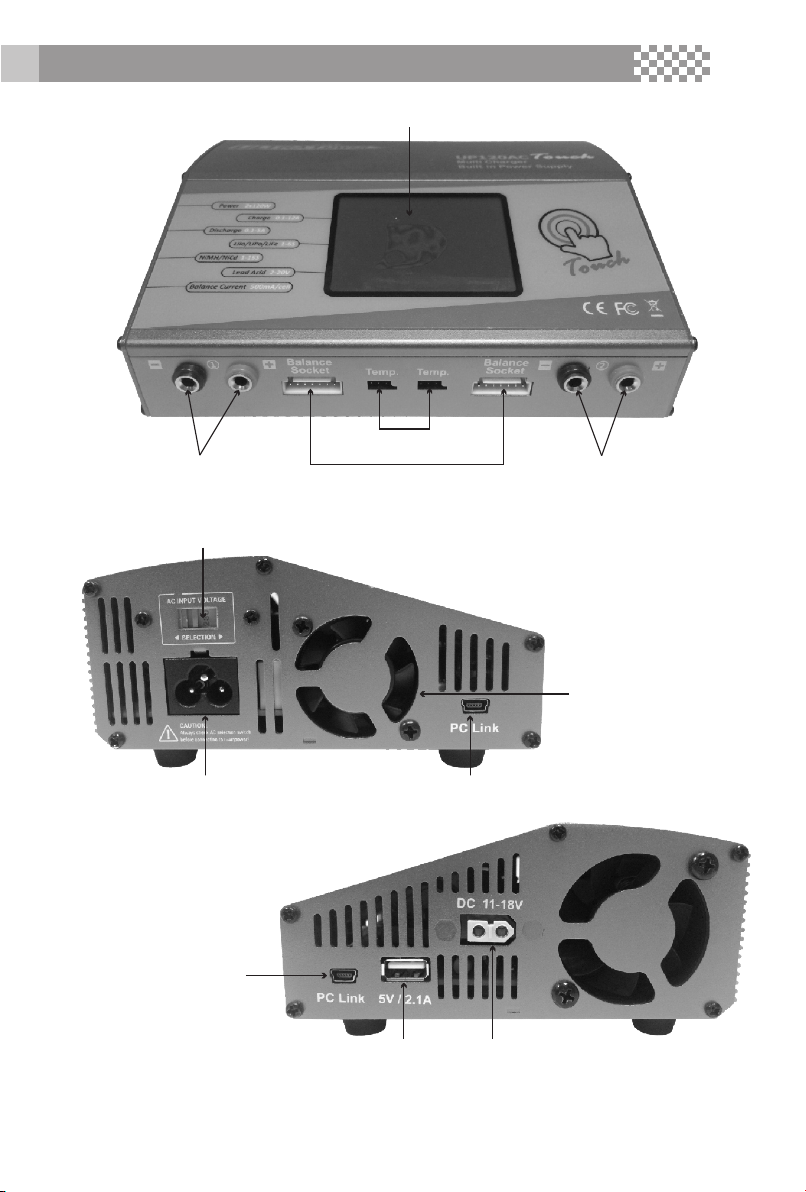
AC Input
110 or 220V AC
Cooling fan with Temp.
Sensor Control
PC Link
Battery Sockets Battery Sockets
Temp. Sensor
DC Input
11-18V
PC Link
DC Output
5V, 2.1A
AC Input Voltage
Selection Switch
INTRODUCTION
Balance
DC
Socket
Color LCD Touch Screen

4
Optimized Operating Software
UP120AC Touch features the AUTO function that set the feeding current
during the process of charging or discharging. Especially for lithium
batteries, it can prevent the overcharging which may lead to an
explosion. It can disconnect the circuit automatically and alarm once
detecting any malfunction. All the programs of this product were
controlled through two way linkage and communication, to achieve the
maximum safety and minimize the trouble. All the settings can be
congured by users!
Balancing Individual Cells For Battery Discharging
During the process of discharging, UP120AC Touch can monitor and
balance each cell of the battery individually. Error message will be
indicated and the process will be ended automatically if the voltage of
any single one cell is abnormal.
Adaptable to Various Type of Lithium Battery
UP120AC Touch is adaptable to various types of lithium batteries, such
as LiPo, LiIon and the new LiFe series of batteries.
Fast and Storage Mode of Lithium Battery
Purposes to charge lithium battery varies, 'fast' charge reduce the
duration of charging, whereas 'store' state can control the nal voltage
of your battery, so as to store for a long time and protect useful time of
the battery.
Cyclic Charging/Discharging
1 to 5 cyclic and continuous process of charge>discharge or discharge
> charge is operable for battery refreshing and balancing to stimulate
the battery's activity.
Re-Peak Mode of NiMH/NiCD Battery
In re-peak charge mode, the charger can peak charge the battery
once, twice or three times in a row automatically. This is good for
making certain the battery is fully charged, and for checking how well
the battery receives fast charges.
SPECIAL FEATURES

5
Data Store/Load
The charger can store up to 6 different charge/discharge proles for
your convenience. You can keep the data pertaining to program setting
of the battery of continuous charging or discharging. Users can call out
these data at any time without any special program setting.
Terminal Voltage Control(TVC)
The charger allows user to change the end voltage.
LiPo Battery Meter
The user can check battery's total voltage, the highest voltage, the
lowest voltage and each cell's voltage.
Maximum Safety
Delta-peak sensitivity for NiMH/NiCd battery: The automatic charge
termination program based on the principle of the Delta-peak voltage
detection. When the battery's voltage exceeds the threshold, the
process will be terminated automatically.
Automatic Charging Current Limit
You can set up the upper limit of the charging current when charging
your NiMH or NiCd battery, it is useful for the NiMH battery of low
impedance and capacity in the 'AUTO' charging mode.
Capacity Limit
The charging capacity is always calculated as the charging current
multiplied by time. If the charging capacity exceeds the limit, the
process will be terminated automatically when you set the maximum
value.
Temperature Threshold*
The battery's internal chemical reaction will cause the temperature of
the battery to rise. If the temperature limit is reached, the process will
be terminated.
*This function is available by connecting optional temperature probe,
which is not included in the package.
Processing Time Limit:
You can also limit the maximum process time to avoid any possible
defect.
SPECIAL FEATURES

6
These warnings and safety notes are particularly important. Please
follow the instructions for maximum safety; otherwise the charger and
the battery can be damaged or at worst it can cause a re. Also read
the chapter before you begin.
Never leave the charger unsupervised when it is connected to its
power supply. If any malfunction is found, TERMINATE THE
PROCESS IMMEDIATELY and refer to the operation manual.
Keep the charger well away from dust, damp, rain, heat, direct
sunshine and vibration. Never drop it.
The allowable DC input voltage is 11-18V DC.
The allowable AC input voltage is 110V or 220V AC.
This charger and the battery should be put on a heat-resistant,
non-ammable and non-conductive surface. Never place them on
a car seat, carpet or similar surface. Keep all ammable volatile
materials away from the operating area.
Make sure you know the specications of the battery to be
charged or discharged to ensure it meets the requirements of this
charger. If the program is set up incorrectly, the battery and
charger may be damaged. Fire or explosion can occur due to
overcharging. This warranty is not valid for any damage or
subsequent damage arising as a result of a misuse or failure to
observe the procedures outlined in this manual.
To avoid short circuiting between the charge lead, always connect
the charge cable to the charger rst, then connect the battery.
Reverse the sequence when disconnecting.
Never attempt to charge or discharge the following types of
batteries:
A battery pack which consists of different types of cells (including
different manufacturers)
A battery that is already fully charged or just slightly discharged
Non-rechargeable batteries (pose an explosion hazard)
A faulty or damaged battery
A battery tted with an integral charge circuit or a protection circuit.
WARNING AND SAFTEY NOTE

7
WARNING! By setting the TVC to any POSITIVE SETTING above default value,
you ACCEPT ALL RESPONSIBILITY for DAMAGE to your battery, FIRE, INJURY,
and any other loss which may result. If you do not agree to accept all risk, DO
NOT OPERATE YOUR CHARGER UNLESS ALL TVC POSITIONS ARE SET TO
DEFAULT VALUE!
Batteries installed in a device or which are electrically linked to
other components
Batteries that are not expressly stated by the manufacturer to be
suitable for the currents the charger delivers during the charge
process
Please bear in mind the following points before commencing
charging:
Did you select the appropriate program suitable for the type of
battery you are charging?
Did you set up appropriate current for charging or discharging?
Have you checked the battery voltage? Lithium battery packs can
be wired in parallel and in series, i.e. a 2-cell pack can be 3.7V (in
parallel) or 7.4V (in series).
Have you checked that all connections are rm and secure? Make
sure there are no intermittent contacts at any point in the circuit.
Standard Battery Parameters
Be very careful to choose the correct voltage for different types of
battery otherwise you may cause damage to the batteries. Incorrect
settings could cause the cells to re or explode.
3.7V/cell
4.2V/cell
3.8V/cell
≦1C
3.0-3.3V/cell
3.6V/cell
4.1V/cell
3.7V/cell
≦1C
2.9-3.2V/cell
3.3V/cell
3.6V/cell
3.3V/cell
≦4C
1.2V/cell
1.5V/cell
n/a
1C-2C
1.2V/cell
1.5V/cell
n/a
1C-2C
2.0V/cell
2.46V/cell
n/a
≦0.4C
2.6-2.9V/cell 0.1-1.1V/cell 0.1-1.1V/cell
1.8V/cell
Nominal
Voltage
Max Charge
Voltage
Storage
Voltage
Allowable
Fast Charge
Min. Discharge
Voltage
LiPo LiIon LiFe NiCD MiMH Pb
WARNING AND SAFTEY NOTE

Charging
During charge process, a specic quantity of electrical energy is fed
into the battery. The charge quantity is calculated by multiplying charge
current by charge time. The maximum permissible charge current
varies depending on the battery type or its performance, and can be
found in the information by the battery manufacturer. Only batteries
that are expressly stated to be capable of quickcharge are allowed to
be charged at rates higher than the standard charge current.
Connect the battery to the terminal of the charger: red is positive and
black is negative. Due to the difference between resistance of cable
and connector, the charger can not detect resistance of the battery
pack. The essential requirement for the charger to work properly is that
the charge lead should be of adequate conductor cross-section, and
high quality connectors which are normally goldplated should be tted
to both ends.
Always refer to the manual by the battery manufacturer pertaining
to charging methods. Operate according to their recommended
charging current and charging time. lithium batteries, in particular,
should be charged strictly according to the manufacturer's instruction.
Close attention should be paid to the connection of lithium batteries.
Do not attempt to disassemble the battery pack arbitrarily.
Please get highlighted that lithium battery packs can be wired in
parallel and in series. In the parallel connection, the battery's capacity
is calculated by multiplying single the battery's capacity by the number
of cells, bearing in mind that total voltage stays the same. If the voltage
is imbalanced, it may cause a re or explosion. Lithium batteries are
recommended to charge in series.
WARNING AND SAFTEY NOTE

8
Table of contents
Other Ultra Power Power Supply manuals
Popular Power Supply manuals by other brands

Videx
Videx 520MR Installation instruction

Poppstar
Poppstar 1008821 Instructions for use

TDK-Lambda
TDK-Lambda LZS-A1000-3 Installation, operation and maintenance manual

TDK-Lambda
TDK-Lambda 500A instruction manual

Calira
Calira EVS 17/07-DS/IU operating instructions

Monacor
Monacor PS-12CCD instruction manual