manuals.online logo
Brands
  1. Home
  2. •
  3. Brands
  4. •
  5. VARRAM
  6. •
  7. Robotics
  8. •
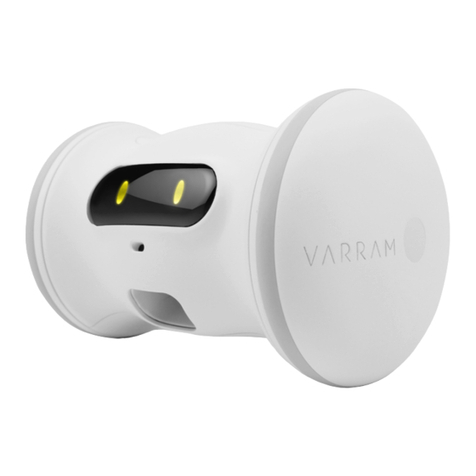
  9. VARRAM Pet Fitness User manual

VARRAM Pet Fitness User manual

Other manuals for Pet Fitness

1

Other VARRAM Robotics manuals

VARRAM APPBOT RILEY Assembly instructions

VARRAM

VARRAM APPBOT RILEY Assembly instructions

VARRAM Pet Fitness Robot Instruction manual

VARRAM

VARRAM Pet Fitness Robot Instruction manual

VARRAM Appbot LINK Assembly instructions

VARRAM

VARRAM Appbot LINK Assembly instructions

VARRAM HOME BOT User manual

VARRAM

VARRAM HOME BOT User manual

Popular Robotics manuals by other brands

Edison Edison Robot V2.0 manual

Edison

Edison Edison Robot V2.0 manual

Aldebaran plato Original instructions

Aldebaran

Aldebaran plato Original instructions

AgileX SCOUT MINI user manual

AgileX

AgileX SCOUT MINI user manual

Keenon Robotics W3 user manual

Keenon Robotics

Keenon Robotics W3 user manual

Franka Emika RESEARCH 3 product manual

Franka Emika

Franka Emika RESEARCH 3 product manual

STEMCenter USA Pi-Bot v2.00 user manual

STEMCenter USA

STEMCenter USA Pi-Bot v2.00 user manual

SunFounder PiDog manual

SunFounder

SunFounder PiDog manual

Universal Robots UR5 Service manual

Universal Robots

Universal Robots UR5 Service manual

Universal Robots E Series Original instructions

Universal Robots

Universal Robots E Series Original instructions

EFORT ECR5 Quick start manual

EFORT

EFORT ECR5 Quick start manual

RoboMaster AI Robot 2020 Standard Version user manual

RoboMaster

RoboMaster AI Robot 2020 Standard Version user manual

fischertechnik Mini Bots manual

fischertechnik

fischertechnik Mini Bots manual

Abicor Binzel iCAT mini operating instructions

Abicor Binzel

Abicor Binzel iCAT mini operating instructions

ABB OmniCore E10 product manual

ABB

ABB OmniCore E10 product manual

Moorebot Scout quick start guide

Moorebot

Moorebot Scout quick start guide

pitsco Tetrix Max Creator's Guide

pitsco

pitsco Tetrix Max Creator's Guide

ECOVACS DEEBOT R95 instruction manual

ECOVACS

ECOVACS DEEBOT R95 instruction manual

Feng Yuan Interstellar Warrior user guide

Feng Yuan

Feng Yuan Interstellar Warrior user guide

manuals.online logo
manuals.online logoBrands
  • About & Mission
  • Contact us
  • Privacy Policy
  • Terms and Conditions

Copyright 2025 Manuals.Online. All Rights Reserved.

FCC Warning Statement
FCC Part 15.19
This device complies with part 15 of the FCC
Rules. Operation is subject to the following
two conditions: (1) this device may not
cause harmful interference, and (2) this
device must accept any interference
received, including interference that may
cause undesired operation.
FCC Part 15.21
Any changes or modifications (including the
antennas) to this device that are not
expressly approved by the manufacturer
may void the user’s authority to operate the
equipment.
FCC Radiation Exposure Statement
This equipment complies with FCC Radiation
exposure limits set forth for an uncontrolled
environment. This device and its antenna
must not be co-located or operating in
conjunction with any other antenna or
transmitter.
This equipment should be installed and
operated with a minimum distance of 20cm
between the radiator and your body.
FCC Warning Statement
FCC
Part 15.19
This d
evice complies with part 15 of the FCC
Rules. O
peration is subject to the following two
conditions: (1) this d
evice may not cause harmful
inte
rference, and (2) this device must accept any
inte
rference received, including interf
erence that
may cause undesir
ed operation.
FCC
Part 15.21
Any changes or m
odifications (including the
antennas) to this d
evice that are not expressly
appr
oved by the manufacturer may void the
user’s authority to o
perate the equipment.
FCC Radiation Ex
posure Statement
This
equipment complies with FCC Radiation
e
xposure limits set forth for an uncontrolled
environment. This d
evice and its antenna must
not
be co-located or operating in conjunction
with any other antenna or transmitter.
This
equipment should be installed and operated
with a minimum distance of 20cm
between the
radiator and
your body.
Hello,
VARRAM Pet Fitness Robot!
www. varram.com
VER.Y18120A
www. varram.com
Function
Bluetooth
Operating Frequency
2402-2480 MHz
Output Power
-7.89 dBm
The motor speed of the toss
function is limited during charging.

What's included Easy Set Up
Turn on the device.
Step 01
Pet Fitness Robot
Treat Box(Big) Cat featherAdditional Treat Box(Small)
Charger 3 tires
① Turn the switch to the right
② Connect the USB cable.
Easy Set Up Easy Set Up
Please do not remove the USB
cable.
Run the APP and click Fitness
.
Step 03Step 02
① Pleas do not turn off the robot or remove the
USB cable in this step.
Please put your phone near from the robot.
① Download the app named "varram robot" from
appstore or playstore .
(Android and IOS)
Easy Set Up Product Details
I can’t connect to my Robot.
Step 03
Product Specification
① Try to check the switch and the cable
② Put your phone near from the robot
Weight 300g Operating Temperature -10 ~45℃
Dimensions 16.5 X 12.7 X 10.3 (cm) Input Power DC 5V(USB Power)
Battery Type Li-Polymer 3.7V 800mAh
Bluetooth Version Bluetooth ver 4.2 Material FDA approved Polycarbonate & Silicone
Working Time 10 hours (Scheduling operation)