4.5.1 Press the MAX/MIN button to activate
the MAX/MIN recording mode. The
display icon "MAX" will appear. Press the
MAX/MIN button again, The display icon
"MIN" will appear. The meter will go to
manual ranging & display and hold the
maximum or minimum reading and will
update only when a new “max or min”
occurs.
4.5.2. Press the MAX/MIN key again and
a blinking “MAX MIN” will appear. The
meter will display the MAX-MIN reading,
To exit MAX/MIN mode press and hold
the MAX/MIN key for 2 seconds.
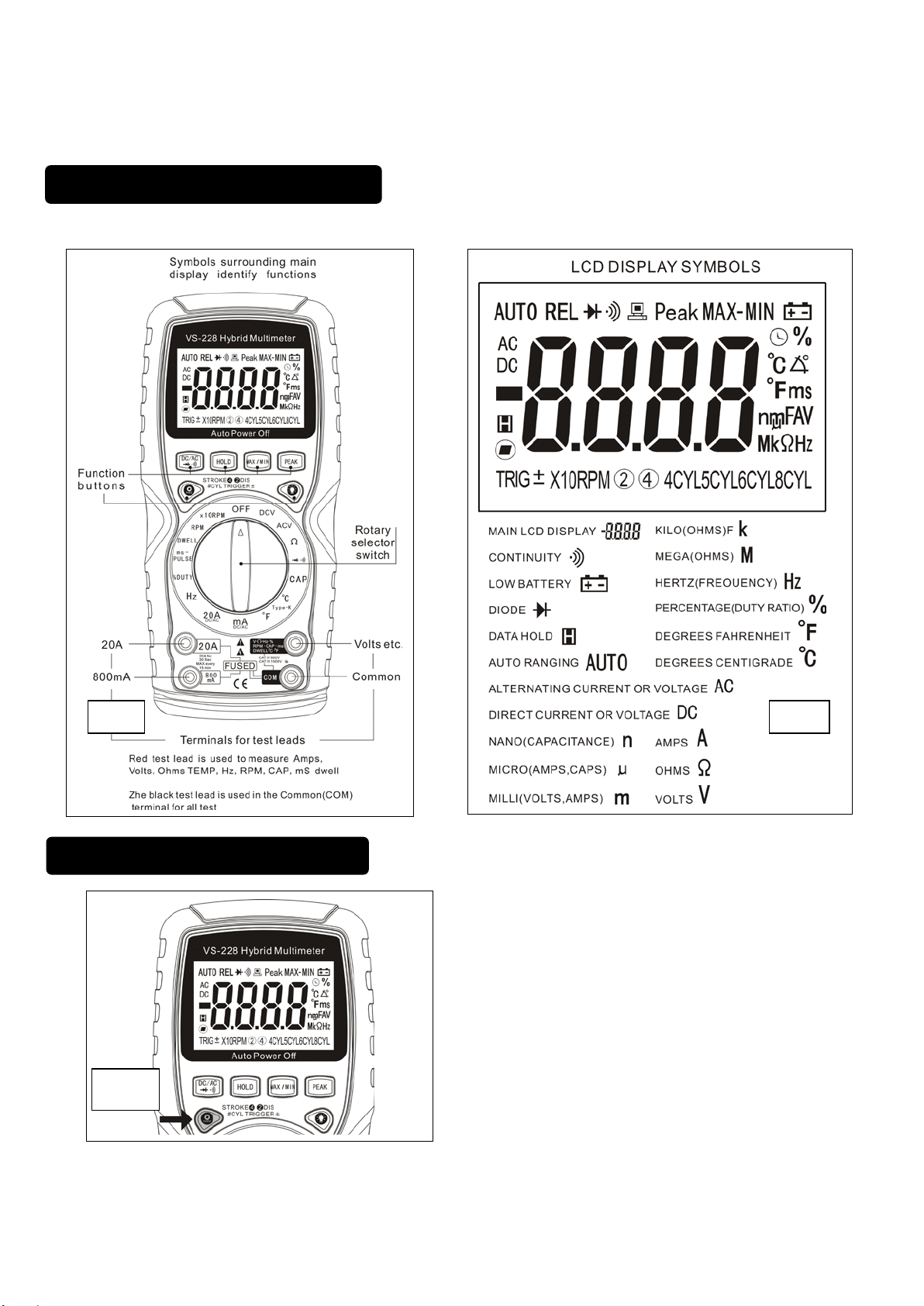
4.6 Backlight buttonbutton (fig.6b)
4.6.1 Press the BACKLIGHT button to turn the
backlighting ON.
4.6.2 Press the BACKLIGHT button again to
turn the backlighting OFF.
5.1 DC Voltage (DCV)
5.1.1 Select the Volts “ DCV” range with the
rotary switch.
5.1.2 The meter will automatically select the
best DC voltage range.
5.1.3 Insert Black lead in COM terminal.
5.1.4 Insert Red lead in V-Ω-RPM terminal
5.1.5 Touch the Black probe to ground or to the
negative (-) circuit
5.1.6 Touch the Red probe to the circuit
coming from the power source
IMPORTANT: Voltage must be
measured in parallel (Red probe
measuring circuit from power
source).
WARNING: When measuring voltage,
be sure the Red test lead is in the
terminal marked “V”. If the test lead is
in an Amp (A) or Milliampere (mA)
terminal, you may be injured or the
meter damaged.
5.2 Resistanceesistance (Ω)
IMPORTANT: If you are testing an
application that has capacitors in the
circuit, be sure to turn the power OFF on
the test circuit and discharge all
capacitors.Accurate measurement is
not possible if external or residual voltage
is present.
5.2.1 Select the Resistance “ Ω” range with
the rotary switch.
5.2.2 Insert Black lead in COM terminal.
5.2.3 Insert Red lead in V-Ω-RPM terminal
5.2.4 Touch the test lead probes across the
resistor to be tested.
5.3 Diode Check ( )
IMPORTANT: Turn the power OFF to
the test circuit
5.3.1 Select the Diode Check " " function
with the rotary switch and mode button.
5.3.2 Insert Black lead in COM terminal.
5.3.3 Insert Red lead in V-Ω-RPM terminal
5.3.4 Touch the Black test probe to the
negative (-) side of the diode.
5.3.5 Touch the Red test probe to the positive
(+) side of the diode.
5.3.6 Reverse the probes: Black to the
positive (+) side and Red to the negative
(-) side.
Note: A “good” diode will read low in one
direction and high in the other direction
when the probes are reversed (or vice
versa).A defective diode will have the
same reading in both directions or read
between 1.0 to 3.0 V. In both directions.