12 V
1234
ON
1234
ON
1234
ON
white
RDA-4 PCB
AXS-100
READER
TERMINAL
BLOCK
PWR
RX
gnd
TX
red
black
green
12 V
1234
ON
RDR-2
PROXIMITY
READER
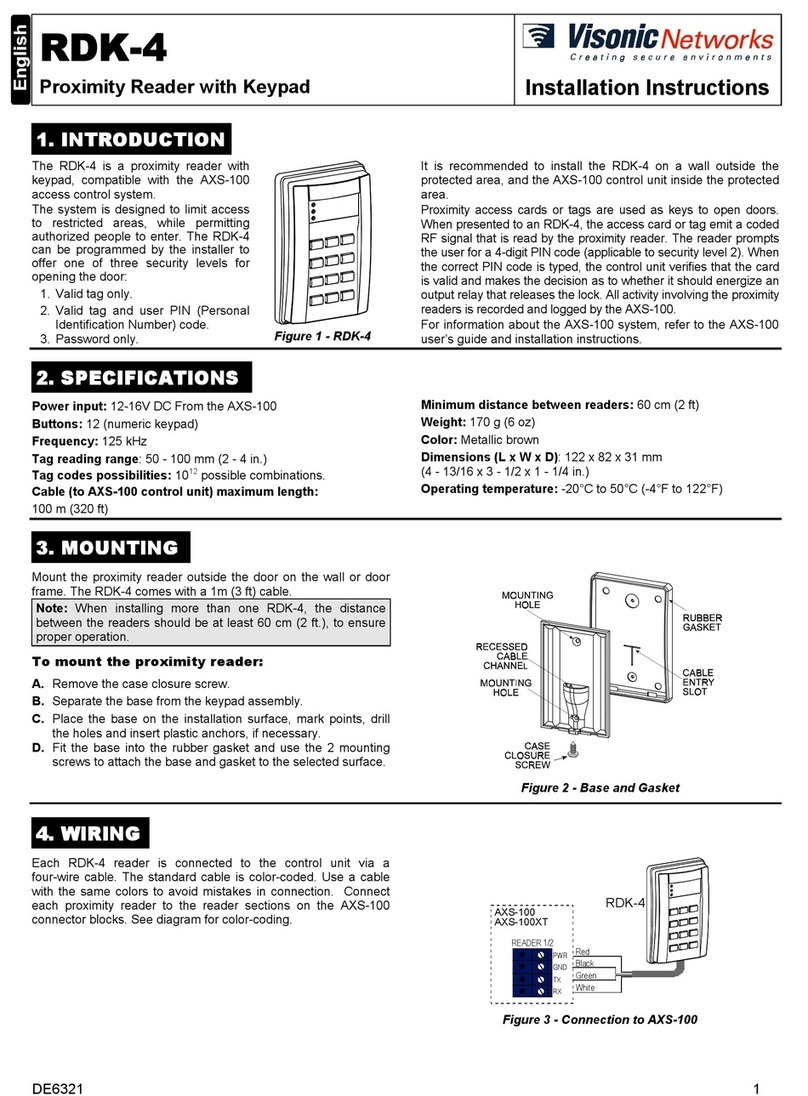
Fig. 6: RDA-4 to Wiegand Reader Interface Fig. 7:RDA-4toWiegandReader(Keypad)Int. Figure 8: RDA-4 to RDR-2 Reader Interface
WARRANTY
Visonic Networks Ltd. and/or its subsidiaries and its affiliates ("the Manufacturer")
warrants its products hereinafter referred to as "the Product" or "Products" to be in
conformance with its own plans and specifications and to be free of defects in materials
and workmanship under normal use and service for a period of twelve months from the
date of shipment by the Manufacturer. The Manufacturer's obligations shall be limited
within the warranty period, at its option, to repair or replace the product or any part
thereof. The Manufacturer shall not be responsible for dismantling and/or reinstallation
charges. To exercise the warranty the product must be returned to the Manufacturer
freight prepaid and insured.
This warranty does not apply in the following cases: improper installation, misuse,
failure to follow installation and operating instructions, alteration, abuse, accident or
tampering, and repair by anyone other than the Manufacturer.
This warranty is exclusive and expressly in lieu of all other warranties, obligations or
liabilities, whether written, oral, express or implied, including any warranty of
merchantability or fitness for a particular purpose, or otherwise. In no case shall the
Manufacturer be liable to anyone for any consequential or incidental damages for breach
of this warranty or any other warranties whatsoever, as aforesaid.
This warranty shall not be modified, varied or extended, and the Manufacturer does not
authorize any person to act on its behalf in the modification, variation or extension of this
warranty. This warranty shall apply to the Product only. All products, accessories or
attachments of others used in conjunction with the Product, including batteries, shall be
covered solely by their own warranty, if any. The Manufacturer shall not be liable for any
damage or loss whatsoever, whether directly, indirectly, incidentally, consequentially or
otherwise, caused by the malfunction of the Product due to products, accessories, or
attachments of others, including batteries, used in conjunction with the Products.
The Manufacturer does not represent that its Product may not be compromised and/or
circumvented, or that the Product will prevent any death, personal and/or bodily injury
and/or damage to property resulting from burglary, robbery, fire or otherwise, or that the
Product will in all cases provide adequate warning or protection. User understands that a
properly installed and maintained alarm may only reduce the risk of events such as
burglary, robbery, and fire without warning, but it is not insurance or a guarantee that
such will not occur or that there will be no death, personal damage and/or damage to
property as a result.
The Manufacturer shall have no liability for any death, personal and/or bodily injury
and/or damage to property or other loss whether direct, indirect, incidental,
consequential or otherwise, based on a claim that the Product failed to function.
However, if the Manufacturer is held liable, whether directly or indirectly, for any loss or
damage arising under this limited warranty or otherwise, regardless of cause or origin, the
Manufacturer's maximum liability shall not in any case exceed the purchase price of the
Product, which shall be fixed as liquidated damages and not as a penalty, and shall be
the complete and exclusive remedy against the Manufacturer.
Warning: The user should follow the installation and operation instructions and among
other things test the Product and the whole system at least once a week. For various
reasons, including, but not limited to, changes in environmental conditions, electric or
electronic disruptions and tampering, the Product may not perform as expected. The user
is advised to take all necessary precautions for his/her safety and the protection of his/her
property.
6/91
Technical Dept.: 35 Hamelacha St. Carmiel 20100 ISRAEL Tel: 972 4 9081115 Fax: 972 4 9081116
Sales Dept.: 30 Habarzel St. Tel Aviv 69710 ISRAEL Tel: 972 3 645 6789 Fax: 972 3 645 6891
Visonic Inc. (U.S.A.): 10 Northwood Drive, Bloomfield CT. 06002-1911. Tel: (860) 243-0833, (800) 223-0020 Fax: (860) 242-8094
VisAccess Ltd. (UK): Unit 1, Stratton Park, Dunton Lane, Biggleswade, BEDS. SG18 8QS. Tel: (01767)600857 Fax: (01767)601098
Internet: www.visonicnet.com
Visonic Networks Ltd. 2003 RDA-4 DE6319- (REV. 2, 7/2003)