manuals.online logo
Brands
  1. Home
  2. •
  3. Brands
  4. •
  5. Whirlpool
  6. •
  7. Washer
  8. •
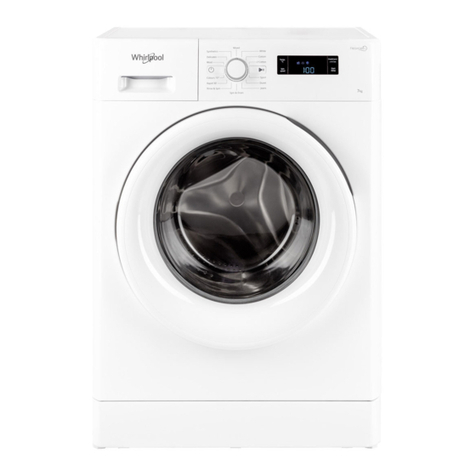
  9. Whirlpool AWG 908 E User manual

Whirlpool AWG 908 E User manual

Other manuals for AWG 908 E

1

This manual suits for next models

1

Other Whirlpool Washer manuals

Whirlpool W11566617A User manual

Whirlpool

Whirlpool W11566617A User manual

Whirlpool LA7980XS User manual

Whirlpool

Whirlpool LA7980XS User manual

Whirlpool 6LBR6233BQ0 User manual

Whirlpool

Whirlpool 6LBR6233BQ0 User manual

Whirlpool FSCR10431 User manual

Whirlpool

Whirlpool FSCR10431 User manual

Whirlpool 3RLSQ8600 User manual

Whirlpool

Whirlpool 3RLSQ8600 User manual

Whirlpool BI WDWG 961484 EU User manual

Whirlpool

Whirlpool BI WDWG 961484 EU User manual

Whirlpool LA5800XP User manual

Whirlpool

Whirlpool LA5800XP User manual

Whirlpool W11114976B User guide

Whirlpool

Whirlpool W11114976B User guide

Whirlpool FDLR70210 User manual

Whirlpool

Whirlpool FDLR70210 User manual

Whirlpool LA7800XM User manual

Whirlpool

Whirlpool LA7800XM User manual

Whirlpool ADP 6949C WH User manual

Whirlpool

Whirlpool ADP 6949C WH User manual

Whirlpool WTW4820XQ0 User manual

Whirlpool

Whirlpool WTW4820XQ0 User manual

Whirlpool Cabrio WTW7340XW Assembly instructions

Whirlpool

Whirlpool Cabrio WTW7340XW Assembly instructions

Whirlpool 8578566 User manual

Whirlpool

Whirlpool 8578566 User manual

Whirlpool FRESH CARE 7010 User manual

Whirlpool

Whirlpool FRESH CARE 7010 User manual

Whirlpool 3LWTW4840YW User manual

Whirlpool

Whirlpool 3LWTW4840YW User manual

Whirlpool LA5558XS User manual

Whirlpool

Whirlpool LA5558XS User manual

Whirlpool AWM 283 User manual

Whirlpool

Whirlpool AWM 283 User manual

Whirlpool WVED900AHG User manual

Whirlpool

Whirlpool WVED900AHG User manual

Whirlpool 3354199 User manual

Whirlpool

Whirlpool 3354199 User manual

Whirlpool WFW96HEYW User manual

Whirlpool

Whirlpool WFW96HEYW User manual

Whirlpool AWE 9725 User manual

Whirlpool

Whirlpool AWE 9725 User manual

Whirlpool ITW4971EW0 User manual

Whirlpool

Whirlpool ITW4971EW0 User manual

Whirlpool WTW6400SW3 User manual

Whirlpool

Whirlpool WTW6400SW3 User manual

Popular Washer manuals by other brands

Haier HWM96-0623S null

Haier

Haier HWM96-0623S null

Haier B828TX null

Haier

Haier B828TX null

Haier HWM30-0701 null

Haier

Haier HWM30-0701 null

Samsung WF8508NMW8 null

Samsung

Samsung WF8508NMW8 null

Samsung WF-B105AV null

Samsung

Samsung WF-B105AV null

Haier HWM20-0701 null

Haier

Haier HWM20-0701 null

Akai AWM1050WF null

Akai

Akai AWM1050WF null

Haier HWM15-0501 null

Haier

Haier HWM15-0501 null

Tricity Bendix AW 1000 W Operating & installation instructions

Tricity Bendix

Tricity Bendix AW 1000 W Operating & installation instructions

Panasonic NA-F60L5WRB operating instructions

Panasonic

Panasonic NA-F60L5WRB operating instructions

GE WSLP1500 Dimensions and installation information

GE

GE WSLP1500 Dimensions and installation information

Electrolux EWF1284EDW Service manual

Electrolux

Electrolux EWF1284EDW Service manual

LG TV2516DV3B owner's manual

LG

LG TV2516DV3B owner's manual

LG TH2517DSAV owner's manual

LG

LG TH2517DSAV owner's manual

VESTEL CMH-XL 7510 TE user manual

VESTEL

VESTEL CMH-XL 7510 TE user manual

AEG 74335 User information

AEG

AEG 74335 User information

Johnson JWF721A user manual

Johnson

Johnson JWF721A user manual

Beko WTE7604XLW0 owner's manual

Beko

Beko WTE7604XLW0 owner's manual

manuals.online logo
manuals.online logoBrands
  • About & Mission
  • Contact us
  • Privacy Policy
  • Terms and Conditions

Copyright 2025 Manuals.Online. All Rights Reserved.

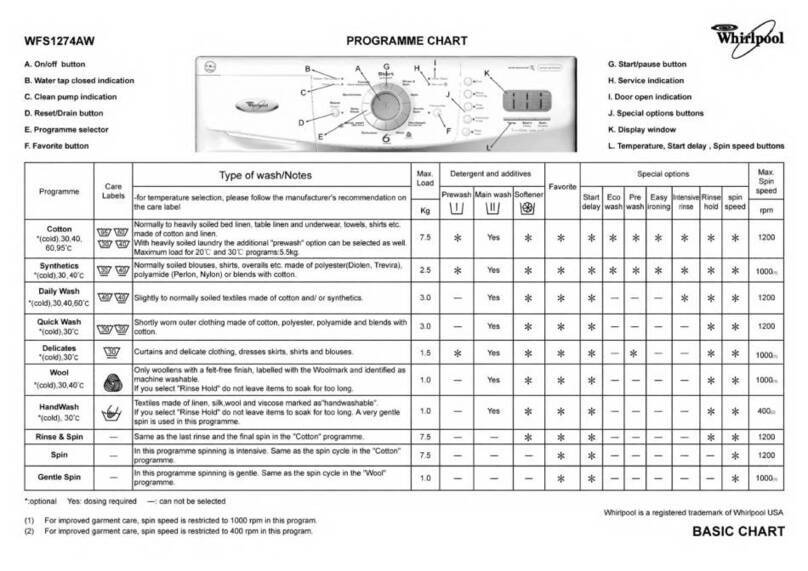
AWG 908 E / AWG 910 E PROGRAMME CHART
5019 301 20130
Whirlpool is a registered trademark of Whirlpool USA
L: optional / Yes : dosing required
1) For improved garment care, spin speed is restricted in these programmes. The “wool” programme of this washing machine has been approved by The Woolmark Company for the washing of
garments labelled as “machine washable”. Follow the instructions given on the label sewn on the garment and the
instructions supplied by the washing-machine manufacturer. (Cert. no. M0402-M0403-M0404-M0405).
Programme Tempe -
rature Care
Labels
Max.
Load
kg
Type of wash/Notes
- For temperature selection, respect the manufacturer’s
recommendations on the care label
Detergents and additives Special functions Max.
spin
speed
rpm
Pre
wash Main
wash Softener Pre
wash Start
delay Easy
Ironing Intensive
rinse Rinse
hold Variable
spin
White Cotton
Antibacterial 75 - 90 °C 5.0 Normally to heavily soiled bed linen, table linen and
underwear, towels, shirts etc. made of cotton and
linen.
At a temperature of 80°C or more, this programme
eliminates bacteria, ensuring sanitization of your
laundry. The bacteria removal efficiency has been
tested following a similar methodology to the NF EN
13697 standard of Nov. 2001.
LYes LLL L L—LMax.
Cotton
60 °C 5.0
30 - 40 °C 5.0
Synthetics 30 - 60 °C 2.5 Normally soiled blouses, shirts, overalls etc. made of
polyester (Diolen, Trevira), polyamide (Perlon, Nylon)
or blends with cotton. LYes LLL L L L L
800 1)
Delicates 30 - 40 °C 2.5 Curtains and delicate clothing, skirts, shirts and
blouses. —Yes L—L——LL
500 1)
Wool 30 - 40 °C 1.0 Only woollens labelled with the Woolmark and
identified as machine washable.
This programme (40°C) is tested and approved by The
Woolmark Company for handwashable wool. —Yes L—L——LL
800 1)
Lingerie ——
2.5 Curtains and delicate clothing in wool or silk only
washable in cold water. —Yes L—L——LL
500 1)
Handwash 30 °C 2.0 Garments made of linen, silk, wool and viscose marked
as “handwashable”. —Yes L—L——LL
800 1)
Quick wash 35 °C 2.5 Outer clothing worn for short periods and made of
cotton, polyester, polyamide and cotton blends. —Yes L—L———LMax.
Daily load 40 °C 3.5 Slightly to normally soiled garments made of cotton
and/or synthetics. LYes LLL L L—LMax.
Cold wash ——
5.0 Slightly soiled garments in cotton and/or synthetics
washable only in cold water. —Yes L—— LL
—LMax.
Rinse ——
5.0 Same as the last rinse and the final spin in the “Cotton”
programme. ——L—L—L—LMax.
Drain
Spin ——
5.0 In this programme spinning is intensive. Same as the spin
cycle in the “Cotton” programme. ————L———LMax.
E H
FJ O G
A
B
C
D
This washing machine is equipped with
automatic safety functions which
detectfaultsat an early stage and react
appropriately, e.g.:
A. “Service” indicator
B. “Clean Pump” indicator
C. “Water Tap Closed” indicator
D. “Door lock” indicator
E. Programme selector
F. “Start” button
G. “Variable spin” button
H. The programme sequence indicator
/ Start delay time indicator
O. Optional function buttons
J. “Start delay” button
30120130GB.fm Page 1 Wednesday, August 8, 2007 10:16 AM
Black process 45.0° 150.0 LPI
Downloaded From WashingMachine-Manual.com Manuals

5019 301 20130
Whirlpool is a registered trademark of Whirlpool USA
Add detergent as indicated on the front page and as
described in the chapter “Detergent and Additives”
in the Instructions for Use.
1. Turn the programme selector to the desired
programme.
2. The indicator of the predefined spin speed
lights up; in case you want to set another spin
speed, press the “Variable spin” button .
Press the button(s) of any required option(s) - the
respective indicator lights up.
When the combination of programme and
additional option(s) is not possible,
the indicators switch off automatically. Unsuitable
combinations of options are deselected automatically.
“Prewash” button
• Onlyfor heavilysoiledloads(e.g.sand, granulardirt).
Increases the cycle time by approx. 15 minutes.
• Do not use liquid detergent for the main wash
when activating the prewash option.
“Easy Ironing” button
• Can be used together with “Cotton”,
“Synthetic” and “Daily load” programmes to
make ironing easier.
• Increases the water quantity and the clothes are
spun very gently.
“Intensive rinse” button
• More water is added and the rinse cycle is
prolonged.
• This option is particularly suitable for areas with
very soft water, washing baby linen, and helps
people with allergies.
“Rinse hold” button
• The laundry remains in the last rinse water
without the final spin cycle, to avoid creasing and
prevent colours from changing.
• Thisoptionisparticularly recommended for the
“Synthetics”,“Dailyload”or “Delicates” programmes.
• It is particularly useful if you want to postpone
spinning to a later time, or if you want to drain only.
• If you select “Rinse hold”, do not leave the
laundry to soak for too long.
Note: The programme stops to “Rinse hold” at
thetime the“Rinse Hold”lightintheprogramme
sequence indicator is on. The indicator next to
the “Start”
button flashes.
To terminate the “Rinse hold” option :
•Pressthe“Start” button; the programme
will terminate automatically with the final spin
cycle for the preset wash programme.
“Variable spin” button
• Every programme has a predefined maximum
spin speed.
• Press the button to set another spin speed.
• If spin speed “0” is selected, the final spin is
cancelled but intermediate spin peaks remain
during rinse. The water is drained out only.
CONSUMPTION DATA
Programme Tempe rature
(°C) Load
(kg) Water
(l) Energy
(kWh) Approx. programme duration
(hours : minutes)*
White Cotton / Antibacterial 90 5.0 52** 1.70 2:10
Cotton 75 5.0 52 1.33 2:05
Cotton with “Eco”*** 60 5.0 49 0.95 2:15
Cotton 40 5.0 62 0.51 2:00
Synthetics 60 2.5 46** 0.80 1:40
Synthetics 40 2.5 46 0.46 1:35
Daily load 40 3.5 52 0.30 1:25
Quick wash 35 2.5 30 0.40 0:40
Delicates 30 2.5 54 0.24 0:45
Wool 40 1.0 56 0.44 0:54
Handwash 30 2.0 65 0.24 0:57
Consumption values were measured in normalized conditions in compliance with standard IEC/EN 60 456. In domestic use, consumption data
may vary with respect to the values in the table in relation to the water supply pressure and temperature, the load and the type of wash.
*The time indicated on the display (if present) can deviate from the values in the table, because it takes into account the household
conditions applicable at that time.
** To reduce the water temperature, some cold water is added at the end of the main wash cycle, before the pump drains the water out.
*** Reference programme for energy label.
ADD DETERGENTS, CLOSE THE DOOR
AND SELECT THE PROGRAMME
SELECT ANY DESIRED OPTION
The “Start Delay” option allows you to
programme machine activation at a later stage, for
example at night when electricity is cheaper. Do not
useliquid detergentwhenactivatingthe“Startdelay”.
• Select the programme and options.
• Press the “Start Delay” button to select
programme start a delay time of 1 to 12 hours;
•Pressthe“Start” button .
The indicator next to the “Start Delay” button
lights up, whereas the selection indicator flashes
to signal the countdown of the remaining time.
• At the end of the delay time the machine starts
the set programme. The LED indicating the
wash stage in progress lights up.
• After pressing the “Start” , the number of
hours preselected can be reduced by pressing
and holding the “Start Delay” button.
To cancel the “Start Delay”:
Press the “Start Delay” button until all the indicator
lights are off. The selected programme will then start.
Open the tap and press the “Start” . The
indicator next to the “Start” button lights up.
The programme sequence indicator shows the
currentprogrammestage, running from lefttoright
through Prewash, Wash, Rinse, Spin/Drain, End.
At the end of a programme, the “End” indicator
lights up signalling that the door can be opened. As
long as a wash programme is running, the door
remains locked and must not be forced open. In
case you have an urgent need to open it during a
running programme, refer to “Cancel (Reset) a
running programme before the end”.
“Service” indicator
Lightingup of the“Service”indicator canbe caused by
a fault in an electrical component. Refer to the
“TroubleshootingGuide”intheInstructionsforUse; If
the fault persists, contact our After-Sales Service.
“Clean pump” indicator
The water is not pumped out. Check whether the
drain hose is kinked or the filter must be cleaned; in
the latter case refer to the Instructions for Use
(“Removing the filter”).
“Water tap closed” indicator
Machine water supply insufficient or lacking. Open
the water tap; Turn the programme selector to
“Off/0” and reset the programme. If the indicator
remainson,refertothe“TroubleshootingGuide”in
the Instructions for Use.
“Door lock” indicator
Lighting up of the indicator could be caused by the
door not being properly closed. Try closing it again.
Turntheprogrammeselectorto“Off/0”andresetthe
programme. If the indicator remains on, refer to the
“Troubleshooting Guide” in the Instructions for Use.
• Lighting up of the lamp on the wash sequence
indicator means that the programme has ended
and the door is unlocked.
1. Turn the programme selector to the “Off/O”
position.
2. Close the water tap.
3. Open the door and unload the machine.
4. Leave the door ajar to allow the drum to dry.
1. Turn the programme selector to “Off/O”.
2. Select the new programme, any options and
another spin speed if you want.
3. Press the “Start” button again. The new
programmeresumesthewash programme from
wheretheprevious onewasinterrupted. Do not
add detergent for this programme.
• Reset by turning the programme selector to
“Off/0” and select the “Drain Spin” programme
to remove the water remaining in the bowl
before the door can be opened.
START DELAY
PROGRAMME START
“DOOR OPEN” INDICATOR
RED INDICATORS
PROGRAMME END
CHANGING PROGRAMME AND/OR
OPTIONS AFTER PROGRAMME START
CANCEL (RESET) A RUNNING
PROGRAMME BEFORE THE END
30120130GB.fm Page 2 Wednesday, August 8, 2007 10:16 AM
Black process 45.0° 150.0 LPI
Downloaded From WashingMachine-Manual.com Manuals