PureEarth Technologies, Inc.
352 Friendship Court Marietta, GA 30064
(800) 669-1376 sales@pure-earth.com
After hours (M-F 9-5 ET) technical support: 678-756-5383
Step 5:
Attach the KDF MediaGuard cartridge to the control valve –align the slots and turn
until it locks in place. Lubricate the “O”-ring at the bottom of the MediaGuard. (It also
aids in installation to lubricate the rise pipe 2/3” of the way down.)
Step 6:
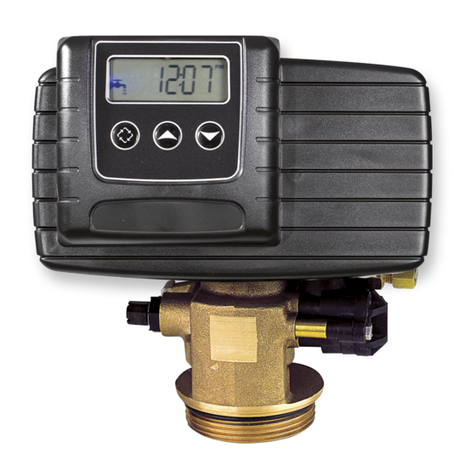
The control valve (head) now must be installed onto the mineral tank. Be sure the
large O-ring is in place, and lubricate it with some of the grease provided in the by-
pass valve kit box, if needed. ALSO BE SURE THAT THE TANK RING IS TWIST-
LOCKED INTO PLACE –IT KEEPS THE O-RING IN POSITION. Slip the control
unit and KDF Media-Guard canister onto the distributor tube. Then carefully screw
the valve onto the tank - NO pipe dope should be used on the threads. The control
valve should be hand tightened, snugly, clockwise.
Step 7:
You are now ready to install the bypass valve to the control valve. Follow the
instructions in the box. The in and out arrows on the bypass valve should be pointing
the same direction as the in/out arrows on the outside of the control valve. The
arrows are molded into the plastic on both the bypass valve and the control valve.
Step 8:
Water connections to and from filter will now be connected to the bypass 1 1/4"IPS male threads by using the two
1 1/4" Female nuts provided. Slip one 1 1/4" female nut over one of the flanged tailpieces, so that the tube is
sticking through the nut and the flanged piece is resting on the inside of the female threaded part of the nut. Use
one 1 3/4" o.d. rubber washer to fit into the female part of the nut on top of the flanged tailpiece and screw the nut
onto the 1 1/4" IPS male threads on the control valve. Do the same for the other side. Now connect your water
source to the tailpieces. Important: Be sure you double-check the inlet and outlet arrows on your filter
before soldering! Caution: A common problem for when soldering onto the copper tailpieces is overheating them,
melting the plastic nuts that connect to the bypass valve. We recommend that you wrap a wet rag around the nuts
and tailpieces to keep the heat away. Screw on the barbed elbow onto the threaded fitting between the inlet and
outlet on the valve –this is for the drain line. If a sediment filter is being installed, position it AFTER the main unit
as a polishing filter.
IMPORTANT STEPS BEFORE TURNING ON WATER:
Follow the instructions in the Autotrol manual for putting the filter into service
You will be programming the Logix 740 computer as a filter by selecting “F” upon the initial start-up (see Logix
Series Manual Installer Quick-Start, page 3). For most applications, every 7 days backwash is fine, though areas
with high sediment levels or phosphates should set more frequently, perhaps 4 days. The default backwash time is
15 minutes –decrease that to 10 minutes. In areas where there are water shortages, you can shorten the
backwash cycle to 7 minutes. Keep in mind, however, that the media may not last as long.
Now follow the instructions in the Autotrol manual for putting the filter into service (page 34). Skip the steps that
have “(conditioner only)” as these pertain to a 5-cycle water softener with a brine tank.
Notes: Water will be discolored with black carbon fines initially –this is normal. Your water also may have minute
bubbles for the first couple of days –this is normal and will clear. If using copper pipe, we recommend using type L
copper. Type L is thicker than type M copper.
For the first few days, when you draw a glass of water, it may appear initially cloudy and then clear. This is simply
trapped air being purged from the carbon –it will clear up after use. Remember to check with local code officials
and install per local code.
Warranty: GE/Autotrol Control Valve –Five Years / Enpress Vortech Mineral Tank –Ten Years