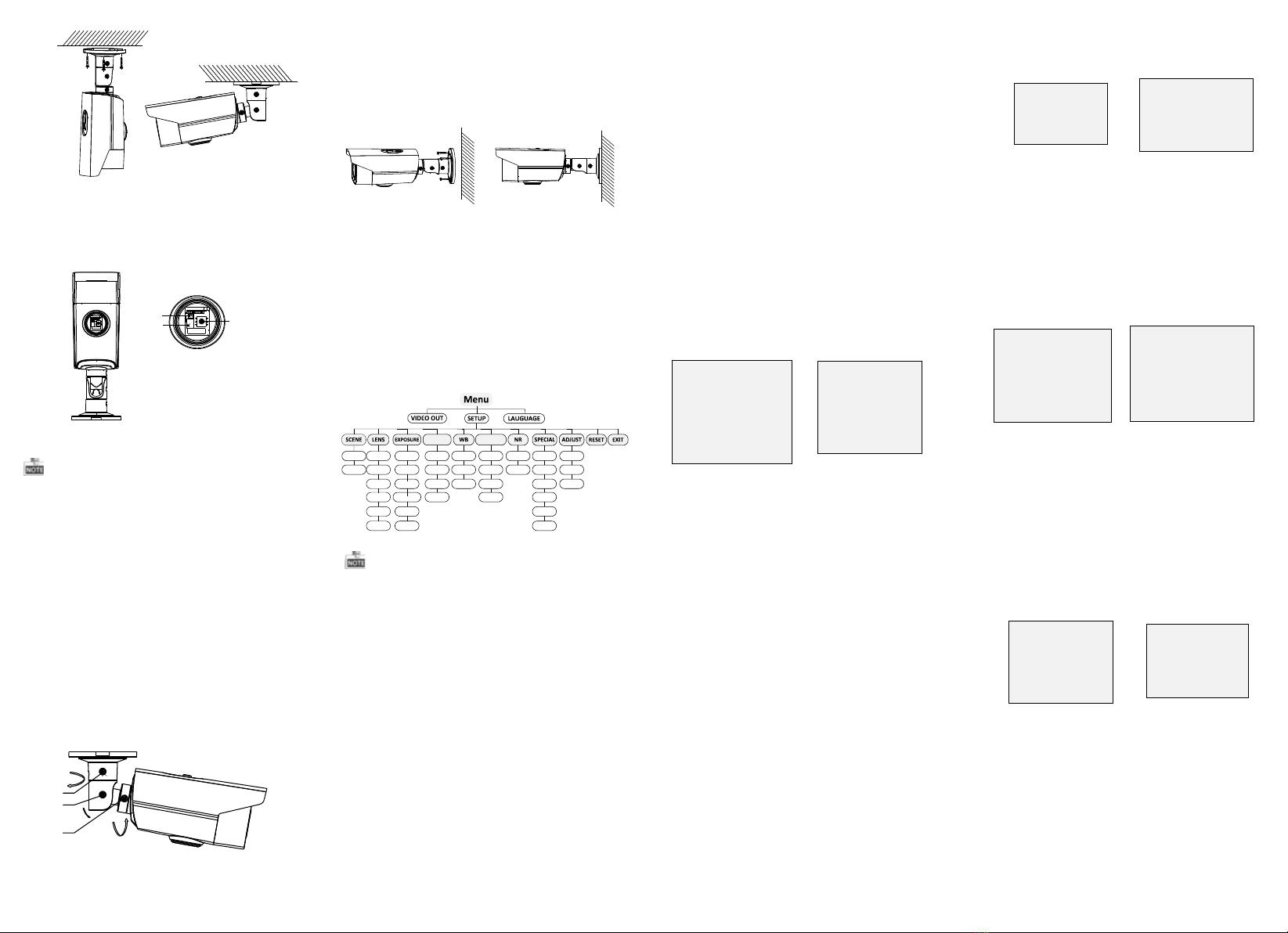
3 Menu Operation
Figure 3-1 Main Menu
DAY&NIGHTBACKLIGHT
INDOOR
OUTDOOR
ZOOM
SPEED SHUTTER
AGC
SENS-UP
BRIGHTNESS
D-WDR
DEFOG
BLC
HSBLC
ATW
AWC-SET
MANUAL
COLOR
B/W
TRIGGER
2D NR
3D NR
CAM
TITLE
D-EFFECT
MOTION
PRIVACY
DEFECT
HEAT
CTRL
SHARPNESS
MONITOR
LSC
PRESET
FOCUS
MODE
LENSINIT
ZOOM
VIEW
AFLIMIT
WDR
OFF
AUTO
You can call the menu and adjust the camera
parameters with the direction button or a coaxial
camera controller (purchase separately). You can
also call the menu with supported DVR.
3.1 VIDEO.O UT
PAL or NTS C is selectable .
3.2 LANGUAG E
Chinese and English are selectable.
3.3 SETUP
3.3.1 SCENE
You can select indoor and outdoor scene modes
according to the working environments.
3.3.3 EXPOSURE
EXPOSURE
1. EXPOSURE IRIS-PRI
2. SHUTTER AUTO
3. AGC OFF
4. SENS-UP ---
5. BRIGHTNESS ---|------ 40
6. D-WDR OFF
7. DEFOG OFF
8. RETURN RETURN
Figure 3-2 Exposure
EXPOSUR E: Manual and IRI S-PRI are selectable.
SHUTTER: AUTO,1/25, 1/75, 1/100, 1/120…1/3.5k
, 1/6k, 1/10k, 1/20k and 1/30 kare selectable.
AGC: You can set the AGC value from 0 to 15.
SENS-UP: You can set the SENS-UP to O FF or AUTO.
BRIGHTN ESS: You can set the brightness value
from 1 to 14.
D-WDR: You can set the D-WDR as ON or OFF.
DEFOG: You can set the defog function as ON to
enable the function. Position, size, and the defog
gradation are configurable.
3.3.4 Backlight
WDR:Set the WDR status as ON or OFF.
Backlight Compensation (BLC):
-GAIN: Set the gain of BLC as High, Middle, or Low.
-AREA: Press the up/down/left/right button to
define the BLC position and size. Select RET or
AGAIN to go back the BLC menu or re-define the
BLC area.
-Default: Restore the BLC settings to the default.
HSBLC: Select an HSBLC area. Set the DI SPLAY
status as O N. Press the up/down/left/right button
to define the area position and size. Set the HSBLC
LEVEL from 0 to 100. Select ALL DAY or Night for the
HSBLC mode. Set the BLAC K MASK status as ON or
OFF.
HSBLC
1. SELECT AREA 1
2. DISPLAY ON 8
3. LEVEL ---|------ 20
4. MODE ALL DAY
5. BLACK MASK ON
6. DEFAULT 8
7. RETURN RETURN
Figure 3-3 HSBLC
3.3.5 White Balance (WB)
MANUAL, ATW (Auto-tracking White Balance),
AWC→SET are selectable.
3.3.6 Day & Night
Auto, Trigger, Color, and B/W are selectable for
DAY and NIGH T switches. You can enable IRF in
trigger mode.
3.3.7 NR
2D NR: You can set 2D NR status as ON or OFF.
3D NR: Set the Smart NR status as ON and adjust
the 3D smart N R sensitivity ranges from 0 to 100.
Set the 3D NR LEVEL ranges from 0 to 100. Set the
2D&3D NR
1. 2DNR OFF
2. 3DNR ON 8
3. RETURN RETURN
3D NR
1. SMART NR OFF
2. LEVEL ------|--8 0
3. START. AGC -|--------10
4. END. AGC -|--------10
5. RETURN RETURN
Figure 3-4 NR Figure 3-5 3D NR
3.3.8 SPECIAL
Camera Title: Edit the camera title on this section.
D-effect:
-FREEZE: Set the freeze function as ON or OFF.
-MIRROR: OFF, MIRROR, V-FLIP, and ROTATE are
selectable for mirror.
-D-ZOOM: Define the zoom ratio of certain area
from 2 to 62.
-NEG.IMAGE: Set the NEG IMAGE as ON or OFF.
SPECIAL
1. CAM TITLE OFF
2. D-DFFECT 8
3. MOTION OFF
4. PRIVACY OFF
5. DEFECT 8
6. HEATCTRL 8
7. RETURN RETURN
Figure 3-6 Special
MOTION
1. SELECT AREA 1
2. DISPLAY ON8
3. SENSITIVITY ----|---- 30
4. MOTION VIEW ON
5. DEFAULT 8
6. RETURN RETURN
Figure 3-7 Motion Detection
Motion: Select a MOTION area. Set the DISP LAY
status as O N or OFF. Press the up/down/left/right
button to define the position and size of the area.
Set the SENSIT IVITY from 0 to 100. Set the
MOTI ON VIEW status as ON or OFF.
Privacy: Select a PRIVACY area. Set the D ISPLAY
status as I NV, MOSAIC, COLOR or OFF. Press the
up/down/left/right button to define the position
and size of the area. Up to 8 areas are configurable.
Defect: LIVE DPC and STATIC DPC are selectable
in this section.
PRIVACY
1. SELECT AREA 1
2. DISPLAY MOSAIC 8
3. COLOR 10
4. TRANS. 1
5. DEFAULT 8
6. RETURN RETURN
ADJUST
1. SHARPNESS --------|15
2. MONITOR LCD8
3. LSC OFF
4. RETURN RETURN
3.3.9 ADJUST
Sharpness: Adjust the sharpness from 0 to 15.
Monitor: Monitor CRT, and Monitor LCD are
selectable.
LSC: Set the LSC status as ON or OFF.
3.3.10 RESET
Reset all the settings to the default.
3.3.11 EXIT
Press OK to exit the menu.
START. AG C level as the threshold to enable AGC,
and set the END. AGC level as the threshold to
disable AGC.
Figure 3-8 Privacy Mask Figure 3-9 Adjust
3.3.2 LENS
The camera is equipped with 5-50mm motorized
vari-focal lens.
Click Zoom + and Zoom - on the DVR PTZ to zoom in
and zoom out. The camera automatically focuses
after zooming in/out.
ZOOM SPEED: Move the cursor left/right to adjust
the zoom speed.
PRESET: You can set, delete, and call the preset. 1
to 64 presets are configurable.
Figure 2-2 Fix the Camera to the Ceiling
Figure 2-4 3-axis Adjustment
Figure 2-5 Fix the Camera to the Wall
5. Rotate the cover of camera anticlockwise and the
direction button, auxiliary video interface, and
the DIP switch show.
1
2
3
1.Direction Button
2.Auxiliary Video Output
3.DIP Switch
Figure 2-3 Image Adjustment
lA small monitor can be connected to the auxiliary
video output to adjust the video.
lDIP switch is used to enable/disable WDR function.
(By disabling WDR function, video output can be
realized by both CVBS output and HD video output.)
(By enabling WDR function, video output cannot be
realized by CVBS output.)
2
1
360°
3
90°
360°
6. Adjust the surveillance angle.
1). Loosen No.1 adjusting screw to adjust the pan
position (0° ~ 360°).
2). Loosen No.2 adjusting screw to adjust the
tilting position(0° ~ 90°).
3). Loosen No.3 adjusting screw to adjust the
rotation position(0° ~ 360°).
4). Tighten the adjusting screws.
2.2 Wall Mounting
Steps:
1. Drill the screw holes and the cable hole in the
ceiling according to the supplied drill template.
2. Hammer the supplied plastic expansion bolt into
the screw holes.
3. Route the cables to the cable hole and connect
the corresponding cables.
4. Fix the camera to the ceiling with the supplied
PA4 screws.
5.Adjust the surveillance angle as shown in the
figure 2-4.
FOCUS MODE: Manual, Auto, and Trigger modes
are selectable. In auto mode, the camera focuses
automatically, and in manual mode, you can click
Zoom+ and Zoom- to focus.
LENSINI T: You can reset the lens.
AFLIMIT: 20m, 10m, 6m, 3m, 1.5m, 1m, 30cm, and
10cm are selectable as the Min. focus distance limit.
ZOOM VIEW: Enable the zoom view and the zoom
ratio displays while lens zooming in/out.
HEAT CTRL: AUTO, ON and OFF are selectable in
this section.