manuals.online logo
Brands
  1. Home
  2. •
  3. Brands
  4. •
  5. Woodstock
  6. •
  7. Grinder
  8. •
  9. Woodstock ACCU-SHARP D3978 User manual

Woodstock ACCU-SHARP D3978 User manual

Other Woodstock Grinder manuals

Woodstock M1107 User manual

Woodstock

Woodstock M1107 User manual

Woodstock SHOP FOX W1710 User manual

Woodstock

Woodstock SHOP FOX W1710 User manual

Woodstock Shop Fox W1834 User manual

Woodstock

Woodstock Shop Fox W1834 User manual

Popular Grinder manuals by other brands

Makita GA5040CN instruction manual

Makita

Makita GA5040CN instruction manual

Gude 20000 PRO Original operating instructions

Gude

Gude 20000 PRO Original operating instructions

Nesco FG-300 Care/use guide

Nesco

Nesco FG-300 Care/use guide

RIDGID R86047 Operator's manual

RIDGID

RIDGID R86047 Operator's manual

Holzmann MTY 8-70 user manual

Holzmann

Holzmann MTY 8-70 user manual

DeWalt DWE4557G instruction manual

DeWalt

DeWalt DWE4557G instruction manual

Meterk S1M-GW20-115 Translation of the original instructions

Meterk

Meterk S1M-GW20-115 Translation of the original instructions

U.S.SAWS SX65000C operating manual

U.S.SAWS

U.S.SAWS SX65000C operating manual

Parkside PWS 230 C3 Translation of the original instructions

Parkside

Parkside PWS 230 C3 Translation of the original instructions

SUHNER ABRASIVE ASC 9 Technical document

SUHNER ABRASIVE

SUHNER ABRASIVE ASC 9 Technical document

PTA P1322 Operation manual

PTA

PTA P1322 Operation manual

Craftsman CMCG400 instruction manual

Craftsman

Craftsman CMCG400 instruction manual

Crown CT13313 Original instructions

Crown

Crown CT13313 Original instructions

Parkside 280250 instructions

Parkside

Parkside 280250 instructions

Jet JPSG-618M1 Operating instructions and parts manual

Jet

Jet JPSG-618M1 Operating instructions and parts manual

Makita GA4030 instruction manual

Makita

Makita GA4030 instruction manual

DeWalt DWEN202 Original instructions

DeWalt

DeWalt DWEN202 Original instructions

Garrick BG8-UT instruction manual

Garrick

Garrick BG8-UT instruction manual

manuals.online logo
manuals.online logoBrands
  • About & Mission
  • Contact us
  • Privacy Policy
  • Terms and Conditions

Copyright 2025 Manuals.Online. All Rights Reserved.

COPYRIGHT © NOVEMBER, 2008 BY WOODSTOCK INTERNATIONAL, INC.
WARNING: NO PORTION OF THIS MANUAL MAY BE REPRODUCED IN ANY SHAPE OR FORM WITHOUT
THE WRITTEN APPROVAL OF WOODSTOCK INTERNATIONAL, INC. Printed in China#11386TS
MODEL D3978
ACCU-SHARP®GRINDING JIG
INSTRUCTIONS
To reduce the risk of serious injury when using
this grinding jig, take the following precau-
tions:
1. GRINDER OWNER'S MANUAL. Read
and understand the owner's manual for your
grinder and always follow all of the safety
precautions and instructions for your grinder.
2. EYE/FACE PROTECTION. Always wear
safety glasses or a face shield to protect your-
self from flying material.
3. HAND PLACEMENT. Always keep your
hands and fingers away from the spinning
grinding wheel, and protect yourself from the
sharp edges of the tool.
4. SECURE CLAMPING. Make sure the tool is
securely clamped in the jig and that the table is
firmly locked in the proper position.
Introduction
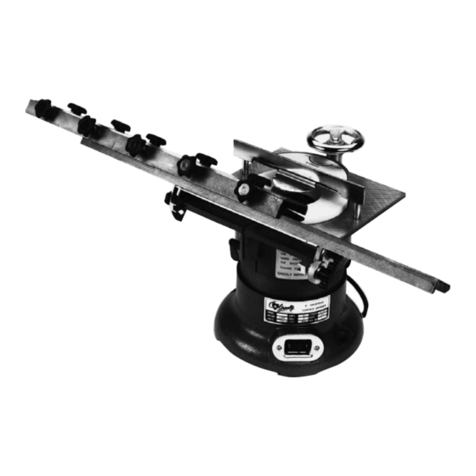
The Model D3978 Accu-Sharp®Grinding Jig works
with the tool rest table of your grinder to properly posi-
tion chisels and plane irons up to 2
3⁄4" wide, as shown
in Figure 1. The tool clamping jig uses a special
plastic rod and pads to slide the tool from side-to-side
across the auxiliary table and the grinding wheel.
If you need help with your new grinding jig, call
Woodstock Tech Support at: (360) 734-3482.
Figure 1. Using the Accu-Sharp Jig to grind the bevel
of a flat chisel.
Inventory
After removing the contents of the shipping package,
lay them out and refer to Figure 2 to inventory the
components.
Figure 2. Model D3978 inventory.
Mounting
Screws
Auxiliary
Table
Tool
Clamping
Jig
Installing Auxiliary Table
1. DISCONNECT GRINDER FROM POWER!
2. Remove the tool rest table from your grinder.
3. Center the jig auxiliary table over the grinder
table, then use a scratch awl through the three
mounting holes of the auxiliary table to mark the
grinder table (see Figure 3).
Note: Make sure that you position the tables so
that when the jig is mounted on the grinder, the
auxiliary table edge shown in Figure 3 is facing
the grinding wheel.
4. Use a center punch to indent these marks on the
grinder table, then drill 7⁄32" holes completely
through the table.
5. Insert the three included mounting screws from
underneath the grinder table, then loosely thread
them into the auxiliary table.
6. Square the auxiliary table with the grinding wheel
surface, then fully tighten the mounting screws.
Operation
Loosen the clamping screws shown in Figure 4, slide
the tool under the top bar and align its left side up
against the 90° stop pins to make it square with the
grinding wheel, then re-tighten the screws.
Figure 4. Clamping screws, washers, and stop pins.
90° Stop
Pins
Clamping
Screws &
Washers
The plastic washers of the clamping screws can be
arranged to accommodate various tool thicknesses
and to provide good thread bearing for the screws.
However, be sure the bottom of the screws do not
protrude beyond the bottom of the jig more than 1⁄8" to
avoid scratching the auxiliary table.
If your tool width is 1
1⁄8" or less, remove the right-hand
clamping screw and washers and thread it into the
middle hole to provide secure clamping.
Place the tool and jig on the auxiliary table, align
and lock the table in place, then slide the tool across
the rotating grinding wheel with light pressure (see
Figure 5).
Figure 5. Plane iron clamped in the jig.
Figure 3. The mounting holes of the jig auxiliary
table.
Mounting Holes
Auxilary Table Edge Faces Grinder