ENA-001-010 | ENA-MINI-010Installation Guide | Copyright © 2016 WyreStorm Technologies | wyrestorm.com
Contents
IMPORTANT! Safety Information ...................................................................................................................................... 2
Contents ........................................................................................................................................................................... 3
1Introduction................................................................................................................................................................... 4
Before Beginning .....................................................................................................................................................................................................4
2Product Overview .......................................................................................................................................................... 5
Key Features ............................................................................................................................................................................................................5
In the Box..................................................................................................................................................................................................................5
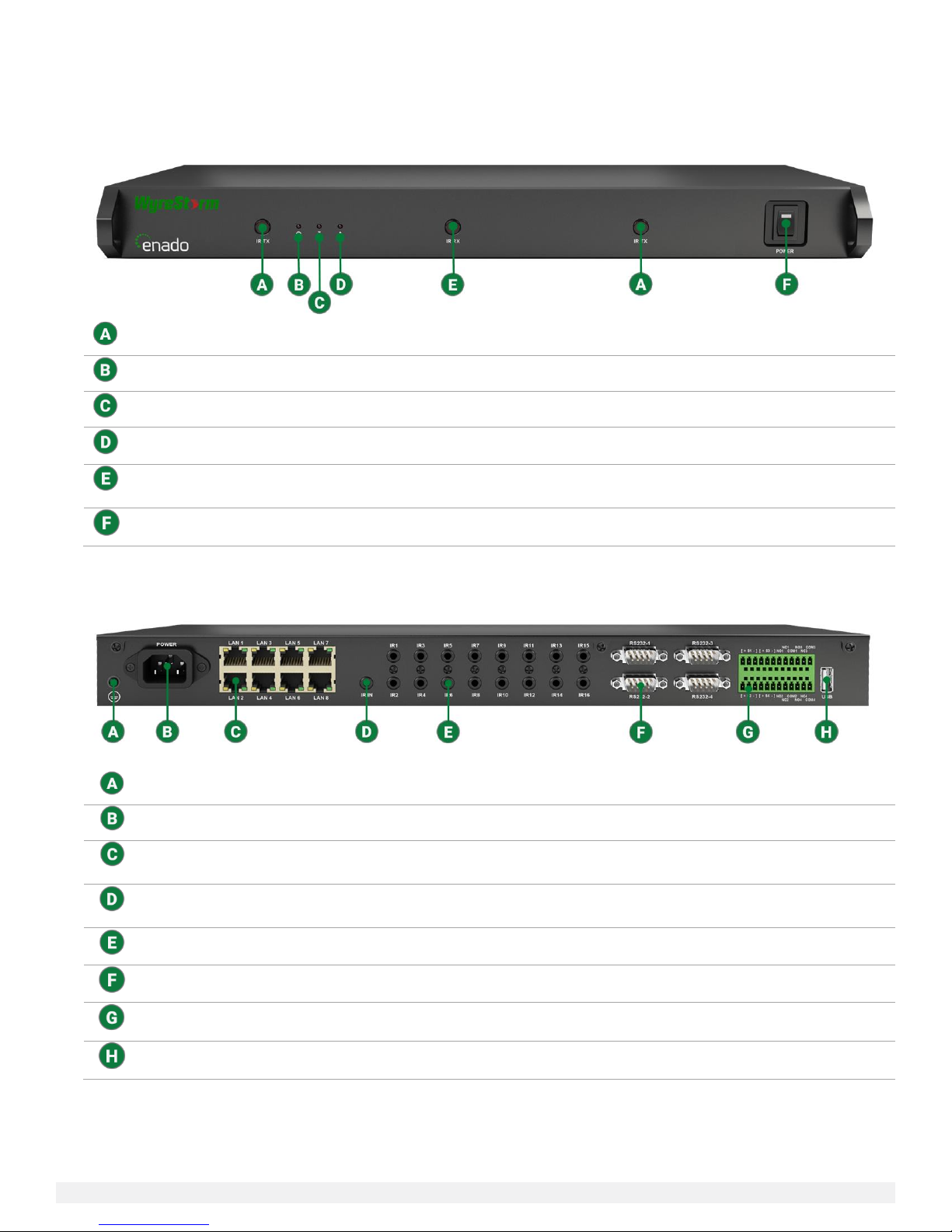
ENA-001-010 Enado Control Solution..................................................................................................................................................................6
ENA-MINI-010 Enado Mini IP Control Solution...................................................................................................................................................8
Specifications ..........................................................................................................................................................................................................9
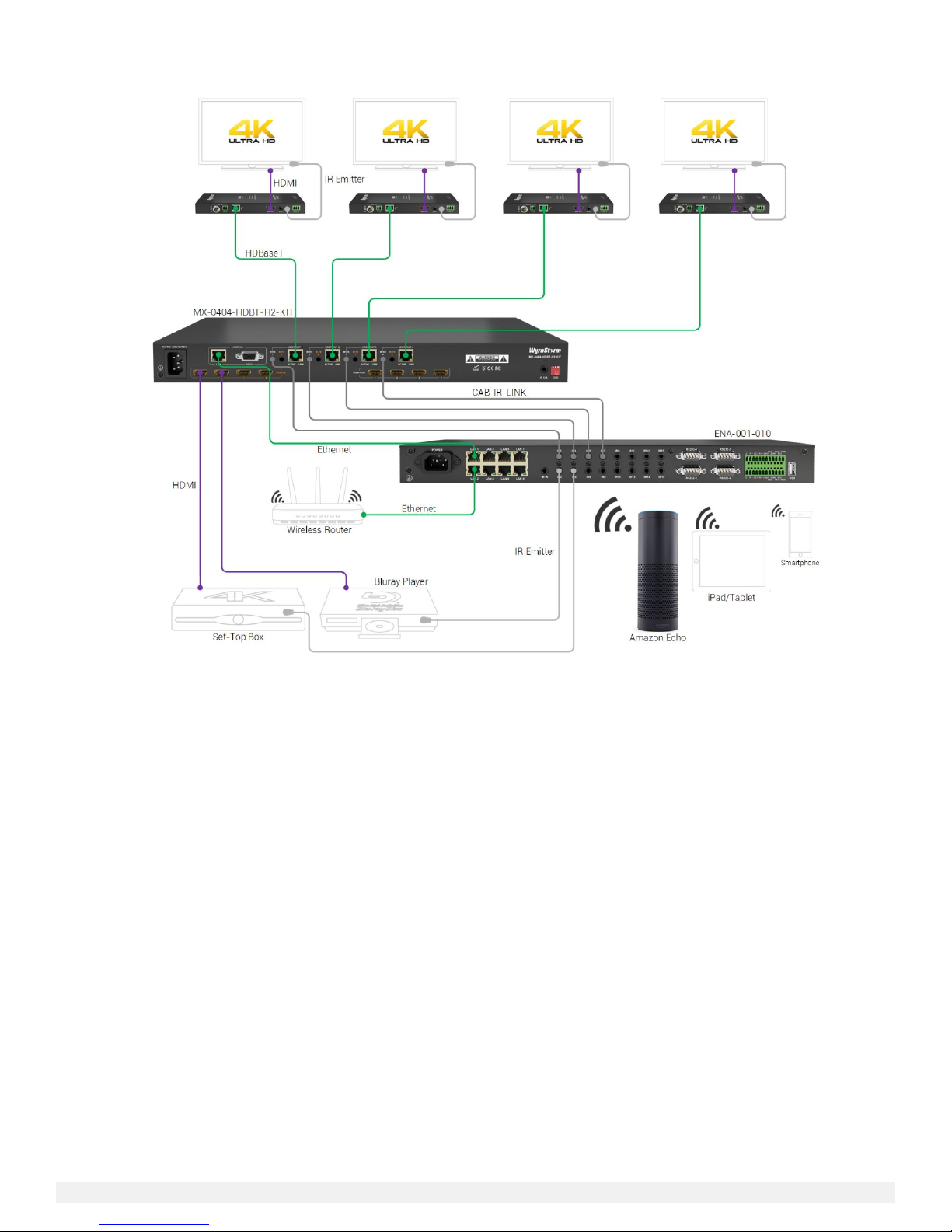
Typical Application..................................................................................................................................................................................................9
3Installation .................................................................................................................................................................. 12
Shelf Placement.....................................................................................................................................................................................................12
Rack Placement.....................................................................................................................................................................................................12
Wiring and Connections .......................................................................................................................................................................................12
4Configuration .............................................................................................................................................................. 14
Connection Steps ..................................................................................................................................................................................................14
Network Configuration .........................................................................................................................................................................................14
5Product Operation....................................................................................................................................................... 15
Accessing the Configuration UI...........................................................................................................................................................................15
Firmware Update...................................................................................................................................................................................................15
Network Settings...................................................................................................................................................................................................15
Help menu ..............................................................................................................................................................................................................15
Creating a Project..................................................................................................................................................................................................16
Adjusting I/O Ports................................................................................................................................................................................................16
Downloading & Importing Device Commands..................................................................................................................................................17
Creating Rooms & Activity Buttons ....................................................................................................................................................................20
Creating Activity Layouts .....................................................................................................................................................................................21
Button Groups........................................................................................................................................................................................................21
Adding Commands to Buttons............................................................................................................................................................................23
Assigning Activity Layouts & Ports.....................................................................................................................................................................26
Uploading Custom Icons......................................................................................................................................................................................26
Visual Theme .........................................................................................................................................................................................................26
QR Codes................................................................................................................................................................................................................27
Remote Access......................................................................................................................................................................................................27
Triggered Commands...........................................................................................................................................................................................28
Adding a Video Source .........................................................................................................................................................................................29
Publishing a Project ..............................................................................................................................................................................................30
Adjusting Controller Preferences........................................................................................................................................................................30
Project & Controller Backup.................................................................................................................................................................................30
6Troubleshooting.......................................................................................................................................................... 31
Unable to Locate Enado’s IP Address ................................................................................................................................................................31
Devices Aren’t Being Controlled ..........................................................................................................................................................................31
Testing Commands ..............................................................................................................................................................................................31
Activity Layouts Aren’t Publishing.......................................................................................................................................................................31
Cannot Gain Remote Access...............................................................................................................................................................................31
Custom Image Will Not Upload...........................................................................................................................................................................31
Contacting Technical Support.............................................................................................................................................................................31
7Warranty and Service .................................................................................................................................................. 32
Warranty Limits & Exclusions..............................................................................................................................................................................32
Obtaining Warranty Service .................................................................................................................................................................................32
Publication Disclaimer .................................................................................................................................................... 34