
XD XCLUSIVE Rena P301.13 Series User manual

Copyright© XD P302.42X
Rena
UV-C sterilizer box with
5W wireless charger
Copyright© XD P301.13X

Content
English p. 3
Deutsch p. 11
Español p. 19
Français p. 15
Italiano p. 23
Svenska p. 27
Nederlands p. 7
Polski p. 31
ENGLISH
SPECIFICATIONS:
• Type-C Input : 5V/1.5A
• Wireless Output : 5W
• UVC wavelength: 270nm-280nm
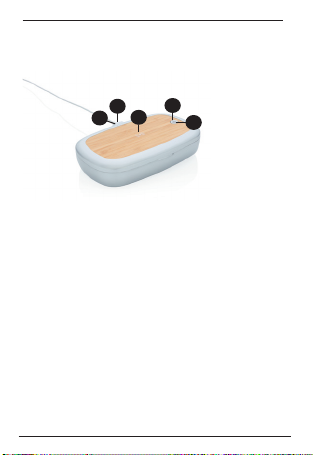
1. Type-C Input
2. Wireless Charging Output
3. Wireless Charger Indicator Light
4. On/O button
5. LED indicator
1. 2.
3. 4.
5.

HOW TO USE
1. Plug in the Type-C cable.
2. Open the Case and place your device inside of the case.
3. Make sure the case is closed
4. There are two sanitizing modes - fast mode and deep mode. Fast mode will
take 90s and deep mode will take 5mins (300s).
- Fast sanitizing mode: Press the power button one time , the blue light on top
cover will light up, the UVC LED inside the box will light up for 90 seconds. The
blue light will flash 3times when sanitizing finished and light will turn o.
- Deep sanitizing mode: Press the power button two times , the green light on
top cover will light up, the UVC LED inside the box will light up for 5minutes. The
green light will flash 3times when sanitizing finished and light will turn o.
5. Flip your device and repeat above steps to sanitize both sides.
LED indicator
Blue light - Fast sanitizing mode
Green light - Deep Sanitizing mode
Fast Sanitizing
Solid Blue - In the progress of Sanitize.
Flashing Blue (3 seconds) - Sanitize Finished.
Turn O - Sanitize Turn o
Deep Sanitizing
Solid Green - In the progress of Sanitize.
Flashing Green (3 seconds) - Sanitize Finished.
Turn O - Sanitize Turn o
Safety sensor & Protection
Built-in magnet sensor to protect user from UVC light.
The product CANNOT be powered on when the cover is not closed.
When you open the case in the progress of sanitizing , Sanitizing will be stopped
immediately. You need to close the lid then manually press the button to restart
the sanitizing from beginning.

HOW TO USE THE WIRELESS CHARGER
Connect the provided Type-C to USB cable to a power source and to the
Type-C port on the UV Phone Sterilizer. The LED indicator will glow RED
when device is connected. Once connected, place the wireless charging
supported device on the charging surface, the LED indicator will glow BLUE
when device is charging.
The device will begin to wireless charge automatically.
Note:
When wireless charging, if the LED indicator flashes BLUE/RED the device
is either NOT a wireless charging device or there is an object between the
device and charging surface interfering with the charging
Wirless charging Light Table
Solid red - Pending
Solid blue - Charging

WARNING!
• This product is provided with a safety mechanism to reduce the risk of
exposure to ultraviolet radiation. Do not defeat its purpose.
• Do not attempt to look directly at the UVC LEDS while the unit is on. UV light
can be irritating to the eyes and skin.
• Do not attempt to modify this product. It has been designed to contain
UV exposure.
• Do not vigorously shake, hit or throw the product.
• Some phone cases may block the wireless charging
• Do not place other materials, like metal objects, magnets, and magnetic stripe
cards, between the mobile device and the wireless charger pad.
• Check your mobile device’s battery percentage using the charging icon
displayed on the screen of your phone.
• When the mobile device is not placed on the charging surface accurately, your
mobile device may not charge properly.
• Please do not expose this device to moisture or heat sources
• This is not a toy, not suitable for children under the age of 7
• Only use included or certified accessories ( cables, chargers) to use the item.
Unsafe cables or chargers can influence the safety of the item.
NEDERLANDS
SPECIFICATIES:
• Type-C ingang: 5V/1.5A
• Draadloos opladen uitgang: 5W
• UVC golflengte: 270nm-280nm
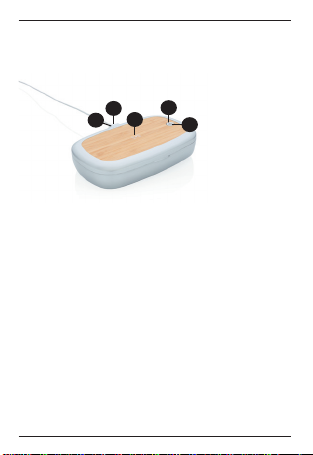
1. Type-C ingang
2. Draadloos opladen oppervlak
3. Draadloos opladen indicator
4. Aan/uit-knop
5. LED indicator
POWERBANKSPECIFICATIES:
1. 2.
3. 4.
5.

HOE TE GEBRUIKEN
1. Steek de meegeleverde Type-C kabel in het stopcontact. De USB-connector
gaat naar uw lader en de Type-C gaat naar het item.
2. Open de box er plaats uw mobiele apparaat.
3. Zorg dat de box gesloten is.
4. Er zijn twee manieren van ontsmetten: snelle modus en diepe modus.
De snelle modus duurt 90 seconden en de diepe modus duurt 300
seconden.
- Snelle ontsmettingsmodus: Druk eenmaal op de aan/uit knop. De LED
indicator blauw oplichten en het UV-C licht aan de binnenkant van de box
zal 90 seconden branden. De blauwe LED indicator zal 3 maal knipperen
wanneer het ontsmetten voltooid is en zal vervolgens uit gaan.
- Diepe ontsmettingsmodus: Druk tweemaal op de aan/uit knop. De LED
indicator zal groen oplichten en het UV-C licht aan de binnenkant van de
box zal 300 seconden branden. De groene LED indicator zal 3 maal
knipperen wanneer het ontsmetten voltooid is er vervolgens uit gaan.
5. Draai het mobiele apparaat en herhaal bovenstaande stappen om beide
kanten van het apparaat te ontsmetten.
LED indicator
Blauw licht - Snelle ontsmettingsmodus
Groen licht - Diepe ontsmettingsmodus
Snelle ontsmettingsmodus
Constant blauw - Ontsmetting bezig
Knipperend blauw - Ontsmetting voltooid
Diepe ontsmettinsmodus
Constant groen - Ontsmetting bezig
Knipperend groen - Ontsmetting voltooid
Veiligheidssensor & bescherming
De box bevat een ingebouwde magnetische sensor om te beschermen tegen
UV-C licht. Het item werkt NIET wanneer de box geopend is. Wanneer tijdens
het ontsmetten de box wordt geopend, zal het ontrsmetten direct onderbroken
worden. Sluit de box en volg de stappen om het ontsmetten opnieuw te starten.

DE DRAADLOZE OPLADER GEBRUIKEN
Steek de meegeleverder Type-C kabel in de Type-C poort van de box en
steek het andere uiteinde van de kabel in de lader in het stopcontact.
De draadloos opladen indicator zal ROOD branden wanneer het apparaat
klaar is om draadloos op te laden. Leg het mobiele apparaat op het
oppervlak voor draadloos opladen. De draadloos opladen indicator zal blauw
oplichten wanneer het het mobiele apparaat verbonden is. Het mobiele
apparaat zal dan automatisch beginnen met draadloos opladen.
Note:
Wanneer de draadloos opladen indicator rood/blauw knippert is het mobiele
apparaat niet geschikt voor draadloos opladen of is er iets tussen het
mobiele apparaat en het oppervlak voor draadloos opladen geplaats wat
draadloos oplkaden verhindert.
Draadloos opladen indicator
Constant rood - Klaar om mobiel apparaat draadloos op te laden
Constant blauw - Mobiele apparaat wordt draadloos opgeladen.

WAARSCHUWING!
• Dit apparaat is voorzien van een veiligheidsmechanisme dat het risico op
blootstelling aan ultraviolet straling verkleind. Verniel dit mechanisme niet.
• Probeer niet direct in het UV-C licht te kijken wanneer het apparaat in werking
is. UV-C licht kan irritatie veroorzaken aan ogen en huid.
• Probeer de werking van dit apparaat niet aan te passen.
• Schud, sla of gooi het product niet.
• Sommige telefoonhoesjes kunnen draadloos opladen blokkeren.
• Plaats geen andere materialen, zoals metalen objecten, magneten en passen
met magnetische strip, tussen het mobiele apparaat en het laadstation.
• Controleer het batterijniveau van uw telefoon via het oplaadicoon op het
beeldscherm van uw telefoon.
• Als het mobiele apparaat niet correct op het oppervlak voor draadloos
opladen is gelegd, kan uw telefoon niet goed worden opgeladen.
• Houd dit apparaat uit de buurt van vocht en warmtebronnen
• Dit is geen speelgoed, niet geschikt voor kinderen jonger dan 7 jaar.
• Gebruik alleen meegeleverde of gecertificeerde accessoires (kabels, oplader).
Onveilige kabels of opladers kunnen de veiligheid van het item beïnvloeden.
This manual suits for next models
1
Table of contents
Languages:
Popular Laboratory Equipment manuals by other brands







Agilent Technologies
Agilent Technologies 5800 ICP-OES user guide

Endress+Hauser
Endress+Hauser Cleanfit CPA875 operating instructions

NI
NI PXI-5422 CALIBRATION PROCEDURE

Collomix
Collomix Aqix operating instructions

SPEX SamplePrep
SPEX SamplePrep 6875 Freezer/Mill Series operating manual

Ocean Insight
Ocean Insight FLAME-NIR+ Installation and operation manual

Parker
Parker ALIGN-MG-NA Installation, operation and maintenance manual

BD
BD 644787 user guide

DENTAURUM
DENTAURUM Compact Megaplus Instructions for use

Biuged Laboratory Instruments
Biuged Laboratory Instruments BGD 626 instruction manual

VWR
VWR SAS Super IAQ instruction manual

illumina
illumina MiSeqDx reference guide