Xtant BLM-1 User manual

MOUNTING PORT
RIGHT ANGLE
HEADER CONNECTOR
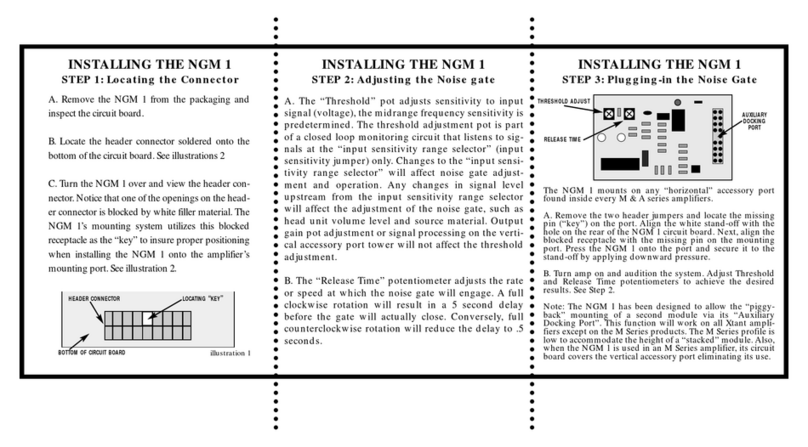
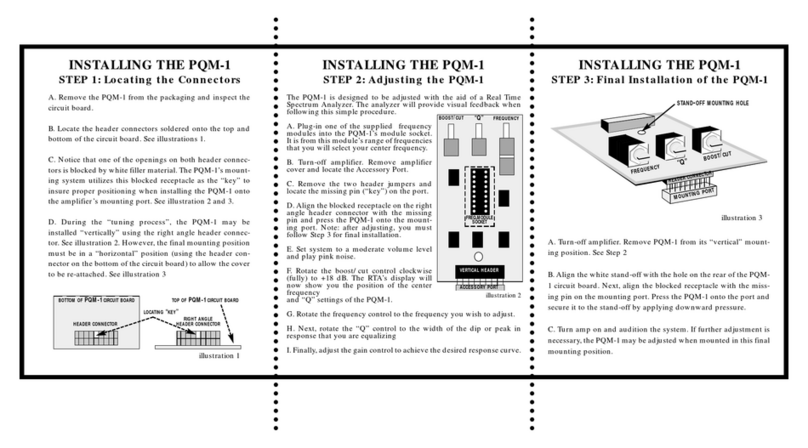
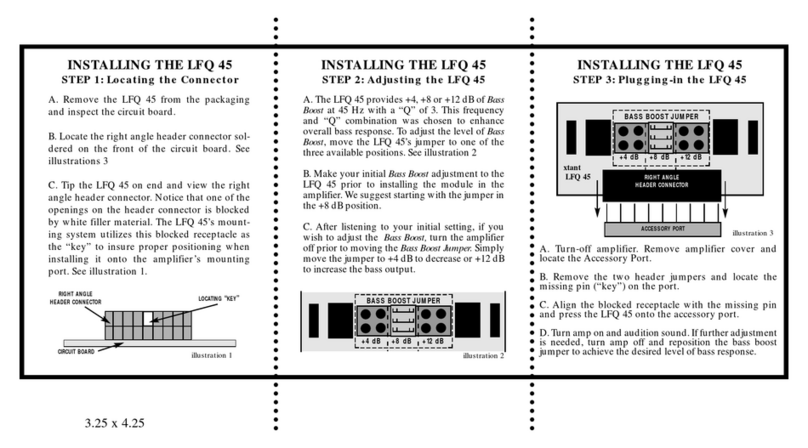
INSTALLING THE BLM-1
STEP 1: Locating the Connector INSTALLING THE BLM-1
STEP 2: Adjusting the BLM-1 INSTALLING THE BLM-1
STEP 3: Plugging-in the BLM-1
A. Turn-off amplifier. Remove amplifier cover and
locate the Balanced Line Port.
B. Remove the two header jumpers and locate the
missing pin (“key”) on the port.
C.Align the blocked receptacle with the missing pin
and press the BLM-1 onto the mounting port.
D. Turn amp on and audition input signal level. If
further adjustment is necessary, turn amp off and
reposition the input gain jumper to achieve the
desired input signal level.
A. Remove the BLM-1 from the packaging and
inspect the circuit board.
B. Locate the right angle header connector sol-
dered on the circuit board next to the Xtant logo.
See illustrations 2
C. Tip the BLM-1 on end and view the right angle
header connector. Notice that one of the openings
on the header connector is blocked by white filler
material. The BLM-1’s mounting system utilizes
this blocked receptacle as the “key” to insure
proper positioning when installing the BLM-1
onto the amplifier’s mounting port. See illustra-
tion 1.
A. It is easier to make your initial input sensitivi-
ty adjustment to the BLM-1 prior to installing the
module in the amplifier. Please note that the
BLM-1 bypasses the input adjustment on your
Xtant amplifier. Once installed, all input sensitiv-
ity adjustments must be made on the BLM-1.
B. Each of the five jumper positions (-20, -10, 0,
+10, +20) will affect the level of the input signal.
Refer to the chart below to determine the jumper
position which best suits your system. See illus-
tration 2
Setting Input Multiplier Result
–20 dB x .10 reduces signal
–10 dB x .3 reduces signal
0 dB x 1 no change
+10 dB x 3 boost signal
+20 dB x 10 boost signal
HOW TO USE THE INPUT MULTIPLIER
Head Unit’s Output Voltage 500 mV
+10 dB Multiplier x 3
Resulting Input Voltage 1.5 Volts
C. Locate the input gain jumper which is preset to
the +10 position. To change the input sensitivity,
simply remove the jumper and place it one of the
other four positions (-20, -10, 0, +20 dB).
xtant
BLM-1
RIGHT ANGLE
HEADER CONNECTOR LOCATING “KEY”
CIRCUIT BOARD
–20 –10 0 +10 +20
illustration 2
illustration 1
INPUT GAIN JUMPER

BLM-1 APPLICATIONS
The BLM-1 was designed for two different
types of applications. First, to eliminate
“ground loops” or inducted noises which
enter the amplifier through the input signal
cables.
Secondly, to provide a superior OEM interface.
The BLM-1 will accept speaker level signals
from any head unit or low powered amplifier
(up to 50 Watts) without adapters. In this
application, we suggest starting in the -20
position.
Application Chart
MODEL INPUTS BLM-1’SREQUIRED
2140c 2 channels 1
3150c 2 channels 2
3150c 4 channels 2
303x 2 channels 2
303x 4 channels 2
3300c 2 channels 2
3300c 4 channels 2
603x 2 channels 2
603x 4 channels 2
4180c 2 channels 2
4180c 4 channels 2
1001d 2 channels 1
1001dx 2 channels 1
FOUR - YEAR LIMITED U.S.A. WARRANTY
This warranty gives you specific legal rights, and you may also have other rights which vary from
state to state. Xtant Technologies (Xtant) warrants its amplifiers and accessories to be free from defects
in materials and workmanship under normal use and service for a period of four (4) years from the
date of original purchase when the unit is installed by an Authorized Xtant Select Dealer. Non-
Authorized Dealer installed products carry a one (1) year parts and labor limited warranty. The extent
and conditions of Xtant’s Limited Warranty are as follows:
1. Authorized Xtant Select Dealer Installed Products: Xtant will either repair or replace at no charge,
to the original purchaser, any unit which Xtant’s examination discloses to be defective and under war-
ranty, provided the defect occurs within four (4) years from the date of purchase when the unit is
installed by an Authorized Xtant Select Dealer and the product is returned immediately to Xtant. This
warranty is not transferable.
2. Non-Authorized Xtant Dealer Installed Products: Xtant will either repair or replace at no charge, to
the original purchaser, any unit which Xtant’s examination discloses to be defective and under war-
ranty, provided the defect occurs within one (1) year from the date of purchase and the product is
returned immediately to Xtant. This warranty is not transferable.
3. The date of purchase and proof of Authorized Dealer Installation of an Xtant amplifier and/or
accessory must be established by an original (or copy of the original) sales receipt which must accom-
pany the article being returned for warranty work.
4. This warranty shall NOT apply to any Xtant unit found to have the original factory serial number
removed or defaced. All products received (by Xtant) for in warranty or out of warranty repair, with
their original serial numbers removed or defaced, will NOT be repaired and will be returned to
sender, freight collect.
5. The provisions of this warranty shall not apply to any Xtant unit used for a purpose for which it is
not designed, which has been repaired or altered in any way, or which has been connected, installed,
or adjusted other than in accordance with the instructions furnished in Xtant’s owner’s manual. Nor
shall this warranty apply to any part which has been subject to misuse, neglect, or accident.
6. Xtant does not authorize any other persons to assume any other liability in connection with its prod-
ucts. This warranty is the only express warranty made by Xtant applicable to its products. Any
implied warranty or merchantability or fitness for a particular purpose applicable to Xtant’s ampli-
fiers and or accessories is limited in duration to the duration of this limited warranty. Xtant shall not
be liable for the incidental, consequential, or commercial damages resulting from the breach of this
written warranty. Some states or provinces do not allow the exclusion or limitation of incidental or
consequential damages or limitations on how long an implied warranty lasts; so the above limitations
or exclusions may not apply to you.
7. Your unit will be serviced on an in-warranty basis within the warranty period for the correction of
warranted defects. If improper operation of your Xtant product should occur, contact your Authorized
Xtant Select Dealer for assistance with the return and factory repair of your Xtant product. If an
Authorized Xtant Select Dealer is not available, please contact Xtant’s Customer Relations
Department at (602) 970 9900 from 8:00 am to 5:00 pm (MST) for assistance. Xtant Technologies • 7676 South 46th Street • Phoenix, Arizona 85040
Other Xtant Amplifier manuals