
3B SCIENTIFIC N180 User manual
3B SCIENTIFIC®PHYSICS
1
Trinocular Microscope Model N180 1013150
Instruction Manual
07/13 ALF
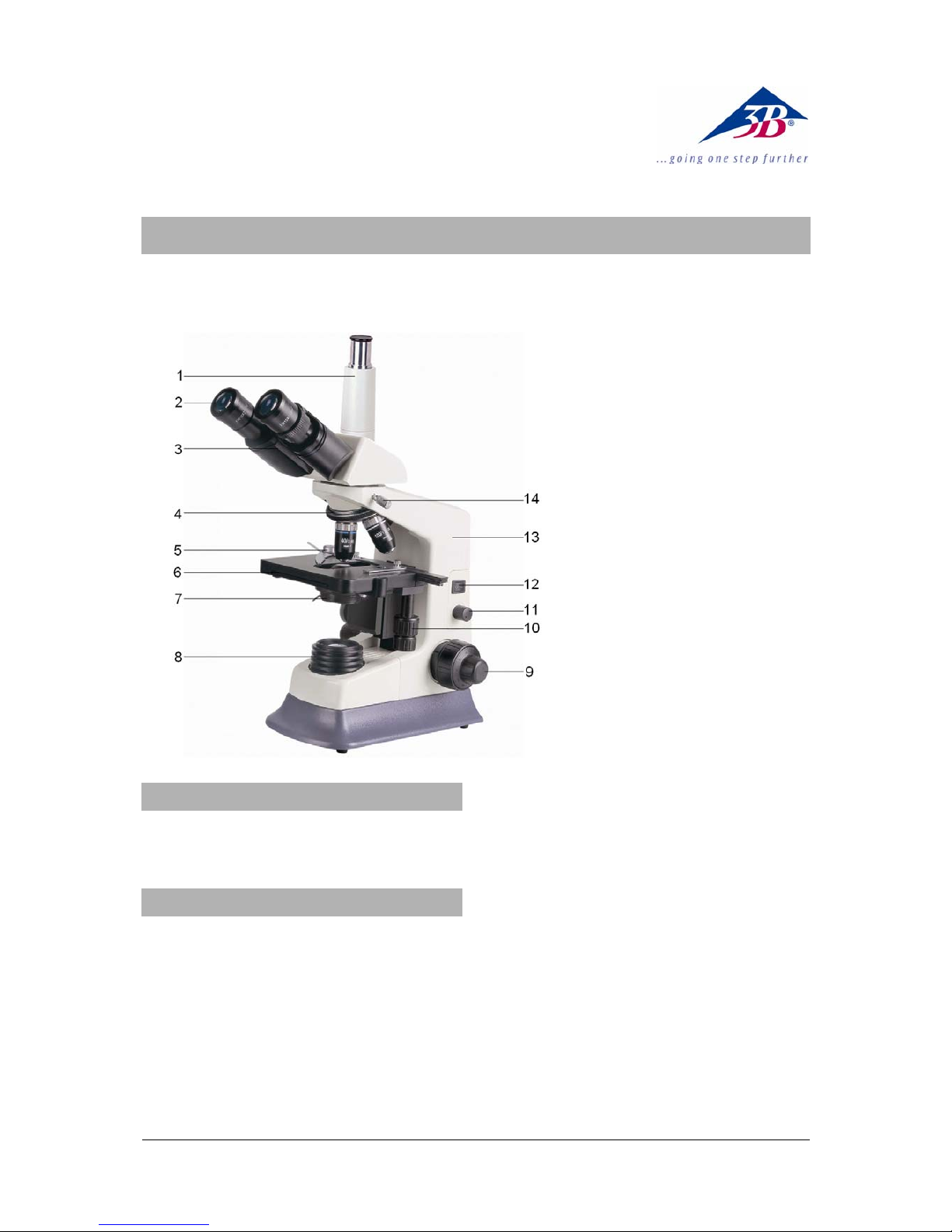
1 Vertical tube
2 Eyepiece
3 Binocular ube
4 Revolver with objectives
5 Object guide
6 Object stage
7 Condensor with iris diaphragm
and filter holder
8 Lamp housing
9 Coarse and fine movement con-
trols with holding brake
10 Coaxial movement control for the
object stage
11 Illumination control
12 Mains switch
13 Stand
14 Head lock screw
1. Safety notes
•For power supply use only electrical sockets
with ground contact.
2. Description, technical data
The microscope model N180 allows two-
dimensional viewing of objects (thin sections of
plant or animal specimen) in 40x to 1000x mag-
nification and a eyepiece camera (e.g. 1003259,
1013379 and 1013380) to be attached for
documenting work in the form of photographs
and videos.
Stand: Robust, all metal stand with arm perma-
nently connected to the base. Focussing by
means of separate knobs for coarse and fine
adjustment located on either side of the stand
Tube: Trinocular Siedentopf head, 360° ro-
tatable, binocular tubus with 30° viewing angle,
viewing distance adjustable between 55 and 75
mm, ±5 dioptric compensation, one tube with
vertical viewing angle to attach a camera
Eyepiece: Pair of extra wide field eyepieces EW
10x 20 mm
Objectives: Inverted objective revolver with 4
semi plan achromatic objectives 4x / 0.10, 10x /
0.25, 40x / 0.65, 100x / 1.25 (oil)
Magnification: 40x, 100x, 400x, 1000x
Object stage: x-y mechanical stage, 140 mm x
140 mm, with object guide and coaxial adjust-
ment knobs perpendicular to the object stage,
adjustment range 75 mm x 50 mm
Illumination: Adjustable LED lighting integrated
in base, universal 100 to 240 V, 50/60 Hz power
supply

2
Condenser: Abbe condenser N.A.1.25 NA 0.65
with iris diaphragm, filter holder and blue filter
Dimensions: 291 x 214 x 415 mm³ approx.
Weight: 7.2 kg approx.
3. Unpacking and assembly
The microscope is packed in a molded styro-
foam container.
•Take the container out of the carton remove
the tape and carefully lift the top half off the
container. Be careful not to let the optical
items (objectives and eyepieces) drop down.
•To avoid condensation on the optical com-
ponents, leave the microscope in the original
packing to allow it to adjust to room tem-
perature.
•Using both hands (one around the pillar and
one around the base), lift the microscope
from the container and put it on a stable
desk.
•The objectives will be found within individual
protective vials. Install the objectives into the
microscope nosepiece from the lowest
magnification to the highest, in a clockwise
direction from the rear.
•Put the head onto the top of the stand and
tighten the head-lock-screw. Insert the eye-
pieces into the tube.
4. Operation
4.1 General information
•Set the microscope on a level table.
•Place the object to be observed in the centre
of the specimen stage and clamp it to the
object guide.
•Connect the mains cable to the net and turn
on the switch to get the object illuminated.
•Make certain that the specimen is centered
over the opening in the stage.
•Adjust the interpupillary distance so that one
circle of light can be seen.
•Make the necessary eyepiece dioptre ad-
justments to suit your eyes.
•To obtain a high contrast, adjust the back-
ground illumination by means of the iris dia-
phragm and the variable illumination control.
•Rotate the nosepiece until the objective with
the lowest magnification is pointed at the
specimen. There is a definite “click” when
each objective is lined up properly.
NOTE: It is best to begin with the lowest power
objective. This is important to reveal general
structural details with the largest field of view
first. Than you may increase the magnification
as needed to reveal small details. When 100x
(oil) objective is chosen, objective oil must be
dripped onto the slide.
To determine the magnification at which you are
viewing a specimen, multiply the power of the
eyepiece by the power of the objective.
•Adjust the holding brake to give a suitable
degree of tightness in the focusing mecha-
nism.
•Adjust the coarse-focusing-knob which
moves the stage up until the specimen is fo-
cused. Be careful that the objective does not
make contact with the slide at any time. This
may cause damage to the objective and/or
crack your slide.
•Adjust the fine-focusing-knob to get the im-
age more sharp and more clear.
•Colour filters may be inserted into the filter
holder for definition of specimen parts.
Swing the filter holder out and insert colour
filters.
•Use the knobs of the mechanical stage to
move the slide side-, back- and forwards.
The vernier provides accurate location of the
specimen area.
•Always turn off the light immediately after
use.
•Be careful not to spill any liquids on the mi-
croscope.
•Do not mishandle or impose unnecessary
force on the microscope.
•Do not wipe the optics with your hands.
•Do not attempt to service the microscope
yourself.
4.2 Changing the fuse
•Turn off the power switch and unplug the
mains plug.
•Unscrew the fuse holder on the back of the
stand base with a screwdriver.
•Replace the fuse and reinsert the holder in
its socket.
5. Storage, cleaning and disposal
•Keep the microscope in a clean, dry and
dust free place.
•When not in use always cover the micro-
scope with the dust cover.
•Do not expose it to temperatures below 0°C
and above 40°C and a max. relative humid-
ity of over 85%.
•Always unplug the mains plug before clean-
ing or maintenance.

3B Scientific GmbH • Rudorffweg 8 • 21031 Hamburg • Germany • www.3bscientific.com
Subject to technical amendments
© Copyright 2013 3B Scientific GmbH
•Do not clean the unit with volatile solvents or
abrasive cleaners.
•Do not disassemble objective or eyepieces
to attempt to clean them.
•Use a soft linen cloth and some ethanol to
clean the microscope.
•Use a soft lens tissue to clean the optics.
•The packaging should be disposed of at
local recycling points.
•Should you need to
dispose of the equip-
ment itself, never throw
it away in normal do-
mestic waste. Local
regulations for the dis-
posal of electrical
equipment will apply.

Other 3B SCIENTIFIC Microscope manuals


Popular Microscope manuals by other brands





VWR
VWR VisiScope 384 Series instruction manual
Nikon
Nikon ECLIPSE E200 POL instructions
Leica
Leica DI C800 User's manual & installation instructions
ThermoFisher Scientific
ThermoFisher Scientific Continuµm manual
ThermoFisher Scientific
ThermoFisher Scientific Continuµm manual
Olympus
Olympus SZ61 instructions