
3nStar T702 User manual

3nStar, Inc. Get connected to the change…!!!
1
Model: T702
USER MANUAL

3nStar, Inc. Get connected to the change…!!!
2
Thank you for choosing 3nStar StarTab.
This user manual has been specially designed to guide you through the
functions and features of your device.
•Please read this manual carefully before using your device to ensure
safe and correct use.
•The descriptions in this manual are based on the default settings of
your device.
•Please keep this manual for future reference.

3nStar, Inc. Get connected to the change…!!!
3
Catalog
Chapter 1: Overview
1.1
Appearance (Standard PC Tablet )
1.2
Buttons
1.3
Open and shut down
1.4
Open and shut down standby mode
1.5
Lock and unlock the screen
1.6
Homepage information column
1.7
Text input
1.8
Reset
1.9
USB Connect
1.10
Accessories
Chapter 2: Internet
2.1
Browser
Chapter 3: Applications
3.1
Camera
3.2
Gallery
3.3
Video
3.4
Music
3.5
Calendar
3.6
Calculator
3.7
Explorer
3.8
APK Installer
3.9
E-mail
3.10
Downloads
3.11
Sound recorder
3.12
Clock
Chapter 4: System setting
4.1
Wireless networks setting
4.2
Sound setting
4.3
Display setting
4.4
Application setting
4.5
Date & Time setting
4.6
Language and input setting
Chapter 5: Safety & Handling

3nStar, Inc. Get connected to the change…!!!
4
Chapter 1: Overview
1.1 Appearance.
Standard PC Tablet
1.2 Buttons
Power button
Long press the power button 2-3 seconds to open the screen
When open the tablet, short press this button to enter the off-screen state and short
press again to light up the screen
Volume
Press Volume+/- to adjust the volume
1.3 Open and shut down
Open
Long press the power button (see the appearance) 2-3 seconds, pictures will show
up until to the interface
Shut down
Long press the power button, then the screen shows would you like to shut down,
press sure to shut down
In charging state, when the tablet is off, press the power button, it will shows
charging feature, once again to click power button, the tablet will be opened.
1.4 Open and close standby mode
Open the standby mode
In boot mode, you can tap the power button, the system will into the standby mode
which can save power
Close the standby mode
In the standby mode, light tap of the power button of the device, enter the normal
state
1.5 Lock and unlock the screen
Lock
You can set the sleep time in the system of display
The system will sleep automatically and lock the screen to the standby mode if
without any inactivity when reaches the preset of standby time.

3nStar, Inc. Get connected to the change…!!!
5
Unlock
Move the sign to unlock, show as below
Drag this to unlock the screen and enter the application interface
Add items to the home screen
Tap the icon at the upper right to access the application list shown below from home
screen.

3nStar, Inc. Get connected to the change…!!!
6
Scroll left or right to view more items.
To add items to the home screen, tap and hold an item, then drag the item to a new
location.
To remove items from the home screen, tap and hold an item, then drag the item to the
Remove area at the top of the home screen.
1.6 Homepage information columns
1.7 text input
When use the tablet, you can use the virtual keyboard to enter text, number,
symbols directly by touching screen. After selecting the Android input method, the
default keyboard show as below:
To switch the numbers and letters, please press this

3nStar, Inc. Get connected to the change…!!!
7
To switch the capital and lowercase letter, please press
1.8 Reset
Press the reset button on the right side of the device, then you device will restart and reset
1.9 USB connect
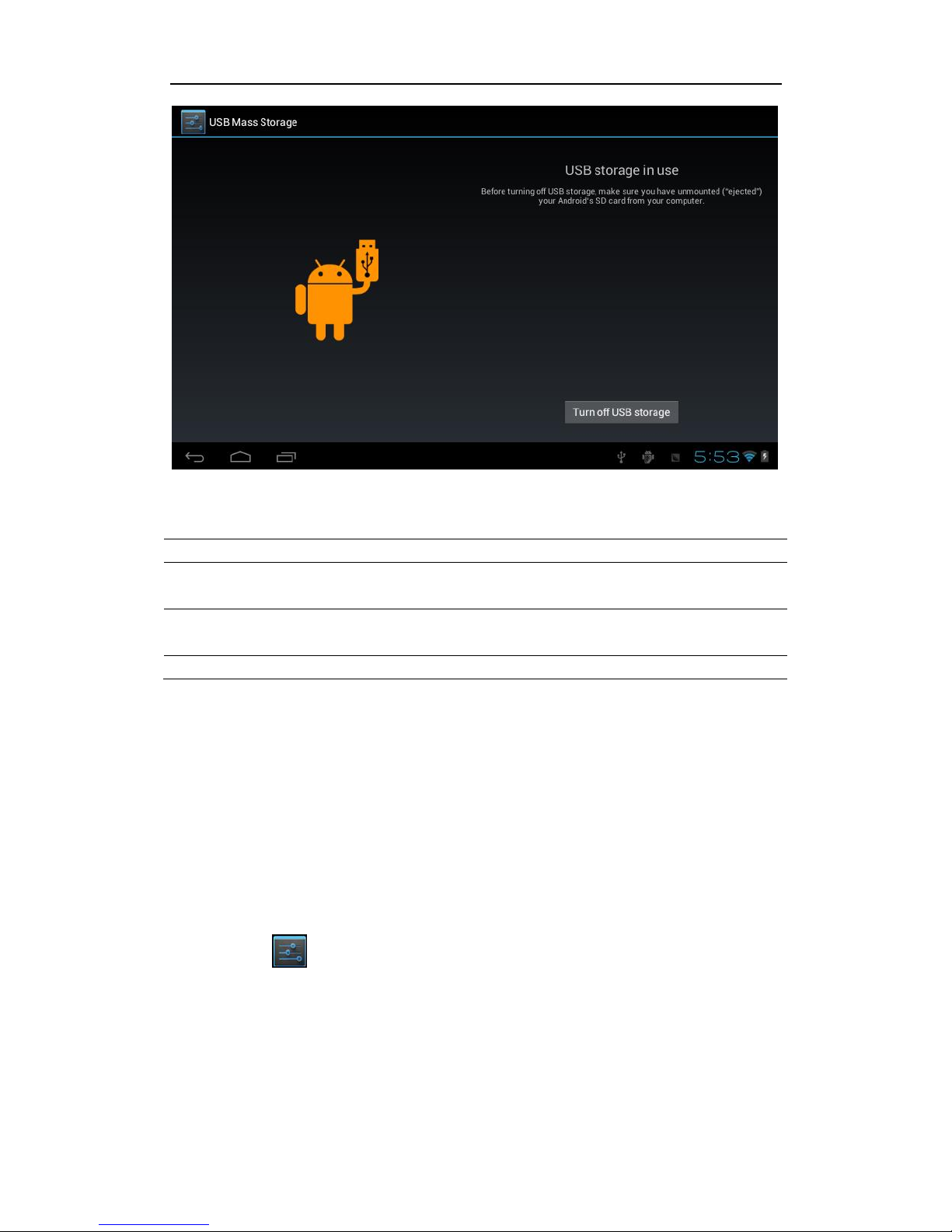
Please connect PC with in-box USB cable for your tablet and you will see on
your tablet, click this sign and turn on USB storage to connect your device
Turn off USB storage to disconnect your device with PC
3nStar, Inc. Get connected to the change…!!!
8
1.9 Accessories
Item
What you can do with it
Power Adapter
Use power adapter to provide power and
charge the battery
USB Cable
Use USB cable to connect device with USB
device
User manual
Guide your use
Chapter 2: Internet
2.1 Browser
Require network support before using a web browser, if there are network
supporting problems, please contact your network operator or the service provider.
Tablet’s web browser can connect to the Internet via WIFI to satisfy your business
and individual network needs
Please touch to set up the WIFI so that can use the browser normally. See as
picture:

3nStar, Inc. Get connected to the change…!!!
9
Touch here in the application list to enter the browser pages; the default
homepage is the Recently Viewed showing recently viewed pages.
Browser supports the following features
Enter the URL-touch the input area to get the soft keyboard, then text the UPL.
Bookmark search—click this to add into the bookmark
Touch this to read the favorite website that collected

3nStar, Inc. Get connected to the change…!!!
10
Touch this to search the internet
Touch this to add new browser
Touch this to close the browser
Chapter 3: Application
3.1 Camera
With the camera function, you can capture photos and take videos.
Capture a photo
1. Open the application list and select Camera.
2. Before taking a picture, you need to make some adjustments.
Place two fingers on the screen and spread them apart or move fingerscloser together
to zoom in or zoom out.
Icon
Definition
Tap to switch between the front and rear camera lenses
Change the resolution option or set storage location.
Change to video mode.
Change to panorama mode to take a landscape photo.
Adjust the color balance.
Adjust the exposure value.
Table of contents
Other 3nStar Tablet manuals


Popular Tablet manuals by other brands

Laser
Laser MID-1060 Quick operation guide

MUNBYN
MUNBYN IRT09J Easy setup guide

Motorola
Motorola MC3090R - Win CE 5.0 Professional 520 MHz quick start guide

Dell
Dell Latitude ST Setup and features information

Lenovo
Lenovo IdeaTab S6000L Hardware Maintenance Manual

Venturer
Venturer WT9L11 quick start guide











