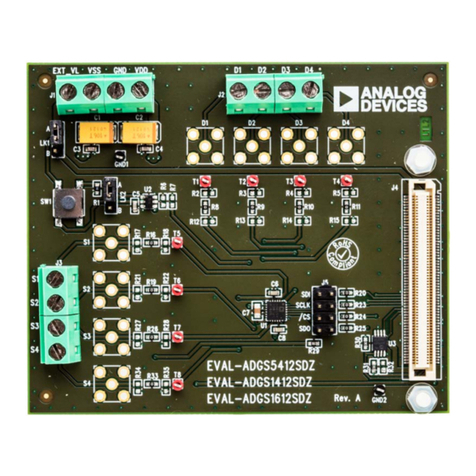
EVAL-ADFS5758SDZ User Guide UG-1688
Rev. 0 | Page 3 of 20
EVALUATION BOARD HARDWARE
POWER SUPPLIES
The EVAL-ADFS5758SDZ evaluation board contains the
ADP1031-1 power management unit (PMU), which generates
three of four power supply inputs required by the ADFS5758:
AVDD1 (+26.7 V), AVDD2 (+5.15 V), and AVSS (−15.4 V) device.
VLOGIC is the fourth power supply required by the ADFS5758.
The JP11 link provides the 3.3 V supply to the VLOGIC input via
the VLDO output of the ADFS5758. The AVDD2 input can be
connected to the AVDD1 input via the JP12 link if the VOUT2
supply from the ADP1031-1 is not in use. See Table 1 for link
options and the default link positions.
The EVAL-ADFS5758SDZ evaluation board operates with a
power supply range from −33 V on AVSS to +33 V on AVDD1,
with a maximum voltage of 60 V between the two rails. AVDD2
requires a voltage between 5 V and 33 V. The VDPC+ pin of the
ADFS5758 can be driven by AVDD1 via the JP6 link. The JP6 link
bypasses the dc-to-dc circuitry.
SERIAL COMMUNICATION
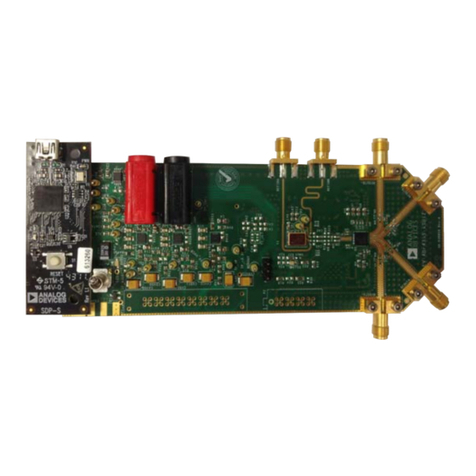
The SDP-S system demonstration platform handles commu-
nication to the EVAL-ADFS5758SDZ via the PC. By default, the
SDP-S board handles the serial port interface (SPI) commu-
nication, controls the RESET and LDAC pins, and monitors the
FAULT pin of the ADFS5758.
The EVAL-ADFS5758SDZ evaluation board can disconnect
from the SDP-S board and drive the digital signals from an
external source by removing the appropriate links on the P10
link. The option to tie the RESET and LDAC pins to high or low
levels can be accessed through the S2 switch and JP4 link.
ADFS5758 REFERENCE
The ADFS5758 can use its internal reference or an external
reference. The external reference on board is the ADR4525 and
is powered by either the AVDD2 generated from ADP1031-1 or
the VLDO generated by the ADFS5758. JP5 selects which voltage
reference is to be used by the ADFS5758.
ADFS5758 ADDRESS PINS
The ADFS5758 address pins (AD0 and AD1) are used in
conjunction with the ADFS5758 address bits within the SPI
frame to determine which ADFS5758 device is being addressed
by the system controller. AD0 and AD1 can be configured
through JP7 and JP8.
ADP1031-1 POWER GOOD
PWRGD is an active high signal that indicates when the
ADP1031-1 outputs have reached the desired output voltage.
The DS1 light emitting diode (LED) lights up when the power-
good signal is low, indicating an error on the ADP1031-1
voltage outputs.
Table 1. EVAL-ADFS5758SDZ Link Option Functions
Link Default Link Position Function
JP1 B Position A connects the AVSS pin to ground for the unipolar supply option (current output only).
Position B selects the VOUT3 voltage of the ADP1031-1.
JP2 Inserted Connects the VLOGIC pin of the ADFS5758 to the SVDD1 pin of the ADP1031-1.
JP3 A Position A selects the 3.3 V output from the SDP-S to the MVDD pin of the ADP1031-1.
Position B selects the 3.3 V input via the EXT+3.3V_ header to the MVDD pin of the ADP1031-1.
JP4 A Position A connects the LDAC pin to GND. Position B connects the LDAC pin to the VLOGIC pin.
JP5 A Position A selects VOUT2 of the ADP1031-1 as the input voltage to the ADR4525.
Position B selects the VLDO pin as the input voltage to the ADR4525.
JP6 Not inserted Shorts the VDPC+ pin to the AVDD1 pin, bypassing the positive dc-to-dc circuitry.
JP7 A Position A connects the AD0 pin to ground. Position B connects the AD0 pin to the VLOGIC pin.
JP8 A Position A connects the AD1 pin to ground. Position B connects the AD1 pin to the VLOGIC pin.
JP9 Not inserted Connects the return signal to ground.
JP10 B Position A selects the REFOUT pin of the ADFS5758 as the input to the REFIN pin of the ADFS5758.
Position B selects the ADR4525 output as the input to the REFIN pin.
JP11 Inserted Connects the 3.3 V output of the VLDO pin to the VLOGIC pin.
JP12 A Position A selects VOUT2 of the ADP1031-1 as the input voltage to the AVDD2 pin.
Position B selects the AVDD1 pin as the input voltage to the AVDD2 pin.
JP13 Inserted Connects VOUT1 of the ADP1031-1 to the AVDD1 pin.
P10 Inserted Provides options to disconnect from the SDP-S board and to drive digital signals from an external source.
See Table 2 for the specific link options.
S2 Left In the left position, this link connects the RESET pin to the VLOGIC pin.
Middle (default) In the middle position (default), this link controls the RESET pin via the SDP-S board.
Right In the right position, this link connects the RESET pin to ground.