CONGRATULATIONS! You have one of the most unique and sophisticated radios ever built! It is designed for a long trouble free life
and quality sound. Our objective is to preserve the original fit, functions and appearance of your radio while providing superior sound
using the best of the latest digital technology. The more modern features that were not available when your vehicle was new are cleverly
disguised so that they are functional and easily accessible, but are not visible. The face, thumbwheels and pushbuttons are designed to
loo and feel just li e the original. Please ta e a few minutes to read this manual and familiarize yourself with all of the features of this
radio. Note: The dial pointer and pushbuttons are electrically operated and will not unction without power.
Although this radio is considerably smaller than the original, it will fit in the dash without any alterations. The radio is designed to wor
well with the original antenna. Do not use the original speakers. They will not handle the power or the frequency range of this radio.
Be ore you begin installation: Be Safe! Disconnect one battery terminal and leave it disconnected until installation is complete. Ma e
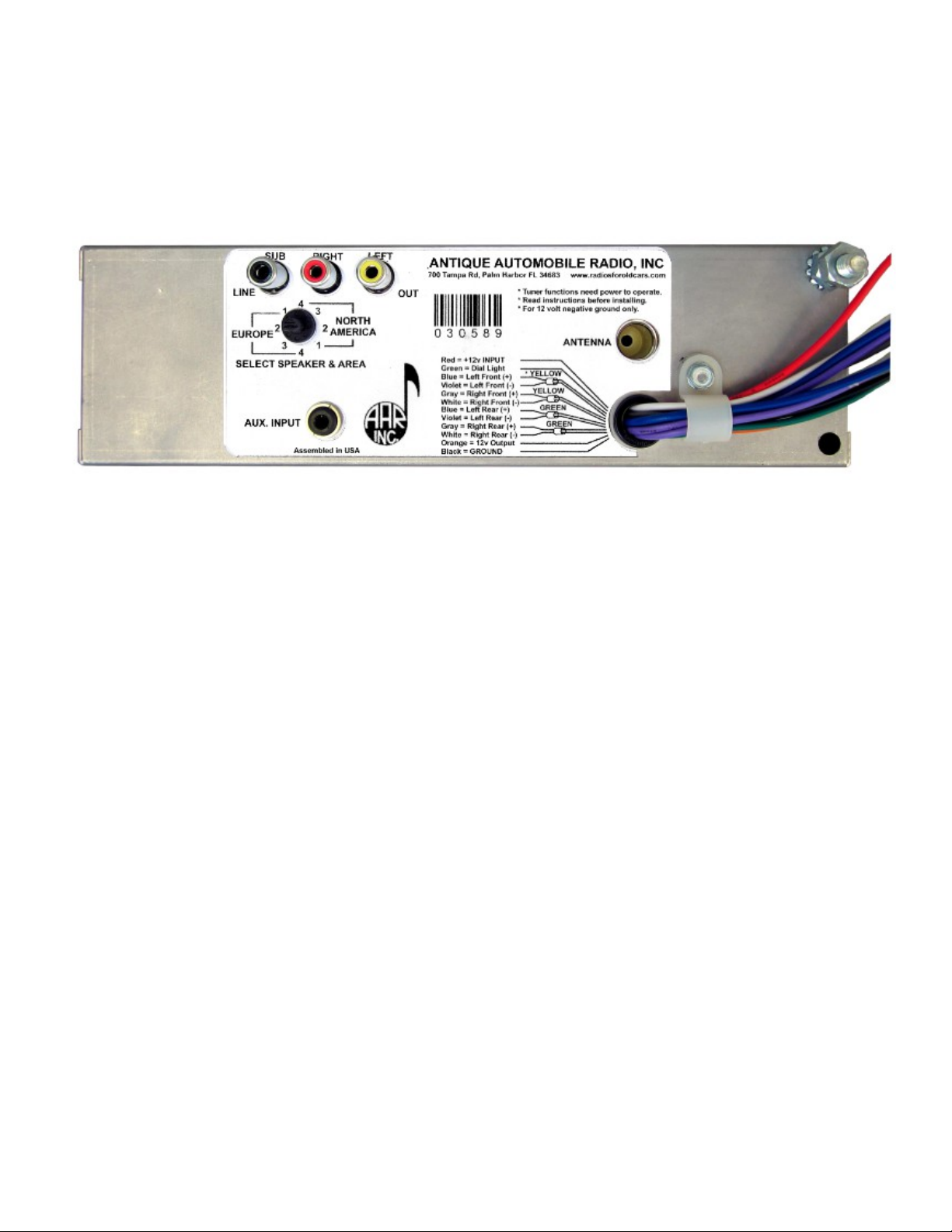
sure you are familiar with the options and features programmed into this radio. Locate the antenna jac , the auxiliary input, line outputs
and other options you may need before you mount the radio. If you want to “bench test” the radio use a fully charged battery. DO NOT
operate this radio directly from a battery charger. Serious damage may result!
This radio is built for 12 volt negative ground systems only! The radio has several protection circuits to help prevent serious damage from
wiring errors and power faults in the vehicle electrical system. Never use a fuse rated for more than 10 Amps!
A major consideration will be spea ers. There are many possibilities for additional spea er placements. You will have to decide what will
wor best for your application. Will it matter if the spea ers show? You might consider ic panel, door spea ers, or mounting spea ers
under the dash where they’re out of sight. You can add an external amp or sub woofer (see next page).
Use one 4 ohm spea er for each channel you want to connect. Ma e sure it can handle the wattage! Unless you cran it all the way up
regularly, 30 or 40 watt RMS ratings should be sufficient. The higher the SPL rating of the spea er, the better it sounds. Loo for an SPL
of 88 or better. A good full range spea er should have a frequency range from less than 40 Hz to better than 20 Hz. Pay attention to
polarity! Spea er terminals will be mar ed with a + and - , or a red dot on the + terminal. If all spea ers are connected to the proper
polarity, they will operate in harmony. If they are not properly phased, you will not hear the full fidelity of the radio. Note: - does not
mean ground! This is a high power radio in which both spea er lines are driven with high currents! Never allow any spea er lead to
become grounded when the radio is on!
Operating Your Radio
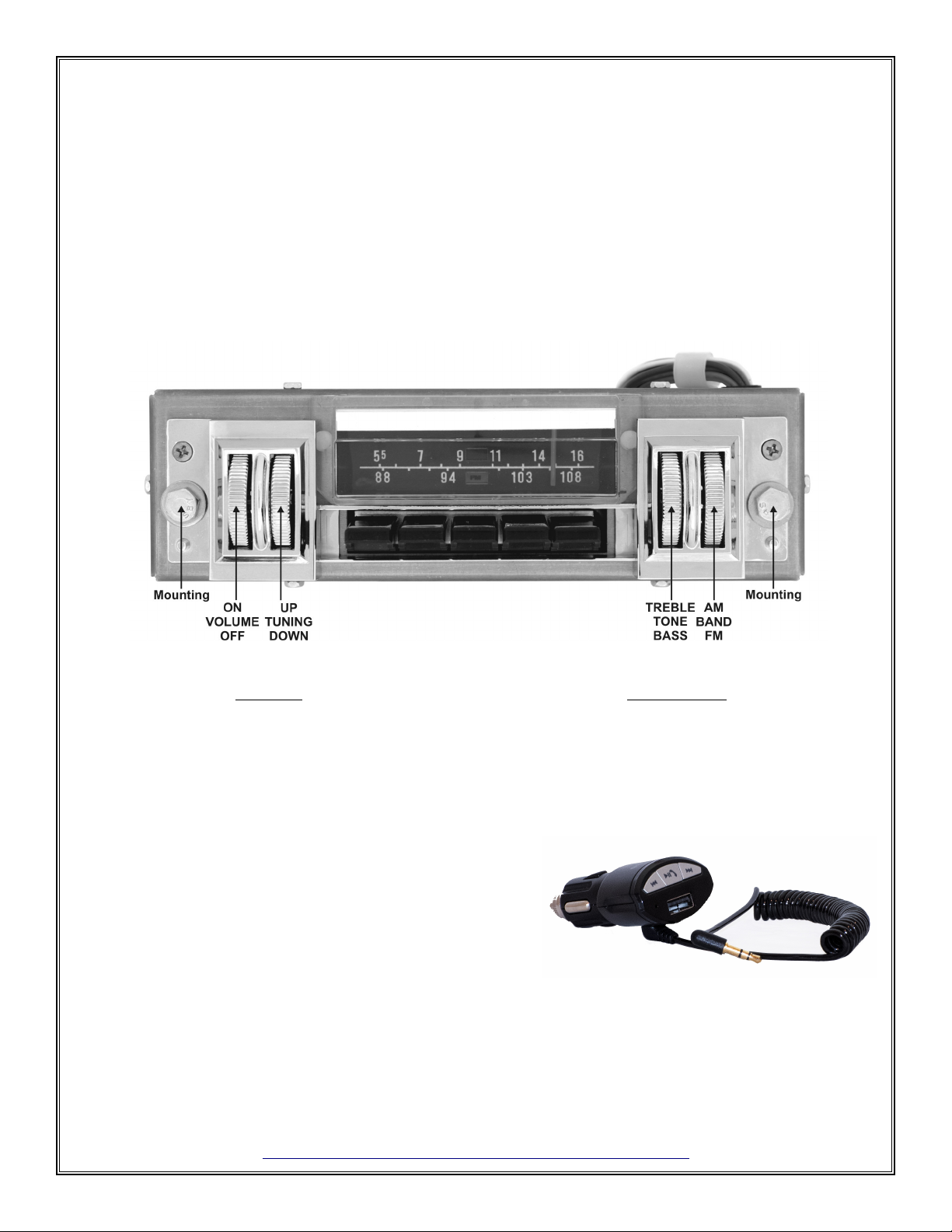
Refer to the picture on the front page for control locations. Your new radio has the same type of controls in the same positions as the
original radio. Because the original was a “Mono” radio, there is no visible stereo indicator or balance control. To turn the radio ON, roll
the leftmost thumbwheel up. Continuing to roll the thumbwheel up will increase volume. Rolling the thumbwheel down will decrease
volume until the radio clic s off.
Tuning: The tuning thumbwheel is next to the ON/OFF/Volume control. Rolling the thumbwheel up will move the dial pointer up the dial
scale. Rolling the thumbwheel down will move the dial pointer down the dial scale. There is no stop on this thumbwheel. The dial pointer
will stop moving when it reaches the top or bottom of the scale. Note: The dial pointer will only move when the radio is powered on.
Setting pushbuttons: Your radio has 5 presets for FM, and 5 for AM. A major difference between the original radio and this one is the
way the pushbuttons are set. Never attempt to pull out on the buttons! When you push a button, the radio will start playing the selected
station, and the dial pointer will move to the selected location. To set a button to a different station: (1) Tune in the desired station. (2)
Press and hold the button you want to set. The tuner will move to the previous setting. (3) After about 2 seconds, the radio will begin
playing the newly selected station. The dial pointer may cycle a few times to locate the correct position. This is a normal procedure. The
dial pointer will stop at the new station. (4) Release the button. Be aware it ta es a couple of seconds to write the new pushbutton data to
permanent memory. You can continue to set other buttons or tune other stations, but if the radio is turned off before the write cycle is
completed, the new stations may not be saved. Note: pushbuttons will only operate when the radio is turned on.
Tone: The tone thumbwheel (to the right of the dial) provides flat bass and treble near the center position. Rolling the thumbwheel up
boosts treble and down boosts bass. The tone control is also used for the balance and ader controls (see next).
Balance: (2, 3, or 4 spea er settings only). The original radio did not provide for a balance control, so we use the tone control to program
this function. To adjust the balance: (1) Select the FM band and tune in a station near the low end of the dial. (2) Let it play for a few
seconds, then tune the radio all the way to the low end of the dial. After about 8 seconds, the station you were listening to will begin
playing at this location. (3) Roll the tone thumbwheel up to shift the audio to the right spea er, and down to shift the audio to the le t
spea er. In a stereo system, the audio information sent to the right channel is often different than the left channel. When you set the
balance to the extreme left or right, the radio will automatically switch out of the stereo mode and all of the information for both channels
will be present in the spea er that is selected (Mono mode). (4) When you tune away from the bottom of the dial, the radio will resume
normal operation and the tone control will no longer affect the balance function. The balance setting is permanently stored (until you
change it).
Fader: (4 spea er setting only). The fader is also set by using the tone control except that the adjustment is made at the top end of the FM
dial. To adjust the fader, tune to an FM station near the top of the dial. After you’ve listened for a few seconds, tune all the way to the top
of the dial. After about 8 seconds, the last station you were listening to will start playing again. Roll the tone thumbwheel up to shift the
audio to the rear spea er pair and down to shift the audio to the front pair. When you tune away from the top of the dial, the radio will
resume normal operation, and the tone control will no longer affect the fader function. The fader setting is permanently stored (until you
change it).
Band selection: The rightmost thumbwheel is the band selector. Roll the thumbwheel up to switch to AM. A white AM flag will show in
the middle of the AM dial. Roll the thumbwheel down to switch to FM. A red FM flag will show in the middle of the FM dial.
(1)