yAdjusting the position of the camera: WHILE SUPPORTING
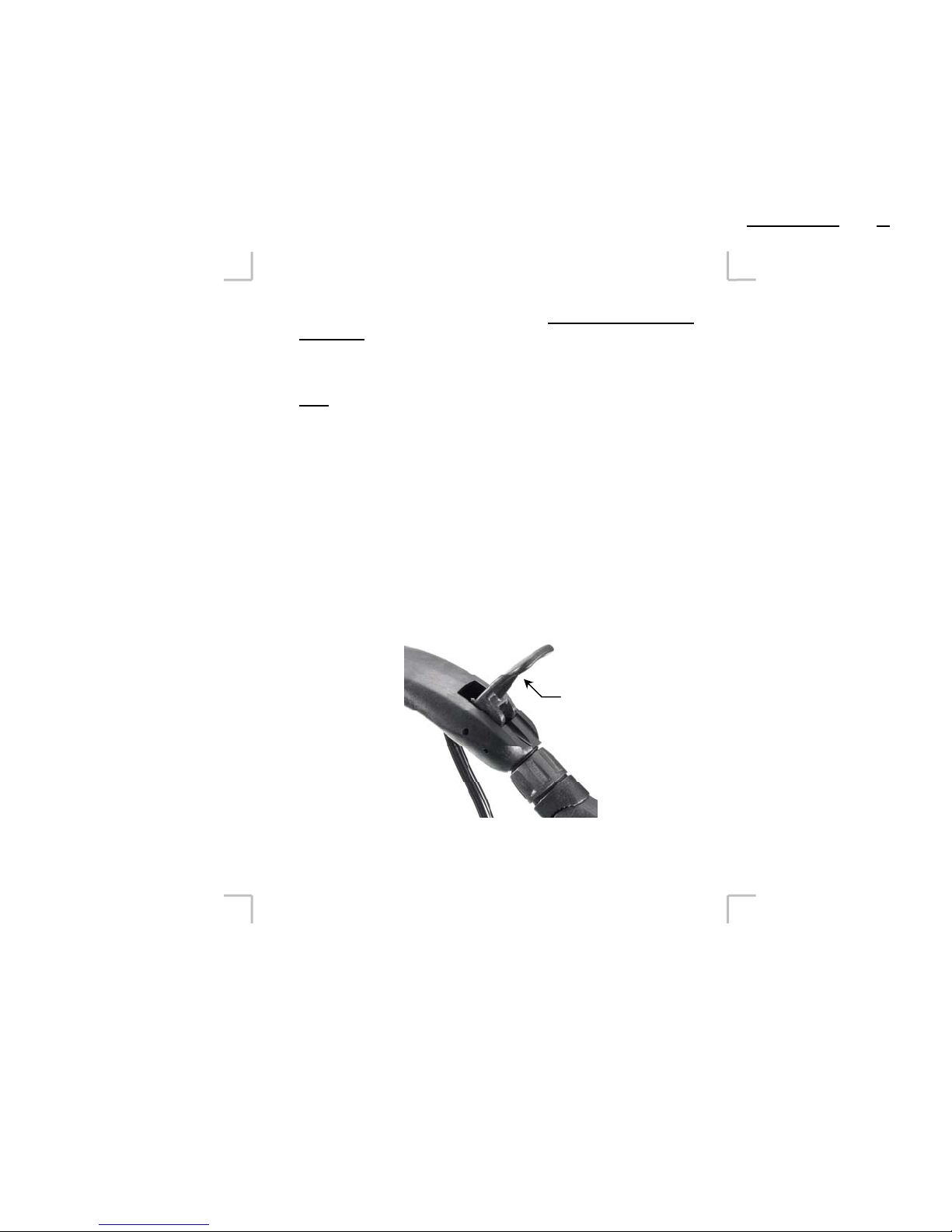
CAMERA, (As in picture on page 2) open locking lever (Figure 5).
The flexible arm will release completely when latch is open. IT IS
BEST TO RELEASE LOCKING LEVER ONLY WHEN THE
CAMERA IS ON THE STASIS FLEX, ON YOUR SHOULDER
AND YOUR HAND IS SECURELY HOLDING THE CAMERA
THROUGH LENS GRIP IN THE SAME MANNER AS YOU
WOULD OPERATE THE CAMERA - this allows the camera to be
securely held and assists in locating the camera to the best position. For
right handed people, this means holding the camera normally through
the lens/camera strap with your right hand while using your left hand to
release the locking lever. The camera can now be adjusted forward and
back, up or down, left or right – allowing you to place the viewfinder or
LCD in an accessible position.
TIP: As you move the camera into position with your right hand (in the
camera grip) use the left hand to smooth and position the “knuckles” of
the Flex arm. If too much of the form of the Flex arm is created by too
few knuckles, they may bind and make it difficult to close the lever. In
this case, simply move the camera away so that the arm is straight, then
re-form the positioning of the knuckles.
A7595-0326 Rev A
DA-C078 Sht 10 of 16
Figure 5
7
Locking lever