NOTE FOR ELECTRICIAN:
The security Sensor must be wired to its own
switch. Before installation/maintenance, the
electrical supply must be isolated. Switching
off the wall switch is NOT sufcient isolation to
prevent electrical shock.
LIGHT LEVEL ADJUSTMENT CONTROL
Adjusts the light level at which the Security
Sensor operates. Adjust to , the unit will
operate day and night. Adjust to , the unit
will operate only at night when movement is
detected.
Time – time “ON” adjustment
Varies the length of time the light will stay ON
from about 20 seconds to 7 minutes. Turn
anti-clockwise to increase ON-time – ideal
setting is about 2 o’clock position (approximately
2 minutes). Whilst there is movement within
range of the unit, the light will remain ON. When
no further movement is detected, the light will
switch OFF after the pre-set time has elapsed.
When in standby mode the pilot lamp will ash
once every 4 seconds. When movement is
detected it will ash twice every second.
IMPORTANT: Be careful of electrical shock.
Always remember that the light may not switch
ON during daylight or the light maybe in the
automatic OFF mode. Never touch live areas
unless fuse is removed or circuit breaker is in
OFF position at the switchboard main.
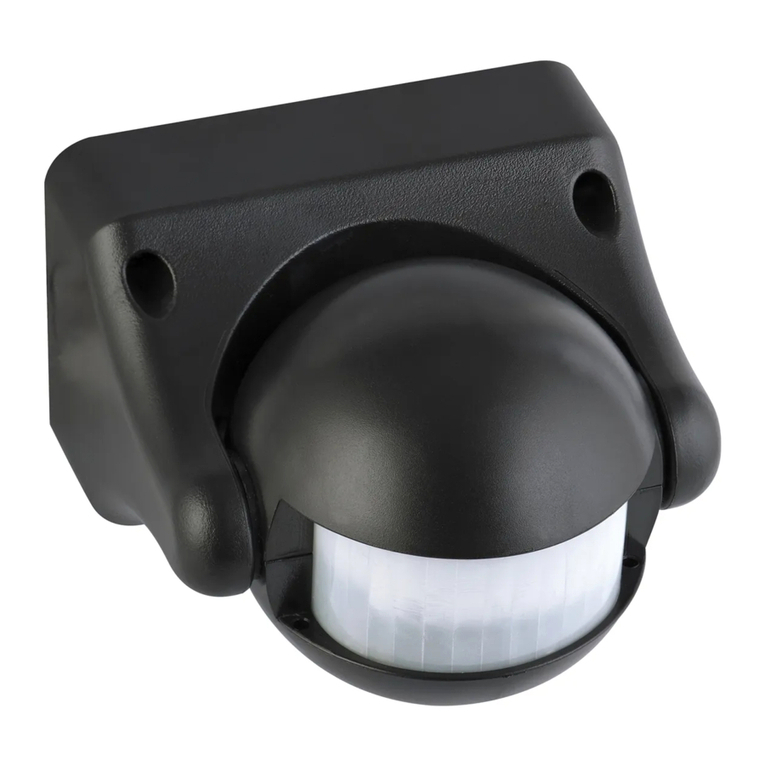
To achieve best results for outside use the Arlec
Security Sensor should be mounted on a wall,
or under eaves of a building, generally used to
control an existing light tting. Ideally the Security
Sensor should be mounted 2.4 metres (8ft)
above the area to be scanned (Refer Fig.1).
To avoid damage to the unit – do not aim the
sensor towards the sun. Sensor can be angled
above animal height to avoid nuisance triggering.
To avoid nuisance triggering, the sensor should
be directed away from heat sources such as
barbecues, air conditioners, other outside
lighting, moving cars and ue vents.
Do not aim towards reective surfaces such
as smooth white walls, swimming pools, etc.
The Arlec Compact Sensor scanning
specications are are follows: Approximately 8m
distance at 220° on HIGH sensitivity mode and
3m at 220° on LOW sensitivity mode. Sensitivity
is set by pressing “SENS” button (Refer Fig 4).
Sensitivity may also vary slightly depending on
the mounting height and location.
The detection range of the unit may also alter
with temperature change. Before selecting a
place to install the Arlec Security Sensor,
you should note that movement across the
scan area is more effective
than movement directly
toward or away from the
sensor (Refer Fig. 2A).
If movement is made
walking directly toward
or away from the sensor
and not across it, the
apparent detection range
will be substantially
reduced (Refer Fig. 2B).
WARNING: Must be installed by a licenced
electrician or other person authorised by
legislation to work on xed wiring of an electrical
installation.
1. Using the base as a template, mark and drill
the four holes for the masonry plugs or
screws. (More holes maybe needed for cable
entry and exists. Care should be taken to
avoid drilling into concealed electrical wiring.)
2. Run the cable through the rubber grommits
located in the mounting base.
3. Terminate all wires in accordance with Fig.3.
4. Re-assemble sensor.
5. Add silicone at rear of base around cable
entry holes.
6. Mount the unit using screws provided.
Where to fit your
security sensor
understanding
the controls
Manual operation
(autoMatic override)
8m
2.4m
(8ft)
Ideal
mounting
height
Sensor can be angled above animal
height to avoid nuisance triggering
Figure 1.
Side View
Figure 2A
Best sensitivity
Figure 2B
Reduced sensitivity
Figure 4
BrownSensor 240 volt mains
supply via switch
To new or
existing lighting
A
N
Load
Blue
Red
Figure 3.
For best results and operation the following
steps should be taken:
1. Direct the sensor toward the desired area
to be scanned.
2. Turn the light level control knob fully
anti-clockwise, and time control
knob fully clockwise.
3. Turn the wall switch ON, light will come ON
for 20 seconds and then go OFF, provided that
there is no movement in the 220° detection area.
4. Have another person move across the centre
of the area to be scanned and tilt the sensor
until the unit senses the presence of the
moving person, causing the light to switch ON.
5. Adjust time control (TIME ON) to required
setting.
6. Turn the light level control knob fully
clockwise.
7. Your Security Sensor is now ready for use,
and will automatically operate when movement
is detected at night.
8. The wall switch should remain “ON” for
automatic operation.
Turn your wall switch ON. This will put the sensor
into ‘automatic’ mode and it will then start
sensing after dusk. The light will switch ON and
automatically switch OFF after the pre-set time
elapses and will then operate automatically
whenever heat movement is detected.
To override the automatic mode, the sensor must
be switched ON in the automatic mode. Now
switch wall switch OFF wait for 2 seconds then
switch back ON. Your Security Sensor will now
hold your light ON continuously just like a normal
light. This override function can be selected
during night time only. To return your sensor
to the automatic mode, switch your wall switch
OFF for at least 4 seconds, then switch it ON
again. To switch your security sensor and lights
OFF completely, switch your wall switch OFF.
autoMatic Mode
setting the controls
installing your
security sensor