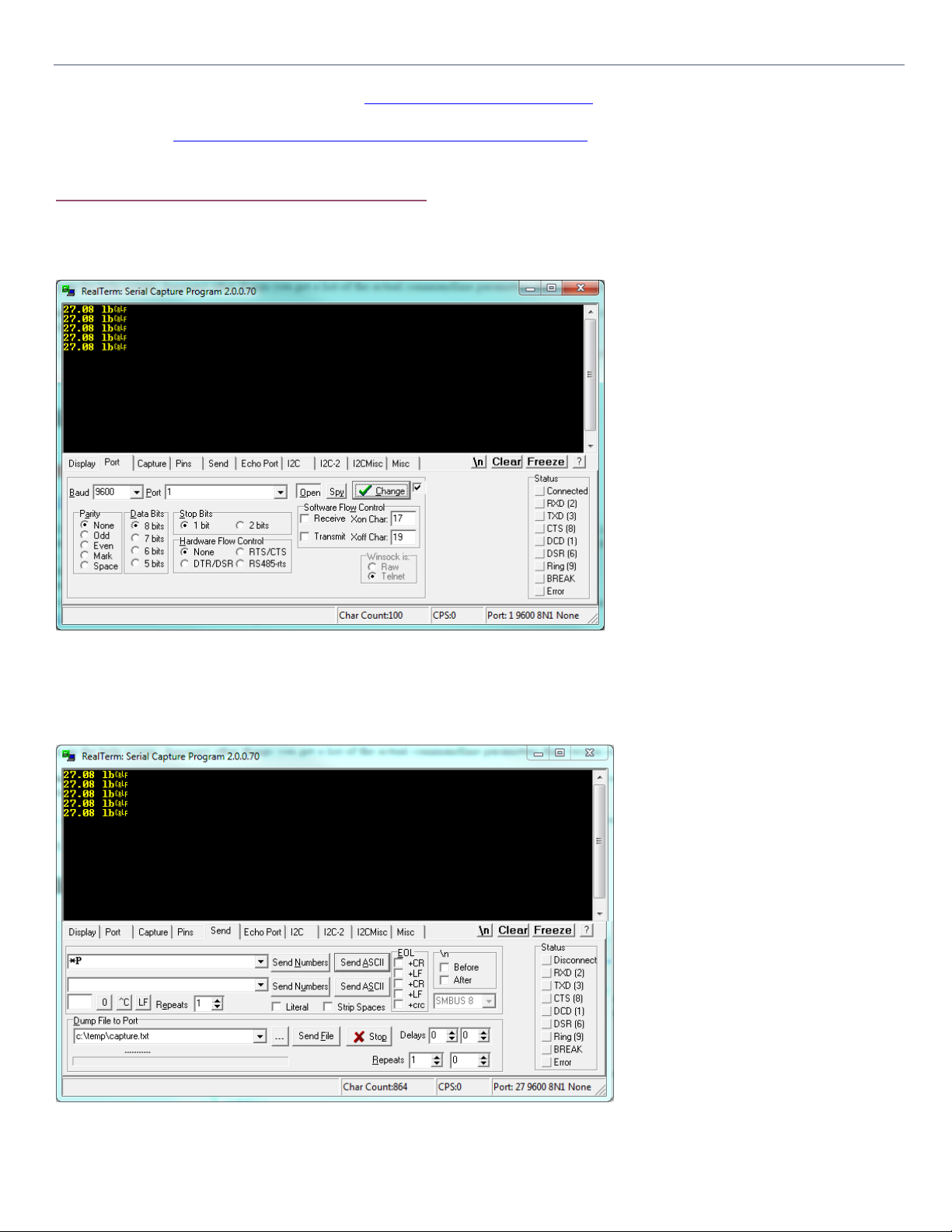
Press the Send ASCII button to send the command to the scale. If everything works out as specified, the scale is working properly.
This section completes the testing and installation of your USB Scale. You can now proceed to integrate the scale into your own
software, or use a 3rd party professional data collection software such as WinWedge (http://www.taltech.com/winwedge).
One of the reasons for Serial Emulation is to make it easy for customers to implement their own software. Serial Connectivity is the
most common standard for Industrial communication. Almost all software frameworks inherently support communication with Serial
Ports. If you wish to integrate the scale to your own software, there are many examples available on the web for most if not all
languages for connecting to Serial Ports. Here are some examples:
C#: https://code.msdn.microsoft.com/windowsdesktop/SerialPort-brief-Example-ac0d5004
Java: https://stackoverflow.com/questions/8165021/how-to-read-write-a-serial-port-with-java-on-windows?rq=1
C++: http://softwaresouls.com/softwaresouls/2011/12/11/simple-c-class-example-using-serial-port/
Make sure to:
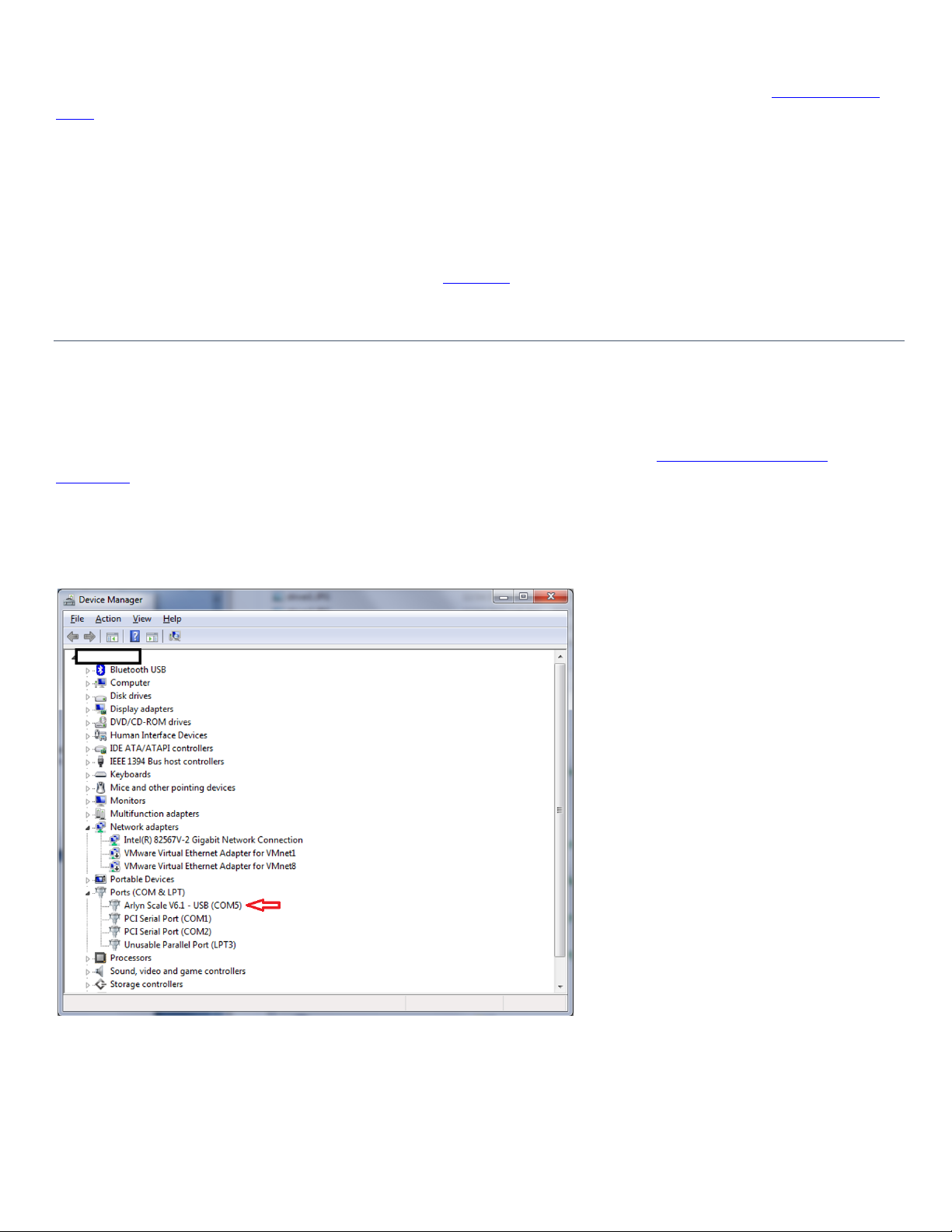
❑Utilize COM Port found in Device Manager as your Serial COM Port.
❑Either use the *P command to retrieve the weight from the scale
❑Or, use the PRINT key to send the data from the scale.
Armed with these fundamentals, writing software for this scale should be easier.
6NOTES ON DATA COLLECTION SOFTWARE
Arlyn Scales also offers the New Remote Indicator Software for data collection. It is compatible with most Windows PCs. It can
function as a method to view your scale screen on your PC in real time. It can also periodically log data on an Excel Sheet. It can also
allow you to send or stream data on any other application you are running on your PC. For further information, visit
https://www.arlynscales.com/remote-indicator
If you prefer more advanced functionality such as connecting to multiple scales on a single PC, editing data in mid-stream and other
functions, we also are authorized resellers of WinWedge Software. Please visit our website or call (800) 645-4301 for further
information.
7LICENSE AGREEMENT –TECHNICAL SUPPORT
Before installing this software, please read, understand and accept the following agreement:
This software and its drivers are only available through Arlyn Scales’ Web Site at http://www.arlynscales.com. Arlyn Scales doesn’t
normally provide “Installation Disks”. All drivers and software should be downloaded from this site.
This software package is supplied free of charge “as is”. Arlyn Scales cannot, and will not offer technical support for the Remote
Indicator Software. It was provided simply as a service to our customers.
The drivers and their authors dictate the system requirements. Arlyn Scales has no control over the update path or future availability
of these drivers, Remote Indicator Software or any given software available for this feature. Given that the drivers were written
elsewhere, we cannot support them to any realistic degree. We have found that the people at FTDI or Silicon Labs are very
cooperative with technical issues. For driver related technical issues, we generally have to defer to them.
Arlyn Scales does not warrant, guarantee or make any representations regarding the use, or results of the use of the Software or
accompanying materials in terms of correctness, accuracy, reliability, timeliness or otherwise. You assume all responsibility
concerning selection of the software, and the ability to achieve the results you intend.