EnglishDeutsch
 logo
Brands
  1. Home
  2. •
  3. Brands
  4. •
  5. Asko
  6. •
  7. Washer
  8. •
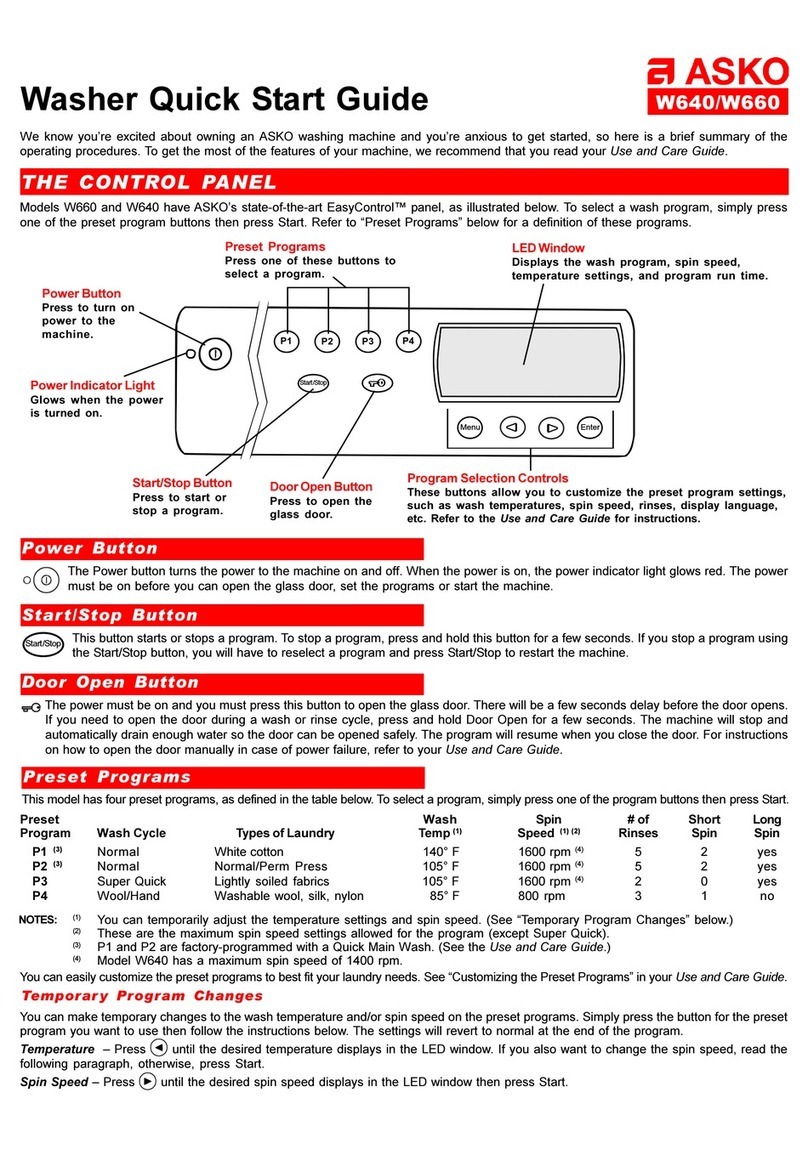
  9. Asko W6221 User manual

Asko W6221 User manual

Other manuals for W6221

2
Other Asko Washer manuals

Asko W6903 User manual

Asko

Asko W6903 User manual

Asko PROFESSIONAL WMC943VS User manual

Asko

Asko PROFESSIONAL WMC943VS User manual

Asko WM75 C-V Series User manual

Asko

Asko WM75 C-V Series User manual

Asko WM25 User manual

Asko

Asko WM25 User manual

Asko SC70 Guide

Asko

Asko SC70 Guide

Asko W6903 User manual

Asko

Asko W6903 User manual

Asko W6761 User manual

Asko

Asko W6761 User manual

Asko PROFESSIONAL WMC947PS User manual

Asko

Asko PROFESSIONAL WMC947PS User manual

Asko W2114C User manual

Asko

Asko W2114C User manual

Asko WL6511XXL User manual

Asko

Asko WL6511XXL User manual

Asko W6424W User manual

Asko

Asko W6424W User manual

Asko W40868C/1/22 User manual

Asko

Asko W40868C/1/22 User manual

Asko W660 User manual

Asko

Asko W660 User manual

Asko W2096R.W User manual

Asko

Asko W2096R.W User manual

Asko W4114C/1 User manual

Asko

Asko W4114C/1 User manual

Asko WL6532 XXL User manual

Asko

Asko WL6532 XXL User manual

Asko 12004 Operating instructions

Asko

Asko 12004 Operating instructions

Asko W6984W User manual

Asko

Asko W6984W User manual

Asko W4114C User manual

Asko

Asko W4114C User manual

Asko W640 User manual

Asko

Asko W640 User manual

Asko W6222 User manual

Asko

Asko W6222 User manual

Asko W6863 Instruction Manual

Asko

Asko W6863 Instruction Manual

Asko PROFESSIONAL WMC747VS User manual

Asko

Asko PROFESSIONAL WMC747VS User manual

Asko W620 User manual

Asko

Asko W620 User manual

Popular Washer manuals by other brands

Haier HWM96-0623S null

Haier

Haier HWM96-0623S null

Haier B828TX null

Haier

Haier B828TX null

Haier HWM30-0701 null

Haier

Haier HWM30-0701 null

Samsung WF8508NMW8 null

Samsung

Samsung WF8508NMW8 null

Samsung WF-B105AV null

Samsung

Samsung WF-B105AV null

Haier HWM20-0701 null

Haier

Haier HWM20-0701 null

Akai AWM1050WF null

Akai

Akai AWM1050WF null

Haier HWM15-0501 null

Haier

Haier HWM15-0501 null

Tricity Bendix AW 1000 W Operating & installation instructions

Tricity Bendix

Tricity Bendix AW 1000 W Operating & installation instructions

Panasonic NA-F60L5WRB operating instructions

Panasonic

Panasonic NA-F60L5WRB operating instructions

GE WSLP1500 Dimensions and installation information

GE

GE WSLP1500 Dimensions and installation information

Electrolux EWF1284EDW Service manual

Electrolux

Electrolux EWF1284EDW Service manual

LG TV2516DV3B owner's manual

LG

LG TV2516DV3B owner's manual

LG TH2517DSAV owner's manual

LG

LG TH2517DSAV owner's manual

VESTEL CMH-XL 7510 TE user manual

VESTEL

VESTEL CMH-XL 7510 TE user manual

AEG 74335 User information

AEG

AEG 74335 User information

Johnson JWF721A user manual

Johnson

Johnson JWF721A user manual

Beko WTE7604XLW0 owner's manual

Beko

Beko WTE7604XLW0 owner's manual

https://manuals.online logo
https://manuals.online logoBrands
  • About & Mission
  • Contact us
  • Privacy Policy
  • Terms and Conditions

Copyright 2026 Manuals.Online. All Rights Reserved.

2
3
4
5
6
7
8
9
10
11 1
C
85˚
105˚
120˚
140˚
160˚
175˚
205˚
5h
400
600
800
1000
1100
1200
S
tar
t
Sto
p
We know you’re excited about owning an ASKO washing machine and you’re anxious to get started, so here is a brief summary of the
operating procedures. To get the most of the features of your machine, we recommend that you read your Use and Care Guide.
THE CONTRTHE CONTR
THE CONTRTHE CONTR
THE CONTROL POL P
OL POL P
OL PANELANEL
ANELANEL
ANEL
Super Rinse Button
Press to program
two additional rinses.
Washer Quick Start Guide W6221
Power Button
Press to turn on power
to the machine.
Program Control
Turn to select a program. (Please
note that the dial does not move as
the program advances.)
Power Indicator Light
Glows when the power is
turned on.
Temperature Control
Turn clockwise to set the
wash temperature.
Delay Start Button
Press to delay starting the
program for five hours.
Spin Speed Control
Turn clockwise to select the
spin speed for the final spin.
PRPR
PRPR
PROGRAMSOGRAMS
OGRAMSOGRAMS
OGRAMS
Your ASKO washer has several programs and options specifically designed to give you the cleanest laundry possible. The table below defines
each program. The Options are explained on the next page.
Door Open Button
Press to open the glass door. (Please
note that the unit must be at the end of a
program to open the glass door.)
Start/Stop Button
Press to start or stop/
interrupt a program.
Program Recommended
Number Program Types of Laundry Temp. Range (° F)
1 Stain For heavily soiled cotton 140–205
2 Heavy wash For normally soiled cotton 140–205
3 Normal wash For lightly soiled cotton and colorfast fabrics 105–140
4 Synthetics For acrylic, polyester 105–140
5 Quick wash Lightly soiled synthetics 105-140
6 Super Quick wash Lightly soiled fabrics of all types 105–140
7 Wool wash Washable 85–105
8 Hand wash/Delicate Delicate fabrics, such as silk or nylon 85–105
9 Rinse
10 Spin
11 Drain
CAUTION! Some fabrics may not be able to withstand extremely hot temperatures. Please refer to the
Recommended Wash Temperatures chart in the Use and Care Guide.
PP
PP
Poo
oo
oww
ww
wer Buttoner Button
er Buttoner Button
er Button
The Power button turns the power to the machine on and off. When the power is on, the power indicator light glows red. The power must be on
before you can open the door, set the programs or start the machine.
StarStar
StarStar
Start/Stop Buttont/Stop Button
t/Stop Buttont/Stop Button
t/Stop Button
Once you’ve selected the program and options, press this button to start the washer. To stop the washer during a program, press and hold this
button down for a few seconds. If you press this button to stop a program, you will have to reselect the program to restart the unit.
Door Open ButtonDoor Open Button
Door Open Button
The power must be on and you must press this button to open the door. There will be a few seconds delay before the door opens. Please note
that the unit must be at the end of a program to open the glass door.
InterInter
InterInter
Interrr
rr
rupting or Changing a Prupting or Changing a Pr
upting or Changing a Prupting or Changing a Pr
upting or Changing a Proo
oo
ogg
gg
grr
rr
ramam
amam
am
If you wish to interrupt a program to add an item to the wash, press and hold the Start/Stop button until the unit stops. Turn the Program Control
knob to 11 (Drain) to drain the water. Press the Door Open button. The door will open when the water has drained. Insert the item you wish to
wash and close the door. Add detergent (if needed), turn the control knobs to the desired settings, and press Start/Stop to restart the machine.
QQ
QQ
QUICK STUICK ST
UICK STUICK ST
UICK STARAR
ARAR
ART PRT PR
T PRT PR
T PROCEDURESOCEDURES
OCEDURESOCEDURES
OCEDURES
THE DETERTHE DETER
THE DETERTHE DETER
THE DETERGENT DRAGENT DRA
GENT DRAGENT DRA
GENT DRAWERWER
WERWER
WER
The detergent drawer on ASKO washers automatically dispenses the detergent and
fabric softener at the appropriate times. The drawer is located to the left of the control
panel. Simply pull the drawer out and pour the measured amounts of detergent and
softener into the proper compartments (as illustrated) and close the drawer.
If you use liquid detergent, you will need to use the main wash compartment partition
packaged with your washer. (See your Use and Care Guide.)
DETERDETER
DETERDETER
DETERGENTGENT
GENTGENT
GENT AND FAND F
AND FAND F
AND FABRIC SOFTENERABRIC SOFTENER
ABRIC SOFTENERABRIC SOFTENER
ABRIC SOFTENER AMOUNTSAMOUNTS
AMOUNTSAMOUNTS
AMOUNTS
Because ASKO washers use less water than conventional top-loading washers, you need less detergent and fabric softener. We recommend
that you use a low-sudsing powder detergent only, preferably a high-efficiency (HE) detergent designed specifically for front-loading washers.
(Liquid detergents tend to suds more, which make them more difficult to rinse out.)
Detergent – The amount of detergent needed varies, depending on the detergent you use. For high-efficiency detergent specifically for
front-loading washers, you should use the amounts recommended by the manufacturer. For regular laundry detergent, 1 to 3 tablespoons of
detergent is all you need for a normal wash load. More heavily soiled items, however, may need slightly more detergent. Also, the amount
of detergent needed can vary due to differences in water hardness. (Refer to the Use and Care Guide for more details.) If you choose to use
a liquid detergent, start out with a very small amount, such as one or two tablespoons.
Fabric Softener – We recommend that you use only 2 tablespoons of fabric softener.If more softening is desired, try using slightly more
with the next load.
Prewash detergent
Main wash
detergent
Fabric
softener
We recommend that you don’t use bleach in your ASKO washer.
The tumbling wash action, temperature control options and extended
wash times are sufficient to remove most stains.
NOTE:
The detergent drawer is equipped with an optional child
safety catch. (See your Use and Care Guide.)
(For more troubleshooting issues, refer to the “Troubleshooting” section in your Use and Care Guide.)
COMMONLCOMMONL
COMMONLCOMMONL
COMMONL
YY
YY
Y ASKED QASKED Q
ASKED QASKED Q
ASKED QUESTIONSUESTIONS
UESTIONSUESTIONS
UESTIONS
1) Where do I put the fabric softener?
2) Why does the machine run longer than my old
top-loader?
3) The machine won’t start.
4) The machine won’t spin.
5) The door won’t open.
ANSWERSANSWERS
ANSWERSANSWERS
ANSWERS
1) See illustration above.
2) One reason ASKO washers clean better than others is because they
have longer wash cycles and extra rinses. Also, if the water entering
the machine is exceptionally cold, it will take longer to heat, therefore
increasing the cycle time.
3) a) Make sure the unit is securely plugged into the wall outlet.
b) Be sure the Power button is pushed in and the indicator light is red.
c) The door must be closed securely (but don’t slam it).
d) The Program Control knob may not be in the proper
position for the beginning of a program.
e) Check the house breaker and fuses.
4) Check the pin trap for an obstruction blocking the pump or outlet hose.
5) See “Door Open” on the previous page and Answer 3 above.
1.
2.
3.
4.
5.
6.
7.
8.
9.
Press the Power button to turn on the machine.
Press the Door Open button to open the door and load the wash. (The door will open in a few seconds.)
Check that the door is clear of laundry then close it firmly. (It won’t shut if it’s slammed.)
Pour the detergent and fabric softener into the proper compartments in the detergent drawer, as illustrated below. (Don’t
put detergent in the prewash compartment unless you plan to prewash.)
Close the drawer securely. (Do not slam it closed.)
Turn the Temperature Control knob to the desired wash temperature.
Set the Spin Speed Control knob to the desired rpm (optional).
Select program options, such as No Spin or Super rinse.
Turn the Program Control knob to the desired wash program. The machine will start.
W6221
DefinitionOption
Spin Speed Control
In addition to the 400 rpm to 1200 rpm spin speed options, the Spin Speed Control has a No Spin/No Drain option ( ) and a No Spin ( )
option. These are for delicate fabrics that should not be spun dry.
Super Rinse – Provides two additional rinses. Recommended for persons with sensitive skin or allergies.
Delay Start – Automatically delays starting the program for five hours.
OPTIONSOPTIONS
OPTIONSOPTIONS
OPTIONS
Art. No. 80 646 40 Rev. 02