manuals.online logo
Brands
  1. Home
  2. •
  3. Brands
  4. •
  5. ATZ
  6. •
  7. Switch
  8. •
  9. ATZ HDMI-91SM User manual

ATZ HDMI-91SM User manual

Other ATZ Switch manuals

ATZ HDMI-414PR User manual

ATZ

ATZ HDMI-414PR User manual

ATZ HDMI-V2-44B User manual

ATZ

ATZ HDMI-V2-44B User manual

ATZ US241H User manual

ATZ

ATZ US241H User manual

ATZ HDMI-V2-31L User manual

ATZ

ATZ HDMI-V2-31L User manual

ATZ HDMI-161SM User manual

ATZ

ATZ HDMI-161SM User manual

ATZ HDBT-E70-WPVD User manual

ATZ

ATZ HDBT-E70-WPVD User manual

ATZ HDMI-V2-41SMPR User manual

ATZ

ATZ HDMI-V2-41SMPR User manual

Popular Switch manuals by other brands

SMC Networks SMC6224M Technical specifications

SMC Networks

SMC Networks SMC6224M Technical specifications

Aeotec ZWA003-S operating manual

Aeotec

Aeotec ZWA003-S operating manual

TRENDnet TK-209i Quick installation guide

TRENDnet

TRENDnet TK-209i Quick installation guide

Planet FGSW-2022VHP user manual

Planet

Planet FGSW-2022VHP user manual

Avocent AutoView 2000  AV2000BC AV2000BC Installer/user guide

Avocent

Avocent AutoView 2000 AV2000BC AV2000BC Installer/user guide

Moxa Technologies PT-7728 Series user manual

Moxa Technologies

Moxa Technologies PT-7728 Series user manual

Intos Electronic inLine 35392I operating instructions

Intos Electronic

Intos Electronic inLine 35392I operating instructions

Cisco Catalyst 3560-X-24T Technical specifications

Cisco

Cisco Catalyst 3560-X-24T Technical specifications

Asante IntraCore IC3648 Specifications

Asante

Asante IntraCore IC3648 Specifications

Siemens SIRIUS 3SE7310-1AE Series Original operating instructions

Siemens

Siemens SIRIUS 3SE7310-1AE Series Original operating instructions

Edge-Core DCS520 quick start guide

Edge-Core

Edge-Core DCS520 quick start guide

RGBLE S00203 user manual

RGBLE

RGBLE S00203 user manual

Thrustmaster FLIGHT SIMULATOR X quick guide

Thrustmaster

Thrustmaster FLIGHT SIMULATOR X quick guide

Southwire SURGE GUARD 41390 RVC troubleshooting guide

Southwire

Southwire SURGE GUARD 41390 RVC troubleshooting guide

Buhler Nivotemp NT 61 Brief instructions

Buhler

Buhler Nivotemp NT 61 Brief instructions

Kramer VS-41HDCP user manual

Kramer

Kramer VS-41HDCP user manual

Techly IDATA AU-270 user manual

Techly

Techly IDATA AU-270 user manual

Belkin F1U109 user manual

Belkin

Belkin F1U109 user manual

manuals.online logo
manuals.online logoBrands
  • About & Mission
  • Contact us
  • Privacy Policy
  • Terms and Conditions

Copyright 2025 Manuals.Online. All Rights Reserved.

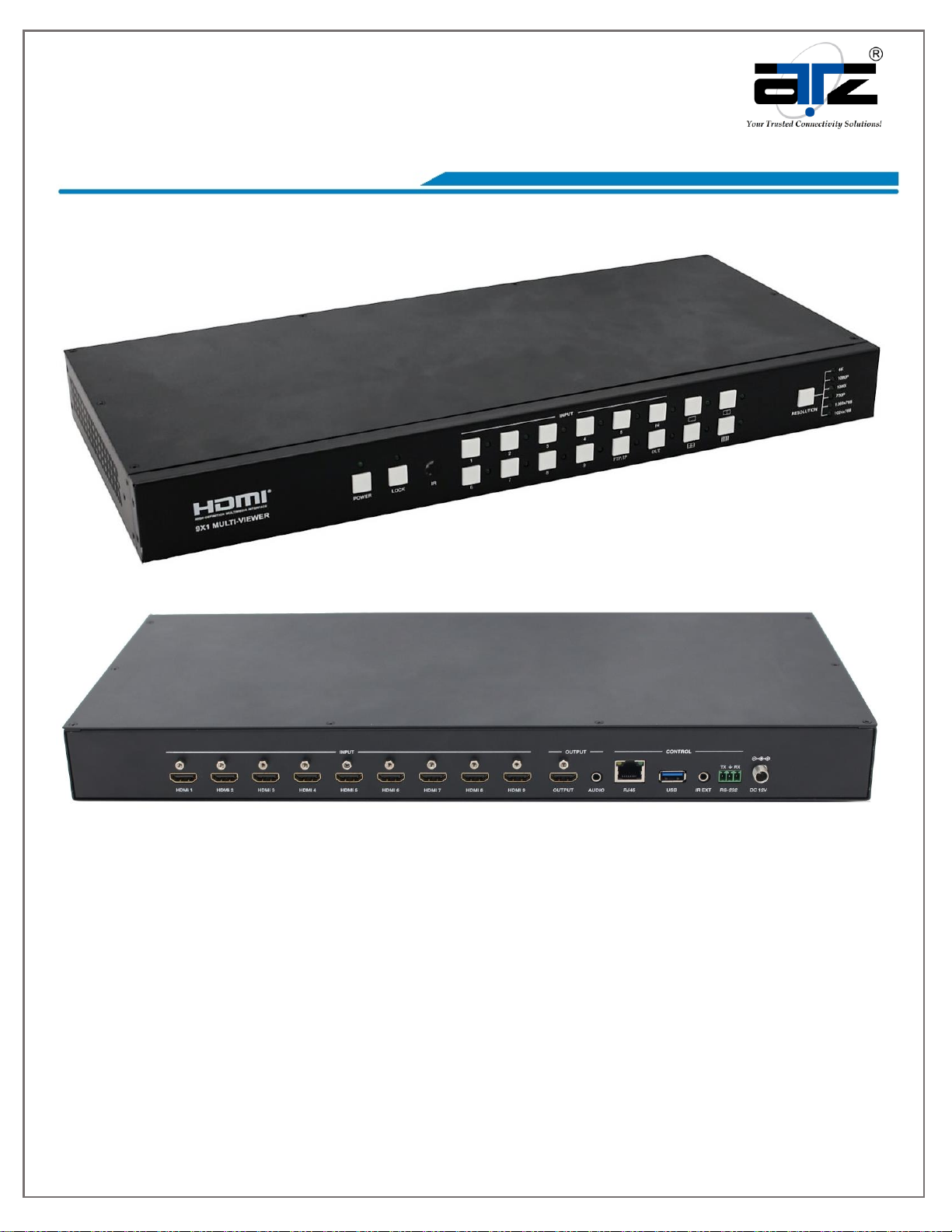
Model : ATZ HDMI-91SM
Description : 9x1 HDMI SEAMLESS Switcher with Multi-viewer
pg. 1
Notes:- All brand names and trademarks are properties of their respective holders and are referred to here for descriptive purpose only. Photo attached is for reference only, it may be slightly varied in items of colour,
shape from the actual item delivered from time to time.
All specifications are subject to change without prior notice.
© Copyright ATZ
This 9x1 seamless switcher supports 9 HDMI inputs and one HDMI output. It allows user
can view up to 9 HD video contents on one display at the same time. Output resolution
can be chosen for supporting legacy display. This switcher is a suitable solution for
presentation purpose at classroom
and conference room.
Model : ATZ HDMI-91SM
Description : 9x1 HDMI SEAMLESS Switcher with Multi-viewer
pg. 2
Notes:- All brand names and trademarks are properties of their respective holders and are referred to here for descriptive purpose only. Photo attached is for reference only, it may be slightly varied in items of colour,
shape from the actual item delivered from time to time.
All specifications are subject to change without prior notice.
© Copyright ATZ
Features:
HDMI 1.4b, HDCP 1.4 compliant.
Input video resolution up to 1080p@60Hz, Output up to 4K2K@30Hz
9x HDMI inputs, 1x HDMI and 1x de-embedded analog audio output
Fast seamless switching with scaling up to 3840x2160p (4K)
Supports 1/2/4/9 windows multi-view modes
Display 4x full HD signals within one 4K display with pixel-to-pixel quality
Control is via on-panel button, IR, RS-232, LAN or Web GUI
1U rack mounted design
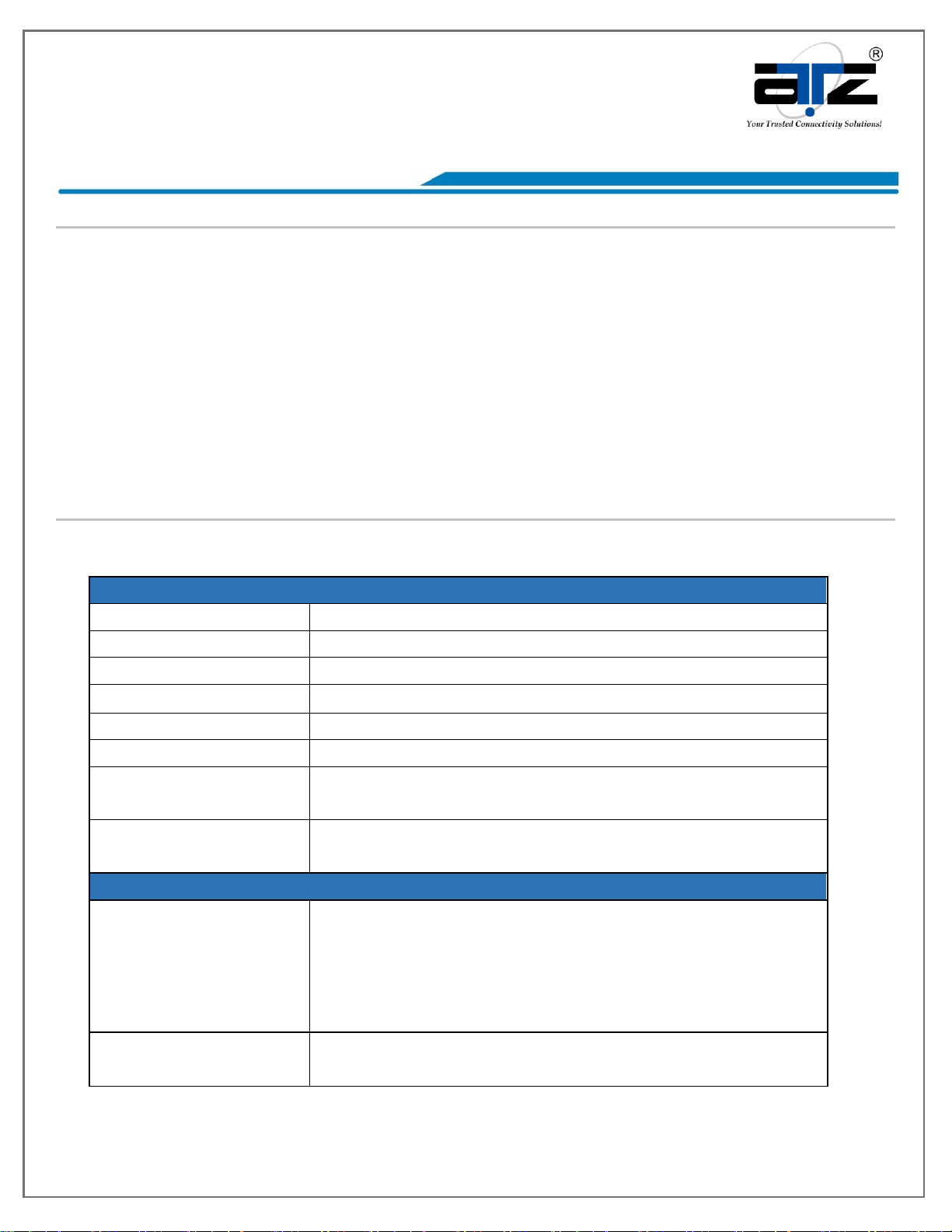
Specifications:
Technical
HDMI Compliance
HDMI 1.4b
HDCP Compliance
HDCP 1.4
Video Bandwidth
3Gbps
Video Resolutions
4K2K@30Hz YUV4:4:4、RGB4:4:4
Color Depth
8-bit
Color Space
RGB, YUV4:4:4, YUV 4:2:2
HDMI Audio
Formats
LPCM 2.0
ESD Protection
Human body model —±8kV (air-gap discharge) &
±4kV (contact discharge)
Connections
Inputs
9x HDMI Type A [19-pin female]
1x RJ45 [8-pin female]
1x RS-232 [Phoenix jack]
1x USB [USB-A]
1x IR EXT [3.5mm Stereo Mini-jack]
Outputs
1x HDMI Type A [19-pin female]
1x Audio Out [3.5mm Stereo Mini-jack]
Model : ATZ HDMI-91SM
Description : 9x1 HDMI SEAMLESS Switcher with Multi-viewer
pg. 3
Notes:- All brand names and trademarks are properties of their respective holders and are referred to here for descriptive purpose only. Photo attached is for reference only, it may be slightly varied in items of colour,
shape from the actual item delivered from time to time.
All specifications are subject to change without prior notice.
© Copyright ATZ
Mechanical
Housing
Metal Enclosure
Color
Black
Dimensions
440mm (W)×200mm (D)×44.5mm (H)
Weight
2.26kg
Power Supply
Input: AC100 - 240V 50/60Hz
Output: DC 12V/1A (US/EU standards, CE/FCC/UL
certified)
Power
Consumption
7.8W (Max)
Operation
Temperature
32 - 104°F / 0 - 40°C
Storage
temperature
-4 - 140°F / -20 - 60°C
Relative Humidity
20 - 90% RH (no condensation)
Operation Controls and Functions:
Front Panel
Number
Name
Function description
1
RESET
button
and LED
Press this button up to 10s to reset to factory
set, the indicator LED will blink 5 times.
2
LOCK button
and LED
Press this button to lock all buttons on the panel,
the indicator LED is on. Press this button again is
unlock, the indicator LED is off.
Model : ATZ HDMI-91SM
Description : 9x1 HDMI SEAMLESS Switcher with Multi-viewer
pg. 4
Notes:- All brand names and trademarks are properties of their respective holders and are referred to here for descriptive purpose only. Photo attached is for reference only, it may be slightly varied in items of colour,
shape from the actual item delivered from time to time.
All specifications are subject to change without prior notice.
© Copyright ATZ
3
IR
IR receiver window, it receive IR remote control
signal.
4
INPUT button
INPUT 1~9 button: Press this button to select
HDMI input source from 1 to 9.
AUDIO/IP button: a. Select output audio signal
from HDMI input. For example, when user want
to select input 1 port audio to output audio port,
press AUDIO/IP button→INPUT 1 button. In this
time, the AUDIO/IP indicator LED is blink 3
times.
b. Long press this button up to 6s will output the
unit IP address on screen display.
IN/OUT button: When user need select multi-
screen output, firstly user need select multi-
screen mode button, then through operate
IN→x→OUT→y to select output screen.
Please see the below detail description.
5
Multi-screen
mode button
Press these button to select display mode.
6
RESOLUTION
button
Press this button to select output resolution.
Rear Panel
Number
Name
Function description
1
HDMI INPUT
Area
Connect to the HDMI input source device, such
as DVD player or Set top box.
2
HDMI
OUTPUT Area
HDMI OUTPUT: Connect to the HDMI output
device, such as TV or Monitor.
AUDIO OUTPUT: Connect to audio amplifier.
This audio volume can be adjust through Remote
Model : ATZ HDMI-91SM
Description : 9x1 HDMI SEAMLESS Switcher with Multi-viewer
pg. 5
Notes:- All brand names and trademarks are properties of their respective holders and are referred to here for descriptive purpose only. Photo attached is for reference only, it may be slightly varied in items of colour,
shape from the actual item delivered from time to time.
All specifications are subject to change without prior notice.
© Copyright ATZ
Control or Web GUI software.
3
CONTROL
ports
RJ45: This port is the link for Web GUI or PC
control, connect to an active Ethernet link with
an RJ45 terminated cable.
USB: Upgrade Fireware.
IR EXT: IR extend receiver port, connect to IR
receiver cable.
RS-232: Connect to a PC or control system for
transmission RS-232 commands or upgrade MCU
firmware.
4
DC 12V
Plug the 12V/1A adapter to AC wall outlet for
power supply.
Detail description of display mode:
The 9×1 HDMI Seamless Switcher have 4 display modes.
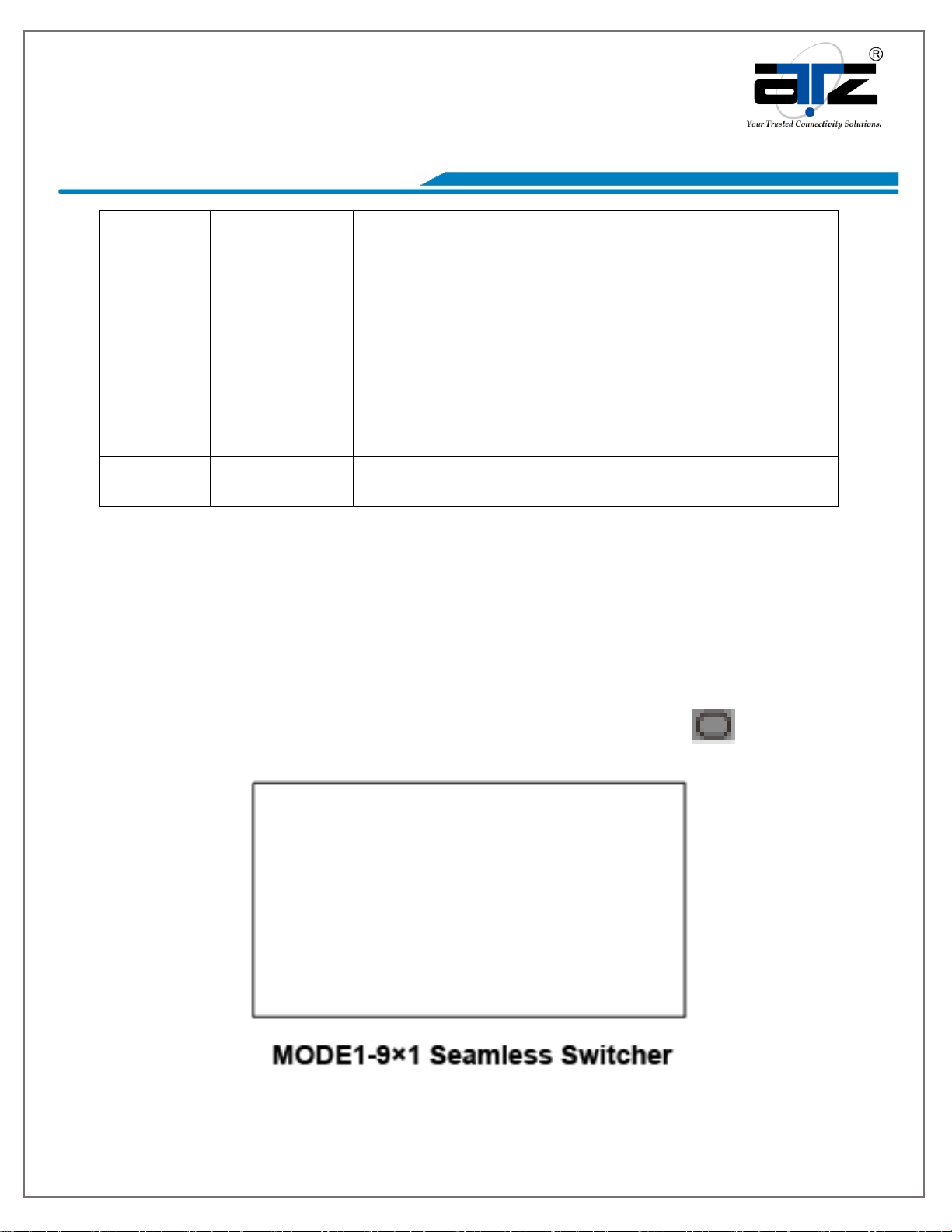
MODE1: The 9x1 HDMI Seamless Switcher will display nine HDMI inputs separately.
Switch to the front panel or remote control MODE button. Operating illustration: select
MODE 1 button→select HDMI input source button [MODE 1 button( )→x].
Model : ATZ HDMI-91SM
Description : 9x1 HDMI SEAMLESS Switcher with Multi-viewer
pg. 6
Notes:- All brand names and trademarks are properties of their respective holders and are referred to here for descriptive purpose only. Photo attached is for reference only, it may be slightly varied in items of colour,
shape from the actual item delivered from time to time.
All specifications are subject to change without prior notice.
© Copyright ATZ
MODE2: The 9×1 HDMI Seamless Switcher divides two HD inputs and display on a
screen. Select input signal source to different display screen.
Operating illustration:
press MODE 2 button(If you want to output the other display mode, please press this
button two times continuously.)→press IN button→press HDMI input source button→
press OUT button→press HDMI input source button(MODE 2 button→IN→x→OUT→y).
For example, if user need the second screen from the third HDMI input port [MODE 2
button( )→IN→3→OUT→2].
MODE3: The 9×1 HDMI Seamless Switcher divides four HD inputs and display on a
Model : ATZ HDMI-91SM
Description : 9x1 HDMI SEAMLESS Switcher with Multi-viewer
pg. 7
Notes:- All brand names and trademarks are properties of their respective holders and are referred to here for descriptive purpose only. Photo attached is for reference only, it may be slightly varied in items of colour,
shape from the actual item delivered from time to time.
All specifications are subject to change without prior notice.
© Copyright ATZ
screen. Select input signal source to different display screen.
Operating illustration:
press MODE 3 button (If you want to output another display mode, please press this
button continuously)→press IN button→press HDMI input source button→press OUT
button→press HDMI input source button(MODE 3 button→IN→x→OUT→y). For example,
if user need the fourth screen from the third HDMI input port [MODE 3 button
( )→IN→3→OUT→4].
Model : ATZ HDMI-91SM
Description : 9x1 HDMI SEAMLESS Switcher with Multi-viewer
pg. 8
Notes:- All brand names and trademarks are properties of their respective holders and are referred to here for descriptive purpose only. Photo attached is for reference only, it may be slightly varied in items of colour,
shape from the actual item delivered from time to time.
All specifications are subject to change without prior notice.
© Copyright ATZ
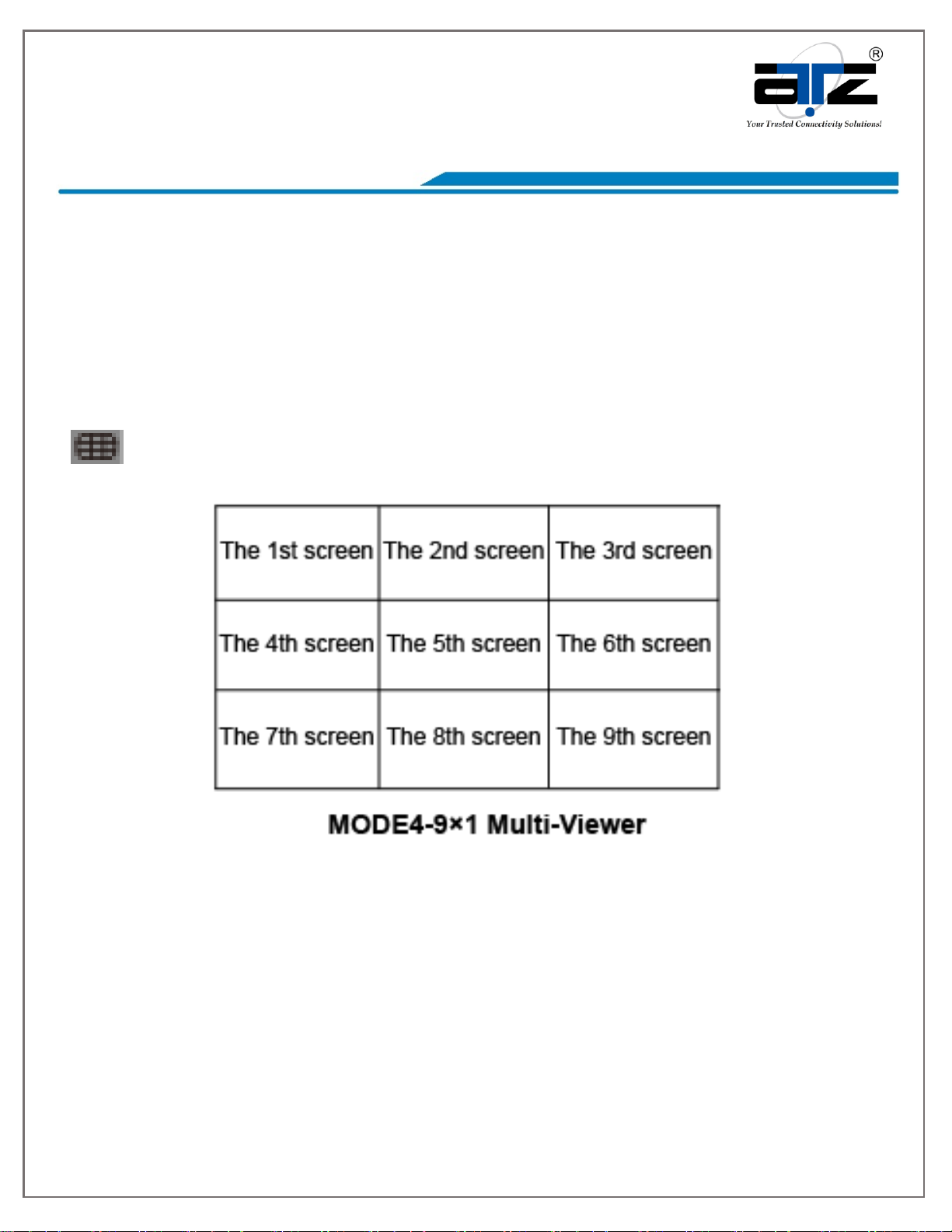
MODE4: The 9×1 HDMI Seamless Switcher divides nine HD inputs with same size and
display on a screen. Select input signal source to different display screen.
Operating illustration:
press MODE 4 button→press IN button→press HDMI input source button→
press OUT button→press HDMI input source button(MODE 4 button→IN→x→OUT→y).
For example, if user need the sixth screen from the first HDMI input port [MODE 4
button
( )→IN→1→OUT→6].
Model : ATZ HDMI-91SM
Description : 9x1 HDMI SEAMLESS Switcher with Multi-viewer
pg. 9
Notes:- All brand names and trademarks are properties of their respective holders and are referred to here for descriptive purpose only. Photo attached is for reference only, it may be slightly varied in items of colour,
shape from the actual item delivered from time to time.
All specifications are subject to change without prior notice.
© Copyright ATZ
Remote Control
Reset: Long press this button up to 10s to reset to factory set. Input
1~9: Press these button to select input source.
In/Out: When user need select Output multi-screen, firstly user need
select the remote control Output multi-screen mode button, then
through operate In→x→Out→y to select output screen.
Please see the above detail description.
Audio: Select output audio signal from HDMI input port.
For example, when user want to select input 1 port audio to output
audio port, press Audio button→Input 1 button.
: Press these button to select display mode.
RES: Cycling select resolution output.
(1024×768/1360×768/720P/1080I/1080P/4K)
IP: Press this button, the output screen left top corner will display
the unit IP address.
VOL-/VOL+: Adjust audio volume output.
Mute: No volume output.
Web GUI User Guide
The switcher can be controlled via Web GUI software through RJ45 port. You should
know current switcher IP address. The static IP address is 192.168.1.100. You can
connect PC Web GUI through dynamic IP address. If you don’t know dynamic IP
address, long press AUDIO/IP button up to 6s, the output screen left top corner will
display dynamic IP address. Then you should set the IP address to your PC or laptop or
mobile device is within the same IP address segment with the switcher. After above, you
can enter the switcher IP address in the web browser to access Web GUI.

Model : ATZ HDMI-91SM
Description : 9x1 HDMI SEAMLESS Switcher with Multi-viewer
pg. 10
Notes:- All brand names and trademarks are properties of their respective holders and are referred to here for descriptive purpose only. Photo attached is for reference only, it may be slightly varied in items of colour,
shape from the actual item delivered from time to time.
All specifications are subject to change without prior notice.
© Copyright ATZ
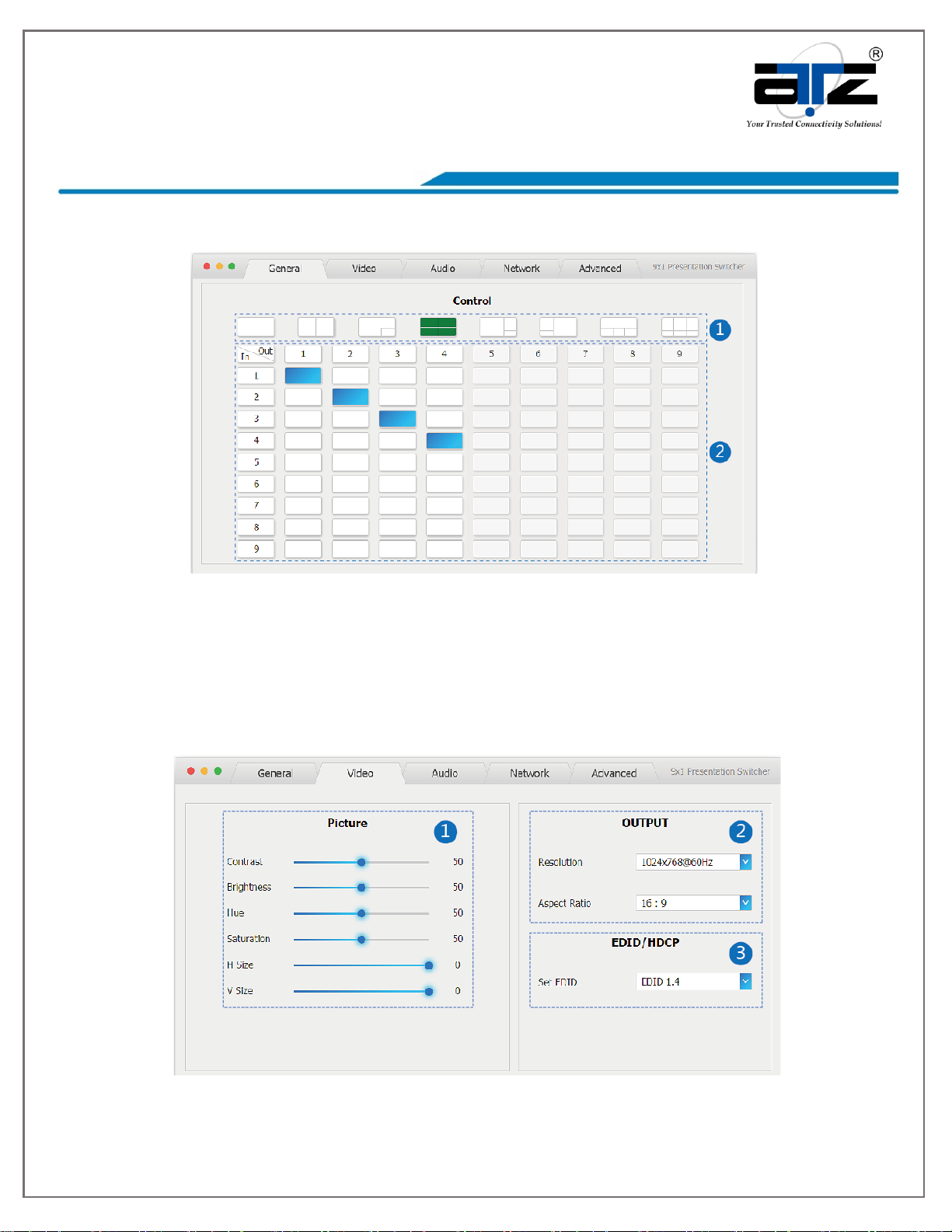
General mode
①Select output screen mode.
②When you have selected output screen mode, then you can select output screen
corresponding input signal source.(The order is from left to right and from top to
bottom.)
Video mode