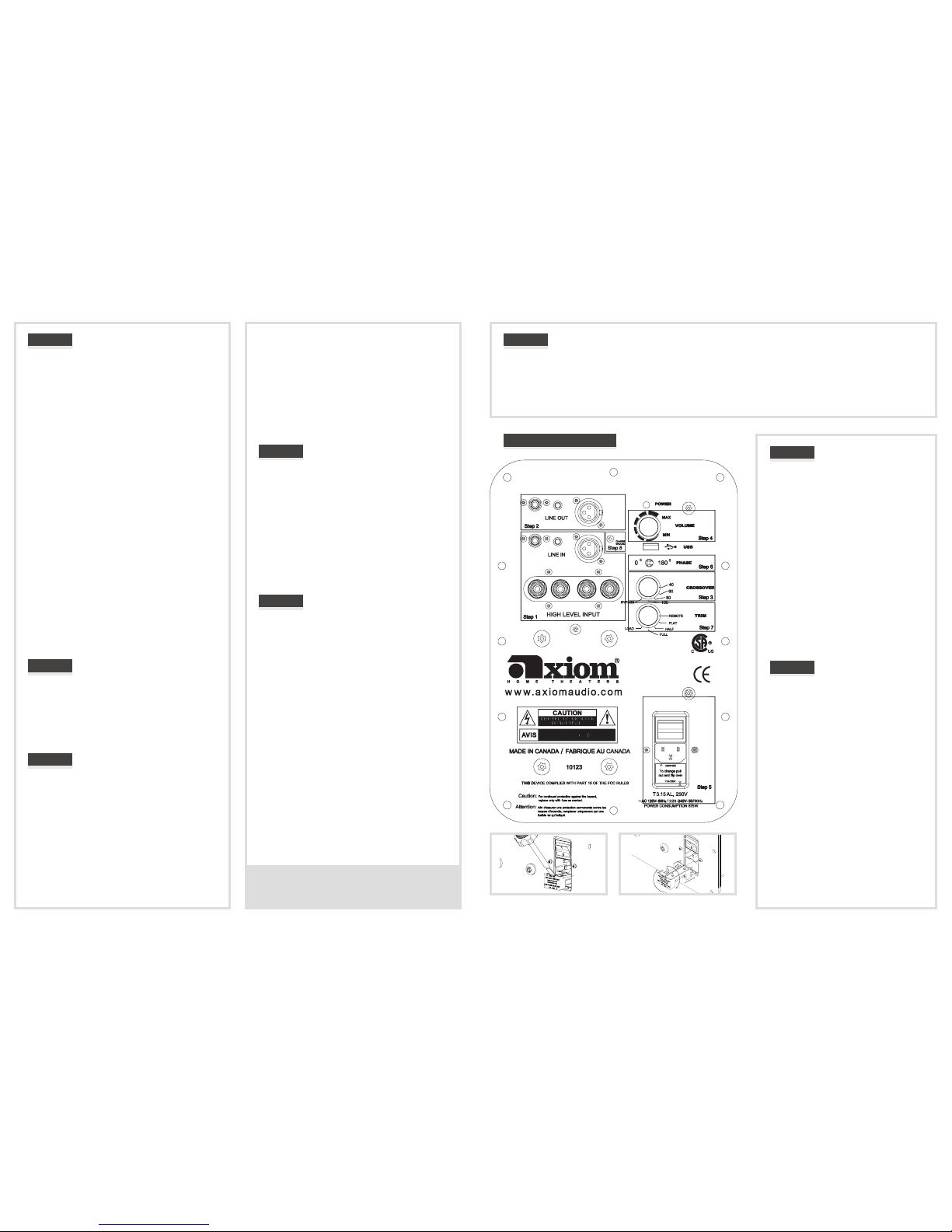
If you are using the HIGH LEVEL (Speaker Level)
binding-post inputs, set the subwoofer crossover switch
to 80 Hz for initial setup. If you have oor-standing
speakers (M50, M60, or M80), try a 60 Hz crossover
frequency, for the M80 try 40 Hz. If your main speakers
are bookshelf models use the 80 Hz setting. Ultimately
you want to use a crossover frequency that produces the
smoothest blend of sound between the subwoofer and
your main speakers.
Step 4:
VOLUME: Set the volume to the 9 o’clock position for
the time being. Later, when you have nished the hookup
of your subwoofer, you will return to this volume setting
to balance the output of the subwoofer to the other
speakers. Avoid the use of the auto-setup feature in your
receiver if it is equipped with one. ese devices rarely
work properly. e best method is to balance your sub
to the other speakers using a variety of music you are
very familiar with. Setting up sub levels and proper sub
placement in your room can be tricky but worth putting
some eort into as the results will be signicant. For a
detailed description please go to www.axiomaudio.com/
sub_setup.html
Step 5:
ON/OFF AC POWER/VOLTAGE SETTING: Your
subwoofer is supplied with a pop-out voltage regulator
set for use with 100 - 120 volts from the A/C line. It can
beeasilyremovedandturnedovertosetyourEP400to
220 volts from the A/C line. See diagrams on the next
page. e EP400 come with a three-prong power cord
compatible throughout the United States and Canada.
Residents of other countries will need to purchase a
converter/adaptor or the proper power cord that ts your
specic socket.
Once you have made appropriate connections from the
A/Vreceiverorpreamp/processortotheEP400andset
the subwoofer’s voltage regulator to the proper voltage,
nd a nearby AC wall outlet and connect the main power
cord to the three-wire socket at the bottom of the control
panel.MovethepowerswitchtotheONsetting.eLED
POWERindicatorshouldglowGreen.eEP400hasan
instantaneous Standby mode that enables itself whenever
thereisnosignalinputfromyourAVreceiverorpreamp.
e Green LED POWER indicator does NOT change
color when the EP400 enters its idle mode, however
power consumption is reduced to 10 watts or less. Leave
the switch at the ON setting unless you go away for an
extended period. Moving it to OFF will shut down all
power to the subwoofer.
Step 1:
LINE IN: e RCA line-level female input, second row,
accepts a standard RCA male plug. Connect a shielded
coaxial cable, with male RCA plugs on each end, from
theA/VreceiverorA/Vpreampprocessor’sSubwoofer
Output jack to the RCA LINE IN female jack on the
EP400.
3.5mm MINI-Jack: is is for any 3-Volt to 30-Volt
power-on trigger. It is also intended for trigger-controlled
operation with future Axiom products.
BALANCED XLR LINE IN:IftheA/VreceiverorA/V
preamp-processor has balanced XLR subwoofer line-
outconnections,youmayconnectaBalancedXLRmale
connector to the XLR female input. Otherwise, ignore
this connector. Do not use a combination of RCA and
XLRinputoroutputconnectors.
HIGH LEVEL INPUT: Use these “speaker-level” or high-
level 5-way binding post connectors only if your receiver
or preamp lacks a dedicated line-level subwoofer output
jack. Connect speaker cables from your amplier’s le-
channel and right-channel speaker output binding posts
to the high-level inputs using banana plugs (single or
dual), spade connectors, pins, or bare cable if you wish
(unscrew the top of each binding post and insert the cable
into the hole in the post; tighten the knurled knob against
the cable). Run a second pair of speaker cables from these
jacks to your main le and right front speakers. Do not
use these connectors if you are already using an RCA or
XLRline-levelconnectionfromthereceiverorpreamp
to the subwoofer. NOTE: BE SURE TO CONNECT
BLACK TO BLACK AND RED TO RED.
Step 2:
LINE OUT (RCA, Trigger and XLR Balanced):
An RCA line-level (female) output and balanced XLR
output (male) are provided for connection to a second
subwoofer. Use a standard shielded coaxial cable for
connection of the RCA Line Out to the second subwoofer.
IfyouareusingbalancedXLRconnectors,thenusethe
balancedLineOutforoperationofasecondEP400.
Step 3:
CROSSOVER: If you are using the Bass Management
crossovermenusettingsinyourA/Vreceiverorprocessor,
turn the subwoofer crossover control to the setting at or
just above the highest crossover point you selected on
yourAVreceivermenu,i.e.fora90-Hzorhigherreceiver
menu setting, use “Bypass” on the sub (“Bypass” selects
a150-Hzcrossover),for70–80HzontheAVreceiver’s
menu, use 80 Hz on the sub, and so on. If your le and
right front satellite speakers have a woofer diameter of
4 inches or less, use the 150-Hz “Bypass” setting on your
subwoofer to enable a smoother transition between your
subwoofer and satellites.
Step 6:
0 & 180 PHASE: is synchronizes the in/out movement of the subwoofer cone driver with the other speakers in your system.
Once you have chosen the best location for your subwoofer, try ipping the phase switch between 0 and 180 to see if one or
the other setting produces deeper and smoother bass output in your room. Leave the switch at the setting that results in the
smoothest and deepest bass at several listening locations in the room. If you hear no dierence, leave the switch at the 0 position.
Quite oen the phase switch makes no dierence, but it’s dependent on your particular room’s dimensions and subwoofer
location.
EP400 Amplier
Step 7:
TRIM: Set this to FLAT for normal subwoofer
operation in a large room. e subwoofer will
reproduce deep bass at normal levels from
the movie soundtrack or music sources. e
LOAD setting is for accessing the internal
microprocessor. Do not use this setting as it
will turn o the sub output and turn the light
amber.eREMOTEsettingisforoperation
withfutureAxiomremote-controlledproducts
that will enable remote-control adjustment of
subwoofer levels. If you are in a medium or
small room you should experiment with Half
and Full to compensate for room loading.
Setting the TRIM to Half will partially increase
frequencies above 33 Hz. e Full setting will
greatly increase frequencies above 33 Hz. is
may be necessary to overcome room loading
or boundary eects (too much or too little low
bass).
Step 8:
GROUND LOOP:
If your subwoofer is producing a 60 Hz hum,
remove the Chassis Ground Screw. If this does
not solve the 60 Hz hum, call 1-866-244-8796
or consult the troubleshooting page at www.
axiomaudio.com/troubleshooting_ep400.
html
POWER INDICATOR: e LED Power
indicatorglowsGreenwhenit’sonandYellow
indicating a fault.
USB: is is to be used for future soware
upgrades to the Digital Signal Processor inside
yourEP400.YoumayalsousetheUSBinput
to connect the accessory Axiom light to ease
visibility in making subwoofer adjustments
or connections. Visit www.axiomaudio.com/
manual_index.html for this Owner’s Manual
with live links to further helpful information.
Step 5: (For 220 volt supply only)
Troubleshooting pages:
www.axiomaudio.com/troubleshooting_ep400.html
www.axiomaudio.com/archives/subsetup.html