manuals.online logo
Brands
  1. Home
  2. •
  3. Brands
  4. •
  5. AZ
  6. •
  7. Measuring Instrument
  8. •
  9. AZ 8902 User manual

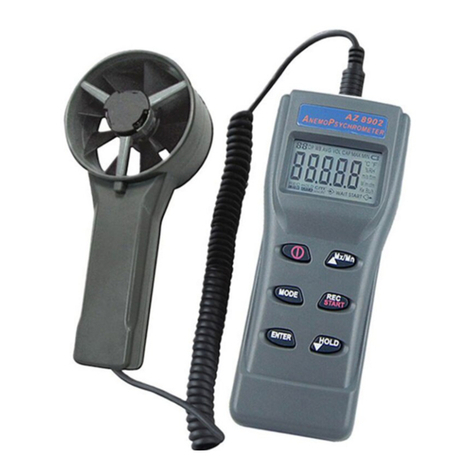
AZ 8902 User manual

Other manuals for 8902

1

This manual suits for next models

2

Other AZ Measuring Instrument manuals
AZ 8925 User manual

AZ

AZ 8925 User manual

AZ AZ8903 User manual

AZ

AZ AZ8903 User manual

AZ 8902 User manual

AZ

AZ 8902 User manual

Popular Measuring Instrument manuals by other brands

Powerfix Profi 278296 Operation and safety notes

Powerfix Profi

Powerfix Profi 278296 Operation and safety notes

Test Equipment Depot GVT-427B user manual

Test Equipment Depot

Test Equipment Depot GVT-427B user manual

Fieldpiece ACH Operator's manual

Fieldpiece

Fieldpiece ACH Operator's manual

FLYSURFER VIRON3 user manual

FLYSURFER

FLYSURFER VIRON3 user manual

GMW TG uni 1 operating manual

GMW

GMW TG uni 1 operating manual

Downeaster Wind & Weather Medallion Series instruction manual

Downeaster

Downeaster Wind & Weather Medallion Series instruction manual

Hanna Instruments HI96725C instruction manual

Hanna Instruments

Hanna Instruments HI96725C instruction manual

Nokeval KMR260 quick guide

Nokeval

Nokeval KMR260 quick guide

HOKUYO AUTOMATIC UBG-05LN instruction manual

HOKUYO AUTOMATIC

HOKUYO AUTOMATIC UBG-05LN instruction manual

Fluke 96000 Series Operator's manual

Fluke

Fluke 96000 Series Operator's manual

Test Products International SP565 user manual

Test Products International

Test Products International SP565 user manual

General Sleep Zmachine Insight+ DT-200 Service manual

General Sleep

General Sleep Zmachine Insight+ DT-200 Service manual

Sensa Core Lacto Spark user manual

Sensa Core

Sensa Core Lacto Spark user manual

VOLTCRAFT UTS-1980 operating instructions

VOLTCRAFT

VOLTCRAFT UTS-1980 operating instructions

EBCHQ 94915 Operation manual

EBCHQ

EBCHQ 94915 Operation manual

Balluff BIP LD2-T017-01-EP-S4 Series user guide

Balluff

Balluff BIP LD2-T017-01-EP-S4 Series user guide

Pulsar IMP Lite Series instruction manual

Pulsar

Pulsar IMP Lite Series instruction manual

ETCR 6800 user manual

ETCR

ETCR 6800 user manual

manuals.online logo
manuals.online logoBrands
  • About & Mission
  • Contact us
  • Privacy Policy
  • Terms and Conditions

Copyright 2025 Manuals.Online. All Rights Reserved.

OPERATION MANUAL
Model:8903/8904/8906
ANEMO-PSYCHROMETER
&
BTU-PSYCHROMETER
Model:
8902
8911
8912
www.GlobalTestSupply.com
Find Quality Products Online at: sales@GlobalTestSupply.com
All manuals and user guides at all-guides.com
Thank you very much for purchasing
this Anemo-Psychrometer.
This unique meter design with 7 H.V.A.C
&R must parameters in 1. The meter
designed as battery operated for Humidity
,Air temp., Dew Point, Wet Bulb, Air
Velocity, Air Volume & BTU (8912).
The sensor is built in the remote fan and
is specially protected by tunable cap.
While in operation, please turn on the cap
to get accurate temperature and humidity
reading.
The psychrometer is a micro processor-
based design. A must device for HVAC
engineers use. No need to whirl the
meter or refer to the chart. Easy to get
wet bulb, dew point and BTU(8912)
quickly!
Features :
1
INTRODUCTION
Big LCD digit display
Professional remote vane
Metric& Imperial selectable
Handheld size, easy to carry
Low battery indication
Fast response &
Tripod mountable for long time use
Dew Point calculated in seconds
Wet Bulb calculated in seconds
Microprocessor circuitry for reliability
Sleep and non-sleep selectable
Powered by 4 AAA batteries or 9VDC
adaptor
Back light for dark places
Accurate reading
Tunable cap to protect sensor
Up to 8 velocity memory (only 8911)
www.GlobalTestSupply.com
Find Quality Products Online at: sales@GlobalTestSupply.com
All manuals and user guides at all-guides.com
2
The meter x 1
Remote vane x1
Battery x 4 (AAA size )
Operation manual x1
Hard carry case x1
This package contains:
MATERIAL SUPPLIED
REMINDER
1. Rotate the cover before measurement
to ensure the measured data is correct.
.
Important:
AC to DC 9V adaptor
RS232 cable & CD
Optional accessory:
2. The fan and meter are sold as a kit and
are well calibrated.
When you need to replace the fan,
please see page 16 for the details of
fan replacement.
CONTROLS AND INDICATORS
LCD DISPLAY
DPWBA VOLVG CAPMAXMIN
%RH
m/s ft/m
cfm
Btu/hKw
CF
M/m
3
REC HOLD WAITSTART
LDWinch
cm2
2
AREA
www.GlobalTestSupply.com
Find Quality Products Online at: sales@GlobalTestSupply.com
All manuals and user guides at all-guides.com
3
KEY PAD
1.Power :
-Turn on the meter with auto-sleep mode.
-Turn off the meter at any mode.
-When the meter is off, pressing more
than two sec. to enter units selection.
2.MODE:
-Pressing to select different modes.
Temp. DP WB RH Velocity.
-Pressing longer to select VOL and CAP.
3.ENTER:
- To confirm the setting & calibration.
4.Mx/Mn/Up :
-Pressing to view MAX/MIN/AVG value.
-Press to select the value of each digit
in cycle.
5.REC/START:
- In velocity mode, pressing this key to
store the current velocity reading into
memory (8911only)
- To start measuring volume or capacity
(8912 only) without waiting.
www.GlobalTestSupply.com
Find Quality Products Online at: sales@GlobalTestSupply.com
All manuals and user guides at all-guides.com
4
6.HOLD/Down :
- In basic modes pressing this key to
hold the current reading, then pressing
this key again to unlock the holding.
- Pressing to select the setting digit.
7.Power + :
- When the meter is off, pressing more
than two sec. to enter non-sleep mode.
8.Power + + :
- Pressing more than two seconds to
enter RH calibration mode.
9.ENTER+ :
- Pressing to turn on/off the backlight.
%RH
Ft/m
cfm
Btu/h
F
C
%RH
m/s
Kw
M/m
3
POWER ON/OFF & UNIT SELECT
Press to turn on the meter with
auto-sleep mode. Press again to turn
off the meter at any mode.
Or
cm inch
When in unit selection mode, press
or to select the unit, then,
press to save and meter will be
powered on automatically.
When the meter is off, pressing
more than two seconds to enter units
selection mode.
BASIC MEASUREMENT
Please refer to below table of the basic
measured parameters of each model
www.GlobalTestSupply.com
Find Quality Products Online at: sales@GlobalTestSupply.com
All manuals and user guides at all-guides.com
8902 89128911
Basic Measure
Air temp.
Humidity
Dew Point
Wet Bulb
Air Velocity
Vel with
average
Air Volume
Capacity
Extend Measure
8902 89128911
Sum of
Volume
Sum of
Capacity
5
m/s
REC
When power on, the air temperature
is the default value to show on the LCD.
To review the other basic parameters,
just press key then each parameter
will be display in turn.
Velocity with memory (8911 only)
In velocity mode, press to store
value into memory. A record number will
be displayed on the top-left of the LCD.
The max. record is 8 points.(Fig.A)
While in basic mode, press for over
2 seconds to enter extend measurement
mode. For 8912, also press key to
switch between volume and capacity.
(Fig.A)
www.GlobalTestSupply.com
Find Quality Products Online at: sales@GlobalTestSupply.com
All manuals and user guides at all-guides.com
MAX
%RH
DP MIN
F
6
From the meter is powered on, air temp.,
dew-point, WBT, humidity & velocity will
be temporarily saved in meter, so, to
press could view the average value
minimum value and maximun value in
turns. Press again to back to normal
mode. The data will be re-counted once
the meter is powered off and turn on
again.
MAX, MIN & AVG.
When in Max./Min./Avg. mode, pressing
key to display the parameters you
need. (Fig. B, Fig. C)
(Fig. C)
(Fig. B)
Checking velocity memory(8911 only)
While the 8911 is in velocity mode and
with record in memory (up to 8 points),
pressing key to review average
value (at moment, the meter is in hold
mode).
Pressing key to view the minimum
/maximun value of memorised velocity
in turns.(Fig.D & Fig. E)
Pressing key again to exit above
average/ min. /max. review and back to
normal.
The memorized record will be deleted
after the meter is powered off and turn
on again.
www.GlobalTestSupply.com
Find Quality Products Online at: sales@GlobalTestSupply.com
All manuals and user guides at all-guides.com
7
AIR VOLUME: OUTLET SIZE
While in normal mode, long pressing
key to enter air volume mode.
To measure the volume, the outlet size
need to be input first. There are three
choice to enter the size:
- Length & Width:
This is the default choice. Press
key to select the setting digit first,
then press key to select the
appropriate value ( 0~9). When select
the value, the value will show from 0
to 9 in cycle. After entering length,
short press to enter width setting.
Repeat the procedure of length setting,
then short press again to finish
the size setting and enter next step.
(Fig.F)
AVG
Ft/m
HOLD
MIN
Ft/m
HOLD
(Fig.E)
(Fig.D)
- Diameter:
While in default outlet setting mode
(length), pressing key for over
two seconds to choose diameter setting.
Press key to select the setting digit
first, then press key to select the
appropriate value ( 0~9)
After selection, short press again
to finish the size setting and enter next
step. (Fig. G)
- Area:
While in diameter setting mode,
pressing key for over two seconds
to enter area setting.
www.GlobalTestSupply.com
Find Quality Products Online at: sales@GlobalTestSupply.com
All manuals and user guides at all-guides.com
VOL
cm
L
VOL
cm
W
VOL
cm
D
2
VOL
cm
AREA
(Fig. F)
(Fig. G) (Fig. H)
8
AIR VOLUME: MEASUREMENT
After short pressing to finish and
leave size setting, there are 20 second
waiting time for you to put the vane
to the grill.
Press key to select the setting digit
first, then press key to select the
appropriate value ( 0~9)
. After selection, short press again
to finish the size setting and enter next
step. (Fig. H)
Note: Refer to page 13 for the range
of each size input mode.
During the 20 second waiting time, the
count down number displayed on top-
left corner and meter also beeps when
time is up.(Fig. I)
If no need to wait for 20 seconds, just
pressing key to start measuring
the volume right away.
VOL
WAIT
m/s (Fig. I)
www.GlobalTestSupply.com
Find Quality Products Online at: sales@GlobalTestSupply.com
All manuals and user guides at all-guides.com
After starting measuring the volume,
the meter will automatically count the
volume for 60 seconds to give a average
value. (Fig. J) During this 60 second
time, the vane should move along the
whole outlet to cover each area so the
measured data could be more accuracy.
The count down number displayed on
the top- left corner as a reminder and
meter also beeps when 60 sec is up.
VOL
M/m
3
(Fig. J)
VOL
AVG
M/m
3
(Fig. K)
START
After time is up, 60 seconds average
volume will display on the LCD as Fig K.
9
After measuring more than one outlet
volume, you could press key to
review the sum of all outlets. Pressing
key to review the last outlet volume.
If there are more than one outlet, you
could press key again to repeat
the procedure from outlet size input.
You could measure outlet as many as
you need.
CAPACITY: OUTLET SIZE
While in normal mode, long pressing
to enter air volume, then short
press to enter capacity mode.
To measure the capacity, put the vane
on the Inlet, then press to count
the 60 second average Temp. & RH%
( Fig. L)count down will show on left-top
corner of LCD and meter beeps after 60
second is up. Then, the meter enter
outlet size setting automatically. (Note 1)
www.GlobalTestSupply.com
Find Quality Products Online at: sales@GlobalTestSupply.com
All manuals and user guides at all-guides.com