manuals.online logo
Brands
  1. Home
  2. •
  3. Brands
  4. •
  5. Behringer
  6. •
  7. Recording Equipment
  8. •
  9. Behringer 305 EQ/MIXER/OUTPUT User manual

Behringer 305 EQ/MIXER/OUTPUT User manual

Other Behringer Recording Equipment manuals

Behringer MiniFBQ FBQ800 User manual

Behringer

Behringer MiniFBQ FBQ800 User manual

Behringer Modulizer PRO DSP1200P User manual

Behringer

Behringer Modulizer PRO DSP1200P User manual

Behringer B-Control Fader BCF2000 User manual

Behringer

Behringer B-Control Fader BCF2000 User manual

Behringer Super-X Pro CX3400 User manual

Behringer

Behringer Super-X Pro CX3400 User manual

Behringer MicroMIX MX400 User manual

Behringer

Behringer MicroMIX MX400 User manual

Behringer Minibeat BEAT800 User manual

Behringer

Behringer Minibeat BEAT800 User manual

Behringer TDF1616 User manual

Behringer

Behringer TDF1616 User manual

Behringer PRO-1 User manual

Behringer

Behringer PRO-1 User manual

Behringer Noise Reducer NR300 User manual

Behringer

Behringer Noise Reducer NR300 User manual

Behringer B-Control Fader BCF2000-WH User manual

Behringer

Behringer B-Control Fader BCF2000-WH User manual

Behringer FEEDBACK DESTROYER PRO DSP1124P User manual

Behringer

Behringer FEEDBACK DESTROYER PRO DSP1124P User manual

Behringer BASS OVERDRIVE BOD400 User manual

Behringer

Behringer BASS OVERDRIVE BOD400 User manual

Behringer X-UF User manual

Behringer

Behringer X-UF User manual

Behringer ULTRAPATCH PX1000 User manual

Behringer

Behringer ULTRAPATCH PX1000 User manual

Behringer U-CONTRO LUMX25 User manual

Behringer

Behringer U-CONTRO LUMX25 User manual

Behringer U-CONTROL UMA S UMA25S User manual

Behringer

Behringer U-CONTROL UMA S UMA25S User manual

Behringer Eurorack MX1604A User manual

Behringer

Behringer Eurorack MX1604A User manual

Behringer BRAINS User manual

Behringer

Behringer BRAINS User manual

Behringer MIDI FOOT CONTROLLER FCB1010 User manual

Behringer

Behringer MIDI FOOT CONTROLLER FCB1010 User manual

Behringer GUITAR LINK UCG102 User manual

Behringer

Behringer GUITAR LINK UCG102 User manual

Behringer EURORACK UBB1002 User manual

Behringer

Behringer EURORACK UBB1002 User manual

Behringer ULTRA-DI DI100 User manual

Behringer

Behringer ULTRA-DI DI100 User manual

Behringer VIRTUALIZER PRO DSP1000P User manual

Behringer

Behringer VIRTUALIZER PRO DSP1000P User manual

Behringer FEEDBACK DESTROYER FBQ1000 User manual

Behringer

Behringer FEEDBACK DESTROYER FBQ1000 User manual

Popular Recording Equipment manuals by other brands

ThermoFisher Scientific Dionex DRS 600 Installation checklist

ThermoFisher Scientific

ThermoFisher Scientific Dionex DRS 600 Installation checklist

Shure ANIUSB-Matrix user guide

Shure

Shure ANIUSB-Matrix user guide

Nady Audio HE-1 user guide

Nady Audio

Nady Audio HE-1 user guide

AUDAC APM 01 User manual & installation guide

AUDAC

AUDAC APM 01 User manual & installation guide

Teac GF-350 owner's manual

Teac

Teac GF-350 owner's manual

Fractal Audio MFC-101 MARK III owner's manual

Fractal Audio

Fractal Audio MFC-101 MARK III owner's manual

bmcm USB-OI16 manual

bmcm

bmcm USB-OI16 manual

HHB BurnIT CDR-830 Service manual

HHB

HHB BurnIT CDR-830 Service manual

GE VersaMax IC200CPUE05 manual

GE

GE VersaMax IC200CPUE05 manual

IntesisBox MH-RC-MBS-1 user manual

IntesisBox

IntesisBox MH-RC-MBS-1 user manual

Attero Tech unD4l user manual

Attero Tech

Attero Tech unD4l user manual

Sennheiser UI 765 instruction manual

Sennheiser

Sennheiser UI 765 instruction manual

Sony RCD-W1 Operating Instructions  (primary... Service manual

Sony

Sony RCD-W1 Operating Instructions (primary... Service manual

Roland Planet-P  MKS-10 owner's manual

Roland

Roland Planet-P MKS-10 owner's manual

Roland BOSS GT-PRO Turbostart

Roland

Roland BOSS GT-PRO Turbostart

8x8 Inc Valcom V-2001A manual

8x8 Inc

8x8 Inc Valcom V-2001A manual

Waves SUB Align user guide

Waves

Waves SUB Align user guide

Mitsubishi Electric MAC-334IF-E installation manual

Mitsubishi Electric

Mitsubishi Electric MAC-334IF-E installation manual

manuals.online logo
manuals.online logoBrands
  • About & Mission
  • Contact us
  • Privacy Policy
  • Terms and Conditions

Copyright 2025 Manuals.Online. All Rights Reserved.

Quick Start Guide
305 EQ/MIXER/OUTPUT
Legendary Analog Parametric EQ,
Mixer and Output Module for Eurorack
Controls
(1) MIXER INPUTS (1 / 2 / 3 / 4) – Use these jacks to route
audio signals into the OUTPUT MIXER section via cables
with 3.5 mm connectors. Channel 1 includes a pre-wired,
normalled connection from the parametric EQ section, so
the PARAMETRIC EQ output can directly enter the Channel
1 signal path just before the volume slider. If a 3.5 mm
connector is inserted into the MIXER INPUT 1 jack, the EQ
output is disconnected and replaced by the incoming jack
signal from MIXER INPUT 1.
(2) VOLUME SLIDERS – Use these sliders for independent
volume control of each input channel.
(3) PANPOT – These knobs control each channel’s placement
in the stereo eld.
(4) LEVEL (1 / 2 / 3 / 4) – Use these knobs to cut or boost each
of the PARAMETRIC EQ’s four frequency bands.
(5) BANDWIDTH – These knobs control the width or
narrowness of the parabolic lter curve for each frequency
band. Higher values narrow the curve, while lower values
produce a wider, gentler parabolic curve.
(6) FREQUENCY – Use these knobs to adjust the placement
of each EQ lter around the center value shown just above
the knob.
(7) IN – Use this input to route external signals into
the PARAMETRIC EQ section via cables with 3.5 mm
connectors. The IN jack’s associated signal and clip LEDs
read the input signal level when BYP is selected on the
EQ/BYP sliding switch. When EQ is selected on the EQ/BYP
sliding switch, the LEDs read the EQ output level.
(1)
(2)
(3)
(7)
(4)
(5)
(6)
(8)
(9)
(14)
(15)
(12)(13)(11)
(10)
V 1.0
(8) EQ/BYP – This sliding switch turns the PARAMETRIC EQ
circuit on or o. When the switch is in the BYP position,
and the EQ circuit is inactive, the signal coming in through
the IN jack will be passed through unaltered to the
Channel 1 mixer channel.
(9) EQ OUT (1 / 2) – Use these parallel output jacks to send
the PARAMETRIC EQ section’s processed signal out for use
elsewhere via cables with 3.5 mm connector. When the
EQ/BYP switch is in the BYP (bypassed) position, the signal
coming in through the IN jack will be duplicated at the EQ
OUT outputs.
(10) MIX LEVEL – Use this knob to adjust the volume of the
STANDARD OSC output before the adjusted signal is then
sent to the headphone LEVEL control and the nal MASTER
VOLUME control.
(11) FREQ (OFF / 220 / 440 / 880) – This sliding switch turns
the onboard oscillator (STANDARD OSC) on or o and
chooses the oscillator’s frequency. The oscillator’s output

goes to the OUTPUT MIXER section as a pre-wired parallel
connection, like an additional fth mono channel, that
is blended into the mixer section’s output using the MIX
LEVEL control.

(12) MASTER VOLUME – Use this knob to make nal level
adjustments before the mix goes to the MASTER OUTPUTS.
(13) MASTER OUTPUTS – Use these outputs to send out the
nal mix via separate left and right jacks via cables with
either 3.5 mm or ¼” connectors. For a single mono output,
use only the output labeled L/MONO.
(14) LEVEL (PHONES) – Use this knob to control the volume
level for the PHONES output.
(15) PHONES – This output sends out the nal mix for
headphones with a 1/8” stereo connector.
Power Connection
The 305 EQ/MIXER/OUTPUT module comes with the required
power cable for connecting to a standard Eurorack power supply
system. Follow these steps to connect power to the module. It
is easier to make these connections before the module has been
mounted into a rack case.
1. Turn the power supply or rack case power o and
disconnect the power cable.
2. Insert the 16-pin connector on the power cable into the
socket on the power supply or rack case. The connector has
a tab that will align with the gap in the socket, so it cannot
be inserted incorrectly. If the power supply does not have
a keyed socket, be sure to orient pin 1 (-12 V) with the red
stripe on the cable.
3. Insert the 10-pin connector into the socket on the back of
the module. The connector has a tab that will align with the
socket for correct orientation.
4. After both ends of the power cable have been securely
attached, you may mount the module in a case and turn on
the power supply.
Installation
The necessary screws are included with the module for mounting
in a Eurorack case. Connect the power cable before mounting.
Depending on the rack case, there may be a series of xed holes
spaced 2 HP apart along the length of the case, or a track that
allows individual threaded plates to slide along the length of the
case. The free-moving threaded plates allow precise positioning
of the module, but each plate should be positioned in the
approximate relation to the mounting holes in your module before
attaching the screws.
Hold the module against the Eurorack rails so that each of the
mounting holes are aligned with a threaded rail or threaded
plate. Attach the screws part way to start, which will allow small
adjustments to the positioning while you get them all aligned.
After the nal position has been established, tighten the
screws down.
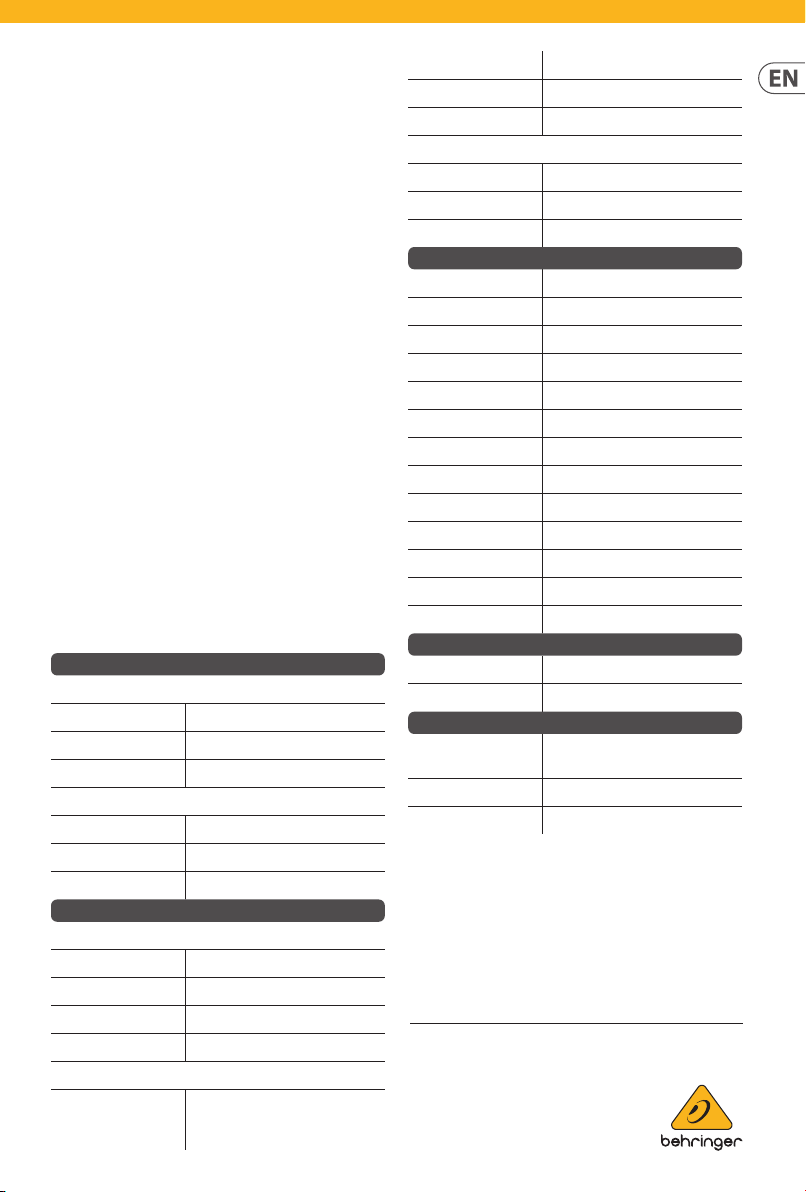
Specications
Inputs
EQ input
Type 3.5 mm TS jack, AC coupled
Impedance 40 kΩ, unbalanced
Max input level +18 dBu
Mixer input
Type 4 x 3.5 mm TS jacks, AC coupled
Impedance > 25 kΩ, unbalanced
Max input level +21 dBu
Outputs
EQ output
Type 2 x 3.5 mm TS jacks, DC coupled
Impedance 330 Ω, unbalanced
Max output level +18 dBu
Noise with EQ set at < -90 dBu, 22 Hz to 22 kHz
Master output
Type 2 x 3.5 mm TS jacks
2 x ¼" TS jacks
AC coupled
Impedance 700 Ω, unbalanced
Max output level +8 dBu
Noise with 1 channel open
< -100 dBu, 22 Hz - 22 kHz
Phones output
Type 3.5 mm TRS stereo jack, AC coupled
Impedance 50 Ω, unbalanced
Max output level +18 dBu
Controls
EQ level ±12 dB, 0 dB center detent
EQ bandwidth Q range
0.9 to 9
EQ frequency range 1 20 Hz to 200 Hz
EQ frequency range 2 100 Hz to 1 kHz
EQ frequency range 3 500 Hz to 5 kHz
EQ frequency range 4 2 kHz to 20 kHz
EQ bypass switch O / on
OSC frequency switch O / 220 Hz / 440 Hz / 880 Hz
OSC mix level -∞ to unity gain
Mixer input fader -∞ to unity gain
Mixer panpot -∞
to unity gain, -3 dB center detent
Master volume -∞ to -10 dBu
Phones level -∞ to +10 dBu
Power
Power supply Eurorack
Current draw 120 mA (+12 V), 100 mA (-12 V)
Physical
Dimensions 53 x 122 x 129 mm (2.1 x 4.8 x
5.1")
Rack units 24 HP
Weight 0.28 kg (0.62 lbs)
LEGAL DISCLAIMER
Music Tribe accepts no liability for any loss which may be suered by any
person who relies either wholly or in part upon any description, photograph,
or statement contained herein. Technical specications, appearances and
other information are subject to change without notice. All trademarks are
the property of their respective owners. Midas, KlarkTeknik, Lab Gruppen,
Lake, Tannoy, Turbosound, TC Electronic, TC Helicon, Behringer, Bugera,
Auratone and Coolaudio are trademarks or registered trademarks
of Music Tribe Global Brands Ltd. © Music Tribe Global Brands Ltd.
2020 All rights reserved.
LIMITED WARRANTY
For the applicable warranty terms and conditions and
additional information regarding Music Tribe’s
LimitedWarranty, please see complete details online
at musictribe.com/warranty.