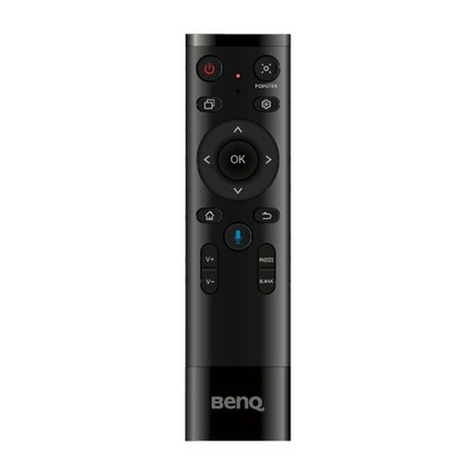
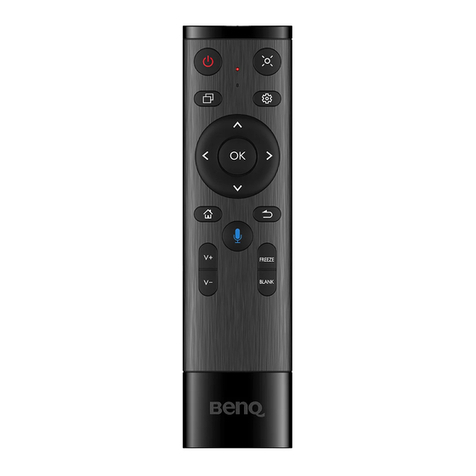
BenQ TRY01 User manual

TRY01
Remote Control
User Manual

Parts of the display and their functions
Remote control
Turn the display on or off.
Press to activate the spotlight function.
Press to open switch Q.
Press to open or close the OSD menu.
Direction key. Press for upward selection.
Direction key. Press for left selection.
Press to proceed.
Direction key. Press for right selection.
Direction key. Press for downward selection.
Android system main screen button.
Return key.
Press to activate Voice Assistant.
Volume up.
Volume down.
Freeze screen.
One key for blank screen.
OK
3
1
7
8
12
16
14
5
2
6
4
10
13
11
15
9
1
2
3
4
5
6
7
8
9
10
11
12
13
14
15
16

Parts of the display and their functions
Remote control important notice
1. This remote control is only applicable to BenQ RP6501K, RP7501K, RP8601K.
2. The function keys can work only when the enclosed dongle is inserted to the BenQ
IFP.
3. The remote control and the enclosed dongle have been paired in default.
Using the remote control
Installing remote control batteries
Dongle
1. Open the remote control battery compart-
ment cover.
2. Insert the supplied batteries ensuring that
the positive and negative marked battery
terminals match the (+) and (-) marks in the
battery compartment.
The supplied batteries are provided for your
convenience so that you can operate the display
straight away. You should replace them as soon as
possible.
3. Refit the battery compartment cover.

Parts of the display and their functions
Using the BenQ IFP by remote control
1. Insert the enclosed dongle into BenQ IFP’s USB port.
2. You can activate functions on the screen once the remote control is connected to
its enclosed dongle as a receiver.
3. For detailed function of each button, please refer to Remote control on page 10.
Pairing the remote control and the enclosed dongle
If the default pairing was unsuccessful, please follow the steps:
1. Press the and at the same time, and the indicator light starts flashing.
2. Insert the enclosed dongle to IFP’s USB port and place the remote control near it.
3. The pairing is completed once the indicator stops flashing.
Remote control usage tips
• Aim the top front of the remote control directly at the display’s remote control sensor
window when you press the buttons.
• Avoid getting the remote control wet or store it in humid environments (like
bathrooms).
• If the display’s remote control sensor window is exposed to direct sunlight or strong
light, the remote control may not operate properly. In this situation, change the light
source, readjust the angle of the display, or operate the remote control from a location
closer to display’s remote control sensor window.

Regulatory notices for remote control
Regulatory notices for remote control
Accessing regulatory labels
1. Turn on or restart the display, and then go to the system setting via either one of
the following:
•Press on the remote control.
2. Go to System > About > Legal information
•Regulatory labels, which provide country or regional regulatory information, such as
CE, RCM and MIC are physically located on the back of the device.
•The device also provide electronic regulatory labels (e-labels) that can be accessed
through the display system settings.
To view electronic regulatory labels:
•Press the Menu button on the front panel.
•Drag the system menu up from the bottom-center of the screen.

Parts of the display and their functions
3. Go to Legal information
4. Select Remote control electronic label to view the listofavailable electronic label items.

Safety warnings and precautions
• The mains plug of the power supply cord shall remain readily operable. The AC receptacle (mains
socket outlet) shall be installed near the equipment and shall be easily accessible. To completely
disconnect this equipment from the AC mains, disconnect the power cord plug from the AC
receptacle.
• Do not place this display on an uneven, sloping or unstable surface (such as a trolley) where it may
fall and cause damage to itself or others.
• Do not place this display near water, like a spa or pool, or in a position which will allow the
splashing or spraying of water onto the display, like in front of an open window where rain water
may enter.
• Do not install this display in a confined space without proper ventilation and air circulation, such as
in a closed cabinet. Allow proper space around the display for dissipating heat inside. Do not block
any openings and vents on the display. Overheating may result in hazards and electric shock.
• Installation of this display should only be performed by a qualified technician. Failure to install this
display properly may cause injuries and damages to the personnels and the display itself. Check the
installation regularly and maintain the display periodically to ensure the best working condition.
• Use only the accessories approved or recommended by the manufacturer to mount this display.
Using wrong or unsuitable accessories may cause the display to fall and result in serious personal
injuries. Make sure that the surface and fixing points are strong enough to sustain the weight of the
display.
•To reduce the risk of electric shock, do not remove covers. No user serviceable parts inside.
Refer servicing to qualified service personnel.
• T
o prevent personal injuries, mounting the display or installing desktop stands is required before
use.
Notice
This product is also designed for IT power system with phase to phase voltage 230.
THIS EQUIPMENT MUST BE
GROUNDED
To ensure safe operation, the three-pin plug
must be inserted only into a standard
three-pin power outlet which is effectively
grounded through normal household
wiring. Extension cords used with the
equipment must have three cores and be
correctly wired to provide connection to
the ground. Wrongly wired extension
cords are a major cause of fatalities.
The fact that the equipment operates
satisfactorily does not imply that the power
outlet is grounded or that the installation is
completely safe. For your safety, if you are
in any doubt about the effective grounding
of the power outlet, please consult a
qualified electrician.
The lightning flash with arrowhead symbol,
within an equilateral triangle, is intended to
alert the user to the presence of
uninsulated "dangerous voltage" within the
product's enclosure that may be of sufficient
magnitude to constitute a risk of electric
shock to persons.
The exclamation point within an equilateral
triangle is intended to alert the user to the
presence of important operating and
maintenance (servicing) instructions in the
literature accompanying the appliance.
English
P/N: 4J.F4S02.001
7/4/18

安全警告和预防措施
•电源线的电源插头应该保持随时可使用。交流插座 (电源插座)应安装在设备附近且方便
使用。要完全将设备与交流电源断开,请从交流插座上拔下电源插头。
•勿将显示器置于不平、倾斜或不稳的表面 (如推车)上,因为这可能导致其跌落并损伤机
身或其他物品。
•勿将显示器置于水源附近,如浴场或泳池,或置于可能让水飞溅或喷洒到显示器上的地
方,如打开的窗户前面,此处雨水可能溅入。
•勿将显示器安装在没有适当通风和空气流动的密闭空间,如密封的柜子内。显示器周围要
有适当的空间以供其内部散热。勿阻塞显示器上的任何开口和通风口。过热可能导致危险
和电击。
•显示器安装只应由合格电工进行。显示器安装不正确可能导致人身及显示器本身的损伤和
损坏。定期检查并维护显示器,确保其最佳工作状态。
•仅使用许可的或制造商推荐的配件固定显示器。使用错误的或不合适的配件可能导致显示
器跌落,造成严重的人身伤害。请确保表面和固定点足够坚固,可以支撑显示器的重量。
•要减少电击风险,请勿移开机盖。机内没有用户可维修部件。维修服务应由专业维修人士
提供。
•为防止人身伤害,使用前请固定显示器或安装底座。
•本机使用后的废弃电池需得到正确处置和回收。
•请勿让小孩接触电池,勿将电池投入水中,以免发生危险。
注意
此产品的设计也适用带相间电压 230 V 的IT 电源系统。
此设备必须接地
为确保安全操作,三脚插头只能插入使用常规
家庭布线而有效接地的标准三脚电源插座。设
备所使用的延长线必须有三股并应正确接地。
连接错误的延长线是死机的主要原因。
尽管设备运行顺利,但并不表示电源插座已正
确接地或安装完全安全。为了您的安全,如果
您对于电源插座的有效接地有任何疑问,请咨
询合格电工。
在等边三角形内的带箭头的闪电符号旨在警告用
户在产品外壳内有非绝缘的 “危险电压”存在,
该类危险电压足以给人带来触电的风险。
在等边三角形内的惊叹号旨在警告用户查看随机
所附的重要操作和维护 (维修)指示文字。
若机身上有此符号,仅适用于在海拔 2000 米以
下地区安全使用。
若机身上有此符号,仅适用于在非热带气候条件
下安全使用。
简体中文

安全警告與注意事項
• 電源供應器主插頭應隨時保持容易操作的狀態。AC 電源插座 (主插座)應安裝於設備附
近,以便使用。若要從 AC 主插座完全拔下此設備的電源線,請從 AC 電源插座拔下電源
線插頭。
• 請勿將此顯示器置於不平坦、傾斜或不穩定的表面 (例如手推車),因為這可能導致傾
倒,或是造成自己與他人受傷。
• 請勿將此顯示器置於靠近水域之處 (例如 SPA 或水池),或是置於會將水潑灑或噴濺到顯
示器的位置 (例如將顯示器放在開著窗戶且會飄進雨水之處)。
• 請勿在缺乏良好散熱或空氣循環的密閉空間中安裝此顯示器,例如緊閉的櫃子中。為了便
於內部散熱,請在顯示器四周預留適當空間。請勿擋住顯示器上的任何開口或通風口。顯
示器過熱可能導致發生危險和觸電。
• 僅應由合格技師負責安裝本顯示器。若未正確安裝本顯示器,則可能導致人員與顯示器本
身發生傷害或損害。請定期檢查安裝作業並執行維護,以確保最佳運作狀態。
• 僅使用經廠商核可或建議的配件來安裝本顯示器。使用不當或不適合的配件,可能會導致
顯示器摔落而造成嚴重的人員傷害。確定安裝表面與固定點的強度足以支撐顯示器重量。
• 為了減少觸電的危險,請勿移除產品外殼。使用者不得自行維修內部零件。請由合格的服
務人員負責維修工作。
• 為了避免造成人身傷害,使用前請先固定顯示器或安裝桌面支架。
• 使用過度恐傷害視力。
• 使用 30 分鐘請休息 10 分鐘。
• 未滿 2歲幼兒不看螢幕,2歲以上每天看螢幕不要超過 1小時。
注意
本產品的設計也適用於相間電壓 230 V 的IT 電源系統。
本產品必須接地
為確保操作安全,您必須僅將 3 針腳插
頭插入至標準 3 針腳電源插座,以透過
標準家庭電路將產品有效接地。產品必
須使用三芯延⻑線並正確連接電源,以
將產品電源接地。電源延⻑線連接錯誤
是造成致命危險的⼀⼤主因。
產品正常運作並不表示電源插座已接
地,或是安裝過程⼀切安全無虞。為了
安全起見,若您對於是否有效將電源插
座接地有任何疑慮,請洽詢合格的電工
技師。
等邊三角形圖示當中的閃電箭頭符號,意
在警告使用者產品機殼內部會產生非絕緣
的 「危險電壓」,且強度足以導致人員觸
電的風險。
等邊三角形圖示當中的驚嘆號,意在警告
使用者該裝置附有重要的操作與維護 (維
修)文字說明。
繁體中文

Avertissements et précautions de
sécurité
• La prise du cordon d’alimentation doit rester facilement accessible. La prise secteur (prise murale)
doit être installée à proximité de l’équipement et doit être accessible facilement. Pour déconnecter
totalement cet appareil du secteur, déconnectez le cordon d’alimentation de la prise secteur.
• Ne placez pas cet écran sur une surface inclinée ou instable (comme un chariot) où il pourrait
tomber et être endommagé ou blesser quelqu’un.
• Ne placez pas cet écran à proximité d’eau comme un spa ou une piscine ou dans une position qui
permettrait des éclaboussures ou des pulvérisations d’eau sur l’affichage, comme devant une
fenêtre ouverte par laquelle la pluie pourrait rentrer.
• N’installez pas cet écran dans un espace confiné sans une ventilation et une circulation d’air
adéquates, comme dans une armoire fermée. Laissez un espace adéquat autour de l’écran pour
dissiper la chaleur à l’intérieur. Ne bloquez aucune des fentes de ventilations et ouvertures sur
l’écran. Une surchauffe peut entraîner des dangers et des chocs électriques.
• L’installation de cet écran ne doit être effectuée par un technicien qualifié. Ne pas installer cet
écran correctement peut causer des blessures et des dommages au personnel et l’écran lui-même.
Vérifiez régulièrement l’installation et entretenez l’écran régulièrement pour assurer les meilleures
conditions de travail.
• Utilisez uniquement les accessoires agréés ou recommandés par le fabricant pour monter cet
écran. Utiliser des accessoires erronés ou inadaptés peut provoquer la chute de l’écran et
entraîner des blessures graves. Assurez-vous que la surface et les points de fixation sont
suffisamment solides pour supporter le poids de l’écran.
• Pour réduire le risque d’électrocution, ne retirez pas les panneaux. Aucun composant susceptible
d’être manipulé par l’utilisateur. Confiez les opérations d’entretien et de réparation à un technicien
qualifié.
• Pour éviter les blessures, monter l'affichage ou installer les pieds de bureau est nécessaire avant
l'utilisation.
Avis
Ce produit est également conçu pour un système d'alimentation informatique d'une tension phase à
phase 230.
CET ÉQUIPEMENT DOIT ÊTRE MIS À LA
TERRE
Pour assurer une utilisation en toute sécurité,
la prise à trois broches ne doit être insérée
que dans une prise secteur standard
correspondante qui est effectivement mise à la
terre via le câblage domestique normal. Les
rallonges utilisées avec l’équipement doivent
avoir trois fils et être correctement câblées
pour offrir une connexion à la terre. Des
rallonges mal câblées sont une cause majeure
de décès.
Le fait que l’équipement fonctionne
correctement ne signifie pas que la prise
d’alimentation est mise à la terre ou que
l’installation est complètement sûre. Pour
votre sécurité, si vous avez le moindre doute
au sujet de la mise à la terre effective de la
prise secteur, veuillez consulter un électricien
qualifié.
L’éclair fléché dans un triangle équilatéral,
est destiné à alerter l’utilisateur de la
présence de « tension dangereuse » non
isolée dans le boîtier du produit pouvant
être d’une ampleur suffisante pour
constituer un risque d’électrocution pour
les personnes.
Le point d’exclamation dans un triangle
équilatéral est destiné à alerter l’utilisateur
de la présence d’instructions importantes
d’utilisation et de maintenance (entretien)
dans la documentation accompagnant
l’appareil.
Français
Other manuals for TRY01
1
Table of contents
Languages:
Other BenQ Remote Control manuals