7
Charging Battery Pack
The batteries are charged sequentially (one
after the other) in two charging cycles:
– In the first charging cycle, all inserted
batteries are charged up to
approximately 80% of their capacity.
– In the second charging cycle, all inserted
batteries are charged from
approximately 80% to approximately
100% of their capacity. The second
charging cycle begins when all inserted
batteries have been charged to
approximately 80%.
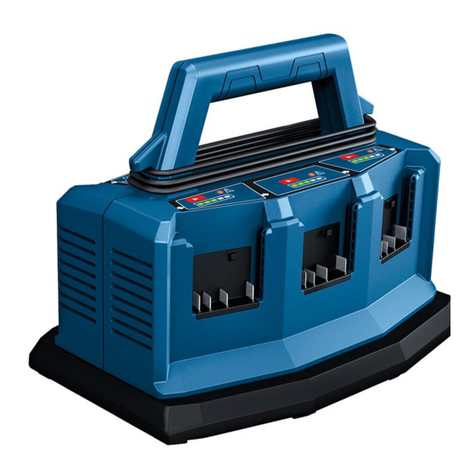
The charging process begins as soon as the
charger 2is connected to a power outlet
and a battery 1have been inserted. If the
charging process is started with multiple
batteries simultaneously, they will be
charged one after the other in the
counterclockwise direction of the arrows 7
(Fig. 1).
If the battery has a state of charge of over
approximately 80%, it is skipped during the
first charging cycle and charged in the
second charging cycle (from approximately
80% to approximately 100%). If a new
battery with a state of charge below
approximately 80% is inserted during the
second charging cycle (from approximately
80% to approximately 100%), it is charged
immediately. Once this battery has been
charged to approximately 80%, the
charging sequence is redefined. The next
battery that is charged in the second
charging cycle (from approximately 80% to
approximately 100%) follows the sequence
of arrows on the battery charger
(counterclockwise).
Thanks to the intelligent charging process,
the state of charge of the battery is
automatically detected and then charged
up with the optimal charge current
depending on battery temperature and
voltage.
Note: The charging process is only possible
when the temperature of the battery is
within the permitted charging temperature
range between 32˚F (0˚C) and 113˚F
(45˚C).
Priority button (priority start)
Each charging bay 3has a priority
button 4that will immediately
start the charging process in this
charging bay (Fig. 1).
– If the priority button 4is pressed once,
the battery in this charging bay will be
prioritized, meaning that it will be
charged up to approximately 80% of its
capacity (first charging cycle). At the
beginning of this charging process, the
first four EDs of the battery charge
indicator 5will light up briefly. Once the
battery has been charged to
approximately 80%, the next battery in
the direction of the arrows
(counterclockwise) will then be charged.
– If the priority button is pressed again,
the battery in this charging bay will be
prioritized further, meaning that it will
be charged to full capacity (i.e.
approximately 100%). At the beginning
of this charging process, the five EDs of
the battery charge indicator 5will light
up briefly. Upon completion of this
charging process, the other batteries will
continue to be charged in sequence to
approximately 80% of their capacity.
If a battery has already been fully charged
due to priority charging, the charging
sequence will skip to the next charging bay
with a battery. The charging sequence
follows the direction of the imprinted
arrows 7on the battery charger
(counterclockwise).
If the priority button is pressed while a
battery is already in the charging mode, it
will set the charge mode target to 100% for
that battery.
Indicator Lights
GREEN BATTERY CHARGE INDICATOR
When the battery pack is inserted the
battery charge indicator 5displays the
current state of charge prior to start of
charging in sequence. When charging
starts, current charge is solid and lights up
to target charge level (4 for 80%, 5 for
100%) will flash.
The first four EDs light up at the
beginning of the first charging
cycle (up to approximately 80%).
Five EDs light up at the beginning
of the second charging cycle (from
approximately 80% to
Operat ng Instruct ons