manuals.online logo
Brands
  1. Home
  2. •
  3. Brands
  4. •
  5. CalDigit
  6. •
  7. Enclosure
  8. •
  9. CalDigit HDPro User manual

CalDigit HDPro User manual

Other manuals for HDPro

2

Other CalDigit Enclosure manuals

CalDigit HDPro User manual

CalDigit

CalDigit HDPro User manual

CalDigit HDPro2 User manual

CalDigit

CalDigit HDPro2 User manual

CalDigit HDPro User manual

CalDigit

CalDigit HDPro User manual

CalDigit T4 User manual

CalDigit

CalDigit T4 User manual

CalDigit S2VR Duo User manual

CalDigit

CalDigit S2VR Duo User manual

CalDigit VR User manual

CalDigit

CalDigit VR User manual

Popular Enclosure manuals by other brands

Antec Veris Fusion Remote Max Specification sheet

Antec

Antec Veris Fusion Remote Max Specification sheet

ENERMAX iVektor.Q ECA 3371 Series user manual

ENERMAX

ENERMAX iVektor.Q ECA 3371 Series user manual

Lindy 43095 user manual

Lindy

Lindy 43095 user manual

SICK C4000 Select operating instructions

SICK

SICK C4000 Select operating instructions

Geeek A60 PLUS installation guide

Geeek

Geeek A60 PLUS installation guide

OVE SYDNEY 48 installation manual

OVE

OVE SYDNEY 48 installation manual

SilentiumPC Armis AR5 Hardware installation

SilentiumPC

SilentiumPC Armis AR5 Hardware installation

Pulsar 17/TRP80/DSPR Assembly instructions

Pulsar

Pulsar 17/TRP80/DSPR Assembly instructions

MSI MPG SEKIRA 500X quick start guide

MSI

MSI MPG SEKIRA 500X quick start guide

Antec Dark fleet DF-10 user manual

Antec

Antec Dark fleet DF-10 user manual

Peavey DS 1502 Specifications

Peavey

Peavey DS 1502 Specifications

D-Link ShareCenter Pro DNS-1550-04 user manual

D-Link

D-Link ShareCenter Pro DNS-1550-04 user manual

Rosewill RX82-U(JBOD) user manual

Rosewill

Rosewill RX82-U(JBOD) user manual

QNAP SAS JBOD CLI 1.0 user guide

QNAP

QNAP SAS JBOD CLI 1.0 user guide

GAMDIAS Talos P1 Quick installation guide

GAMDIAS

GAMDIAS Talos P1 Quick installation guide

Auvs KR615 user manual

Auvs

Auvs KR615 user manual

Antec AR300 user manual

Antec

Antec AR300 user manual

CommScope FDH 3000 user manual

CommScope

CommScope FDH 3000 user manual

manuals.online logo
manuals.online logoBrands
  • About & Mission
  • Contact us
  • Privacy Policy
  • Terms and Conditions

Copyright 2025 Manuals.Online. All Rights Reserved.

Getting Started
HDPro RackMount Kit Installation Guide
2
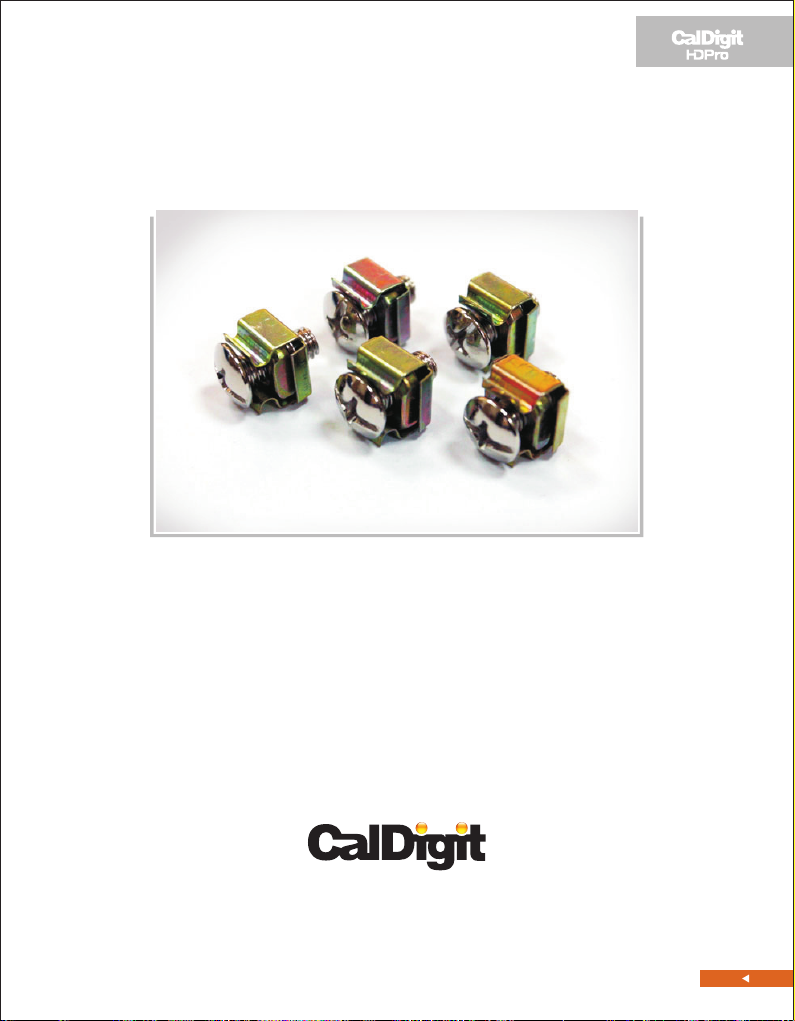
1. 1 x HDPro Rackmount UPPER / LEFT Kit AND 5 x Type-I screws.
2. 1 x HDPro Rackmount LOWER / RIGHT Kit AND 10 x Type-II screws
3. 5 x Rackmount Rack Rail Mounting screws.
4. 1 x HDPro Front LED label.
5. 1 x HDPro Internal Disk label.
Please contact your reseller for any faulty components or missing parts.
First of all, please verify the following components.
3
Please follow these installation steps:
1. Place the HDPro on a table or a smooth surface area.
2. Using a Phillips “crosshead” screwdriver, please unscrew the three screws
(shown in the following picture), then remove the top handle bar module
from the HDPro chassis.
4
3. The top handle bar module will be replaced with the HDPro Rackmount
UPPER / LEFT Kit AND Type-I screws.
4. Insert the HDPro Rackmount UPPER / LEFT Kit into the HDPro chassis, and
then secure the kit with 3 Type-I screws.
5
5. Using a Phillips “crosshead” screwdriver, please unscrew the six screws
from the HDPro chassis (shown in the following picture), and then
remove the two rubber feet.
6. The HDPro Rackmount LOWER / RIGHT Kit and Type-II screws will be installed
at this portion.
6
7. Using the HDPro Rackmount LOWER / RIGHT Kit to cover the HDPro
chassis, and then secure the kit with 6 Type-II screws.
8. Place the HDPro Front LED label at the HDPro front light module.
(See the following picture) Make sure the LED positions are correct.
7
9. Open the HDPro's rear gate, then place the HDPro Internal Disk label
along the right side of the internal wall. (See the following picture)
Make sure the hard drive positions are correct.
10. When the installation is complete, your HDPro will look like this.
(See the following picture) Please keep the original parts with the
extra screws.
8
11. Using the Rackmount Rack Rail Mounting screws, you can now mount
the HDPro on to the Rack rails.
CalDigit HDPRo RackMount Kit Installation Guide v1.0
www.caldigit.com
©Copyright 2009 CalDigit, Inc. All Rights Reserved