manuals.online logo
Brands
  1. Home
  2. •
  3. Brands
  4. •
  5. Casio
  6. •
  7. Watch
  8. •
  9. Casio HS-60W User manual

Casio HS-60W User manual

Other Casio Watch manuals

Casio 2766 User manual

Casio

Casio 2766 User manual

Casio 1874 Configuration guide

Casio

Casio 1874 Configuration guide

Casio 5078 User manual

Casio

Casio 5078 User manual

Casio 2958 User manual

Casio

Casio 2958 User manual

Casio 2931 User manual

Casio

Casio 2931 User manual

Casio 4798 User manual

Casio

Casio 4798 User manual

Casio 5510 User manual

Casio

Casio 5510 User manual

Casio 5235 User manual

Casio

Casio 5235 User manual

Casio 5581 User manual

Casio

Casio 5581 User manual

Casio 3435 User manual

Casio

Casio 3435 User manual

Casio 2514 User manual

Casio

Casio 2514 User manual

Casio 5135 User manual

Casio

Casio 5135 User manual

Casio PRG-270 User manual

Casio

Casio PRG-270 User manual

Casio QW-3042 User manual

Casio

Casio QW-3042 User manual

Casio WVA-400D Troubleshooting guide

Casio

Casio WVA-400D Troubleshooting guide

Casio AEQ120W User manual

Casio

Casio AEQ120W User manual

Casio QW-974 Configuration guide

Casio

Casio QW-974 Configuration guide

Casio EDIFICE EQS-930NIS-1A User manual

Casio

Casio EDIFICE EQS-930NIS-1A User manual

Casio OCW-110TDJ Troubleshooting guide

Casio

Casio OCW-110TDJ Troubleshooting guide

Casio 5285 User manual

Casio

Casio 5285 User manual

Casio 3550 User manual

Casio

Casio 3550 User manual

Casio BLX100-7 User manual

Casio

Casio BLX100-7 User manual

Casio 5605 User manual

Casio

Casio 5605 User manual

Casio 1909 User manual

Casio

Casio 1909 User manual

Popular Watch manuals by other brands

Pandora WATCH2 quick guide

Pandora

Pandora WATCH2 quick guide

Suunto X6 user guide

Suunto

Suunto X6 user guide

Seiko N830 instruction manual

Seiko

Seiko N830 instruction manual

MotionX 365 user guide

MotionX

MotionX 365 user guide

Garmin VENU SQ 2 owner's manual

Garmin

Garmin VENU SQ 2 owner's manual

QCY Watch GTC manual

QCY

QCY Watch GTC manual

Canyon Cindy CNE-KW41WP quick guide

Canyon

Canyon Cindy CNE-KW41WP quick guide

Esq Watches Operating instructions warranty & service guide

Esq

Esq Watches Operating instructions warranty & service guide

Crane AA5-CDSM-3A user manual

Crane

Crane AA5-CDSM-3A user manual

Timex W-214 product manual

Timex

Timex W-214 product manual

DETOMASO MATERA manual

DETOMASO

DETOMASO MATERA manual

Geemarc Watch N Shake user guide

Geemarc

Geemarc Watch N Shake user guide

LORUS W590 instruction manual

LORUS

LORUS W590 instruction manual

STENLILLE Actío user manual

STENLILLE

STENLILLE Actío user manual

Sinn HUNTER'S WATCH 3. Edition manual

Sinn

Sinn HUNTER'S WATCH 3. Edition manual

Slazenger SLZ800 manual

Slazenger

Slazenger SLZ800 manual

iTOUCH 3360 user manual

iTOUCH

iTOUCH 3360 user manual

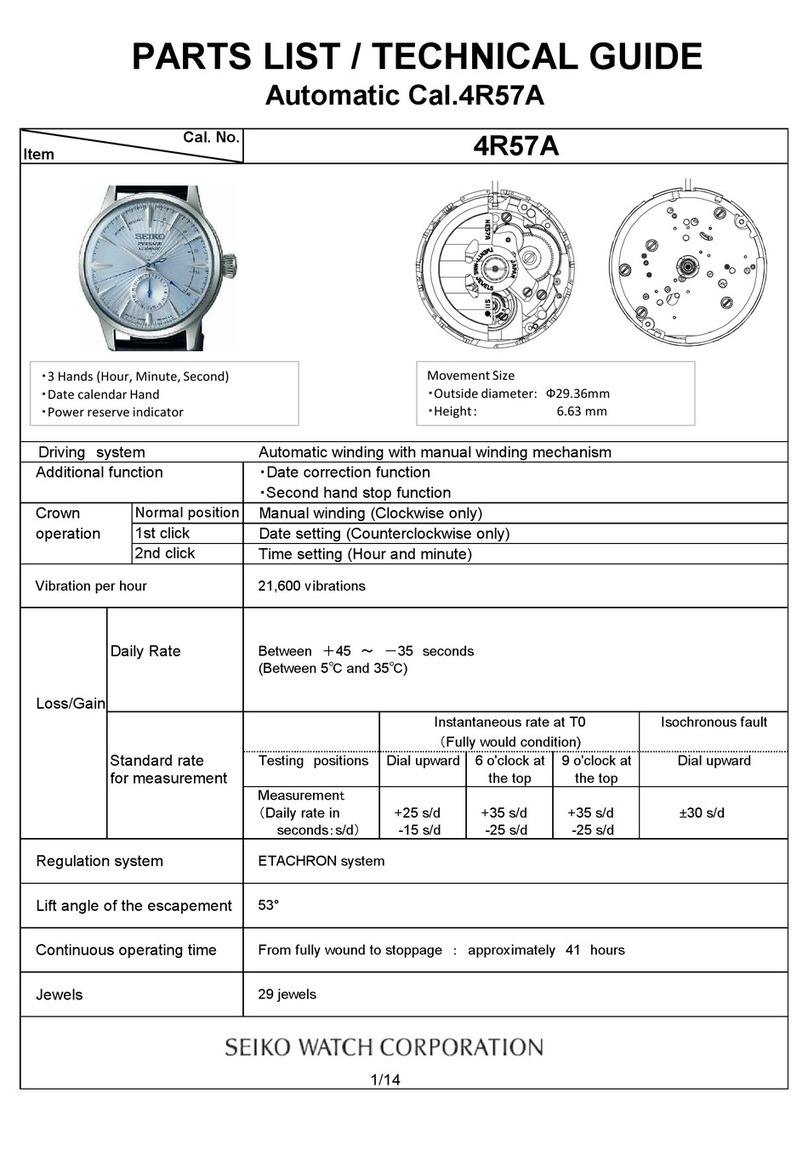
Seiko 4R57A Technical guide

Seiko

Seiko 4R57A Technical guide

manuals.online logo
manuals.online logoBrands
  • About & Mission
  • Contact us
  • Privacy Policy
  • Terms and Conditions

Copyright 2025 Manuals.Online. All Rights Reserved.

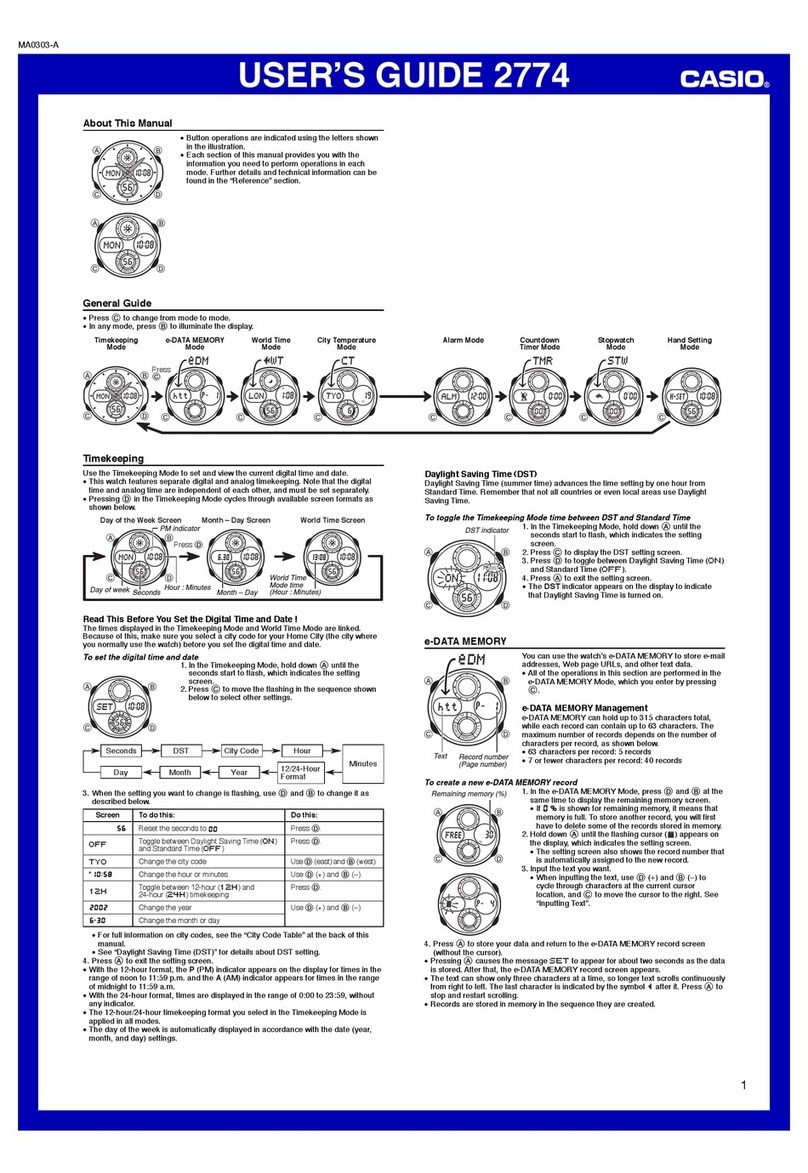
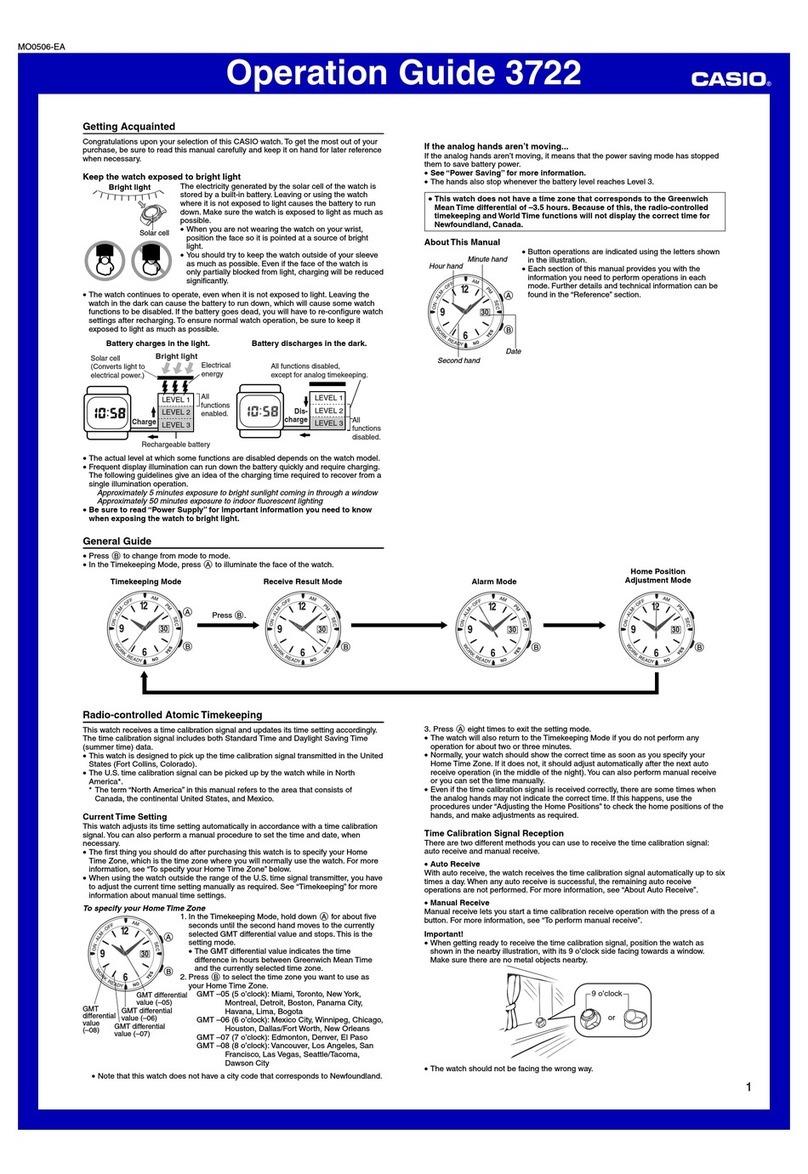
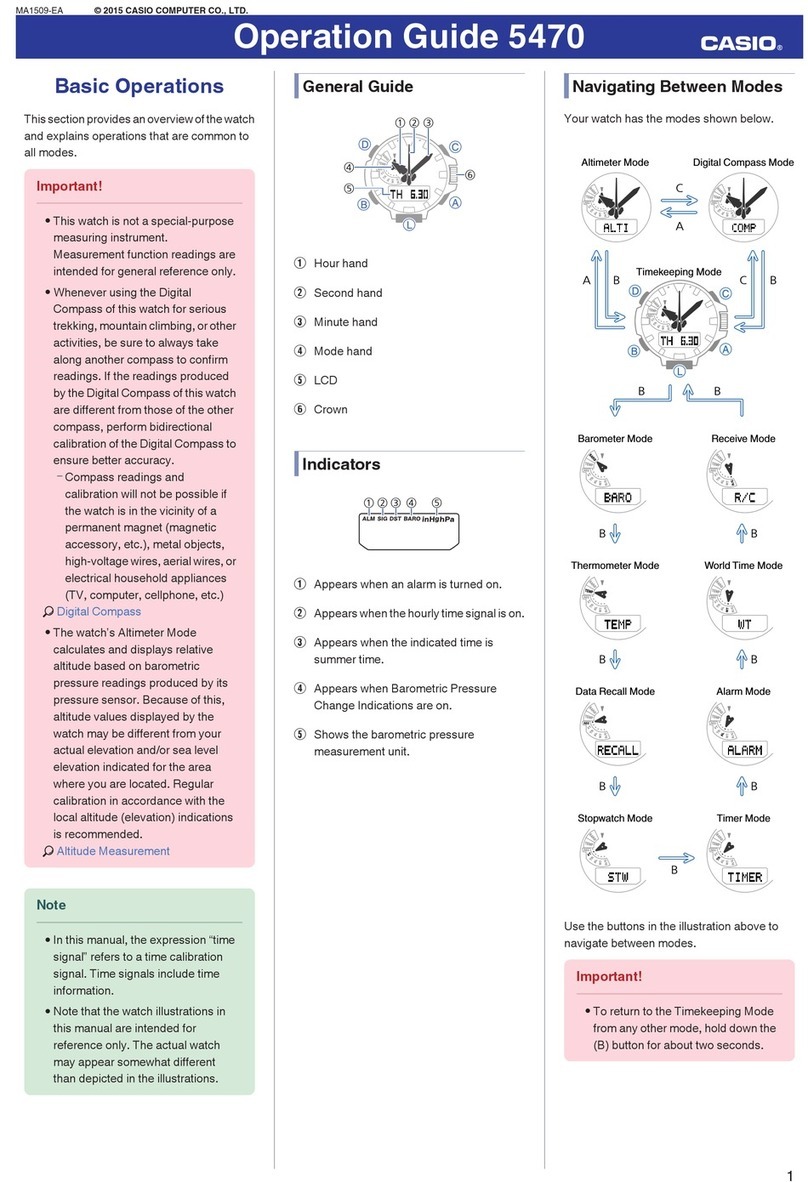
Operation Guide HS-60W
1
MA0410-EA
ILLUSTRATION
Each press of the Bbutton toggles the display between the TIME and STOPWATCH screens.
Year
Month
Day
Seconds
Seconds
Minutes
TIME SCREEN STOPWATCH SCREEN
Minutes
Hour
Hour
Day of
the week
PM
Lap counter
Press .
Split tim
e
Lap time
1/1000th of a second
Total
elapsed
time
Hold down for a few seconds to
toggle between 12/24-hour formats.
•A sticker is affixed to the glass of the stopwatch when you purchase it. Be sure to remove the sticker before using
the stopwatch.
•Depending on its model number, the configuration of your stopwatch may differ somewhat from that shown in the
illustration.
GENERAL GUIDE
STOPWATCH MODE
Abutton ..... Starts and stops timing.
Bbutton ..... Toggles between the current time and stopwatch screens.
Cbutton .... Registers a lap/split time.
Rbutton ..... Recalls lap/split time records and the total elapsed time.
Lbutton ..... Press to illuminate the display for about three seconds.
SPLIT TIME AND LAP TIME
Split time (SPLIT) is the time
elapsed from the start to a
specific point.
Lap time (LAP) is the time
elapsed from one point to another
or for one lap around a track.
START
1ST SPLIT
2ND SPLIT
3RD SPLIT
START
1ST LAP
2ND LAP
3RD LAP
USING THE STOPWATCH 1
The stopwatch beeps whenever the Aor Cbutton is pressed.
Time Display Ranges
Total elapsed time and the split time can be displayed up to 9 hours, 59 minutes, 59.999 seconds. Lap time is
displayed up to 59 minutes, 59.999 seconds. Timing restarts from zero after any of the limits described above is
reached.
The range of the lap counter is from 01 to 99. The lap count restarts from 00 after reaching 99.
NORMAL ELAPSED TIME
0
START STOP RESET
BUTTON
OPERATION
DISPLAY
MEASURE-
MENT
NET ELAPSED TIME
0ab
(a) (a) (a + b)
START STOP START STOP RESET
BUTTON
OPERATION
DISPLAY
(Lost time)
MEASURE-
MENT
After stopping a net elapsed time operation by pressing A, you can resume it by pressing Aagain.
Operation Guide HS-60W
2
USING THE STOPWATCH 2
LAP/SPLIT TIMES
Lap and split times are automatically stored in memory. There is enough memory to hold up to 99 lap/split time
records (01 to 99), plus the total elapsed time. The displayed lap number will flash when memory is full.
Pressing Cwhile memory is full will display the current lap/split times along with the flashing lap number, without
storing them in memory.
Records can be recalled by pressing the Rbutton.
0a(a) b(b) c(c)
START
1ST LAP 2ND LAP 3RD LAP
1ST SPLIT (a)
2ND SPLIT (a+b)
3RD SPLIT (a+b+c)
STOP RESET
BUTTON
OPERATION
DISPLAY
MEASURE-
MENT
Recording the Finishing Times of Multiple Runners
After pressing Ato start timing, press Cas each runner crosses the finish line. This records each of the finishing
times in memory, which you can recall by pressing the Rbutton.
*
Recorded times are retained in memory until you start a new net elapsed time operation (by pressing
A
) after
clearing the stopwatch screen to all zeros (by pressing
C
).
Example : To record the times of 10 different runners.
START 1ST RUNNER
FINISHES
2ND RUNNER
FINISHES
9TH RUNNER
FINISHES
10TH RUNNER
FINISHES
BUTTON
OPERATION
DISPLAY
Difference between this runner’s time
and the previous runner’s time
You can scroll through records in memory by pressing , even while the stopwatch is still
running.
Press .
Runner’s finishing position
Runner’s time
MEASURE-
MENT
SETTING TIME AND DATE
1)While the TIME screen is displayed, hold down Cfor a few seconds to
display the setting screen.
2)Press Ato reset seconds count to 00.
3)Press Cto move flashing between settings.
SECONDS HOUR MINUTES YEAR
MONTHDAYDAY OF THE WEEK
4)Press Ato change (+) selected setting. Hold down Ato change at high
speed.
5)To exit the setting screen, press Bat any time or Cwhile the day of the
week setting is flashing.
*
Year setting is possible up to 2099.
Auto Return
The setting screen automatically returns to the TIME screen if you do not perform any operation for a few minutes.
CARE OF YOUR STOPWATCH
•This stopwatch is water resistant up to five bars (atmospheres), which means you can use it in the rain or in
areas where splashing water is present. Never operate the buttons of the stopwatch while it is immersed in water.
•You should have the rubber seal that keeps out water and dust replaced every 2 to 3 years.

•Should moisture appear inside the stopwatch, have it checked immediately by your retailer or a CASIO
distributor.