9
MULTI-EYE MODELS
with Second Time Zone/Small Seconds Subdials and Big Date
Includes new ESQ Movado Fusion multi-eye models
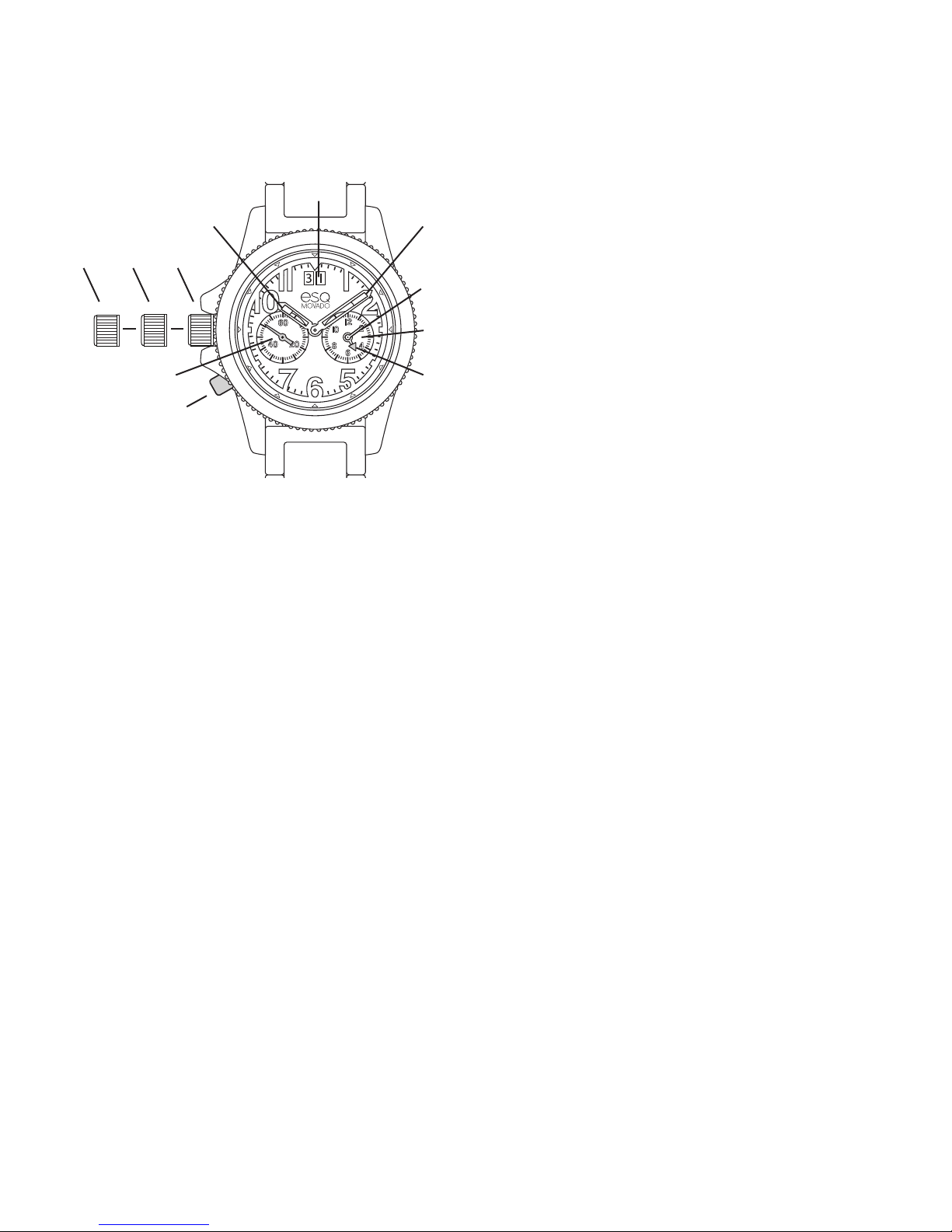
LEGEND:
H– Hour hand
M– Minute hand
S– Small seconds subdial
G– Second Time Zone subdial
P– Small Minute hand
T– Small Hour hand
D– Big Date display
1, 2, 3– Crown positions
A– Push-button for setting time in Second Time Zone
These ESQ Movado multi-eye models feature a
GMT sub-dial with small hour and minute hands
for tracking time in a second time zone, a small
seconds subdial and Big Date display.
To set the Second Time Zone:
Use push-button Ato set the time in subdial G. You
may set the small hour Tand minute hand Pto indicate
the local time in any time zone.
Activating time-setting mode:
1. To enter time-setting mode, press and hold push-
button Afor at least 2 seconds. As soon as small
minute hand Pin subdial Gjumps ahead one minute,
time-setting mode is activated.
NOTE: Once the mode is activated, if 10 seconds
elapses before push-button Ais pressed, the watch
will automatically exit time-setting mode.
Setting the hands:
1. To advance small minute hand Pone minute at a
time, repeatedly press and hold push-button Afor
less than 1 second before releasing it.
2. To advance small hour hand Tby one hour, press
and hold push-button Afor 1 to 2 seconds before
releasing it.
3. To advance hands Pand Tcontinuously, press
and hold push-button Afor longer than 2 seconds.
When desired time approaches, release button A,
then follow steps 1 and/or 2 to advance hands
incrementally to desired time.
To set the time:
1. Pull crown out to position 3. (Watch stops.)
2. Turn crown in either direction until hands indicate
desired time.
3. Push crown back in to position 1. (Watch restarts.)
Setting time to the exact second:
1. Pull crown out to position 3 precisely when small
seconds hand Sreaches <<60>> position. (Watch
stops.)
2. Adjust time to one minute ahead, and take an
accurate time signal, from a radio news station,
for example.
3. When audible tone signals exact time, immediately
push crown back in to position 1. (Watch restarts,
now set to the exact time.)
To set the Big Date (Quick Mode):
1. Pull crown out to position 2. (Watch continues to
run.
2. Turn crown clockwise until correct date appears
in Big Date display D.
3. Push crown back in to position 1.
NOTES: If date is adjusted between 9:00 PM and
midnight when automatic date changes are already
FIGURE A
2 13
H
D
M
P
G
T
S
A