EN
EN - 3 NA 16.18 A
3 - CONTROL
Thecontrolisusedin2-tubesystemswithheating,2-tubesystemswithcoolingand2-tubesystemswithheating/cooling.
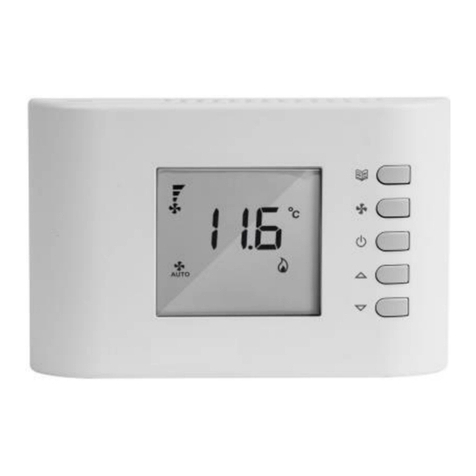
ON/OFFkey
BlueLED–coolingmode
FANkey
RedLED–heatingmode
MODEkey
GreenLED–energysavingmode
Temperature adjustment button
YellowLED–fanspeedautomaticselectionfunction
RedLEDs–fanspeedmode
Fig.5
HEE control
3.1 - Functions
TheHEEcontrolincludesatemperatureselector(rangefrom
10°C to 30°C) that maintains the room temperature at the
selectedvalue.
3.2 - Fan operation
Theusercanusethefanspeedselectorbuttontosetthefan's
operating mode to manual or automatic.
●Inmanualmode,threetypesofspeedcanbeselected(low,
medium, high) depending on the requirements or energy
savingmode.
●In automatic mode, the fan speeds are controlled by a
microprocessor housed in the control unit, according to
the temperature selected. (see table of 3 speeds possible
dependingontheheliothermmodel)
3.3 - Frost protection
Thisfunctionisusedtomaintainatemperatureof7°Cinrooms
leftunoccupiedforlongperiods.
Oncethistemperatureisreached,thecontrolactivatesthefan
athighspeed.
The frost protection function can be activated by conguring
the corresponding switch (see shunt conguration); when it is
activated,itisalsoactivewhenthecontrolisOFF.
3.4 - Energy saving
Energysavingisparticularlyusefulforairconditioninginrooms
atnightorroomsleftunoccupiedforlongperiods.
Inthiscase,function(℮)canbeselectedbyrepeatedlypressing
the FAN key to increase the temperature by 4°C in cooling
modeandreduceitby4°Cinheatingmode.Allotherdisplays
disappearwhenthisfunctionisactive(greenLEDon).
3.5 - Summer/winter switching
●Manual
Heating/cooling mode is selected manually by pushing the
controlbutton(no.5)
●Nightmode
Iftheuserdoesnottouchthekeysorthebuttonfor10seconds,
theLEDsaredimmed.
3.6 - Use
Buttonfunctions:
●POWER
Thisbuttonisusedtoswitchthecontrolunitonandoff.Once
theunitisoff,allthefunctionsaredeactivated,howeverthe
controlsystemisstillsuppliedwith230V.Ifthefrostprotection
functionisselectedusingthecorrespondingmicroswitch,this
functionisactivatedevenifthecontrolunitisoff.
●MODE
Thisbuttonisusedtomanuallychangetheoperatingmode
byswitchingfromcoolingtoheatingandviceversa.
●FAN
This button is used to manually select the fan speed (low,
mediumorhighspeed).Thisbuttoncanbepressedandheldto
activateautomaticselectionofthefanspeedmanagedbythe
microprocessor. If this operating mode is selected, the yellow
LEDcomeson.ThisbuttoncanalsobeusedtoselectEnergy
Savingmode,inwhichtherequiredtemperaturesetpointis4°C
higherforcoolingand4°Clowerforheating.
The green LED comes on when Energy Saving mode is
activated.
3.7 - Temperature selector
The temperature selector maintains the temperature at the
desiredlevel.Theaveragereferencevalueis20°C.
When the button is turned towards the (-) symbol, the
temperature drops in relation to the originally set value
(minimumvalue10°C).Whenthebuttonisturnedtowardsthe
(+)symbol,thetemperaturerisesinrelationtotheoriginallyset
value(maximumvalue30°C).
3.8 - Indicator lights
●BlueLED
On Indicatesthatthecontrolisincoolingmode( )
Flashing
Indicatesthatthecontrolisinfrostprotectionmode( )
●RedLED(right-handunit)
On Indicatesthatthecontrolisinheatingmode( )
Flashing Indicatesthepresenceofafault(faultysensor)
●RedLEDs(left-handunit)
On Indicates that the fan is currently running at the
selected speed
●YellowLED(A)
On Indicates that the fan speed is selected
automatically
●GreenLED(℮)
On Indicates that the control system is in Energy
Savingmode
●Red/blueLED
Flashing Indicates that the control is in "automatic test"
mode