1681 West 2960 South, Nibley, UT 84321, USA
Warning: The max number of attached expansion
modules is determined by power supply voltage and
current, and type of modules attached. For some
installations, additional power supplies and expansion
bus power injectors may be required.
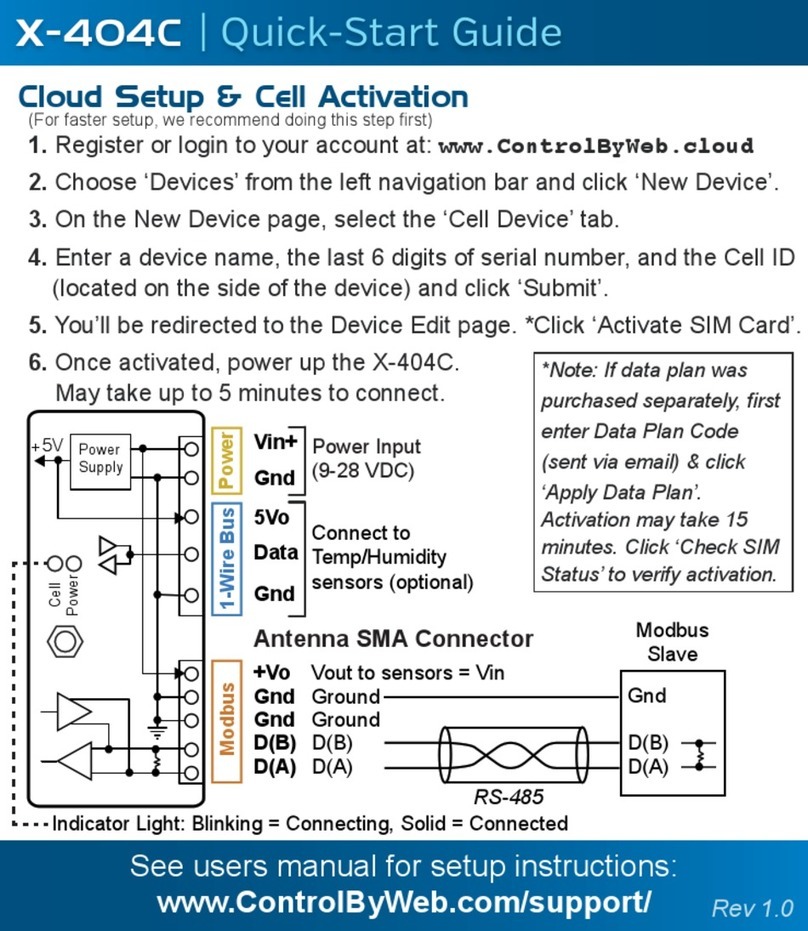
| Quick-Start Guide
X-400C
1. Power the module and connect to network.
2. Set IP address on computer to be on the same network as the
module. (Example: Set computer to 192.168.1.50)
3. To configure the module, open a web browser and enter:
http://192.168.1.2/setup.html
4. Assign permanent IP address to module, then restart module.
5. Restore computer’s IP address, if necessary, and access the module
at its new IP address to finish setup.
LAN Setup Steps (Optional)
IP Address: 192.168.1.2
Subnet Mask: 255.255.255.0
Control Page Web Address: http://192.168.1.2
Control Password: (no password set)
Setup Page Web Address: http://192.168.1.2/setup.html
Setup Username: admin
Setup Password: webrelay (all lower case)
Factory Default Settings