DEVA Broadcast DEVA DB8000 User manual

MAINTENANCE AND OPERATION
INSTRUCTION MANUAL
Publish Date: 20-Jul-2023
DB8000
Silence Monitor
&
Backup Audio Player

Contents
Introduction........................................................................................................................................ 5
Typographic conventions .................................................................................................................. 6
Product Description ........................................................................................................................ 7
Product Features ............................................................................................................................. 8
Technical Specications .................................................................................................................. 9
Safety Warning................................................................................................................................. 11
Operating Recommendations ......................................................................................................... 12
Panel Indicators and Connectors ................................................................................................... 13
Front Panel.................................................................................................................................... 13
Rear Panel..................................................................................................................................... 13
AC Mains Power .............................................................................................................................. 14
Fuse holder.................................................................................................................................... 14
Mains Voltage Selector.................................................................................................................. 14
Power cord .................................................................................................................................... 14
Ground Loops................................................................................................................................ 14
Voltage Selector Switch & Fuse Holder’s location ....................................................................... 15
Getting Started ................................................................................................................................ 16
Connection .................................................................................................................................... 16
Network Settings............................................................................................................................ 17
Network Discovery ........................................................................................................................ 17
Network Security Recommendations ............................................................................................ 18
Menu Structure and Navigation..................................................................................................... 19
Main Menu .................................................................................................................................... 19
Operation.......................................................................................................................................... 20
Audio Levels Adjustment of Backup Audio Sources...................................................................... 20
Backup Source Priority Setting ..................................................................................................... 20
DTMF Settings .............................................................................................................................. 21
MP3 Player Settings...................................................................................................................... 22
MP3 Player Mode Settings....................................................................................................... 22
MP3 Player Mode conguration.............................................................................................. 22
MP3 Player Equalizer Settings ................................................................................................ 23
Silence Detector Settings............................................................................................................... 24
Network Settings............................................................................................................................ 26
IP router and Port Translation...................................................................................................... 27
Required ports for Server and Client services and applications.............................................. 27
FTP Server Settings....................................................................................................................... 28
E-Mail Notications ...................................................................................................................... 30
SNMP Settings............................................................................................................................... 31
Memory Card ................................................................................................................................ 32
Reset to Factory Defaults.............................................................................................................. 32
Device Info .................................................................................................................................... 33
Exit ................................................................................................................................................ 33

Firmware Upgrade........................................................................................................................... 34
Appendix A ....................................................................................................................................... 35
List of DB8000 Factory Default Settings ...................................................................................... 35
Appendix B ....................................................................................................................................... 36
List of DB8000 Jumper Settings.................................................................................................... 36
DB8000 jumpers location ............................................................................................................. 37
DB8000 conguration with impedance 10 kΩ and gain 0 dB of the main and aux inputs 38
DB8000 conguration with impedance 600 Ω and gain -6 dB of the main and aux inputs 39
WARRANTY TERMS AND CONDITIONS................................................................................. 40
Product Registration Card.............................................................................................................. 41

THIS PAGE
IS INTENTIONALLY
LEFT BLANK

65 Aleksandar Stamboliyski Str., 8000 Bourgas, Bulgaria
Tel: +359 56 820027, Fax: +359 56 836700
E-mail: o[email protected] ,Web: www.devabroadcast.com
- 5 -
Introduction
DEVA Broadcast Ltd. is an international communications and high-technology manufacturing
organization, its corporate headquarters and facility located in Burgas, Bulgaria. The company
serves the broadcast and corporate markets worldwide – from consumers and small businesses to
the largest global organizations. It is dedicated to the research, design, development and provision
of advanced products, systems and services. DEVA launched its own brand back in 1997 and has
nowadays evolved to become known as a market leader and internationally reputed manufacturer
of user-friendly, cost-eective and innovative broadcast products.
Creativity and innovation are deeply woven into DEVA corporate culture. Through successful
engineering, marketing and management our team of dedicated professionals creates future-
oriented solutions to improve customers’ performance. You may rely that all issues communicated
to our crew would be addressed accordingly. We pride ourselves on our pre and post-sales support
and purchase services, which along with the outstanding quality of our radio gear have won us due
respect and the market authority position.
DEVA best-of-breed solutions have become the best sellers for our partners. The strategic
partnerships which have been formed with industry leaders during all these years that we have been
operating on the broadcasting market, have proved us a reliable business partner and a valuable
asset, as our dealers worldwide would conrm. In constant pursuit of precision and long-term
satisfaction, DEVA enhances the reputation of our partners and clients alike. Furthermore, we have
already a proven merit as a credible partner provider.
Our portfolio oers complete line of high quality and competitive products for FM and Digital
Radio, Radio Networks, Telecommunication Operators and regulation authorities. For almost
two decades of intensive software and hardware development, we have achieved a unique price-
performance and endurance of our product lines. Our company’s multitude of equipment and
services is in line with the latest technologies and key trends. The most recognizable characteristics
attributed to DEVA products are their clear-cut, streamlined design, easiness of use and cost-
eectiveness: simplicity of forms but multiplicity of functions.
For us there is no stage when we deem that we have reached the most satisfactory level in our
work. Our engineers are in constant pursuit of new ideas and technologies to be captured in DEVA
solutions. Simultaneously, a strict control is being exercised at each step of any new development.
Experience and hard work are our fundament but the continuous improving process is what we
never leave aside. DEVA participates on a regular basis in all landmark broadcasting events, not
only to promote its products, but to exchange valuable know-how and experience. We are also
engaged in international large-scale projects involving radio and audio solutions which makes us
even more competitive on the global market.
All DEVA products are developed and produced in accordance with the latest ISO 9001 quality
control standards.
65 Aleksandar Stamboliyski Str., 8000 Bourgas, Bulgaria
Tel: +359 56 820027, Fax: +359 56 836700
E-mail: o[email protected] ,Web: www.devabroadcast.com
- 6 -
Typographic conventions
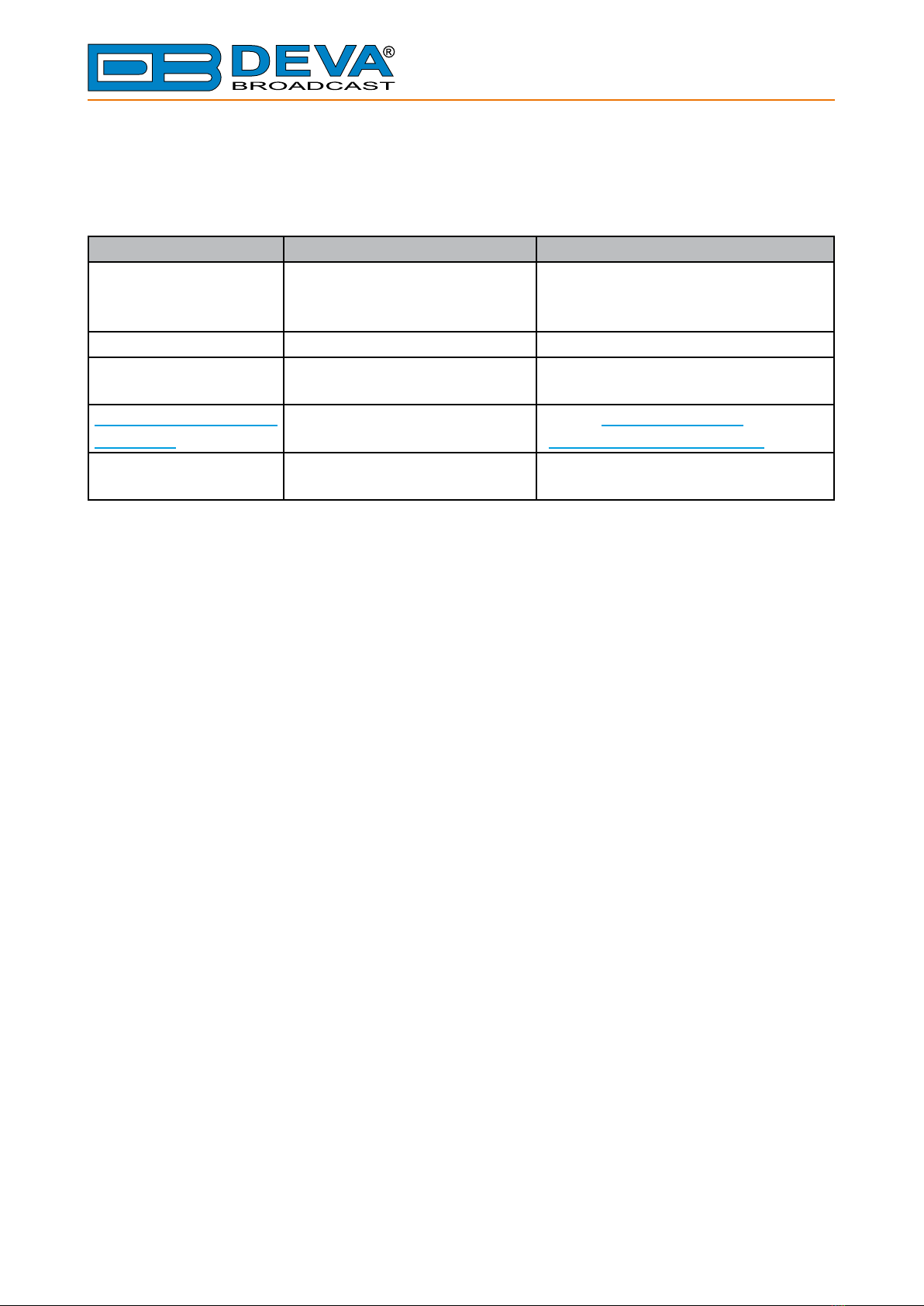
The following table describes important conventions used in the manual.
Convention and Style Description Examples
Menu > Sub Menu >
Menu Command
A menu item(s) and menu
command that you need to click
in sequence
Click Settings > General
[Button] Interface Interactive buttons Press [OK] to save the changes
NOTE Important notes and
recommendations
NOTE: The notication will appear
only once
“Reference Name” on
Page XXX
References and links refer to “New Connection”
(see “Monitoring” on page 56)
Example Used when example text is cited Example for E-mail Notication:
Date: 04 Nov 2013, 07:31:11

65 Aleksandar Stamboliyski Str., 8000 Bourgas, Bulgaria
Tel: +359 56 820027, Fax: +359 56 836700
E-mail: o[email protected] ,Web: www.devabroadcast.com
- 7 -
PRODUCT DESCRIPTION
The best device to ght the dreaded dead air problem is the DB8000 by DEVA Broadcast Ltd.
It is designed and built to be simple, exible, reliable and easy for integration with the existing
setups: from a single station to large radio networks. The basic principle of DB8000 is that this
unit can detect the silence and start playback of a preliminary created play list on the built-in MP3
player. As an addition, if power failure is detected, the MAIN Audio inputs will switch directly to
the Audio outputs. Once the power is restored, the DB8000 will resume its proper operation.
The MP3 backup audio les and play lists can be uploaded in the DB8000 from your PC using
any FTP client. The audio storage capacity of DB8000 is 2 Giga Bytes.
The DB8000 provides additional security in case of loss of audio at the inputs. The audio
backup is presented as an integrated auxiliary audio input for external program backup audio
source and built-in MP3 audio player. Internal bass and treble controls module allow advanced
audio adjustment of the MP3 backup audio.
The unit has DTMF remote control features. Preliminary assigned up to 3 digits DTMF tone
combination can change the audio source input or it just can start playing from the play list of
the built-in MP3 Audio Player. Through this feature the DB8000 can be used for local content or
regional advertisement spots insertion.

65 Aleksandar Stamboliyski Str., 8000 Bourgas, Bulgaria
Tel: +359 56 820027, Fax: +359 56 836700
E-mail: o[email protected] ,Web: www.devabroadcast.com
- 8 -
PRODUCT FEATURES
• Automatic changeover to backup program line on main audio loss
• Automatic activation of continuous backup built-in MP3 Audio Player if the secondary
source is not available
• Response time adjustable from 1 second to 255 seconds
• Passive through audio switching
• Compatible with all analog program sources
• Selectable Backup Audio Source Priority
• Continuous backup from built-in MP3 Audio Player with 2GB Internal Memory
• Advance Bass and Treble controls for the MP3Audio Player
• Built-in DTMF remote control system for source selection
• Capable of over 24 hours of non-repeating audio playback
• SNMP Control and Notication
• E-mail Client
• Easy Device Remote Manager
• Professional Balanced Stereo analog inputs and outputs on XLR connectors
• Digital Volume Control of the Backup Sources
• Headphones Jack on the front panel for local monitoring of the Audio Signal
• Professional 19 inches, 1U aluminum rack mount chassis
• Wide Range Internal Power Supply 100-240VAC 50-60Hz
• Easy Installation and Operation
• Firmware Upgrade Enabled

65 Aleksandar Stamboliyski Str., 8000 Bourgas, Bulgaria
Tel: +359 56 820027, Fax: +359 56 836700
E-mail: o[email protected] ,Web: www.devabroadcast.com
- 9 -
TECHNICAL SPECIFICATIONS
Main Audio Inputs
Connectors Balanced XLR-3
Input Impedance 600 Ω, Balanced with RF Filter
Normal Input circuit passively connected to the output
Auxiliary Audio Input
Connectors Balanced XLR-3
Input Impedance 600 Ω
Level 2 ranges: 0 dBu or +6 dBu
Jumper selectable, with software adjustments
Backup Audio MP3 Player Source
Storage Capacity 2GB Internal Memory SD Card
File types supported MPEG1 layer III
MPEG2 layer III
MPEG2.5
MP3 bit rates supported 8-320 kbps and VBR
Sample rates supported 48, 44.1, 32, 24, 22.05, 16, 12, 11.025, 8 kHz
Audio Output
Connectors Balanced XLR-3
Output Impedance
Normal output circuit Passively connected to main analog inputs
Backup output circuit Active, Balanced 600 Ω
Silence Detector Thresholds and Switching timers
Silence Sensitivity Range Adj. from -40 dBu to 0 dBu
Backup Start Time Adj. from 0 sec to 255 sec
Main Signal Recovery Time Adj. from 0 sec to 255 sec
Audio Performances
Frequency Response ±0.5 dB, 5 Hz-20 kHz
Audio Separation >90 dB (typically 100 dB)
Noise Better than -90 dB
Distortion <0.5%THD
Main Signal Recovery Time Adj. from 0 sec to 255 sec
Storage
Capacity 2GB Built in Memory Card
Data formats *.MP3; *.M3U for Playlists
User interface
Indicators 4 LEDs and Navigation Buttons (on front panel)
Headphone output 1/4” (6.35mm) phone jack (on front panel)
Display Superb 2x40 characters, LCD

65 Aleksandar Stamboliyski Str., 8000 Bourgas, Bulgaria
Tel: +359 56 820027, Fax: +359 56 836700
E-mail: o[email protected] ,Web: www.devabroadcast.com
- 10 -
Operating conditions
Equipment operational between 10°C to 60°C
EMC immunity 6V/m
Front Panel’s Headphones Output
Connector Stereo, 1/4” (6.35mm) phone jack
Volume Adjustable
TCP/IP Communication
Type RJ45 Ethernet 10M Base-T Port
Connector RJ45, rear panel
Power Requirement
Power supply 110/220 V (internal switch)
Connector IEC320, rear panel
Size and Weight
Dimensions (W x H x D) 1U, 19” x 1.7” x 6.9”
Weight 8 lbs
Other manuals for DEVA DB8000
3
Table of contents
Other DEVA Broadcast Recording Equipment manuals