manuals.online logo
Brands
  1. Home
  2. •
  3. Brands
  4. •
  5. Domus
  6. •
  7. Spotlight
  8. •
  9. Domus MURO-PRO-30S Operating and maintenance instructions

Domus MURO-PRO-30S Operating and maintenance instructions

Other Domus Spotlight manuals

Domus MURO-PRO-15S User manual

Domus

Domus MURO-PRO-15S User manual

Domus MURO-30S-B-W User manual

Domus

Domus MURO-30S-B-W User manual

Domus MURO-15S Series User manual

Domus

Domus MURO-15S Series User manual

Domus MURO-PRO-30S-BLK-TRIO User manual

Domus

Domus MURO-PRO-30S-BLK-TRIO User manual

Popular Spotlight manuals by other brands

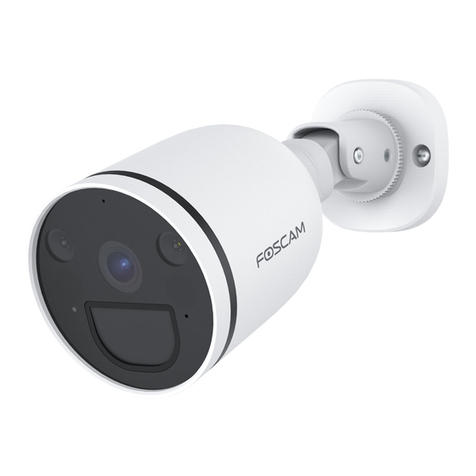
Foscam S41/SPC user manual

Foscam

Foscam S41/SPC user manual

EuroLite LED SLS-144 UV Floor Spot user manual

EuroLite

EuroLite LED SLS-144 UV Floor Spot user manual

Guangzhou Yinhe Lighting&Sound Equipment Factory NE-204 user manual

Guangzhou Yinhe Lighting&Sound Equipment Factory

Guangzhou Yinhe Lighting&Sound Equipment Factory NE-204 user manual

LIVARNO home 375304 2101 Installation, operating and safety information

LIVARNO home

LIVARNO home 375304 2101 Installation, operating and safety information

Leviton Ellipsoid 5/50 user guide

Leviton

Leviton Ellipsoid 5/50 user guide

Vector SL3AKV instruction manual

Vector

Vector SL3AKV instruction manual

Quantum Q262 Product data sheet

Quantum

Quantum Q262 Product data sheet

EUROSPOT C51 instruction manual

EUROSPOT

EUROSPOT C51 instruction manual

DTS MINI BRICK ARC user manual

DTS

DTS MINI BRICK ARC user manual

Federal Signal Corporation VISIBEAM II Installation, operation and maintenance instructions

Federal Signal Corporation

Federal Signal Corporation VISIBEAM II Installation, operation and maintenance instructions

ACME LED-MS350B user manual

ACME

ACME LED-MS350B user manual

EuroLite Akku flat light 1 user manual

EuroLite

EuroLite Akku flat light 1 user manual

Commercial Electric SPTM-1401 Use and care guide

Commercial Electric

Commercial Electric SPTM-1401 Use and care guide

Vision & Control SLB-500-W5K7-P-SL Instructions for use

Vision & Control

Vision & Control SLB-500-W5K7-P-SL Instructions for use

Craftsman CMXLSB10 instruction manual

Craftsman

Craftsman CMXLSB10 instruction manual

Cameo CLQS40WW user manual

Cameo

Cameo CLQS40WW user manual

EverStart maxx SL5W09E quick start guide

EverStart

EverStart maxx SL5W09E quick start guide

Philips 6919114PH brochure

Philips

Philips 6919114PH brochure

manuals.online logo
manuals.online logoBrands
  • About & Mission
  • Contact us
  • Privacy Policy
  • Terms and Conditions

Copyright 2025 Manuals.Online. All Rights Reserved.

29-31 Richland St. Kingsgrove. Sydney NSW 2208 Australia
Phone: 02 9554 9600 | Fax: 02 9554 9433
enquiries@domuslighng.com | www.domuslighng.com
Installaon Manual
Note: -The lamp must be installed by professional electrician
 -Ensurethepowersupplyisswitchedobeforengthisproduct
-Do not touch the lamp when in use
-Keepawayfromhotsteamandcorrosivegas
Specicaons
Voltage: 240V AC, 50Hz Lumen (±10%): Warm White 3000K - 1900lm
Neutral White 4000K - 2100lm
White 5000K - 2000lm
Dimmable: No
Power: 30W Beam Angle: 120°
IP Rang: 44 CCT: 3000K - 4000K - 5000K (Switchable)
CRI: ≥80 Lifespan: 30,000hrs
Detecon Range: Max.12 metres at 180ᵒ scan
Duraon Time adjustment: (10±5) seconds to (4±1) minutes
Detecon circuitry: Passive Infra-Red (PIR)
MURO-PRO-30S
Order Code Product Code Descripon
25062 MURO-PRO-30S-BLK-TRIO 30W Spotlight, with sensor, black nish (TRIO)
25063 MURO-PRO-30S-DGR-TRIO 30W Spotlight, with sensor, dark grey nish (TRIO)
25064 MURO-PRO-30S-WHT-TRIO 30W Spotlight, with sensor, white nish (TRIO)
Thank you for purchasing your new LED MURO-PRO-30S, Please take the me to read and understand the
instrucon sheet below. Failure to do so may void warranty.
The Security Light incorporates a PIR (Passive Infra Red) sensing device which connuously scans a preset
operang zone and immediately switches the light on when it detects movement in that area. This means that
whenever movement is detected within the range of the sensor the light will switch on automacally to illuminate
pathways, steps, paos, porches, or whatever area you have selected to light for reasons of safety, convenience
or security. While there is movement within range of the unit the light will remain on.
This light is for outdoor use and only intended for normal use, must not be used for rough service (for example,
on construcon sites).
The light source of this luminaires is not replaceable; when the light source reaches its end of life the whole
luminaire must be replaced
To achieve best results, we suggest you take into account the following points:
• Ideally the security lamp should be mounted 1.8 to 2.5 metres (6 to 8) above the ground to be scanned
• To avoid damage to unit - do not aim the sensor towards the sun.
• To avoid nuisance triggering, the sensor should be directed away from heat sources such as barbecues, Air-
condioners, other outside lighng, moving cars and ue vents.
• To avoid nuisance triggering, keeping away from the area of strong electromagnec disturbance.
• Do not aim towards reecve surfaces such as smooth white walls, swimming pools, etc. The security lamp
scanning specicaons (approximately 12 meters at 180°) may vary slightly depending on the mounng height
and locaon. The detecon range of the unit may also alter with temperature change. Before selecng a
place to install your security lamp you should note that movement across the scan area is more eecve than
movement directly toward or away from the sensor. If movement is made walking directly towards
or away from the sensor and not across, the apparent detecon range will be substanally reduced.
29-31 Richland St. Kingsgrove. Sydney NSW 2208 Australia
Phone: 02 9554 9600 | Fax: 02 9554 9433
enquiries@domuslighng.com | www.domuslighng.com
Installaon Manual
Note: -The lamp must be installed by professional electrician
 -Ensurethepowersupplyisswitchedobeforengthisproduct
-Do not touch the lamp when in use
-Keepawayfromhotsteamandcorrosivegas
249mm
2x
Ø6x27mm PA4x30mm
91mm
Ø6mm
30mm
2x
187mm
1 2
3
8 9 10 11 12
4 5 6 7
198mm
Installaon
1. Installaon by a licensed electrician and according to IEC wiring Regulaon.
2. Switch power o at the meter box and ensure that there is no power to the lamp
3. Unscrew the Fixing Cover Screws then remove the cover
4. Remove the Cable Anchorage and Terminal Block.
5. Use the plasc back box to mark the posion of screw holes onto mounng surface. Drill the wall to depth of
about 4 cm and t the wall plugs (supplied). Care should be taken to avoid drilling or screwing into concealed
electrical wiring.
6. Connecng the Power Cable to the Terminal Block, see the relave symbol in Figure, ensure the cable must
drill through the Cable Gasket.
7. Ax the back box to the mounng surface with Mounng Wall Screws (supplied)
8. Re-t the Terminal Block and Cable Anchorage.
9. Re-t the cover.
Note:
• Please power o and let the lamp cool before touching the lamp(s), because they will become hot during
lighng on.
• When adjusng lamp holders, ensure that lamps are not touching or in close proximity to sensor head (more
than 40mm), heat from the lamp(s) may distort the PIR Sensor or destroy the plasc encloser of PIR Sensor.
• Loosen lock nuts and screws on sensor and lamp before making any adjustments.
29-31 Richland St. Kingsgrove. Sydney NSW 2208 Australia
Phone: 02 9554 9600 | Fax: 02 9554 9433
enquiries@domuslighng.com | www.domuslighng.com
Installaon Manual
Note: -The lamp must be installed by professional electrician
 -Ensurethepowersupplyisswitchedobeforengthisproduct
-Do not touch the lamp when in use
-Keepawayfromhotsteamandcorrosivegas
Electrician
• The security lamp should be wired to its own light switch.
• Do not interconnect with other lights on the same switch.
• Earth connecon must be required.
• Mulple (More than one) Muro ngs must not be wired to a separate sensor.
• Mulple Muro Fings cannot be wired to a single switching point.
Understanding the controls
Adjusng the duraon me: The length of me that remains switched on aer acvaon can be adjusted from
(10±5) seconds to (4±1) minutes. Rotang the TIME knob + to - will reduce the duraon me.
Note: Once the light has been triggered by the PIR sensor any subsequent detecon will start the med period
again from the beginning.
Adjusng the LUX control level: The Lux control module has a built-in sensing device (photocell) that detects
daylight and darkness. The ( ) posion denotes that the oodlight can work at day and night, and the ( ) posion
only work at night. You can set to operate the unit at the desired level by adjusng the LUX knob.
Adjusng the sensivity: The sensivity means the Maximum distance which PIR Sensor can be triggered by
movement body. Turning the SENS knob + to - will decrease the sensivity.
Seng the controls
1. Put the Lux control knob to light ( ) posion, turn the wall switch on and wait half a minute for the control
circuit to stabilize. At this stage ensure that the TIME control knob is set at minimum duraon. The security lamp
will now switch on and remain on for about 30 seconds (within 60 seconds).
2. Direct the sensor toward the desired area to be scanned by adjusng the elbow joint and swivel joint on the
sensor arm. Important: loosen all lock nuts and screws on sensor and lamp before making any adjustments.
3. Have another person move across the center of the area to be scanned and slowly adjust the angle of the
sensor arm unl the unit sensors the presence of the moving person, causing the light to switch on.
4. Adjust me control to required seng.
5. To set the light level at which the lights will automacally switch “on” at night, turn the LUX control knob from
daylight to night. If the lamps are required to switch on earlier, e. g. Dusk, wait for the desired light level, then slowly
turn the LUX control knob towards daylight while someone walks across the center of the area to be detected.
When the oodlights switch on, release the LUX control knob. You may need to make further adjustments to
achieve your ideal light level seng.
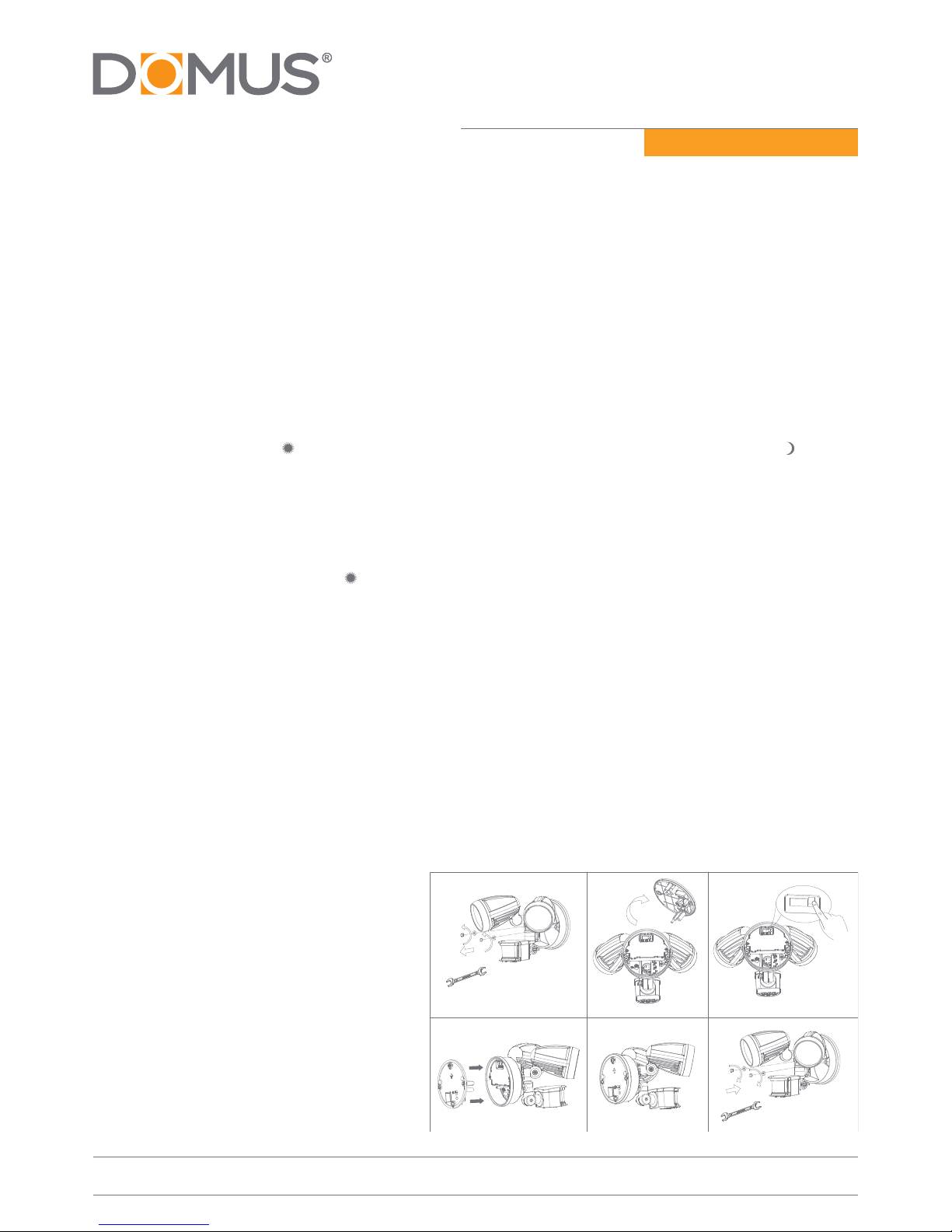
Change the Color Temperature
1. Unscrew the Fixing Cover Screws then
remove the cover
2. Change the Color Temperature at back of
the light
3. W: 5000K
4. NW: 4000K
5. WW: 3000K
6. Re-t the cover.
7. Mount light onto the wall
1 2 3
4 5 6
NW WW W
29-31 Richland St. Kingsgrove. Sydney NSW 2208 Australia
Phone: 02 9554 9600 | Fax: 02 9554 9433
enquiries@domuslighng.com | www.domuslighng.com
Installaon Manual
Note: -The lamp must be installed by professional electrician
 -Ensurethepowersupplyisswitchedobeforengthisproduct
-Do not touch the lamp when in use
-Keepawayfromhotsteamandcorrosivegas
How to change into MANUAL OVERRIDE CONTROL MODE
1. When power on, the PIR detector enters into the “WARN-UP” periods for about 1 minute, then
automacally change into AUTO MODE.
2. During AUTO MODE, by switching the ON/OFF main switch for 2 mes within 3 seconds then switch on,
the PIR detector will automacally change into MANUAL MODE from AUTO MODE. In MANUAL MODE, the
Lamp(s) will remain ON, not aected by duraon me and Lux control level.
3. During MANUAL MODE or AUTO MODE, by switching o the ON/OFF main switch over 6 seconds and then on
again, the PIR detector will reset to WARN-UP periods.
Please note: the periods of “WARN-UP” maybe be shorter than 1 minute.
POWER ON AUTO MODE
MANUAL MODE
1
2
3
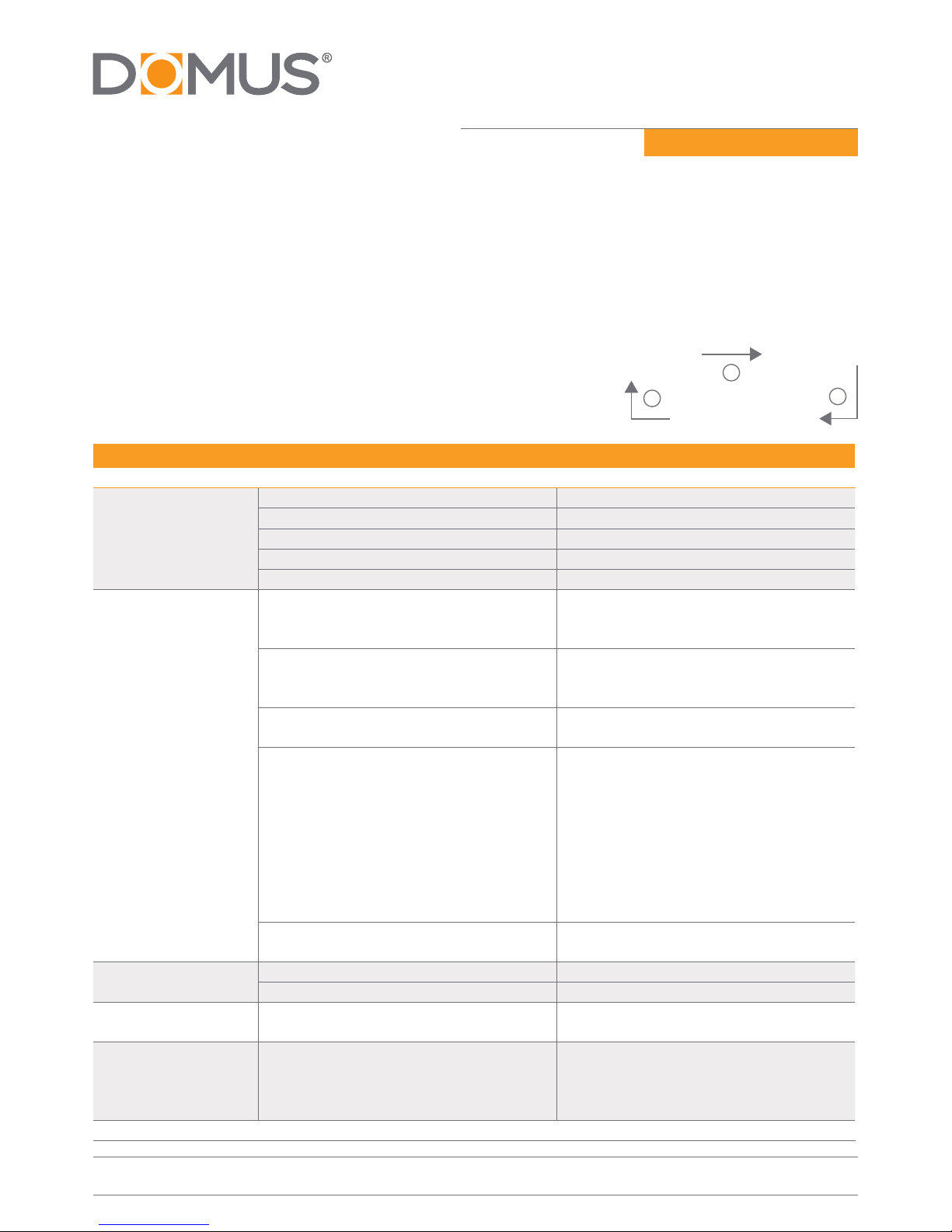
Trouble shoong and user hints
Problem Possible Cause Suggested Remedy
Light does not switch
on when there is
movement in the
detecon area.
1. No mains voltage Check all connecons, and Fuses/switches
2. Bulb(s) faulty or missing. Check. Replace
3. Nearby lighng is too bright. Redirect sensor or relocate the unit
4. Controls set incorrectly Readjust sensor angle or control knob
5. Sensor posioned in wrong direcon Redirect sensor and/or adjust
Lamp switches on for
no apparent reason
(false trigger)
1. Heat from bulb(s) acvang sensor. Adjust lamp holders to allow a Minimum
gap of 40mm between LED bulb and sensor
head.
2. Heat sources such as air-con, Vents,
heater ues, barbecues, other outside
lighng, moving cars are acvang sensor.
Adjust direcon of sensor head, Away from
these sources.
3. Animals/birds e.g. possums or domesc
animals.
Redirecng sensor head may help.
4. Interference from on/o switching of
electric fans or lights on the same circuit as
your security oodlight. (this problem does
not always occur but a faulty switch or noisy
uorescent light may cause the security
lamp to switch on.)
Should the false triggering become
troublesome, consider:
a) Replacing a faulty switch. b) Replacing
noisy uorescent, Tubes and/or starters. c)
Connecng the security lamp to a separate
circuit(in most cases where one or more of
the above suggesons have been carried
out, false triggering has been reduced.)
5. Reecon from swimming pool, or
reecve surface.
Redirect sensor.
Light remains on. 1. Connuously false triggered Redirecng sensor head may help
2. Time is set too long. Reduce me
Light switches on
during daylight hours.
LUX control knob is set to daylight posion. Turn the LUX control knob to desired light
level seng.
When seng controls
in daylight the
detecon distance
becomes shorter.
Interference by sunlight Re-test at night.
Note: all passive infra red detectors are more sensive in cold and dry weather than warm and wet weather