EnglishDeutsch
 logo
Brands
  1. Home
  2. •
  3. Brands
  4. •
  5. Dover
  6. •
  7. Test Equipment
  8. •
  9. Dover Civacon NV4000 User manual

Dover Civacon NV4000 User manual

This manual suits for next models

2

Popular Test Equipment manuals by other brands

SMART KANAAD SBT XTREME 3G Series user manual

SMART

SMART KANAAD SBT XTREME 3G Series user manual

Agilent Technologies BERT Serial Getting started

Agilent Technologies

Agilent Technologies BERT Serial Getting started

Agilent Technologies N3280A user guide

Agilent Technologies

Agilent Technologies N3280A user guide

Lifeloc R.A.D.A.R. quick start guide

Lifeloc

Lifeloc R.A.D.A.R. quick start guide

Fluke T5-600 Service information

Fluke

Fluke T5-600 Service information

Mercury TSL01 user manual

Mercury

Mercury TSL01 user manual

MAHA MBT Series Original operating instructions

MAHA

MAHA MBT Series Original operating instructions

Fuji Electric P-61 instruction manual

Fuji Electric

Fuji Electric P-61 instruction manual

ETC SealerAtor user manual

ETC

ETC SealerAtor user manual

Skyfine ETHYWAY V2 user manual

Skyfine

Skyfine ETHYWAY V2 user manual

Appion G5 Twin Operation manual

Appion

Appion G5 Twin Operation manual

PCB Piezotronics 8159-0112A Installation and operating manual

PCB Piezotronics

PCB Piezotronics 8159-0112A Installation and operating manual

BW Technologies MicroDock II user manual

BW Technologies

BW Technologies MicroDock II user manual

Sun Nuclear 1027 user guide

Sun Nuclear

Sun Nuclear 1027 user guide

Biomark HPR LITE READER user manual

Biomark

Biomark HPR LITE READER user manual

Hioki 3169-20 instruction manual

Hioki

Hioki 3169-20 instruction manual

Ashcroft ATE-100 operating manual

Ashcroft

Ashcroft ATE-100 operating manual

Rohde & Schwarz RTA4000 user manual

Rohde & Schwarz

Rohde & Schwarz RTA4000 user manual

https://manuals.online logo
https://manuals.online logoBrands
  • About & Mission
  • Contact us
  • Privacy Policy
  • Terms and Conditions

Copyright 2026 Manuals.Online. All Rights Reserved.

Pressure Vacuum Vent Test Procedure
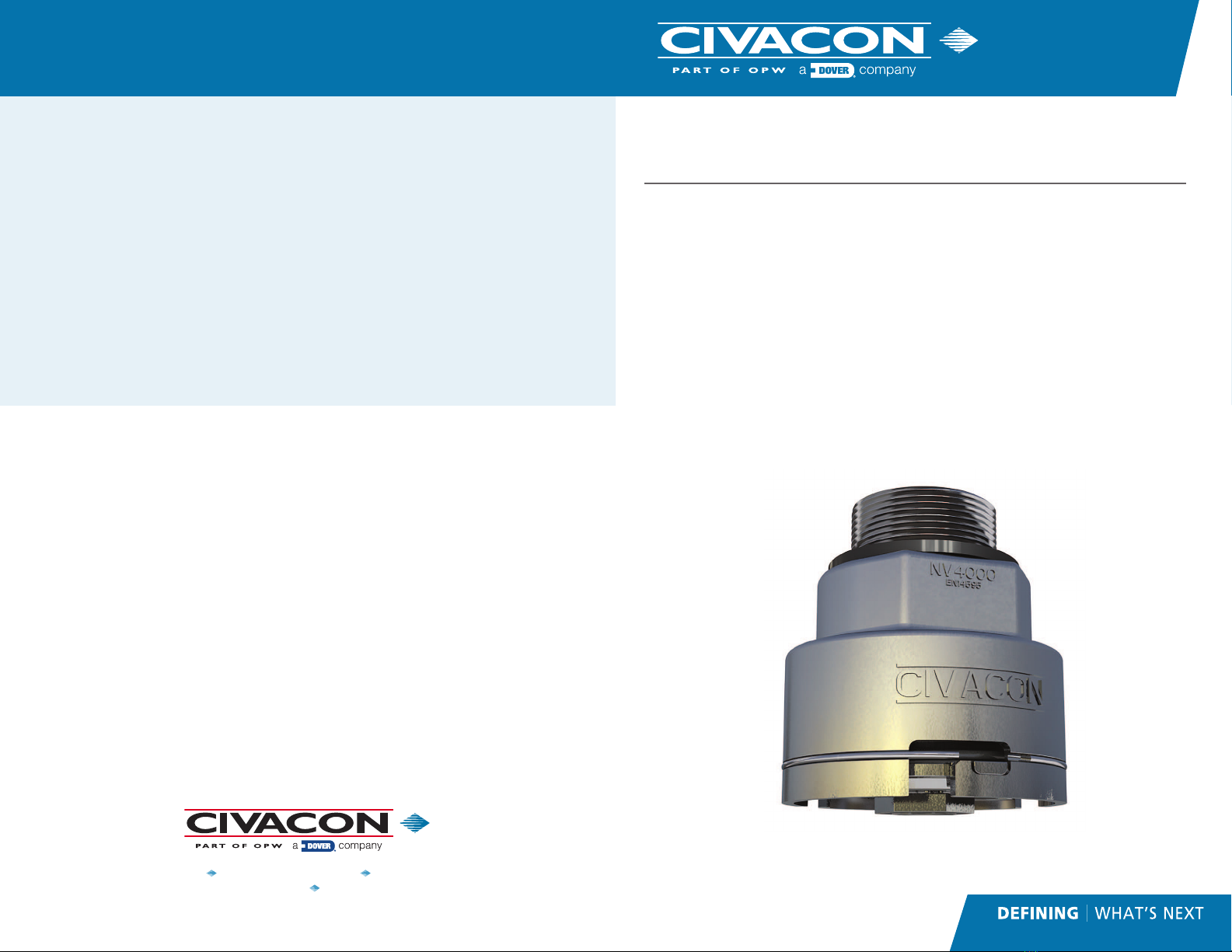
NV4000, NV4000E, NV4000C
Product Description
Civacon’s NV4000 Series Pressure Vacuum Vent has a design that reduces part
count by 45% for easier and quicker maintenance. The NV4000 is installed
on the bottom of the manlid poppet via a 15/16” hex nut and has been built
to withstand the extreme shocks, high G-forces, excessive surge forces and
vibrations that can occur when petroleum products are being transported.
WARRANTY
All parts and products are thoroughly inspected and tested from the time raw
material is received at our plant, until the product is completed. We guarantee
that all products are free from defects in materials and workmanship for a
period of one year from the date of shipment. Any product that may prove
defective within said one year period will, at our discretion, be promptly
repaired, replaced or credit given for future orders. This warranty shall not apply
to any products which has been altered in any way, which has been repaired by
any party other than an authorized service representative, or when such a failure
is due to misuse or condi-tion of use. We shall have no liability for labor costs,
freight costs or any other costs or charges in excess of the amount of invoice
for the products.
THIS WARRANTY IS IN LIEU OF ALL OTHER WARRANTIES, EXPRESS OR
IMPLIED AND SPECIFICALLY THE WARRANTIES OF MERCHANTABILITY
AND FITNESS FOR A PARTICULAR PURPOSE.
WARNING!!
CIVACON products should be used in compliance with the applicable federal,
state and local laws and regulations. Product selection should be based on
physical specifications and limitations, compatibility with the environment,
and the material being handled.
CIVACON MAKES NO WARRANTIES OF
FITNESS FOR A PARTICULAR PURPOSE.
TECHNICAL ASSISTANCE
If at any time during the installation a question arises that is not covered in this
manual or with any other applicable documents feel free to call the Customer
Service Department or visit our website at www.civacon.com.
In the U.S., call 1-888-526-5657
In all other countries, call your local agent.
NOTE: All information subject to engineering and/or other changes. All trade names are copyrighted. Patents Pending. ©2018 Civacon. ©2018 Delaware Capital Formation, Inc.
All Rights Reserved. DOVER and the DOVER logo are registered trademarks of Delaware Capital Formation, Inc., a wholly-owned subsidiary of Dover Corporation.
www.civacon.com 9393 Princeton-Glendale Road Hamilton, Ohio, USA 45011
Phone: (800) 422-2525 Fax: (800) 421-3297
TB05-20
May 2020 Rev+
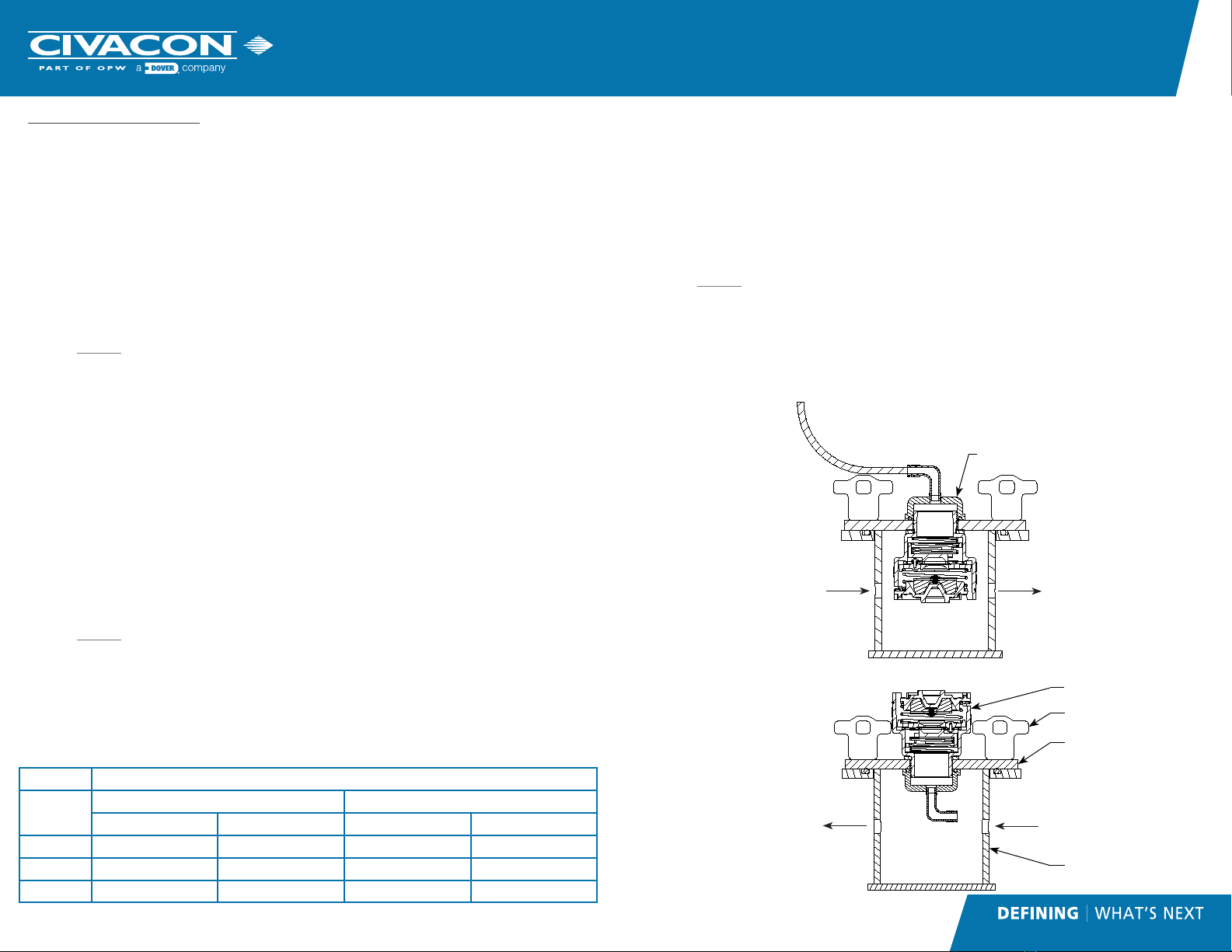
Test Procedure:
Pressure Test (See Illustration “A”)
1. Intall vent (Item# 5) in the hole in the cover plate (Item# 3) of the vent
test tank (Item# 2). Screw vacuum test cap (Item# 1) on to the threaded
portion of the vent (Item# 5).
2. Install cover plate (Item# 3) and vent (Item#5) onto test tank (Item# 2),
with vent (Item# 5) pointing downward as shown in the illustration. Use
wing nuts (Item# 4) to fasten the cover plate (Item# 3) to the test tank
(Item#2).
3. Attach a short length of hose to the vacuum test cap (Item#1) and run it
to a small container of water. Keep the end of the hose 1/4” below the
surface of the water.
4. Slowly apply pressure, and take note at what pressure the bubbles start
coming out of the hose. Note the pressure reading on the gauge or the
manometer.
5. The measured pressure level should fall in the range found in Table 1 for
the specific vent model being tested. If the vent does not pass the test, it
must be cleaned, repaired or replaced.
Vacuum Test (See Illustration “B”)
1. Intall vent (Item# 5) in the hole in the cover plate (Item# 3) of the vent
test tank (Item# 2). Screw vacuum test cap (Item# 1) on to the threaded
portion of the vent (Item# 5).
2. Install cover plate (Item# 3) and vent (Item#5) onto test tank (Item# 2),
with cap inside the tank as shown in the illustration. Use wing nuts
(Item# 4) to fasten the cover plate (Item# 3) to the test tank (Item#2).
3. Spray water/soap solution areound the two black poppets on the side of
the vent.
4. Slowly apply pressure, with the vent in the orientation shown in the
illustration. Take note at what pressure the bubbles start being produced
from the sealing surface. Note the pressure reading on the gauge or the
manometer.
5. The measured vacuum level should fall in the range found in Table 1 for
the specific vent model being tested. If the vent does not pass the test, it
must be cleaned, repaired or replaced.
Overturn Test (See Illustration “A”)
1. Intall vent (Item# 5) in the hole in the cover plate (Item# 3) of the vent
test tank (Item# 2). Screw vacuum test cap (Item# 1) on to the threaded
portion of the vent (Item# 5).
2. Install cover plate (Item# 3) and vent (Item#5) onto test tank (Item# 2),
with vent (Item# 5) pointing downward as shown in the illustration. Use
wing nuts (Item# 4) to fasten the cover plate (Item# 3) to the test tank
(Item#2).
3. Set pressure regulator between 4 and 5 psi (27.6 kPa and 34.5 kPa).
Slowly apply pressure until the air is exhausting out the top or the vent.
4. Rotate test fixture 90 degrees and attach a short length of hose to the
vacuum test cap (Item# 3) and run it to a small container of water. Keep
the end of the hose 1/4” below the surface of the water. A steady
stream of bubbles would represent a failure. This overturn test must be
repeated at an angle of 180 degrees and 270 degrees. If the vent fails at
any of the three orientations, it must be cleaned, repaired or replaced.
TABLE 1 REQUIRED SETTINGS
PART
NUMBER
PRESSURE VACUUM
MIN. MAX. MIN. MAX,
NV4000 1.0 PSI (27.7”H20) 1.5 PSI (41.5” H20) .25 PSI (7.0” H20) .375 PSI (10.4” H20)
NV4000C .87 PSI (6 kPa) 1.16 PSI (8 kPa) .29 PSI (2 kPa) .43 PSI (3 kPa)
NV4000E 1.0 PSI (69 mbar) 1.74 PSI (120 mbar) .25 PSI (17 mbar) .29 PSI (25 mbar)
Air out to small container
of water to see bubbles
when valve opens
Air in from regulator
(0-5 PSI)
Air out to manometer or
low pressure gauge
ILLUSTRATION “A”
POSITIVE PRESSURE TEST POSITION
ILLUSTRATION “B”
VACUUM TEST POSITION
Air out to manometer or
low pressure gauge
Air in from regulator
(0-5 PSI)
1
4
3
5
2