manuals.online logo
Brands
  1. Home
  2. •
  3. Brands
  4. •
  5. Duco
  6. •
  7. Control Unit
  8. •
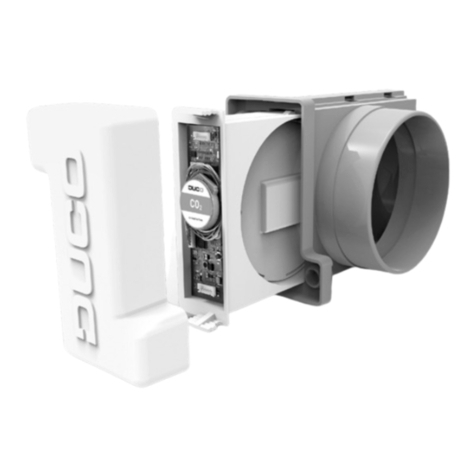
  9. Duco TronicVent User manual

Duco TronicVent User manual

This manual suits for next models

2

Other Duco Control Unit manuals

Duco IQ-unit User manual

Duco

Duco IQ-unit User manual

Duco DucoBox Focus User manual

Duco

Duco DucoBox Focus User manual

Duco iAV User manual

Duco

Duco iAV User manual

Duco iAV User manual

Duco

Duco iAV User manual

Duco IQ-unit User manual

Duco

Duco IQ-unit User manual

Duco iAV User manual

Duco

Duco iAV User manual

Popular Control Unit manuals by other brands

Seitz 14A80 user manual

Seitz

Seitz 14A80 user manual

Wilo RS485 Installation and operating instructions

Wilo

Wilo RS485 Installation and operating instructions

Becker CentralControl CC41 Commissioning Instruction

Becker

Becker CentralControl CC41 Commissioning Instruction

SICK CDB650 operating instructions

SICK

SICK CDB650 operating instructions

Panduit NetKey NKP5E88M Series installation instructions

Panduit

Panduit NetKey NKP5E88M Series installation instructions

MX Options Concentric Petite Fitting instructions

MX

MX Options Concentric Petite Fitting instructions

Clean Water Systems Fleck 2510 Installation & start?up guide

Clean Water Systems

Clean Water Systems Fleck 2510 Installation & start?up guide

Fairchild FSB44104A user guide

Fairchild

Fairchild FSB44104A user guide

LEGRAND Wattstopper LMIN-104 installation instructions

LEGRAND

LEGRAND Wattstopper LMIN-104 installation instructions

PMK ATT10BNCS instruction manual

PMK

PMK ATT10BNCS instruction manual

Tektronix TDS3FFT user manual

Tektronix

Tektronix TDS3FFT user manual

Woodward easYgen Technical manual

Woodward

Woodward easYgen Technical manual

Balluff BNI EIP-502-105-R015 user guide

Balluff

Balluff BNI EIP-502-105-R015 user guide

NXP Semiconductors TWR-LS1021A Getting started

NXP Semiconductors

NXP Semiconductors TWR-LS1021A Getting started

Advantech PCM-3117 Startup manual

Advantech

Advantech PCM-3117 Startup manual

Danfoss MCO 101 manual

Danfoss

Danfoss MCO 101 manual

Moons' Lin Engineering R701P user manual

Moons'

Moons' Lin Engineering R701P user manual

Aventics RV1 operating instructions

Aventics

Aventics RV1 operating instructions

manuals.online logo
manuals.online logoBrands
  • About & Mission
  • Contact us
  • Privacy Policy
  • Terms and Conditions

Copyright 2025 Manuals.Online. All Rights Reserved.

Handleiding Sturingsunits TronicVent en TronicTwin 120
Manuel unités de commande TronicVent et TronicTwin 120
Manual control units TronicVent and TronicTwin 120
De sturingsunit kan slechts gebruikt worden op de DucoBox Focus, DucoBox Silent Connect en DucoBox ECO vanaf software versie 10.0.0
L’unité de commande est compatible à partir de la version software 10.0.0 de la DucoBox Focus, DucoBox Silent Connect et DucoBox Eco.
The control unit can be used from software version 10.0.0 on the DucoBox Focus, DucoBox Silent Connect and DucoBox Eco.
1 2
43
4
6
7
5
5
8
LEGENDE
1. Verwijder de binnenkap.
2. Leg de kabel naar voor (uit het rooster).
3. Zet de klep in gesloten stand (naar boven).
4. Schuif de sturingsunit met de opening (aan de achterzijde) over
het tandwielstuk dat op de klep zit.
5. Zet de sturingsunit vast op de 4 hoeken door de klikstukjes een
halve toer te draaien.
6. Verbind de kabel met de horizontale connector op het bakje.
7. Druk de kabel vast op de zijkant van de sturingsunit.
8. Plaats de binnenkap terug.
LÉGENDE
1. Retirez le capot intérieur.
2. Placez le câble vers l’avant (en dehors de l’aérateur).
3. Réglez le clapet en position fermée (vers le haut).
4. Faites coulisser l’unité de commande avec l’ouverture (à l’arrière) par
dessus la roue dentée qui repose sur le clapet.
5. Fixez l’unité de commande sur les quatre crochets en tournant les clips
d’un demi-tour.
6. Raccordez le câble avec le connecteur horizontal sur le boîtier.
7. Fixez le câble de façon bien serrée sur le côté de l’unité de commande.
8. Replacez le capot intérieur.
LEGEND
1. Remove the inner cap.
2. Lay the cable to the front (out of the grille).
3. Move the valve to the closed position (upwards).
4. Slide the control unit with the opening (at the rear) over the
gear piece on the valve.
5. Secure the control unit at the 4 corners by turning the click
pieces half a turn.
6. Connect the cable to the horizontal connector on the tray.
7. Press the cable firmly onto the side of the control unit.
8. Re-fit the inner cap.
NL FR EN
Ga naar de installatie handleiding van uw DucoBox voor het aanmelden en afmelden
van uw product.
Consultez le manuel d’installation de votre DucoBox pour de plus amples informations sur la
connexion et la déconnexion de votre produit. Go to your DucoBox installation manual to register and unregister your product.

L2001080 Document laatst gewijzigd op 03.04.2020