manuals.online logo
Brands
  1. Home
  2. •
  3. Brands
  4. •
  5. Exsys
  6. •
  7. Laboratory Equipment
  8. •
  9. Exsys EX-60310 User manual

Exsys EX-60310 User manual

Other Exsys Laboratory Equipment manuals

Exsys EX-60300 User manual

Exsys

Exsys EX-60300 User manual

Exsys EX-60315 User manual

Exsys

Exsys EX-60315 User manual

Popular Laboratory Equipment manuals by other brands

Qiagen DML 3000 user manual

Qiagen

Qiagen DML 3000 user manual

Queensgate NANOSCAN OP400 Quick start instructions

Queensgate

Queensgate NANOSCAN OP400 Quick start instructions

Conviron GEN1000-GE Operator's manual

Conviron

Conviron GEN1000-GE Operator's manual

Parr Instrument 4560 Operating instructions manual

Parr Instrument

Parr Instrument 4560 Operating instructions manual

IKA IC control operating instructions

IKA

IKA IC control operating instructions

Integra DOSE IT operating instructions

Integra

Integra DOSE IT operating instructions

Agilent Technologies 5800 ICP-OES user guide

Agilent Technologies

Agilent Technologies 5800 ICP-OES user guide

Endress+Hauser Cleanfit CPA875 operating instructions

Endress+Hauser

Endress+Hauser Cleanfit CPA875 operating instructions

NI PXI-5422 CALIBRATION PROCEDURE

NI

NI PXI-5422 CALIBRATION PROCEDURE

Collomix Aqix operating instructions

Collomix

Collomix Aqix operating instructions

SPEX SamplePrep 6875 Freezer/Mill Series operating manual

SPEX SamplePrep

SPEX SamplePrep 6875 Freezer/Mill Series operating manual

Ocean Insight FLAME-NIR+ Installation and operation manual

Ocean Insight

Ocean Insight FLAME-NIR+ Installation and operation manual

Parker ALIGN-MG-NA Installation, operation and maintenance manual

Parker

Parker ALIGN-MG-NA Installation, operation and maintenance manual

BD 644787 user guide

BD

BD 644787 user guide

DENTAURUM Compact Megaplus Instructions for use

DENTAURUM

DENTAURUM Compact Megaplus Instructions for use

Biuged Laboratory Instruments BGD 626 instruction manual

Biuged Laboratory Instruments

Biuged Laboratory Instruments BGD 626 instruction manual

VWR SAS Super IAQ instruction manual

VWR

VWR SAS Super IAQ instruction manual

illumina MiSeqDx reference guide

illumina

illumina MiSeqDx reference guide

manuals.online logo
manuals.online logoBrands
  • About & Mission
  • Contact us
  • Privacy Policy
  • Terms and Conditions

Copyright 2025 Manuals.Online. All Rights Reserved.

Power LED
PoE LED
65
Mit dem Gigabit Ethernet PoE Injector EX-60310 im robusten Metallgehäuse können Endgeräte
wie IP-Telefone, IP-Kameras, WLAN Access Points etc. über das Netzwerkkabel mit Strom
versorgt werden. Er unterstützt die PoE-Standards IEEE 802.3af (PoE), IEEE 802.3at (PoE+)
und IEEE 802.3bt (PoE++) und ermöglicht eine maximale Leistungsabgabe am PoE-Port von
bis zu 60 W. Die Stromversorgung über ein optionales externes Netzteil erfolgt über den
+12~48V Terminal Block. Der EX-60310 garantiert eine sichere Datenübertragung und eine
exzellente Performance von bis zu 1000Mbit/s. Durch das robuste Metallgehäuse und den
erweiterten Betriebstemperaturbereich von -40°C bis 80°C ist er für eine Vielzahl von Anwen-
dungen auch in rauen Umgebungen geeignet. Zum Lieferumfang gehören ein vormontiertes
DIN-Rack-Kit und eine Wandmontagehalterung.
1
BESCHREIBUNG & TECHNISCHE DATEN
AUFBAU
Anleitung
Vers. 1.1 / 30.10.23
EX-60310
Kompatibilität: Gigabit Ethernet 10/100/1000Base-T
PoE: IEEE 802.3af/at/bt (PoE++)
PoE (PSE): Typ 1 = 15.4W / Typ 2 = 34.2W / Typ 3 = 60W
Betriebssysteme: Alle Betriebssysteme
Anschlüsse: 2x RJ45-Buchse, 1x Terminal Block 12~48VDC
Lieferumfang: EX-60310, DIN-Rail Kit, Wandmontagehalterung, Anleitung
Zertifikate:
HARDWARE INSTALLATION
CONNECTORS & LED'S
Switzerland:
EXSYS Vertriebs GmbH
Dübendorfstrasse 17
8602 Wangen
www.exsys.ch
Germany:
EXSYS Vertriebs GmbH
Industriestrasse 8
61449 Steinbach
www.exsys.de
12V to 48V T-Block:
ATTENTION!
Please pay attention to the correct polarity!
Never connect the power supply to the terminal block while it
is switched on!
Status LEDs:
LED Name Color LED Function
Power Green On: Powered
Off: no power connection
PoE
Green On: PoE activated
Blinking: Power Device (PD) detected
Off: no (PD) device connected
RJ45 Port:
To clean the device, please use only a dry, non-fibrous cloth and remove the dirt with light
pressure. In the area of the connections, please make sure that no fibers of the cloth are left in
the socket. Attention! Never use a moist or wet cloth for cleaning!
CLEANING
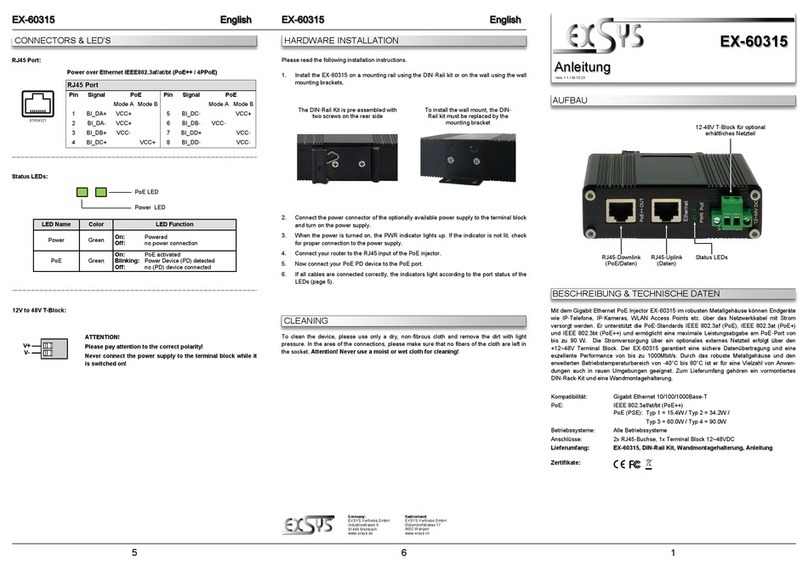
Please read the following installation instructions.
1. Install the EX-60310 on a mounting rail using the DIN-Rail kit or on the wall using the wall
mounting brackets.
2. Connect the power connector of the optionally available power supply to the terminal block
and turn on the power supply.
3. When the power is turned on, the PWR indicator lights up. If the indicator is not lit, check
for proper connection to the power supply.
4. Connect your router to the RJ45 input of the PoE injector.
5. Now connect your PoE PD device to the PoE port.
6. If all cables are connected correctly, the indicators light according to the port status of the
LEDs (page 5).
The DIN-Rail Kit is pre-assembled with
two screws on the rear side To install the wall mount, the DIN-
Rail kit must be replaced by the
mounting bracket
RJ45 Port
Pin Signal PoE Pin Signal PoE
1BI_DA+ VCC+ 5BI_DC- VCC+
2BI_DA- VCC+ 6BI_DB- VCC-
3BI_DB+ VCC- 7BI_DD+ VCC-
4BI_DC+ VCC+ 8BI_DD- VCC-
V+
V-
Status LEDs RJ45-Uplink
(Daten)
12-48V T-Block für optional
erhältliches Netzteil
RJ45-Downlink
(PoE/Daten)
87654321
RJ45 Anschluss
Pin Signal PoE Pin Signal PoE
1BI_DA+ VCC+ 5BI_DC- VCC+
2BI_DA- VCC+ 6BI_DB- VCC-
3BI_DB+ VCC- 7BI_DD+ VCC-
4BI_DC+ VCC+ 8BI_DD- VCC-
Beachten Sie bitte die folgenden Installationshinweise.
1. Installieren Sie den EX-60310 mit dem DIN-Rail Kit auf eine Tragschiene oder mit der
Wandmontagehalterung an die Wand.
2. Schließen Sie den Stromanschluss des optional erhältlichen Netzteils an den Terminal
Block an und schalten Sie das Netzteil ein.
3. Nach dem Einschalten des Geräts leuchtet die PWR-Anzeige. Wenn die Anzeige nicht
leuchtet, überprüfen Sie den korrekten Anschluss an die Stromversorgung.
4. Verbinden Sie Ihren Router mit dem RJ45-Eingang des PoE-Injectors.
5. Schließen Sie nun Ihr PoE-PD-Gerät an den PoE Anschluss an.
6. Wenn alle Kabel korrekt angeschlossen sind, leuchten die Anzeigen entsprechend dem
Portstatus der LEDs (Seite 2).
234
HARDWARE INSTALLATION
ANSCHLÜSSE & LED'S
Das DIN-Rail Kit ist mit zwei Schrau-
ben an der Rückseite vormontiert Zur Montage der Wandhalterung wird
das DIN-Rail-Kit durch den Montage-
bügel ersetzt
LAYOUT
Manual
EX-60310
ACHTUNG!
Bitte auf die richtige Polarität achten!
Netzteil nie eingeschaltet mit dem Terminal Block verbinden!
Schweiz:
EXSYS Vertriebs GmbH
Dübendorfstrasse 17
8602 Wangen
www.exsys.ch
Deutschland:
EXSYS Vertriebs GmbH
Industriestrasse 8
61449 Steinbach
www.exsys.de
Status LEDs:
LED Name Farbe LED Funktion
Power Grün An: Stromversorgung an
Aus: keine Stromversorgung
PoE
Grün An: PoE ist aktiv
Blinken: Power Device (PD) erkannt
Aus: Kein (PD) Gerät angeschlossen
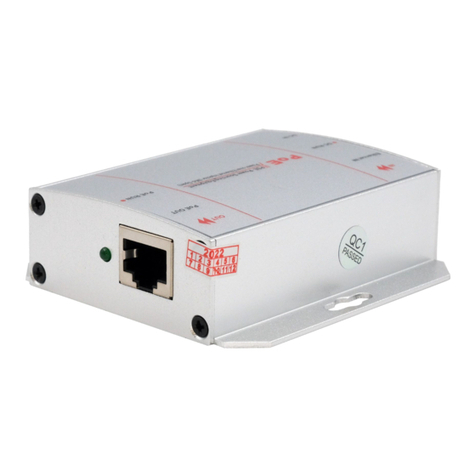
The Gigabit Ethernet PoE Injector EX-60310 in a robust metal housing allows end devices such
as IP telephones, IP cameras, WLAN access points, etc. to be powered via the network cable. It
supports the PoE standards IEEE 802.3af (PoE), IEEE 802.3at (PoE+) and IEEE 802.3bt
(PoE++) and enables a maximum power output of up to 60W at the PoE port. Power is supp-
lied via the +12~48V terminal block using an optional external power supply. The EX-60310
guarantees secure data transmission and excellent performance of up to 1000Mbps. The
rugged metal housing and extended operating temperature range of -40°C to 80°C make it
suitable for a wide range of applications, even in harsh environments. Supplied with a pre-
assembled DIN rack kit and wall mounting bracket.
DESCRIPTION & TECNICAL INFORMATION
Compatibility: Gigabit Ethernet 10/100/1000Base-T
PoE: IEEE 802.3af/at/bt (PoE++)
PoE (PSE): type 1 = 15.4W / type 2 = 34.2W / type 3 = 60W
Operating System: All operating systems
Connectors: 2x RJ45-Port, 1x Terminal Block 12~48VDC
Extent of Delivery: EX-60310, DIN-Rail Kit, Wall Mounting Bracket, Manual
Certificates:
RJ45 Anschluss:
Zur Reinigung des Gerätes verwenden Sie bitte ausschließlich ein trockenes nicht faserndes
Tuch und entfernen Sie die Verschmutzung mit leichtem Druck. Im Bereich der Anschlüsse bitte
darauf achten, dass keine Fasern des Tuchs in der Buchse hinterlassen werden. Verwenden
Sie bitte zu Reinigung in keinem Fall ein feuchtes oder nasses Tuch!
REINIGUNG
Power LED
PoE LED
12V bis 48V T-Block:
V+
V-
Status LEDs RJ45-Uplink
(Data)
12-48V T-Block for optional
Power Supply
RJ45-Downlink
(PoE/Data)
Vers. 1.1 / 30.10.23
87654321