Desde la pantalla de reposo, pulsando secuencialmente las teclas “◄”, “▼”, “►”, y posteriormente “OK” de manera mantenida, pasamos a la pantalla de “Menú de test”. Desde el menú de test , pulsando “OK”
accedemos a un submenú en el que se selecciona con las teclas “◄” y “►” realizar el test sobre el módulo base del PBM-B o sobre el PBM-H. Pulsando “OK” accedemos a los elementos sobre los que realizamos
el test.
NOTA: Cuando el equipo esté instalado tenga en cuenta que al testear las salidas se activan los relés de salida.
The “Test menu” is accessed from the standby mode screen by sequentially pressing the “◄”, “▼” and “►” keys, and then holding down the “OK” key. In the test menu, by pressing “OK” we access the submenu where,
using the “◄” and “►” keys, we can choose to perform the test on the PBM-B base module or on the PBM-H. From here, press “OK” to access the components that can be tested.
NOTE: When the equipment is installed, it must be taken into account that the output relays are activated when the outputs are tested.
À partir de l’écran initiale, en appuyant dans l’ordre les touches “◄”, “▼”, “►”, puis “OK” de manière continue, nous passons à l’écran “Menu de test”. Á partir du menu de test, en appuyant “OK” nous accédons au
un sous-menu avec les touches “◄” y “►” il sera possible de passer à la procédure de test du module de base PBM-B ou au PBM-H. en appuyant sur “OK” nous accédons aux éléments que nous souhaitons tester.
NOTE : Quand l’appareil est installé, il est important de prendre en compte que le test des sorties activera le relais de sortie.
Dostęp do “Menu Test” uzyskuje się w trybie czuwania przez równoczesne wciśnięcie przycisków “◄”, “▼” oraz “►” , a nastepnie wciśnięcie przycisku “OK”. W menu test, przez wciśnięcie OK wchodzimy do
podmenu, gdzie przyciskami “◄” i “►” możemy wybrać wykonanie testu modułu bazowego PBM-B lub modułu PBM-H. Wybór zatwierdzamy wciskając “OK”.
UWAGA: Gdy dany moduł jest zainstalowany, należy wziąć pod uwagę fakt, iż podczas testowania wyjść przekaźniki zostają pobudzone !
Das Menü wird vom Standby-Modus aus durch aufeinanderfolgendes Drücken der Tasten “◄”, “▼” und “►” anschließend halten Sie die OK-Taste gedrückt- Im Test-Menü erreichen wir das Untermenü durch drücken
der OK-Taste. Im Untermenü können wir durch Nutzung der “◄” und “►” Tasten zwischen einem Test im PBM-B Basismoduls oder im PBM-H. Von hier aus drücken wir „OK“, um auf die Komponenten Zugriff zu
erhalten, die getestet werden können.
Hinweis: Wenn das Gerät installiert ist muss beachtet werden, dass die Ausgangsrelais aktiviert sind, wenn die Ausgänge getestet werden.
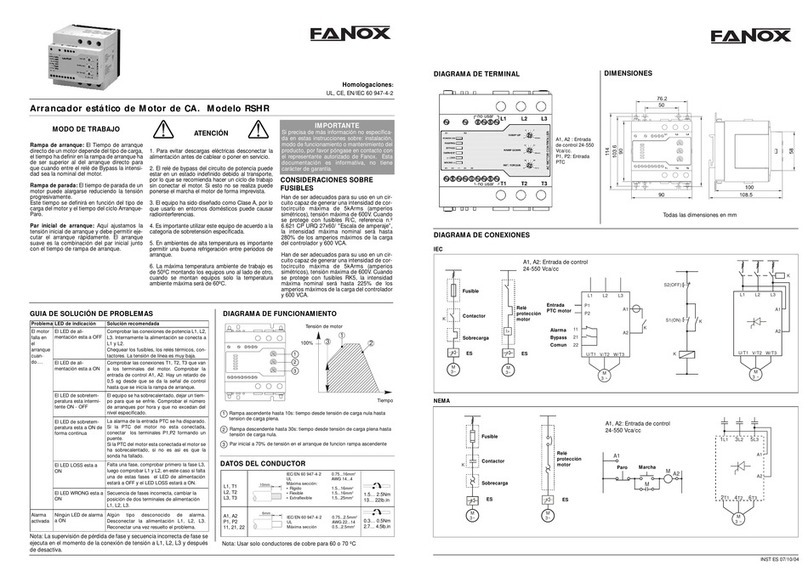
Traducción del menú / Menu translation / Menu traduction / Menu Tłumaczeń / Menü-Übersetzung
Castellano English Français Polski Deutsch
no activado not activated non actif nieaktywny nicht aktiviert
activado activated actif aktywny aktiviert
Menú funcional / Functional menu / Menu fonctionnel / Menu funkcjonalne / Funktionsmenü
• Para acceder a cada submenu solo tiene que presionar “OK”
• To enter in each submenu, just press “OK”
• Pour entrer dans les submenus, appuyez “OK”
• Aby wejść do podmenu wciśnij “OK”
• Um in jedes Untermenü zu gelangen, drücken Sie einfach OK
Traducción del menú / Menu translation / Menu traduction / Menu Tłumaczeń / Menü-Übersetzung
Ingles Castellano Français Polski Deutsch
STATES ESTADOS ÉTATS STANY STATUS
MEASURES MEDIDAS MESURES POMIARY MAßNAHMEN
SETTINGS AJUSTES REGLAGES NASTAWY EINSTELLUNGEN
COMMAND MANDO COMMANDE POLECENIE COMMAND
CONFIGURATION CONFIGURACIÓN CONFIGURATION KONFIGURACJA KONFIGURATION
REPORTS INFORMES RAPPORTS RAPORTY BERICHTE
STATISTICS ESTADÍSTICOS STATISTIQUES STATYSTYK STATISTIKEN
DATE-TIME FECHA-HORA DATE - HEURE DATA-CZAS DATUM-ZEIT
PASSWORD CLAVE MOT DE PASSE HASLO PASSWORD
PBMXXX
FANOX
PBMXXX
TEST-HMI
PBMXXX
TEST-PBM
LED 1
not activated
LED 1
activated
“C”
“C”
“OK”
“OK”
LED 2
not activated
LED 2
activated
LED 3
not activated
LED 3
activated
LED 4
not activated
LED 4
activated
LED 5
not activated
LED 5
activated
LED 6
not activated
LED 6
activated
Lkey
key_x
“C” “OK”
“OK”
“OK”
“OK”
“OK”
“OK”
“OK”
“OK”
“OK”
“OK”
“OK”
“OK”
“C”
“C”
“C”
“C”
“C”
“C held”
LED 1
not activated
LED 1
activated
“C”
“C”
“OK”
LED 2
not activated
LED 2
activated
LED 3
not activated
LED 3
activated
LED 4
not activated
LED 4
activated
LED 5
not activated
LED 5
activated
OUTPUT 1
not activated
OUTPUT 1
activated
OUTPUT 2
activated
OUTPUT 2
not activated
“OK”
“OK”
“OK”
“OK”
“OK”
“OK”
“OK”
“OK”
“OK”
“OK”
“OK”
“OK”
“OK”
“OK”
“C”
“C”
“C”
“C”
“C”
“C”
“C”
PBMXXX
STATES
PBMXXX
FANOX
PBMXXX
MEASURES
PBMXXX
SETTINGS
PBMXXX
COMMAND
PBMXXX
CONFIGURATION
PBMXXX
REPORTS
PBMXXX
DATE-TIME
PBMXXX
ESTATISTICS
PBMXXX
PASSWORD
“OK” “C”
“C”
“C”
“C”
“C”
“C”
“C”
Menú test / Test menu / Menu Test / Menu test / Menü-Test
T
el.: (+34) 94 471 14 09 - www.fanox.com -
[email protected] 06/2018/D01
Fanox reserves the right to modify technical specication of products contained within this catalogue without previous notice.